To reduce the storage size of Candy Crush Saga on your device, you need to clear the accumulated application cache, manage local game level data, and periodically reinstall the application to purge hidden temporary files generated by King's servers. Over time, as you progress past level 10,000, cached assets, booster animations, and episodic background files accumulate significantly, often pushing the app footprint past 2GB to 4GB of internal storage.
Clear App Cache on Android Devices
Android users possess a distinct advantage when managing application footprints because the operating system separates user data from application cache files. If your device is running low on storage due to Candy Crush Saga, navigating directly to your system settings provides an immediate, risk-free reduction in file size without losing your hard-earned progress.
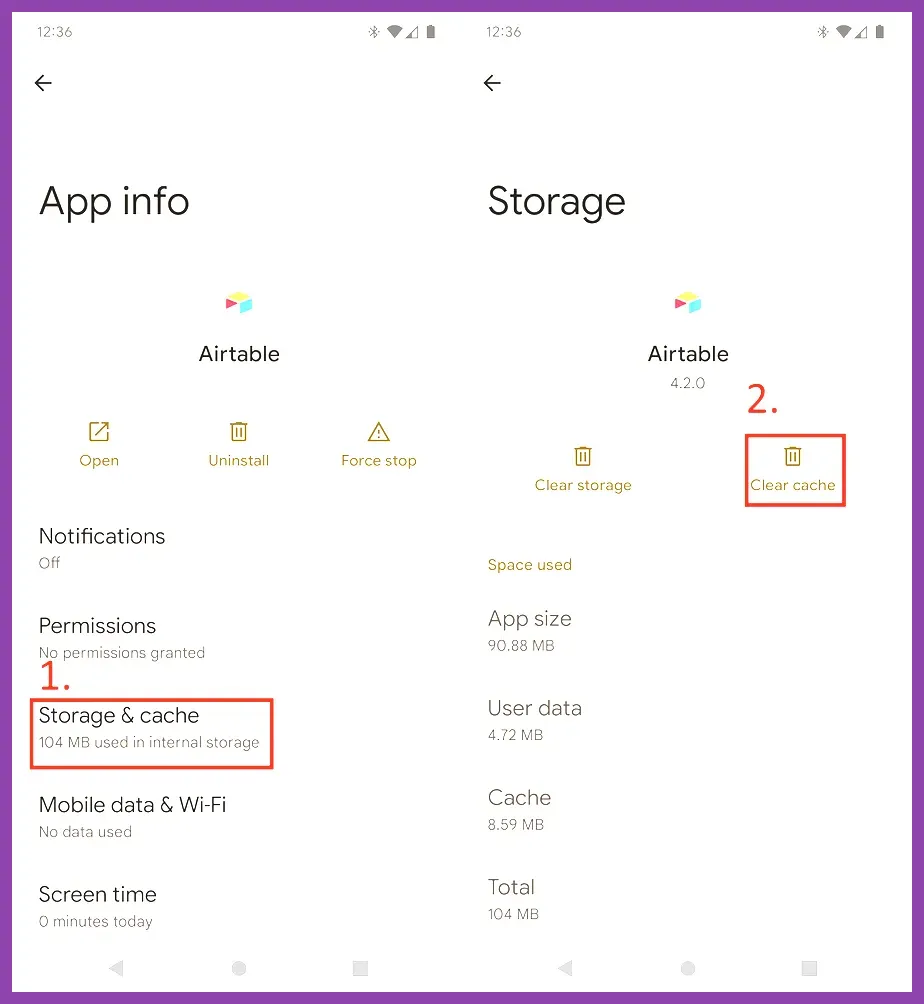
First, open your Android Settings app and scroll down to select Apps or Application Manager. Locate Candy Crush Saga in the alphabetical list of installed applications and tap on it to open the application info page. Tap on Storage & cache. Here, you will see two distinct options: Clear Storage and Clear Cache. You must tap Clear Cache. This action instantly deletes temporary thumbnail data, downloaded level assets, and telemetry logs that are no longer actively required for gameplay. Be cautious not to tap Clear Storage unless your game is securely linked to a King Account or Facebook, as clearing storage wipes all local save files.
For more insights on optimizing mobile hardware and performance, check out this guide on hardware performance optimization, or read up on mobile-centric strategies similar to Wild Rift character scaling.
Offload or Uninstall on iOS Devices
Apple's iOS handles application storage differently by grouping user documents and data together with the core application bundle. Because Apple mobile devices lack a direct 'Clear Cache' button within individual app settings menus, iOS users must utilize alternative methods to trim down Candy Crush Saga's bloated memory footprint.
To safely reduce the game's size on an iPhone or iPad, open your device Settings, navigate to General, and select iPhone Storage (or iPad Storage). Scroll down until you find Candy Crush Saga in the list. iOS will display the exact amount of space the app currently occupies. You have two choices: Offload App or Delete App. Selecting Offload App removes the application binary and core assets while keeping your personal documents and saved game data intact on the device. When you tap the Candy Crush icon on your home screen afterward, it automatically redownloads the fresh, unbloated application files from the App Store. Alternatively, selecting Delete App completely removes everything, which is often more effective for wiping corrupted temporary caches entirely.
When dealing with resource management, understanding how developers structure data helps, much like analyzing progression loops in Marvel Future Fight character builds or managing currencies in Roblox reroll guides.
Disconnect and Reinstall for a Clean Slate
When simple cache clearing fails to recover enough gigabytes, a complete clean reinstallation is the most reliable method to reset the app's structural bloat. Over thousands of puzzle matches involving Jelly, Chocolate, and Bomb blockers, Candy Crush Saga retains localized historical data packets that serve no ongoing purpose once you have cleared past episodes.
Before initiating a clean reinstall, verify that your game progress is safely synchronized. Open Candy Crush Saga, tap the gear icon for Settings, select the green King icon or the Facebook connect option, and ensure your email address and password are confirmed. This step is critical; without cloud synchronization, uninstalling the app permanently erases your gold bars, booster inventories, and current level progression. Once your account is verified, uninstall the application completely from your device. Restart your smartphone or tablet to clear the RAM system registry, then visit the official King Candy Crush Saga portal or your respective app store to download the latest, most compressed version of the game. Logging back into your account restores your progression while purging gigabytes of obsolete legacy files.
If you enjoy optimizing game files and system parameters, you might also appreciate learning how to tweak systems for titles like Nine Sols performance settings or managing heavy inventories in Left 4 Dead 2 weapon mods.
Disable Automatic Background Downloads and Level Pre-Caching
Candy Crush Saga frequently pre-downloads upcoming episode maps and high-definition event assets in the background to ensure seamless transitions between levels. While this keeps gameplay fluid, it silently consumes massive amounts of storage space without user authorization.
To minimize continuous background bloating, access the game's internal settings menu via the gear icon on the main map screen. Look for options concerning data usage, notifications, or automatic asset downloads. Turning off unnecessary features such as personalized ads, push notifications, and auxiliary event participation prevents the app from pulling large promotional video files and dynamic event graphics onto your local drive. Furthermore, avoid opening extra spin-the-wheel mini-games or external event tabs if you are strictly trying to keep storage consumption at a minimum. Each dynamic event introduces temporary UI elements and audio files that linger in your local storage directory long after the event timer expires.
For more optimization techniques across different platforms, consult tutorials detailing how to respec characters efficiently, manage data in complex strategy games, or handle storage footprints similar to console system adjustments.
Utilize Cloud Play and Web Browser Alternatives
If your mobile device is perpetually short on internal storage and none of the local cache-clearing techniques yield enough permanent space, you can bypass the native application installation altogether by playing through web-based platforms.
King allows players to access their exact King Account progression directly via desktop web browsers or mobile web engines without downloading the multi-gigabyte native client application. By visiting the official web version of Candy Crush Saga through platforms supported by the King Player Support Center, you can enjoy match-3 puzzle gameplay utilizing cloud processing. Your moves, scores, and episode progress remain synchronized across devices via your King ID, meaning you can completely remove the application from your smartphone hardware while still maintaining access to your favorite levels whenever you sit down at a computer or use a cloud browser tab.
To explore further gaming strategies and advanced system management guides, review our comprehensive resources on fast leveling strategies, master character progression with Mortal Kombat solo tips, discover hidden items via Nine Sols secret character guides, conquer milestones using Monster Hunter Wilds leveling methods, or check off completionist goals with Nine Sols achievement hunting walkthroughs and high-tier loadout articles like Lies of P weapon tier lists.