
Fly Corp: The American Dream is easy to run on a modern PC, but the recommended specs matter once your airline network covers the map. The published baseline is modest: a 64-bit Windows installation, a 2 GHz processor, 4 GB of RAM, a graphics card with 1 GB of video memory, DirectX 10, and roughly 1 GB of storage. For a comfortable campaign, aim higher with a modern Core i5-class CPU, 8 GB of RAM, and a dedicated GPU around the GTX 750 Ti or better. The demanding part isn't cinematic rendering; it's the growing number of cities, routes, aircraft, passengers, and calculations active at once.
That distinction is important. Fly Corp looks like a clean 2D management game, so it can appear harmless to a laptop. Early in a run, it usually is. The American Dream scenario becomes more demanding as you unlock regions and connect major American hubs, because the simulation has to update route demand and passenger movement continuously. This guide breaks down the Fly Corp - American Dream system requirements, explains what each component does, and gives you a practical settings profile for smoother long sessions.
Fly Corp American Dream minimum and recommended specs

The minimum specification is enough for launching the game and handling a small network. It shouldn't be read as a promise of perfectly smooth performance with a fully developed airline. The processor is the most important part of the equation, while the graphics card mainly needs to support the game's 2D presentation and display resolution.
| Component | Minimum | Recommended target | Why it matters |
|---|---|---|---|
| Operating system | Windows 7/8/10, 64-bit | Windows 10 or Windows 11, 64-bit | Modern drivers and stable long-session support |
| Processor | 2 GHz CPU | Modern Intel Core i5 or AMD Ryzen 5 | Simulation updates, route calculations, and UI responsiveness |
| Memory | 4 GB RAM | 8 GB RAM | Room for the game, Steam, browser tabs, and background apps |
| Graphics | 1 GB VRAM, DirectX 10-capable GPU | GTX 750 Ti-class GPU or newer | Map rendering, zooming, and high-resolution output |
| Storage | About 1 GB available | 1 GB on an SSD with extra free space | Faster startup and more reliable save handling |
These figures are best treated as the floor rather than the ideal target. A four-core laptop CPU from the last several years should clear the minimum comfortably, even if its integrated graphics are doing the work. A very old dual-core processor may technically match the 2 GHz requirement but still struggle when the route map becomes crowded.
For the official listing, check the Fly Corp Steam page before buying, since store requirements and supported operating systems can change. You can also follow updates from KishMish Games, the developer behind the game.

🎮 Dream
Looking to experience this game? Grab your digital key directly on our store for $14.99.
View on Steammoz Store →What PC hardware actually affects performance?

Fly Corp's workload is closer to a spreadsheet that keeps moving than to a traditional 3D game. Every new airport and route adds more information for the simulation to track. That makes CPU performance and available memory more relevant than raw GPU power.
CPU: the key component for busy networks
Your processor handles passenger movement, route demand, aircraft activity, city unlocks, and the constant flow of calculations behind the map. The game may run at a high frame rate during the opening minutes, then become less responsive after your network stretches across dozens of locations. Strong single-core speed helps the simulation react quickly, while extra cores give Windows and background applications breathing room.
A recent Core i3, Core i5, Ryzen 3, or Ryzen 5 should be a sensible match. Don't spend money on a high-end graphics card while pairing it with an ancient dual-core CPU; that upgrade won't fix late-game simulation slowdowns.
RAM: 4 GB works, 8 GB feels safer
The minimum 4 GB requirement can work on a clean system, but Windows itself consumes a meaningful portion of that space. If you play with a browser, Discord, recording software, or a music app open, memory pressure can cause hitching or longer transitions. Eight gigabytes is the practical sweet spot, while 16 GB is useful if you multitask heavily.
GPU and storage: modest demands, real benefits
A 1 GB DirectX 10-capable GPU is enough for the basic presentation. Integrated graphics such as Intel UHD or recent Radeon Vega hardware should be suitable at 1080p, provided your laptop isn't thermally throttling. A dedicated card becomes useful mainly for high resolutions, multiple displays, or other games running in the background.
An SSD won't increase the simulation's raw calculation speed, but it can shorten startup and save loading. If your game stutters while the rest of Windows also feels sluggish, check drive health and free space before blaming the GPU. Our Hunt: Showdown PC specs breakdown explains the same important distinction between a game's listed minimum and a genuinely comfortable target.
Best graphics settings for a low-end PC
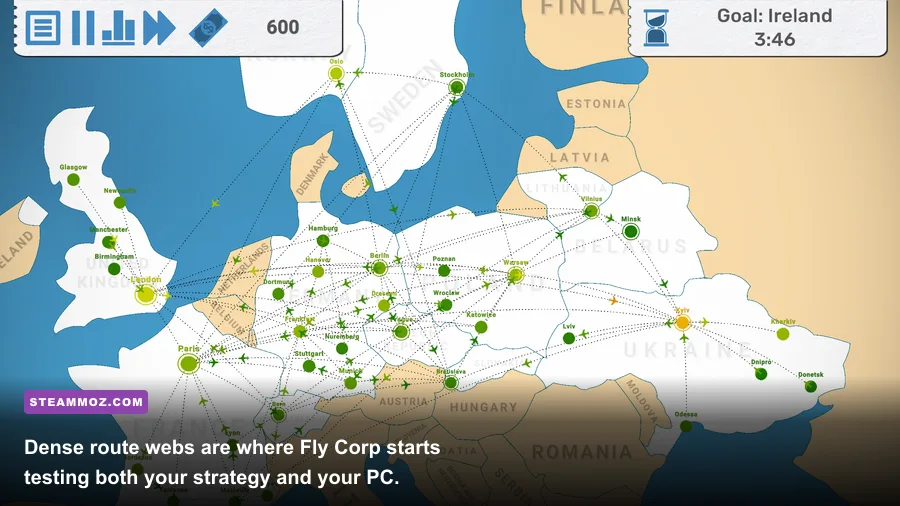
Fly Corp doesn't offer the enormous graphics menu found in a modern 3D release, and that's good news. Start at 1920x1080 if your display supports it, then reduce resolution only if zooming and map movement feel sluggish. The biggest gains usually come from reducing visual effects and avoiding unnecessary desktop scaling rather than chasing a specific GPU.
| Setting or profile | Recommended value | Performance impact | Visual trade-off |
|---|---|---|---|
| Resolution | Native 1080p | Low to medium | Best text clarity and map readability |
| Resolution on integrated graphics | 1600x900 or 1280x720 | Medium benefit | Less sharp text, but easier rendering |
| Window mode | Borderless or fullscreen | Low | Choose fullscreen if background apps cause stutter |
| Effects and animations | Medium or Low if available | Medium in crowded scenes | Fewer decorative effects around busy hubs |
| Display scaling | 100% | Low to medium | Sharper interface and lower rendering overhead |
| Frame-rate cap | 60 FPS | Stabilizes heat and power use | No meaningful loss for a strategy game |
Keep the frame-rate target realistic. A locked 60 FPS feels clean for scrolling and zooming, but 30 FPS is perfectly playable if your system is near the minimum. In a management game, consistent input response matters more than a fluctuating 120 FPS counter.
American Dream performance across campaign stages

The American Dream campaign's performance curve follows the size of your network. The opening phase is light: you have fewer airports, fewer active routes, and less passenger traffic. The middle phase introduces more connections and makes poor hub planning visible. The late phase is where CPU load, memory use, and interface density can all rise together.
| Campaign stage | Typical network state | Likely PC behavior | Best response |
|---|---|---|---|
| Opening | Small regional network and a few routes | Almost any supported PC should feel smooth | Keep native resolution and learn the map |
| Expansion | Several cities, growing demand, upgraded airports | Older CPUs may show brief pauses during updates | Close background apps and avoid excessive zooming |
| National network | Many routes crossing the United States | CPU becomes more important than GPU power | Use a 60 FPS cap and reduce effects first |
| Late campaign | Dense hubs, heavy passenger flow, broad connections | Periodic simulation dips are possible on minimum hardware | Lower resolution, save regularly, and simplify bottlenecks |
Don't confuse a strategic bottleneck with a performance bottleneck. A packed hub can cause passenger delays because your network is inefficient, not because your PC is slow. If the interface remains responsive but travelers are piling up, add capacity, open a better connection, or reroute traffic. If the whole map pauses during updates, the CPU or memory situation deserves attention.
This is also why a well-planned network can feel smoother than a messy one. Fewer unnecessary transfers mean less visual clutter and less frantic management. Players who enjoy optimizing interconnected systems may also like our IXION equipment ranking, although Fly Corp replaces survival pressure with logistics pressure.
Can laptops and integrated graphics run Fly Corp?

Yes, most recent office laptops should run Fly Corp and American Dream without trouble. Intel UHD 620-class graphics, newer Intel Iris Xe hardware, AMD Vega integrated graphics, and modern Radeon integrated solutions are all reasonable candidates for 1080p play. The bigger question is whether the laptop has enough cooling and memory to maintain performance over a long session.
On a low-power laptop, choose a balanced profile: native resolution if the map stays smooth, 60 FPS if available, and low effects once the campaign becomes crowded. Plug the system into power, select a performance power mode, and make sure the game is using the faster GPU if your laptop has both integrated and dedicated graphics.
Four gigabytes of RAM is where laptop users need to be careful. A machine with 4 GB total may launch the game, but Windows plus Steam plus a browser can leave very little headroom. Eight gigabytes is a far better practical minimum. If you experience long freezes rather than consistently low frame rates, close browser tabs and overlays first.
For more troubleshooting ideas, our crash-fix checklist covers general PC checks such as driver updates, verifying files, and disabling troublesome overlays. Those steps apply here too, even though Fly Corp is dramatically less demanding than a VR title.
How to optimize Fly Corp before your first run
Before starting American Dream, give your PC a quick tune-up. Update your graphics driver, install the latest Windows patches supported by your machine, and use Steam's file verification tool if the game crashes or displays corrupted map assets. Keep at least several gigabytes free beyond the game's small installation footprint so Windows has room for temporary files and saves.
- Close heavy background programs. Browsers with video, game launchers, and recording tools can consume more RAM than Fly Corp itself.
- Start at 1080p and a 60 FPS cap. Lower resolution only after you confirm that the busy map causes actual stutter.
- Watch temperatures. A laptop that begins smoothly but slows after 20 minutes may be throttling rather than failing the system requirements.
- Use sensible save habits. Keep rotating saves, especially before unlocking a large region or redesigning several routes at once.
- Turn off overlays temporarily. Steam, Discord, Xbox Game Bar, and GPU overlays can introduce occasional input or rendering hiccups.
If the game still feels slow, test a fresh campaign. Compare the opening minutes with your established American Dream save. A clear difference points toward simulation scale; identical sluggishness points toward drivers, power settings, background load, or hardware.
The short version is reassuring: you don't need a gaming monster for Fly Corp. A 2 GHz processor, 4 GB of RAM, and a 1 GB DirectX 10 GPU satisfy the listed floor, while a modern Core i5 or Ryzen 5, 8 GB of RAM, an SSD, and a modest dedicated or recent integrated GPU make the experience far more comfortable. The American Dream campaign will challenge your route planning long before it challenges a contemporary PC.
For another systems-focused comparison, see our Just Cause 4 PC specs guide. And if you enjoy games where smart planning beats expensive hardware, keep the Goodbye Deponia settings guide nearby for more low-demand PC optimization advice.