To run Mobile Legends: Bang Bang (MLBB) smoothly without frame drops or thermal throttling, Android devices require a minimum of 2 GB RAM with a Qualcomm Snapdragon 435 or MediaTek MT6737 processor, while iOS users need an iPhone 6s running iOS 10.0 or higher. For high-tier competitive gameplay at a stable 60 FPS to 120 FPS with Ultra graphics, Moonton recommends an Android device with a Snapdragon 778G or Dimensity 900 (or better), 6 GB RAM, and Android 10+, or an iPhone 11 equipped with the A13 Bionic chip. Storage space requirements range from 2.5 GB for base assets to roughly 8.5 GB–12 GB after downloading full hero skins, voice lines, and skill effect textures.
Minimum System Requirements for Android and iOS
Moonton designed Mobile Legends: Bang Bang to run across a vast range of smartphone hardware. However, meeting the bare minimum hardware specifications only guarantees that the game boots and runs on low visual presets. Below is the precise hardware baseline required to run MLBB on mobile devices.
Android Minimum Hardware Specs
- Operating System: Android 5.1 (Lollipop) or higher (64-bit OS recommended)
- Processor (CPU): Qualcomm Snapdragon 435, MediaTek MT6737, Exynos 7570, or HiSilicon Kirin 655
- Graphics Processor (GPU): Adreno 505, Mali-T720 MP2, or equivalent
- RAM: 2 GB
- Free Storage Space: 5 GB available internal storage
- Internet Connection: Stable Wi-Fi or 4G LTE (Minimum 3 Mbps bandwidth)
iOS Minimum Hardware Specs
- Operating System: iOS 10.0 or iPadOS 10.0 or later
- Device: iPhone 6s, iPhone 6s Plus, iPhone SE (1st Gen), or iPad (5th Gen)
- Processor (CPU): Apple A9 chip (64-bit architecture)
- RAM: 2 GB
- Free Storage Space: 5 GB available internal storage
Running MLBB on minimum specifications requires setting the graphics preset to Smooth, disabling Shadows, turning off HD Mode, and deactivating Texturize Effects. Running on lower hardware causes thermal build-up quickly, leading to dynamic CPU throttling during late-game 5v5 teamfights in the Lord pit.
Recommended System Requirements for 60 FPS and 120 FPS
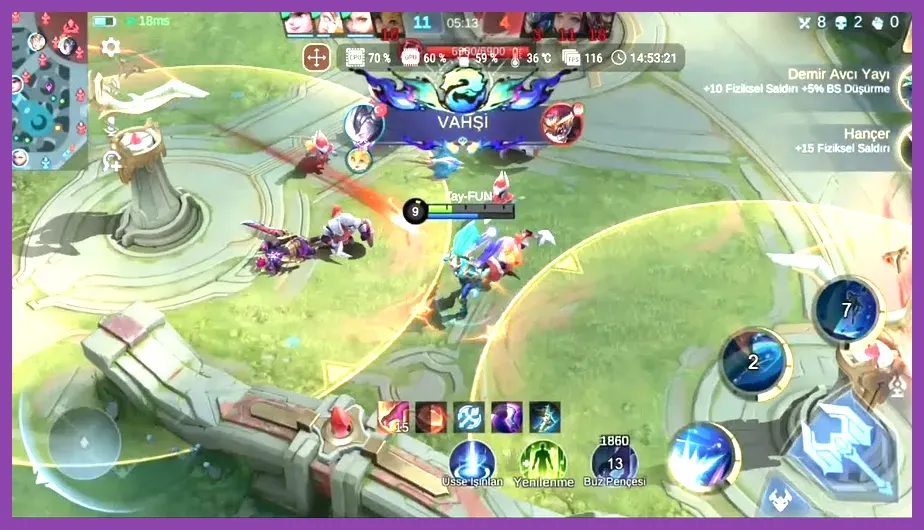
Competitive mobile MOBAs require split-second reaction times. To maintain high frame rates during complex spell interactions—such as Tigreal's Implosion combined with Pharsa's Feathered Air Strike—you need hardware that handles multi-layered particle rendering without dropping below 60 FPS. Similar to checking hardware demands in games like Like a Dragon Infinite Wealth PC requirements guide, matching the recommended specs guarantees stable performance.
Android Recommended Specs (High/Ultra Graphics @ 60–120 FPS)
- Operating System: Android 10, 11, 12, 13, or 14
- Processor (CPU): Qualcomm Snapdragon 778G, Snapdragon 870, Snapdragon 8 Gen 1/2/3, MediaTek Dimensity 900 / 1200 / 9200
- Graphics Processor (GPU): Adreno 642L, Adreno 650, Mali-G68, or Mali-G710
- RAM: 6 GB to 8 GB LPDDR4X / LPDDR5
- Free Storage Space: 15 GB available internal storage (UFS 2.2 or UFS 3.1 fast storage)
- Display: 90 Hz or 120 Hz AMOLED display with 240 Hz touch sampling rate
iOS Recommended Specs (Ultra Graphics @ 60–120 FPS)
- Operating System: iOS 15.0 or higher
- Device: iPhone 11, iPhone 12, iPhone 13 Pro, iPhone 14 Pro, iPhone 15 Pro, or newer
- Processor (CPU): Apple A13 Bionic chip or newer (A15/A16/A17 Pro for 120 FPS Ultra Mode)
- RAM: 4 GB to 8 GB
- Free Storage Space: 15 GB available internal storage
To unlock the Ultra Refresh Rate (120 Hz) setting in the MLBB video options, your device screen must natively support high refresh rates, and Moonton must whitelist your specific device chipset. Devices equipped with flagship silicon like the Snapdragon 8 Gen 2 or Apple A15/A16 natively expose the 120 Hz ultra-frame option in the audio and video settings menu.
Storage Footprint and Resource Download Management
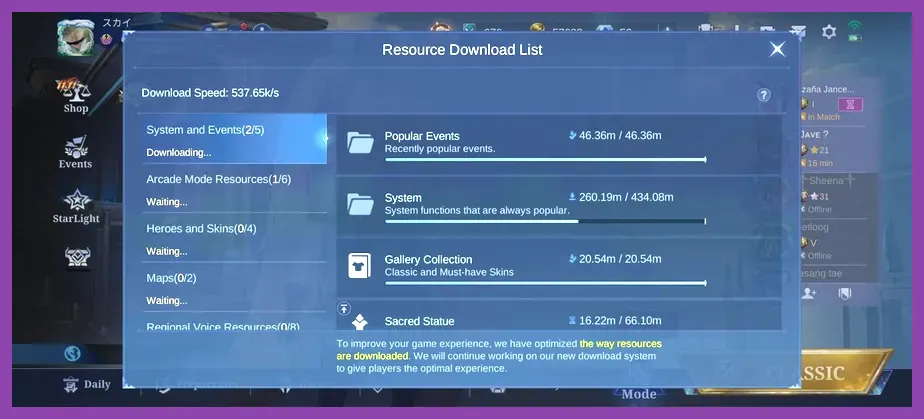
When downloading Mobile Legends: Bang Bang from the Google Play Store or Apple App Store, the initial app installer size is relatively lightweight, sitting between 150 MB and 250 MB. However, once launched, the game client triggers an internal background asset downloader.
The total storage overhead breaks down into several key components:
- Base Installation & Core Engine: ~1.8 GB
- Standard Hero Models & Basic Skill Effects: ~2.5 GB
- HD Skin Packs, Collector Effects, & Recall Animations: ~3.5 GB
- Voice Packs (English, Japanese, Tagalog, etc.): ~400 MB per language pack
- Arcade Modes (Magic Chess, Survival, Mayhem): ~1.2 GB
- Cached Battle Replays & Resource Log Files: Up to 2.0 GB over prolonged play
If your device runs low on storage, navigate to Settings > Network Detection > Clear Cache within the MLBB interface. You can also access the Resource Clearing utility to scan for and delete redundant assets from past seasonal events or temporary Arcade modes. This process frees up several gigabytes without corrupting your main profile data or custom control layouts. Proper local storage optimization is just as critical for mobile titles as managing internal setups in Minecraft PE Pocket Edition.
Best In-Game Graphic Settings Profile for Peak FPS
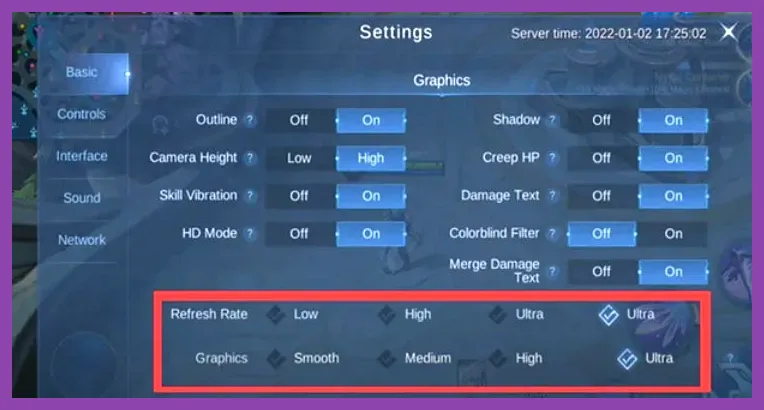
To secure optimal performance during ranked play, adjusting your graphics configuration reduces visual clutter and prevents sudden frame drops during chaotic encounters. Use the following tested profile setups depending on your performance goals.
| Setting Option | Competitive Performance Profile | Maximum Visual Quality Profile |
|---|---|---|
| Graphics Quality | Medium / Smooth | Ultra |
| Refresh Rate (FPS) | High / Super / Ultra (Max Available) | High / Super |
| Camera Height | High | High |
| Shadows | OFF | ON |
| HD Mode | OFF | ON |
| HFR (High Frame Rate) | ON | ON |
| Damage Text | ON | ON |
| Colorblind Filter | As Needed | As Needed |
| Outline | OFF | ON |
Turning off Shadows and setting Outline to OFF yields an immediate performance uplift of 10–15 FPS on mid-range chipsets. Shadows place heavy demands on mobile rasterization pipelines, creating thermal spikes that trigger battery protection throttles during prolonged matches. Keep Camera Height set to High at all times—this increases your tactical field of view on the map without causing performance penalties.
If you're learning hero mechanics or climbing ranks, taking time to configure your visual layout is just as beneficial as learning core mechanics in Marvel Rivals beginner tips and tricks or exploring progression paths in Subway Surfers.
PC Emulator System Requirements: Playing MLBB on BlueStacks & LDPlayer
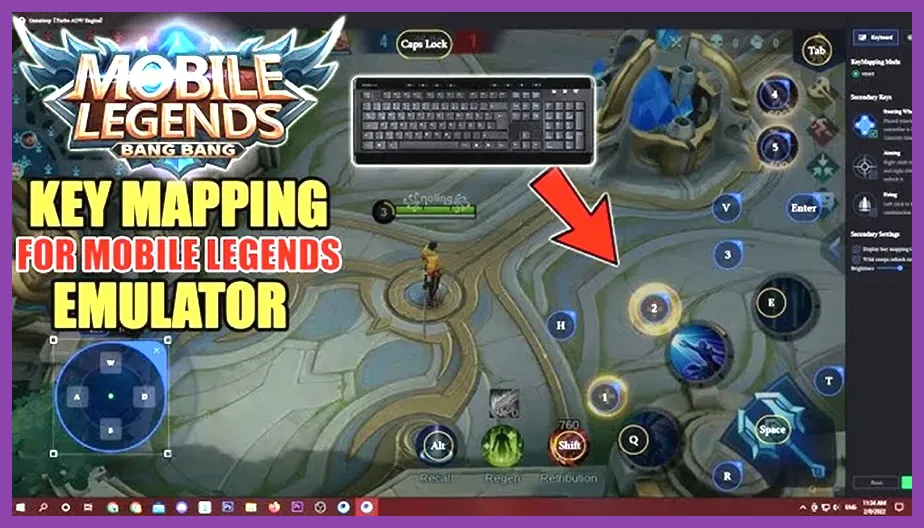
Many players prefer playing Mobile Legends on PC using Android emulators like LDPlayer, BlueStacks, or NoxPlayer to map custom keybindings for skill shots and utilize a mouse for precise camera panning. Emulators introduce an additional software abstraction layer, requiring significantly higher desktop hardware specs than native mobile hardware.
Minimum PC Emulator Specs
- Operating System: Windows 7 / Windows 8.1 / Windows 10 (64-bit)
- Processor (CPU): Intel Core i3-8100 or AMD Ryzen 3 1200 (Must support Hardware Virtualization VT-x / AMD-V)
- Graphics Card (GPU): NVIDIA GeForce GTX 750 Ti or AMD Radeon R7 260X (2 GB VRAM)
- RAM: 8 GB System Memory
- Storage: 10 GB free space on an SSD (Solid State Drive)
- DirectX: Version 11
Recommended PC Emulator Specs (For 120 FPS Max Settings)
- Operating System: Windows 10 / Windows 11 (64-bit latest service pack)
- Processor (CPU): Intel Core i5-11400, Intel Core i5-12400, or AMD Ryzen 5 5600X
- Graphics Card (GPU): NVIDIA GeForce GTX 1660 Super, RTX 3060, or AMD Radeon RX 6600 (6 GB+ VRAM)
- RAM: 16 GB DDR4 / DDR5 Dual-Channel RAM
- Storage: 20 GB free space on an NVMe M.2 SSD
- Virtualization Engine: Hyper-V disabled / VT-x enabled via System BIOS
When running MLBB on an emulator, configure your emulator engine settings as follows:
- Set CPU Allocation to 4 Cores or higher.
- Set Memory Allocation to 4096 MB (4 GB RAM) or 8192 MB if available.
- Set Graphics Rendering Mode to OpenGL+ or DirectX (DirectX generally offers better stability on NVIDIA cards, while OpenGL handles skill effect layers better on AMD hardware).
- Enable High Frame Rate Mode inside emulator display options and set the target frame slider to 120 FPS or 240 FPS.
Failing to enable Virtualization Technology (VT-x/AMD-V) in your motherboard's BIOS settings will result in severe stuttering, input delay, and emulator crashes, regardless of how powerful your desktop graphics card is.
Troubleshooting Lag, Overheating, and Frame Drops in MLBB
Even on hardware that meets Moonton's recommended requirements, mobile phones can suffer from sudden performance dips. Hardware throttling, background application interference, and network instability are the primary culprits behind sudden frame loss during battle.
1. Thermal Throttling Mitigation
Modern mobile System-on-Chips (SoCs) automatically lower their clock speeds when internal processor temperatures exceed 42°C (107.6°F). To prevent performance drops during long gaming sessions:
- Remove protective phone cases that trap thermal energy against the back plate.
- Never play Mobile Legends while fast-charging your device, as fast charging doubles thermal production.
- Consider using a smartphone semiconductor cooling fan clip for sustained 120 FPS performance during long sessions.
2. Network Latency & Ping Spike Fixes
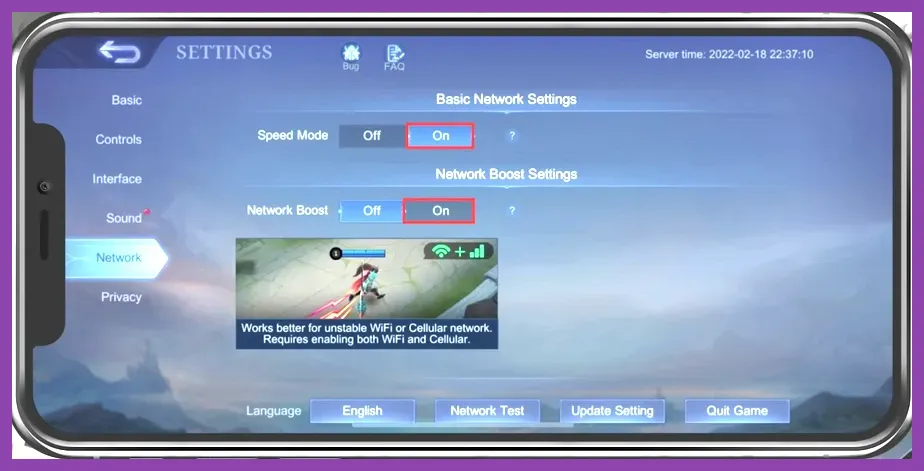
In-game latency spikes (high ping) directly cause perceived input delay and rubber-banding. MLBB offers two built-in network stabilization toggles inside Settings > Network Setup:
- Speed Mode: Reduces packet loss by sending extra data packets to Moonton's game servers. Keep this ON if playing over standard mobile connections.
- Network Boost: Uses both your Wi-Fi signal and 4G/5G mobile data simultaneously to stabilize network routing. This feature requires cellular data access, but it minimizes sudden disconnects during match play.
3. Background RAM and OS Optimization
Mobile operating systems automatically suspend or refresh apps in the background. However, apps like Discord, WhatsApp, TikTok, or screen recorders consume valuable RAM and background CPU cycles. Always clear your recent apps drawer before launching MLBB, disable battery saver mode (which caps CPU performance to 70%), and enable your phone manufacturer's built-in Game Turbo or Game Space utility to dedicate memory bandwidth strictly to the game engine.
Managing account settings and game performance efficiently is essential across all major online titles. If you play other competitive mobile or online games, check out our guides on how to recover your lost Clash of Clans account or optimize your resource progression using our League of Legends Hextech Crafting efficiency guide. Visit the official Mobile Legends: Bang Bang website for official patch updates, new hero spec announcements, and seasonal patch notes.