
The fastest way to reroll in Epic Seven is to log in using a Guest Account, blitz through the main story until you clear Stage 1-4: Wind breeze Suburbs, and immediately open the Selective Summon menu. This entire process takes roughly 5 to 8 minutes per run. If you do not get your desired 5-star hero (primarily Iseria), you do not need to uninstall the game; simply navigate to the in-game settings, click "Reset Server," and start over instantly. To maximize your efficiency, you should run multiple instances of the game simultaneously using an Android emulator like LDPlayer or BlueStacks.
Step-by-Step Guide to Reroll in Epic Seven
To execute the fastest possible reroll cycle in Epic Seven, you must bypass unnecessary cutscenes and optimize your pathing through the prologue. Follow this precise step-by-step sequence to minimize your downtime:
- Step 1: Launch the Game as a Guest – When you boot up the game for the first time, select "Guest" as your login method. Do not link your Google, Apple, or Stove account yet. Linking an account too early makes resetting much slower.
- Step 2: Skip the Cinematics – Tap the screen rapidly during the opening cutscenes. When the option appears in the top-right corner, hit "Skip" to bypass the lengthy animated sequences.
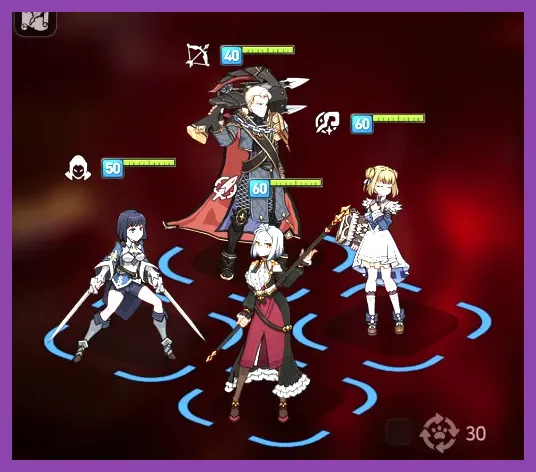
- Step 3: Clear Stages 1-1 through 1-4 – Play through the tutorial battles. Use your skills as soon as they are off cooldown to clear waves of enemies quickly. Focus your attacks on the boss monsters at the end of each stage to save time.
- Step 4: Unlock the Selective Summon – Upon clearing Stage 1-4, the game will guide you back to the Lobby. The "Selective Summon" banner will now be unlocked. This feature gives you 30 multi-summons (10 pulls each), allowing you to keep a single 10-pull of your choice.
- Step 5: Perform Your Pulls – Begin pulling on the Selective Summon. You are guaranteed a 5-star hero or artifact within these pulls, but you can only keep one result. If you pull your target character early, confirm the summon and stop.
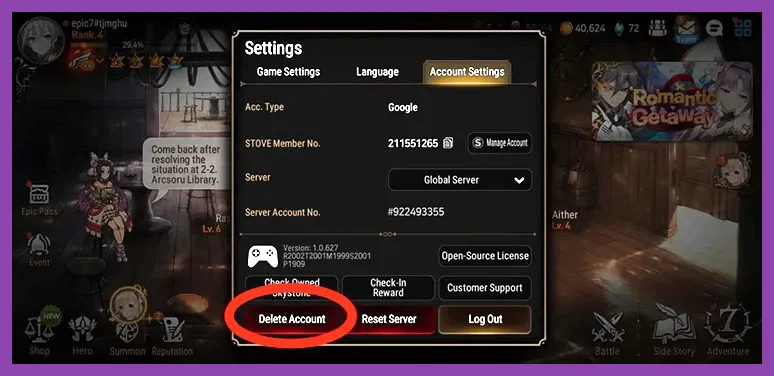
- Step 6: Reset if Necessary – If you exhaust all 30 attempts without getting your target, click on your profile icon in the top-left corner of the Lobby, open the Cog icon (Settings), go to the "Account Settings" tab, and click Reset Server. Type your temporary nickname to confirm, and you will be booted back to the title screen to start again instantly.
This streamlined loop avoids the archaic method of deleting the entire game cache or reinstalling the application, saving you gigabytes of data downloads and hours of waiting. Just like planning an optimal progression route in other massive games—such as mapping out a fast leveling strategy in Pacific Drive—speed and efficiency are everything in the early stages of Epic Seven.
Optimizing Speed: Emulator Multi-Instance Rerolling

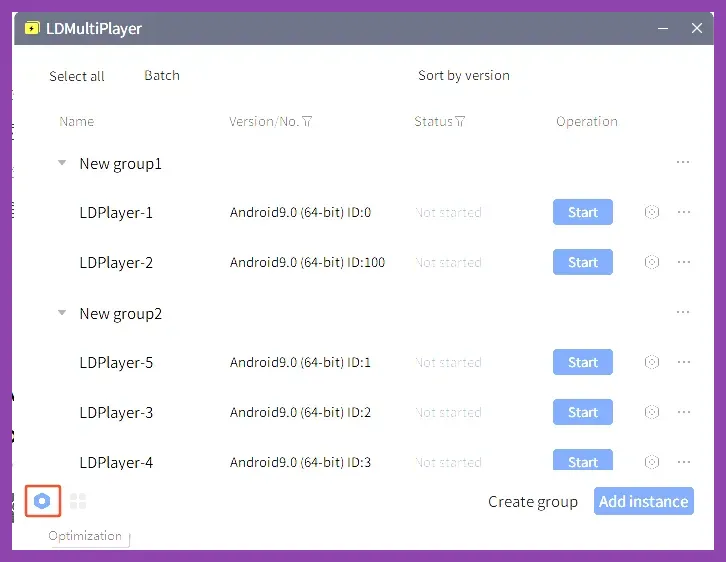
If you are serious about securing the perfect start, rerolling on a single mobile phone is highly inefficient. To scale up your efforts, you should use an Android emulator on your PC to run multiple accounts at the same time. Emulators like LDPlayer or BlueStacks feature built-in multi-instance managers designed specifically for this purpose.
First, install the emulator of your choice and download Epic Seven on a single instance. Do not open the game yet. Instead, open the Multi-Instance Manager and clone that base instance 3 to 4 times, depending on your PC's hardware capabilities. Once your cloned instances are ready, launch them all and arrange them on your screen in a grid pattern.
Next, locate the Synchronizer tool in your emulator's sidebar. When activated, the Synchronizer mirrors every mouse click, drag, and keystroke from your main instance across all other active instances. This means you only have to manually play through Stage 1-1 to 1-4 once, while three or four other accounts mirror your actions perfectly in the background.
By using this method, your effective reroll time drops dramatically. Instead of spending 10 minutes per single attempt, you are completing 4 attempts every 10 minutes. This is highly recommended because it vastly increases your chances of hitting rare 5-star targets quickly. Executing this setup requires a bit of initial preparation, but the time saved is immense—a concept familiar to players optimizing their setups in competitive environments, much like configuring Rune loadouts in Summoners War.
Who to Target: Epic Seven Selective Summon Tier List
Knowing who to pull for is just as important as knowing how to pull. The Selective Summon pool is limited to specific Season 1 heroes. While there are several 5-star characters available, only a select few will drastically alter your progression speed.
| Tier | Hero Name | Element / Class | Why They Are Top Tier |
|---|---|---|---|
| S-Tier | Iseria | Earth / Ranger | Provides defense break, buff strip, and completely resets the cooldowns of an ally. Essential for late-game PvE. |
| A-Tier | Destina | Earth / Soul Weaver | Incredible healer and cleanser. Highly useful in Banshee hunts, Raid, and PvP. Great if you miss Iseria. |
| B-Tier | Ravi | Fire / Warrior | Self-healing lifesteal tank. Great for early story progression, but falls off in high-end endgame hunts. |
| C-Tier | Vildred | Earth / Thief | Excellent AoE farmer, but largely redundant because the game gives you Free Spirit Tieria for free. |
Iseria is the undisputed queen of the Selective Summon. Her second skill, Oath Keeper, resets the skill cooldown of any ally. This unique utility makes her irreplaceable throughout the entire lifespan of your account. When paired with specific characters later on, she unlocks strategies that make difficult bosses trivial. Choosing early skills and characters wisely is a core pillar of any deep RPG, similar to selecting the best skills to unlock first in Persona 3 Reload.
If you absolutely cannot stand rerolling and miss out on Iseria, Destina is your next best option. She is a premier healer who can carry your team through difficult content, cleanse debilitating debuffs, and revive fallen allies. Avoid picking damage dealers like Vildred or Sez; while they look flashy, the free units provided by the game (such as Free Spirit Tieria and Specter Tenebria from the Moonlight Blessing) perform those roles just as well, if not better.
The "Tamaseria" Combo and Advanced Rerolling
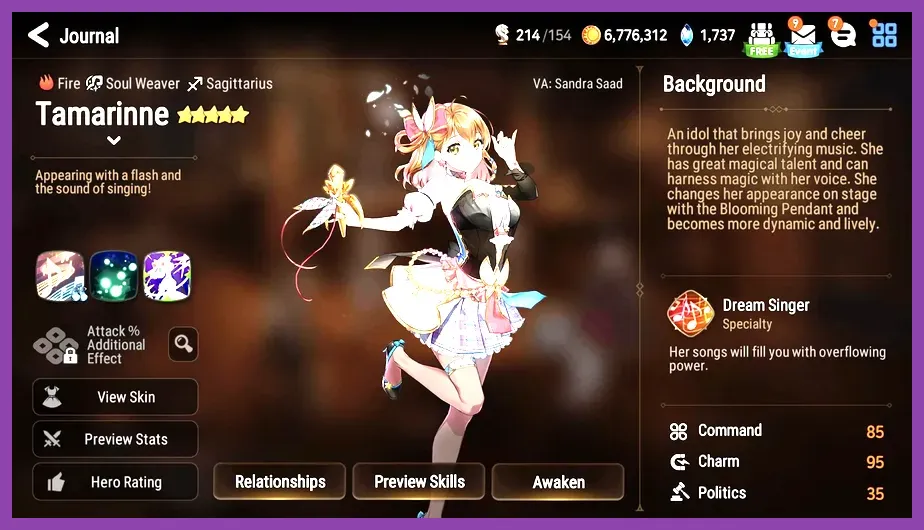
For players who want the absolute ultimate start in Epic Seven, there is an advanced rerolling strategy known as the Tamaseria Combo. This involves securing both Iseria (from the Selective Summon) and Tamarinne (a Fire Soul Weaver) from the general pool or active rate-up banners.
Tamarinne is widely considered the strongest PvE character in the history of Epic Seven. However, her powerful Idol form has a massive cooldown at the start of any battle. Iseria completely bypasses this drawback by using her cooldown reset skill on Tamarinne on Turn 1. This immediately triggers Tamarinne's transformation, providing your team with massive heals, attack buffs, action gauge pushes, and forced dual attacks right out of the gate.
To pull this off, you must check if there are any active free summons, special log-in events, or if Tamarinne has an active rate-up banner on the official Smilegate Stove page. If so, your reroll routine changes slightly: you will use your free Covenant Bookmarks or Skystones to pull on the general/rate-up banners before doing your Selective Summon. If you manage to pull Tamarinne from these random summons, you then proceed to your Selective Summon and lock in Iseria. Achieving this combination sets your account up for unparalleled success, mirroring the strategic depth of securing top-tier units in other competitive gacha games like Summoners War.
Avoiding Common Rerolling Mistakes in Epic Seven
While rerolling is a straightforward process, making a single critical mistake can ruin your progress or force you to wait days to try again. Keep these crucial tips in mind to ensure your reroll process is as smooth as possible:
- Do Not Click "Delete Account" – If you want to wipe your progress, always use the Reset Server option in the settings. Clicking "Delete Account" will delete your entire Stove account. If you do this, Smilegate will lock that email address for 7 days, preventing you from using it to register a permanent account later.
- Avoid the Stage 1-10 Trap – Older Epic Seven guides often advise players to clear Stage 1-10 to unlock the Selective Summon. This information is outdated. Smilegate updated the game so that Selective Summon now unlocks at Stage 1-4. Do not waste precious minutes clearing those extra six stages.
- Do Not Ignore the Moonlight Blessing – Immediately after clearing Stage 1-10, you will unlock the Moonlight Blessing. This allows you to choose a free 5-star Moonlight (Light/Dark) hero. Always choose Specter Tenebria. She is an absolute powerhouse in both high-level PvE and PvP due to her permanent stealth mechanic and poison debuffs. Do not pick Arbiter Vildred, as he has fallen out of the meta.
- Don't Settle for Artifacts Alone – While 5-star artifacts like Song of Stars are incredibly powerful, securing a top-tier hero like Iseria is far more valuable. Heroes define your team compositions; artifacts merely enhance them.
By keeping these traps in mind, you will save yourself from unnecessary headaches and protect your future account security. Managing your early resources and avoiding pitfalls is just as crucial here as it is when trying to raise your gear score fast in V Rising.
What to Do After a Successful Reroll
Once you have secured your ideal starter team—ideally featuring Iseria and your chosen Moonlight Blessing hero—it is time to transition into the early-game progression loop. Your primary objective now is to build a team capable of farming Wyvern 13, the hunt stage that drops the speed and critical hit gear sets used by 90% of the characters in the game.
Fortunately, the game provides almost all the tools you need for free. Head to the "Events" tab and activate the Hunt Expert Challenge. Select the Wyvern challenge to receive Sigret, a premier 5-star Ice damage dealer, completely for free. Combine Sigret with Muwi (a 3-star Ice thief), Furious (obtained for free via the Hero Connection system), and a frontline tank like Angelica or Acolyte Montmorancy.
This free-to-play friendly team will allow you to farm high-level gear quickly, ensuring you don't hit a progression wall. Keep pushing through the main story, complete your daily quests, and save your Skystones for limited-time banners. With your perfectly rolled start, you will breeze through content that takes other players weeks to overcome. For more detailed character strategies and optimization guides, check out the Epic Seven community hub to stay updated on the latest meta shifts.