
Playing Xbox titles right out of the box means settling for sluggish vanilla inventories, compromised frame pacing, and outdated gameplay balancing. Whether you are running titles through the Xbox App on PC with unlocked Win32 directories or downloading through native Creation menus on Xbox Series X, dropping the right modifications onto your system radically overhauls how these titles look and feel. From fixing Starfield's claustrophobic UI to turning Fallout 4 into an automated 4X empire builder, these battle-tested modifications deliver the definitive way to play your favorite Xbox games.
Unlocking Xbox Game Modding: How the Architecture Changed
For years, modding games under the Xbox banner was an exercise in pure frustration. Locked-down Universal Windows Platform (UWP) file containers kept game directories walled off from community tools. That barrier finally collapsed when Microsoft shifted default Xbox PC App installations to standard Win32 directories under the C:\XboxGames folder hierarchy. You can now toggle advanced management features, inspect root installation files, and inject DLL modifications just as easily as you would with a standard Steam release.
On console hardware like the Xbox Series X and Series S, native modding thrives through developer-curated distribution networks. Bethesda titles such as The Elder Scrolls V: Skyrim Special Edition and Starfield lean directly on the Bethesda Creations portal, giving console players access to hundreds of plugins that alter script mechanics, add custom voice-acted companions, and inject high-resolution textures directly from the dashboard. While consoles deal with strict memory caps—such as Skyrim's 5GB reserve limit—the PC side lets you install unlimited plugin libraries alongside external mod management platforms like the Nexus Mods community hub.
If you encounter launch failures or engine instability right after enabling local file access, running system-level performance cleanups is crucial. Check out our breakdown on elex pc fixes that stop crashes and rescue your fps to understand how background memory locks and driver conflicts choke modified game processes before they can initialize.

🎮 FORM
Looking to experience this game? Grab your digital key directly on our store for $14.99.
View on Steammoz Store →The S-Tier Game Changers: Essential Overhauls Ranked

Not every mod deserves a permanent slot on your hard drive. Some inject bloat that causes save-game bloat or introduces memory leaks that ruin forty-hour campaigns. The best modifications rewrite baseline game systems without tanking hardware frame-times. The following tier list focuses strictly on transformative mods that repair broken developer logic, restore cut content, and drastically improve core gameplay loops.
| Mod Name | Target Game | Tier Rating | Performance Cost | Core Transformation |
|---|---|---|---|---|
| Starfield Community Patch (SFCP) | Starfield | S-Tier | 0% (Improves frame pacing) | Patches 300+ quest bugs, script stalls, and vendor credit scaling flaws |
| Sim Settlements 2 | Fallout 4 | S-Tier | Moderate (-3 to -6 FPS in cities) | Automates wasteland colonization with dynamic zoning and storyline progression |
| Ordinator – Perks of Skyrim | Skyrim SE | S-Tier | None (Engine script-safe) | Replaces all 18 vanilla perk trees with 469 viable, dynamic character build paths |
| UE4SS & MapUnlocker | Palworld (Xbox PC) | A-Tier | Negligible | Injects missing Steam-parity optimizations and unmasks locked fog-of-war bugs |
| StarUI Inventory | Starfield | S-Tier | None (Faster menu rendering) | Replaces console-style lists with searchable, multi-column inventory tables |
| Wildcat – Combat of Skyrim | Skyrim SE | A-Tier | None | Replaces floaty melee mechanics with lethal locational damage and stamina costs |
Starfield Community Patch (SFCP)
Bethesda titles launch with thousands of minor script fractures, and Starfield is no exception. The Starfield Community Patch is a collective open-source effort that systematically resolves faulty quest triggers, object collision errors, and broken perk scripts. Unlike aggressive rebalances, SFCP fixes issues like the infamous shield skill bug—where leveling shield perks actually degraded ship defenses—without touching artistic intent. It is an absolute zero-cost installation that guarantees your long-haul save file will not corrupt midway through the Unity storyline.
Sim Settlements 2 (Fallout 4)
Vanilla Fallout 4 settlement building feels like a chore: you manually drop sleeping bags, plant mutfruit, and wire noisy generators while settlers wander around like headless chickens. Sim Settlements 2 flips this entire dynamic on its head by transforming settlements into a living, breathing SimCity simulation. Settlers construct their own residential, commercial, and defensive plots based on your zoning layouts. Complete with an immersive, fully voiced narrative campaign that rivals the base game's main quest, it turns neglected wasteland outposts into self-governing trade bastions.
Interface and Quality-of-Life Mods That Kill the Clutter
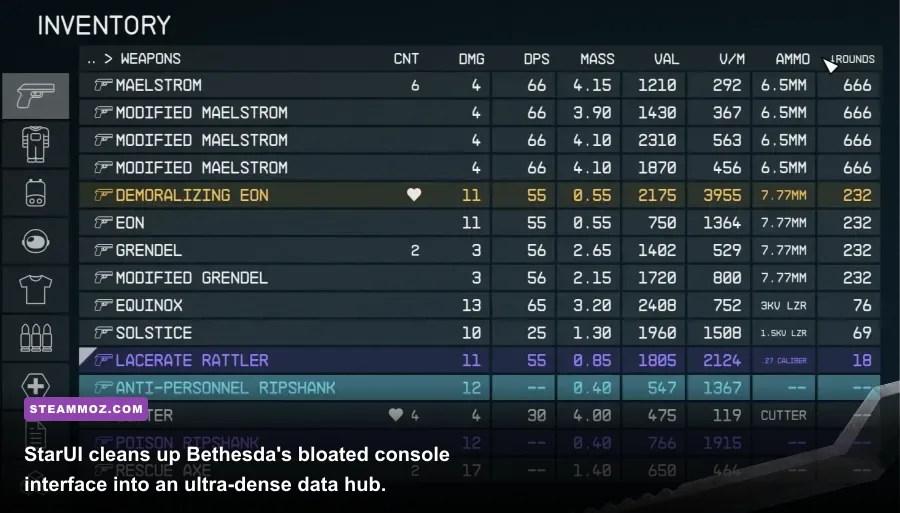
Bethesda and other major Xbox studio games constantly suffer from interfaces clearly designed for living room televisions twenty feet away. Giant fonts, sluggish scrolling speeds, and missing sorting parameters frustrate PC players and console monitor users alike. Cleaning up your HUD and menus is the single fastest upgrade you can give your setup.
StarUI Inventory by m8r98a4f2 turns Starfield's inventory screen into a spreadsheet of pure tactical efficiency. It displays value-to-weight ratios, ammunition counts, damage per second (DPS), and vendor affordability columns directly on screen without needing sub-menu clicks. Opening containers takes milliseconds rather than seconds because it eliminates heavy UI animations that eat into input response times.
For fantasy RPGs on Xbox platforms, running clean HUDs is just as critical. In Skyrim Special Edition, mods like SkyHUD strip away the obstructive vanilla compass and massive health bars, repositioning them into clean corner indicators reminiscent of classic tactical titles. Combining a lighter interface with hardware optimizations guarantees your input latency stays pinned to the floor. To see how interface adjustments directly correlate with smoother frame delivery in modern action titles, review our advice on far cry 6 goty upgrade pass settings for max fps as well as the optimization parameters in our filament marmalade edition settings for higher fps breakdown.
Overhauling Gameplay Systems: Combat, AI, and Progression
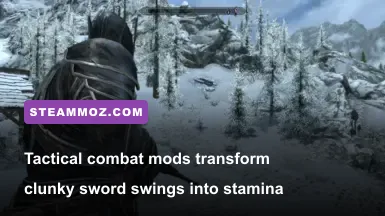
Once your game runs clean and menus stop wasting your time, you need to fix archaic combat loops. Stock Xbox action RPGs often suffer from bullet-sponge or sword-sponge enemy mechanics where higher difficulties simply inflate health bars rather than making encounters smarter.
Revamping Lethality with Wildcat
In Skyrim, bumping the game up to Legendary difficulty simply turns bandits into damage-absorbing monstrosities that hit you like freight trains while you tickle them with hundred-damage battleaxes. Wildcat – Combat of Skyrim replaces this lazy balance design with razor-sharp tactical lethality:
- Lethal Scaling: Damage dealt and received scales up symmetrically, meaning two solid greatsword blows end a fight in either direction.
- Dynamic Stamina Consumption: Missing power attacks drains reserves instantly, leaving you staggered if an enemy counters.
- Locational Injury System: Headshots cause spell disruption, leg strikes cut movement speed by 35%, and arm blows slash block effectiveness.
If you enjoy dialing in complex damage multipliers and creating razor-sharp character synergies like those found in our far cry 6 best beginner build or evaluating optimal gear hierarchies like our ranking of far cry 3 blood dragon weapons ranked, Wildcat forces you to treat every single melee duel with tactical discipline.
Rebuilding Progression: Ordinator's Dynamic Perks
Stock character progression trees quickly run out of steam. Vanilla Skyrim perk trees are filled with bland stat increments like "deal 20% more damage with one-handed weapons." Ordinator – Perks of Skyrim fixes this across all 18 skill categories. Want to play a combat bard? The Speech tree adds war drum performance mechanics that damage nearby enemies while sustaining your allies. Prefer automated traps? The Sneak branch lets you lay tripwires and caltrops. Even traditionally boring crafting skills become dynamic build engines, letting you extract soul shards to fabricate custom dwarven autocannons directly on the battlefield.
Xbox App Configuration and Mod Load Order Protocol

The biggest hurdle in modding Xbox titles is instability caused by messy load orders. The game engine parses community files sequentially; if two plugins alter the same interior cell or weapon balance record, the file loaded last overwrites the earlier one. When structural master files conflict, the engine panics, throwing memory exceptions that lead straight to your Windows desktop or Xbox dashboard.
For titles like Pocketpair's official Palworld release on the Xbox PC ecosystem, third-party frameworks like UE4SS must be placed directly alongside the shipping executable in C:\XboxGames\Palworld\Content\Pal\Binaries\WinGDK. Make sure to consult official Xbox support guidelines if Windows permissions temporarily prevent writing new configuration files to this folder.
Follow this strict structural blueprint to guarantee flawless stability on both Xbox PC Game Pass and Xbox Series X Creation menus:
| Order Priority | Plugin Category | Examples | Load Rule Rationale |
|---|---|---|---|
| 01: Top | Master ESMs & Frameworks | Starfield.esm, Unofficial Patches | Must load first so all subsequent mods reference the corrected game code base. |
| 02: High | Global Game Mechanics & Audio | Audio overhauls, weather engines | Establishes global lighting and environmental variables across the whole world space. |
| 03: Mid | Textures, Meshes & Skeleton Rigs | SMIM, body replacers, 4K armor | Loaded before scripts to ensure visual assets are cached in memory before scripts run. |
| 04: Lower | Gameplay Overhauls & AI | Wildcat, Ordinator, NPC AI mods | Overwrites baseline character attributes, perk charts, and combat behavior trees. |
| 05: Bottom | UI Overhauls, Maps & Late Patches | StarUI, SkyHUD, A Quality World Map | Must be loaded absolute dead last to prevent earlier mods from breaking menu hooks. |
Sticking to this structural hierarchy eliminates 95% of all launch stalls and random mid-dungeon lockups. If your game still stutters or crashes under heavy asset loading, consult our system crash troubleshooting guide in escapevr the basement crashing and low fps fixes to clean your local cache partitions and stabilize your process runtime.
Modifying Xbox titles is no longer the locked-down headache it used to be. By combining modern Win32 directory access on PC with reliable Creation portals on console, you can strip away the clunky interfaces, balance mistakes, and missing features of base games. Install these essential frameworks, lock in your load order hierarchy, and experience your favorite Xbox games the way they were always meant to be played.