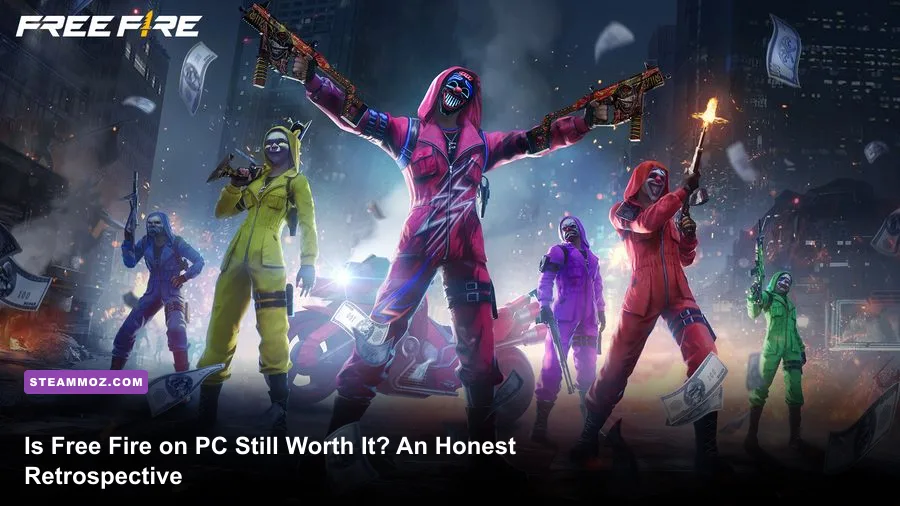
Free Fire on PC occupies a bizarre, surprisingly resilient niche in modern shooter gaming. If you come into it expecting a hyper-realistic tactical military sim to replace your hours in Warzone, you are setting yourself up for bitter disappointment. However, if you want a lightning-fast, arcade-style battle royale that boots up on ancient budget hardware, delivers absurdly aggressive close-quarters duels, and rewards lightning-fast macro-speed Gloo Wall placement, playing Garena's flagship on desktop remains shockingly fun. The catch? You have to conquer a minefield of emulator quirks, navigate an aggressive pay-to-win weapon skin economy, and accept that Garena explicitly quarantines PC players into isolated matchmaking pools.
The Emulator Dilemma: Playing a Mobile Juggernaut on Mouse and Keyboard
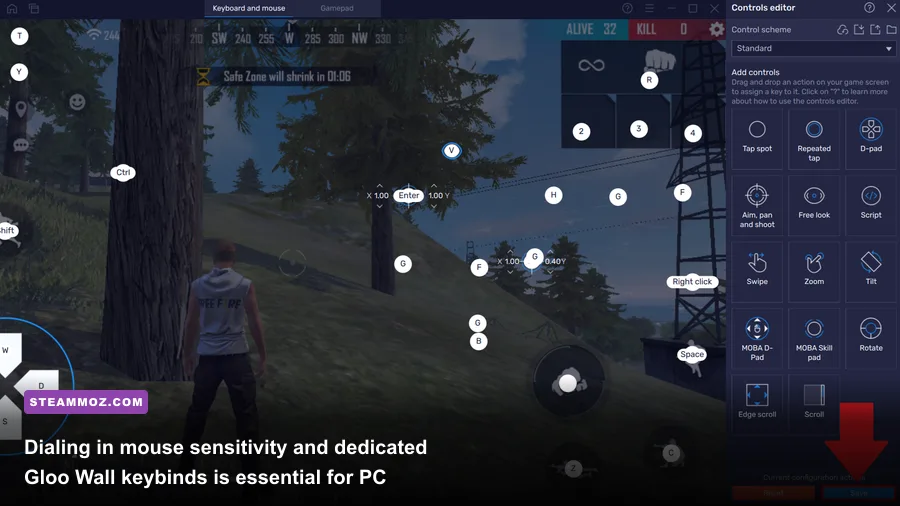
Free Fire was never built natively for Windows. To run it on your rig, you are relying on Android emulation platforms like BlueStacks, LDPlayer 9, or MSI App Player. Over the years, emulator developers have worked minor miracles implementing smart keymapping profiles that automatically hide the cursor when aiming and unlock it when looting crates. Yet, the translation from a capacitive touchscreen to a high-DPI gaming mouse is an entirely different beast that requires serious manual tuning.
On mobile, Free Fire gunplay revolves around the famous vertical drag shot—flicking your right thumb upward across the glass to force your crosshair off an opponent's torso and onto their skull. On PC, mouse precision turns this mechanic into an absolute laser show. If you set your vertical mouse sensitivity (Y-axis) higher than your horizontal axis (X-axis), a slight twitch of your wrist snaps crosshairs straight onto enemy heads with terrifying consistency. Weapons like the Woodpecker, SVD, and Desert Eagle transform into one-tap execution tools in the hands of anyone with decent mechanical mouse control.
The real skill ceiling on desktop, however, is your Gloo Wall execution. Gloo Walls are deployable instant ice barriers that provide on-demand cover in open fields. Mobile players must tap the grenade icon, select the wall, crouch, aim down, and tap the fire button. On PC, you can bind your Gloo Wall to a mouse side button (like Mouse 4) or a quick key like 'Q' or 'E'. Top-tier PC players execute the holy trinity of Free Fire movement: fire a shotgun blast, pull the Gloo Wall, slam it into the dirt at their feet, and jump-slide backward—all in less than 300 milliseconds. Mastering that sequence feels exhilarating, but if your emulator suffers from input lag or key-freeze bugs, you'll be staring at a spectator screen before your ice barrier ever renders. If you encounter weird system hitches during intense play sessions, check out our guide on fixing sudden game crashes and micro-stutters to stabilize background resources.
Visuals, FPS Caps, and Low-Spec Optimization in 2026
One of the strongest arguments for playing Free Fire on a desktop setup has always been hardware accessibility. While AAA extraction shooters and modern battle royales demand hefty multi-core processors and beefy dedicated GPUs, Free Fire MAX can cruise on virtually anything. Even modest office laptops running integrated Intel Iris Xe or AMD Vega graphics can push acceptable framerates, making it an incredible entry point for gamers waiting out hardware upgrade cycles. If you enjoy squeezing playable performance out of modest rigs, you will appreciate our breakdown of low-end PC hardware optimization tips.
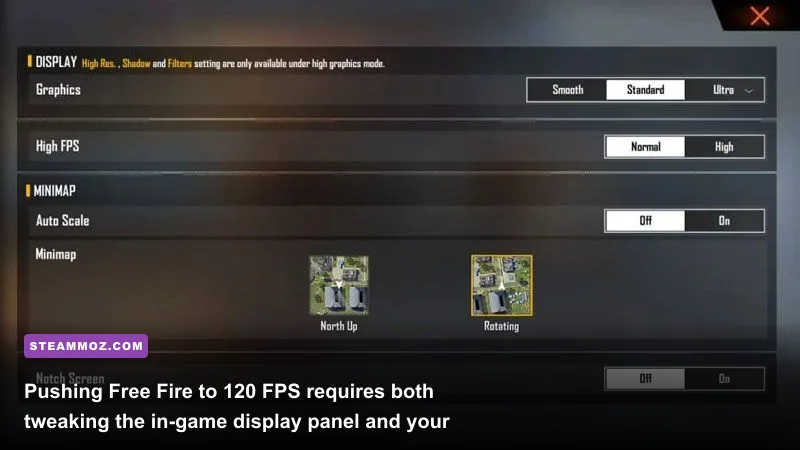
Running the standard version of Free Fire feels visually flat, but Free Fire MAX brings improved lighting models, dynamic water reflections, updated reload animations, and crisp particle effects when firing Evo weapons. To get the absolute best visual clarity and responsiveness out of your monitor, you need to configure your emulator settings correctly. Leaving your emulator on stock settings usually traps you in a muddy 60 FPS profile with sluggish response times.
| Setting Location | Recommended Option | Performance Impact | Gameplay Advantage |
|---|---|---|---|
| Emulator Graphics Engine | DirectX / Vulkan (Dedicated GPU) | Moderate GPU Load | Eliminates micro-stuttering during Gloo Wall spam |
| Emulator Core Allocation | 4 CPU Cores / 4GB to 6GB RAM | Moderate System Load | Prevents keybind freezing during rapid inputs |
| Emulator High Frame Rate | Enabled (Set slider to 120 FPS or 240 FPS) | High CPU Overhead | Drastically reduces input delay for mouse flick headshots |
| In-Game Display (Graphics) | Ultra / Max | Low GPU Load | Sharpens character silhouettes at long distances |
| In-Game Display (High FPS) | High (Mandatory) | Very Low | Unlocks the internal frame cap past standard mobile 30/60 FPS |
| In-Game Visual Filter | Vivid | Negligible | Enhances color contrast to spot enemies camping in foliage |
| In-Game Shadows | Off (Competitive Choice) | Medium | Boosts framerate stability inside high-density towns like Clock Tower |
Reaching a locked 90 or 120 FPS requires forcing the emulator's device profile to emulate an ASUS ROG Phone or Samsung Galaxy S24 Ultra, paired with a display tweak inside your emulator configuration. Once unlocked, the fluid visual feedback turns weapon spray transitions and sliding shot duels into a butter-smooth experience. Just like tuning your display in other performance-heavy titles, dialing in these settings will transform your experience. For a deeper look at balancing visual fidelity and raw framerates, check out our guide to fine-tuning visual settings for maximum FPS.
Matchmaking Realities: The Isolated Emulator Pool and Bot Population
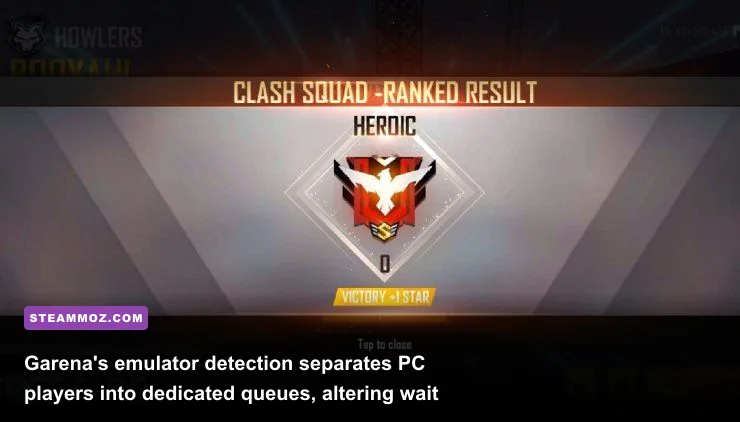
Let's address the elephant in the room: Garena's emulator detection system. Years ago, PC players running third-party software utterly terrorized standard mobile touchscreen lobbies. The mechanical advantage of high-refresh mouse flicking and rapid keyboard inputs completely destroyed the fairness of competitive ranked ladders. Garena eventually clamped down, introducing hard emulator detection that flags your account the moment you launch the game via virtualization software.
Today, when you queue up on PC, you are placed exclusively into an isolated matchmaking pool reserved for other emulator users. If a mobile player invites you to their squad, their entire squad gets pulled straight into the ruthless emulator pool. This change rescued fair play for phone users, but it drastically reshaped the PC experience in two distinct ways:
- Longer Queue Times: Depending on your geographical server (North America, Brazil, Europe, or South Asia), finding a standard Battle Royale Ranked match on PC can take anywhere from 45 seconds to several minutes during off-peak hours.
- Aggressive Bot Padding in Low Ranks: If you are starting fresh in Bronze, Silver, or Gold tiers, your Battle Royale lobbies will be flooded with AI bots that wander aimlessly, shoot in predictable bursts, and drop tier-three armor upon death. It feels empty until you climb higher.
The real competitive pulse of Free Fire PC does not live in casual battle royale lobbies—it thrives in high-tier Ranked Clash Squad (4v4 round-based tactical skirmishes) and private custom rooms ("Salas Personalizadas"). In these modes, the matchmaking wait times drop significantly, and the bot count plummets to zero. In custom rooms, particularly across regions like Latin America and Southeast Asia, competitive emulator clans host high-stakes scrimmages with strict rules (limiting specific active skills or shotgun loadouts) where players showcase hyper-fast movement mechanics that look more like an intense arena shooter than a casual mobile battle royale.
The Meta Shift: Character Abilities and Weapon Balance on PC
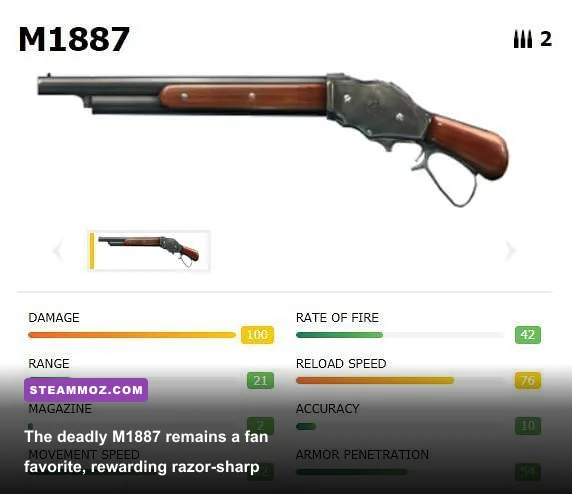
Unlike classic tactical shooters where every avatar functions identically, Free Fire is a hero shooter at heart. Your character loadout consists of one active ability and three passive skills, paired with a tactical pet bonus. On mobile, juggling active skills mid-fight while rotating the camera can lead to fat-finger fumbles. On PC, you can map your skill triggers to hotkeys like Shift, Left Alt, or Mouse 5, unleashing intricate ability combos instantaneously.
The combat meta heavily favors aggressive rush strategies. Because mouse aiming makes closing distance and tracking targets vastly more reliable, high-burst shotguns and rapid-fire SMGs dominate close quarters, while marksman rifles control the mid-range sightlines. If you appreciate dissecting gun stats and damage falloff, take a quick peek at our deep dive into ranking weapons across distinct tiers.
| Loadout Archetype | Core Weapons | Active Character Skill | Passive Synergy Stack | Best Tactical Application |
|---|---|---|---|---|
| The Hyper-Aggressive Rusher | M1887 Shotgun + MP40 | Tatsuya (Rebel Rush) | Hayato + Kelly + Jota | Close-quarters Clash Squad rushes; chain-dashing past Gloo Walls |
| The Precision Headhunter | Woodpecker / SVD + Desert Eagle | Alok (Drop the Beat) | Moco + Laura + Maro | Mid-to-long-range pick-offs; tagging targets for team focus fire |
| The Defensive Anchor | Charge Buster + Groza | Chrono (Time Turner) | Nairi + Antonio + Kapella | Holding open capture points; surviving crossfire with impenetrable cover |
| The Area-Denial Disruptor | Bizon / Thompson + M79 Launcher | Homer (Senses Shockwave) | Alvaro + D-Bee + Shirou | Flushing squads out from behind dense Gloo Wall clusters with explosives |
The current sandbox rewards dynamic combinations. Tatsuya’s Rebel Rush grants rapid forward dashes with multiple stored charges, allowing PC players to execute lightning-fast jukes around enemy Gloo Walls to deliver point-blank shotgun blasts. Pairing that agility with Hayato's armor penetration boost when your HP drops makes you a lethal threat in tight 1v1 situations. Meanwhile, long-range specialists who combine Maro's distance-scaling damage with the piercing fire of the Woodpecker can down fully armored foes across Bermuda with a clean two-tap volley. If you ever run into frustrating engine hitches during these high-speed firefights, our troubleshooting guide on eliminating stuttering and optimizing frame delivery will help smooth out your performance.
The Monetization Minefield: Evo Guns and Pay-to-Win Stat Boosters
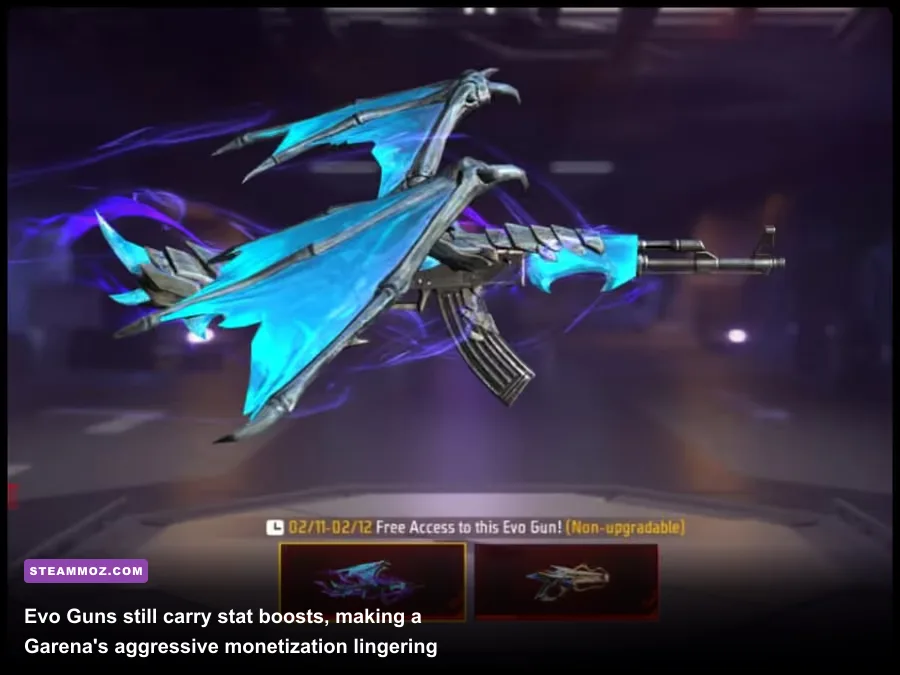
We cannot discuss Free Fire honestly without confronting its aggressive monetization model. In standard competitive shooters like Counter-Strike 2 or Valorant, weapon skins are purely cosmetic status symbols. In Free Fire, skins carry distinct gameplay attribute modifiers. A legendary or Evo skin will routinely grant stat buffs like +2 Rate of Fire, +1 Damage, or +1 Armor Penetration, offset by minor penalties like -1 Magazine Size or -1 Reload Speed.
On PC, where mouse precision already tightens your bullet spread, wielding an upgraded Evo weapon like the MP40 Predatory Cobra or the AK47 Blue Flame Draco widens the performance gap dramatically. An increased rate of fire on an SMG reduces time-to-kill (TTK) by fractions of a second, which often decides who survives a chaotic spray exchange inside a house. While Garena has made efforts to distribute free weapon crates and basic character unlocks through seasonal events, the top-tier, fully upgraded Evo guns demand significant diamond investments or endless grinding.
Is this completely game-breaking? Not necessarily in low-to-mid ranks, where superior aim, clever map positioning, and fast Gloo Wall placement can still outplay a credit-card warrior. However, once you push into Heroic and Grandmaster ranks in Clash Squad, facing an entire four-stack squad armed with maxed-out Evo weaponry exposes the undeniable pay-to-win undercurrent. If you are a competitive purist who refuses to play any shooter where paid skins alter base weapon performance, Free Fire's armory system will definitely rub you the wrong way.
Emulators vs Native Modern Alternatives: How Does It Hold Up?
When Free Fire exploded onto the scene, high-octane battle royales that ran cleanly on low-end hardware were practically non-existent. Today, the PC landscape is radically different. Free-to-play powerhouses provide stiff competition, and newer lightweight indie shooters offer streamlined performance without requiring third-party Android virtualization software. For budget-conscious players looking to maximize lightweight frame rates across different genres, our guide to optimizing settings for higher FPS on modest hardware provides additional inspiration.
Running an emulator still incurs a performance penalty because your system must translate ARM architecture instructions into x86 machine code on the fly. This overhead means that despite Free Fire being a mobile title, it taxes your CPU surprisingly hard. If you own a modern gaming PC with an RTX-tier graphics card, firing up an emulator to play a mobile battle royale can feel counterintuitive when you could easily jump into native desktop experiences. Even the official expansion of the Google Play Games on PC platform has altered the landscape, though full, unrestricted keyboard mapping for competitive shooters on that client remains hit-or-miss compared to mature platforms like BlueStacks.
Yet, Free Fire retains a unique charm that western native PC shooters lack: sheer speed and round density. A full Battle Royale match takes only 10 to 12 minutes, while a dynamic Clash Squad showdown wraps up in under 8 minutes. There is virtually zero downtime. You are not spending 15 minutes trekking across vast deserts just to get picked off by an unseen sniper. You drop in, grab a shotgun or SMG, and engage in non-stop, adrenaline-pumping combat from the opening circle to the final Booyah.
The Final Verdict: Who Should Play Free Fire PC Today?
So, is Free Fire on PC still worth playing? The answer boils down to what you prioritize in an online shooter:
- You SHOULD play Free Fire on PC if:
- You game on an older laptop or low-spec PC that cannot run modern titles like Warzone or Apex Legends at a steady 60 FPS.
- You love fast-paced, arcade-style close-quarters gunfights with virtually zero inventory-management downtime.
- You want to play with real-life friends who play on mobile phones, while enjoying the comfort of your desktop mouse and mechanical keyboard.
- You find the unique, macro-heavy mechanics of rapid Gloo Wall defensive building genuinely fun and rewarding to master.
- You SHOULD SKIP Free Fire on PC if:
- You cannot stand weapon skins that provide tangible stat advantages (Rate of Fire, Damage, Reload Speed).
- You dislike configuring emulators, tweaking keymapping profiles, and dealing with occasional cursor-unlock glitches.
- You demand lightning-fast queue times in classic Battle Royale mode without encountering AI bot padding in lower ranks.
- You expect photorealistic graphics, complex tactical gunplay, and authentic bullet drop physics.
Ultimately, Free Fire on PC is an unapologetically arcade, high-energy guilty pleasure. It doesn't take itself too seriously, boots up in seconds, and offers some of the most frantic, reaction-heavy close-quarters duels in the free-to-play arena. If you treat it as a lightweight fragfest to blast through with friends via the official Garena Free Fire portal, you will find a surprisingly addictive shooter that punches far above its modest mobile weight class.