If Marvel's Spider-Man Remastered turns into a hitching slideshow the moment you leap from a Midtown skyscraper or crashes straight to your desktop mid-swing, your hardware probably isn't broken—it's simply choking on unoptimized asset streaming and DirectX 12 pipeline overhead. Nixxes did a phenomenal job porting Insomniac's open world to Windows, but the game is notoriously brutal on system memory, CPU thread scheduling, and VRAM. The quickest way to eliminate erratic frame pacing right now is to lower Crowd Density and Traffic Density to Medium, drop Ray-Traced Geometry Detail to Medium, clear your corrupt DirectX shader cache, and lock your frame rate slightly below your monitor's maximum refresh rate. Making these adjustments restores silky 1% low frame times and stops sudden crashes during high-velocity web swings.
Eliminate Web-Swinging Stutter: Fixing CPU and Asset Streaming Bottlenecks
The defining technical challenge in Marvel's Spider-Man Remastered on Steam is traversal speed. When you execute a perfect dive and slingshot through Times Square at top speed, the engine must stream hundreds of high-resolution textures, dynamic civilian models, physics-driven vehicles, and building geometries in milliseconds. If your system cannot keep up with these streaming requests, you experience hitching, erratic frametime spikes, and momentary visual freezes. Just like troubleshooting frame pacing issues in ELEX PC performance fixes, diagnosing the root cause requires isolating asset load pipelines from raw GPU rasterization.
The primary culprit behind traversal stuttering is your CPU thread distribution. *Spider-Man* uses a heavy multi-threaded job scheduler that tries to saturate every core available. On modern hybrid architecture processors (like Intel 12th, 13th, and 14th Gen chips with P-Cores and E-Cores), Windows thread scheduling occasionally assigns mission-critical rendering tasks to low-power Efficiency cores. If you notice frame times swinging between 8ms and 24ms during flight, head into your Windows Settings, go to System > Display > Graphics, select Spider-Man.exe, and force it to "High Performance." Additionally, ensure Hardware-Accelerated GPU Scheduling (HAGS) is enabled in Windows Graphics Settings, as Nixxes explicitly built their DirectStorage and frame generation hooks around modern WDDM scheduling.
Storage read speeds also play a massive role. Running this title off a mechanical hard drive is a recipe for disaster, but even older SATA SSDs can struggle when point-launching into dense avenues. For ideal asset decompression, install the game on an NVMe M.2 SSD formatted to NTFS. If you are experiencing micro-stutters during swings on AMD Ryzen processors, make sure you update to your motherboard's latest AGESA BIOS firmware and toggle Resizable BAR (ReBAR) or Smart Access Memory (SAM) on in your BIOS. ReBAR allows your CPU full access to your GPU's entire VRAM frame buffer simultaneously, drastically reducing PCIe bus transfer latency when new street-level textures arrive.
Optimized Graphics Settings: High Framerates Without Sacrificing Visuals
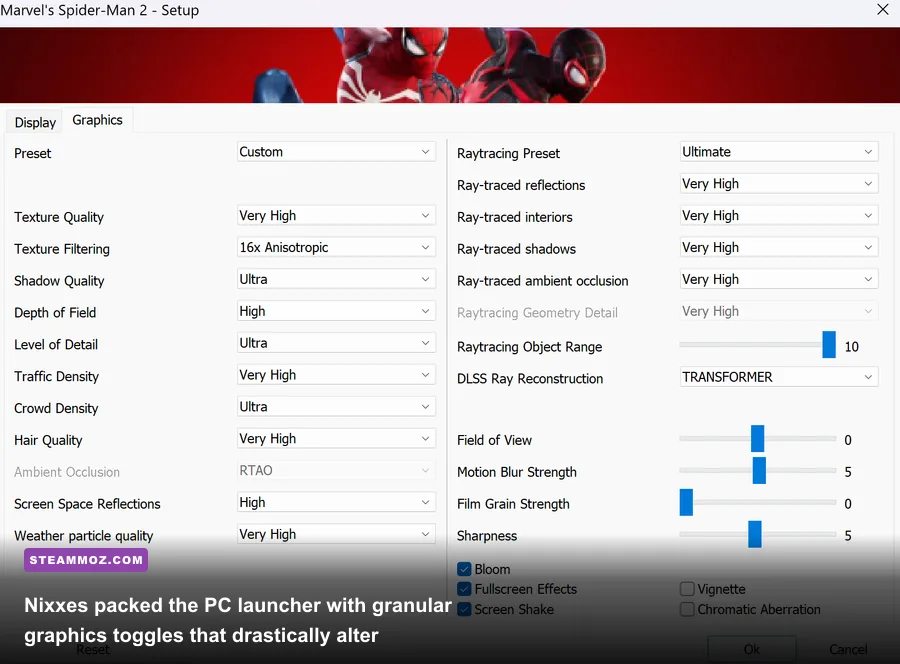
Blasting every toggle to Ultra might look tempting on a flagship card, but several settings in Marvel's Spider-Man offer diminishing visual returns while slaughtering your frame rate. Much like dialing in the correct parameters in our Far Cry 6 PC settings guide or tuning visuals in Filament Marmalade Edition optimization profiles, smart tuning is about identifying the specific settings that tank your 1% low frame rates.
Two settings demand immediate attention: Crowd Density and Traffic Density. High and Very High settings spawn hundreds of unique pedestrian pathfinding routines and car physics calculations that hammer your CPU. Lowering both to Medium preserves the bustling feel of Manhattan while immediately freeing up 15% to 20% of your CPU overhead. Similarly, Object Range governs how far into the distance high-polygon meshes and window air conditioners render. Keeping this at 6 to 8 instead of 10 dramatically stabilizes high-speed flights near Central Park.
| Setting | Default / Ultra | Optimized Setting | FPS Gain (%) | Visual Impact |
|---|---|---|---|---|
| Ray-Traced Reflections | On (Very High) | On (Medium) / Off | +25% to +45% | Reflections become slightly noisier in distant skyscraper glass. |
| Ray-Traced Geometry Detail | High | Medium / Off | +18% to +30% | Reduces distant dynamic objects reflected in puddles; imperceptible in motion. |
| Crowd Density | High | Medium | +12% (CPU) | Minor reduction in street-level pedestrians; no impact on rooftops. |
| Traffic Density | High | Medium | +10% (CPU) | Slightly fewer yellow cabs on avenues; eliminates high-speed swing hitching. |
| Shadow Quality | Very High | High | +8% | Softens distant building contact shadows slightly; zero aliasing difference. |
| Ambient Occlusion | HBAO+ | SSAO | +6% | Slightly lighter contact shadows under benches and dumpster corners. |
| Weather Particle Quality | High | Medium | +7% in Rain | Removes invisible micro-droplets during rain missions; eliminates heavy fog dips. |
| Object Range | 10 | 7 | +9% | Reduces draw distance of distant rooftop clutter without visible pop-in. |
By applying this optimized matrix, you gain between 35% and 55% more performance on average, transforming a stuttering 45 FPS slog into a rock-solid 75+ FPS experience without robbing Manhattan of its cinematic splendor.
Taming the VRAM Monster: Upscaling, Frame Generation, and Memory Leaks
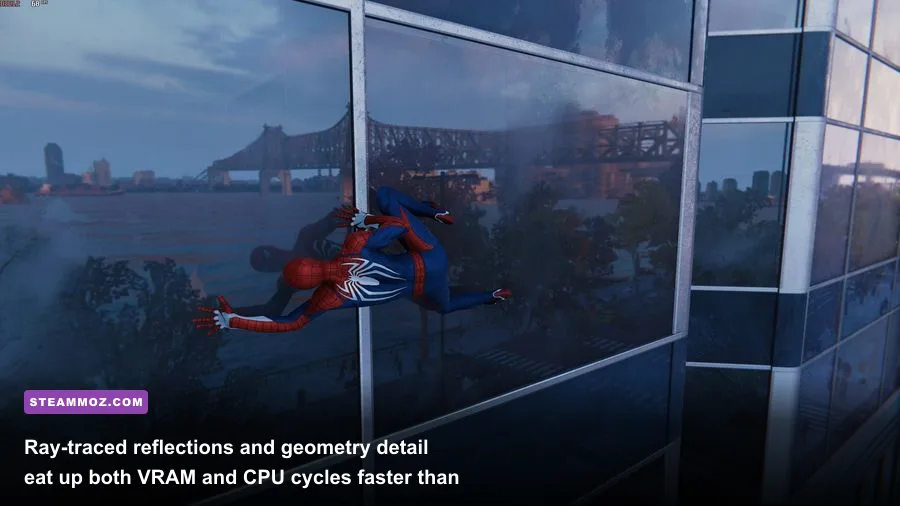
If you play at 1440p or 4K with ray tracing turned on, Marvel's Spider-Man Remastered can consume well over 10GB of video memory within 30 minutes of swinging through the Financial District. Once your GPU exceeds its dedicated VRAM pool, it starts paging assets across the PCIe lane into your standard system RAM—a bandwidth drop that guarantees catastrophic single-digit frame rates and immediate stuttering.
To avoid VRAM starvation, take advantage of modern temporal reconstruction. The PC port features industry-leading implementations of NVIDIA DLSS, AMD FSR 2.2, and Intel XeSS. Running DLSS or FSR in Quality Mode renders the game internally at a lower resolution (e.g., 1080p for a 1440p output) before reconstructing sharp edges and fine geometric details like Peter's suit webbing. This reduces the initial memory footprint of render targets by up to 2GB while yielding a clean 20% to 35% bump in frame rates. If you play on an ultra-wide monitor, using Dynamic Resolution Scaling (DRS) locked to your monitor's refresh rate (like 120Hz) with DLSS selected as the anti-aliasing method allows the engine to dynamically shave rendering load only during rapid aerial turns.
For GeForce RTX 40-Series owners, DLSS Frame Generation is a potent weapon to overcome CPU bottlenecks during traversal. Because Frame Generation generates intermediate frames purely on the GPU's Optical Flow Accelerator, it bypasses the CPU streaming pipeline entirely, turning a CPU-bound 65 FPS swing into an ultra-smooth 110 FPS glide. However, keep in mind that Frame Generation requires roughly 1GB to 1.5GB of additional VRAM overhead. If you are running an 8GB GPU like the RTX 4060 or RTX 3070, do NOT enable Ray Tracing and Frame Generation at the same time—you will trigger a memory leak that inevitably results in the dreaded DXGI_ERROR_DEVICE_REMOVED crash.
Crashing at Launch or Mid-Swing? Proven System and Driver Fixes
Crashing in Spider-Man PC usually falls into two categories: a silent crash to desktop (CTD) within five minutes of launching, or an unexpected freeze accompanied by a GPU driver crash dialogue during cinematic combat transitions. Dealing with these hard crashes requires a calculated approach similar to resolving engine errors in EscapeVR The Basement crash troubleshooting and fixing critical freezes in Everspace 2 PC stability guides.
1. Purge Corrupt DirectX 12 Shader Caches
Whenever you update your graphics drivers or receive a game patch, old precompiled shaders can conflict with newly compiled code, triggering instant desktop crashes during load screens. To flush them completely:
- For NVIDIA users: Navigate to
%LOCALAPPDATA%\NVIDIA\DXCachein Windows Explorer and delete all files inside. Next, check%APPDATA%\NVIDIA\ComputeCacheand clear that directory as well. Grab the newest clean driver directly from the official NVIDIA Driver Download center. - For AMD users: Open AMD Software: Adrenalin Edition, click the Gear icon (Settings) > Graphics > Advanced, scroll to the bottom, and click Reset Shader Cache. If crashes persist, install updated software from the official AMD Support portal.
2. Reconfigure Windows Exploit Protection (Control Flow Guard)
A well-documented quirk in Nixxes' DirectX 12 executable involves Windows Control Flow Guard (CFG). While CFG enhances system security, its real-time memory integrity checks can clash with *Spider-Man's* rapid memory reallocation, sparking random crashes during boss encounters with Rhino or Electro. To add an exclusion:
- Press the Windows Key, type Exploit Protection, and press Enter.
- Click on the Program settings tab, then click Add program to customize > Choose exact file path.
- Locate your Spider-Man.exe installation folder (typically inside
steamapps\common\Marvel's Spider-Man Remastered). - Scroll down to Control Flow Guard (CFG), check Override system settings, turn the toggle OFF, and hit Apply. Reboot your PC.
3. Disable Aggressive Third-Party Overlays and Overclocks
The Nixxes engine uses extensive DirectX 12 hooks (documented in detail by Microsoft Direct3D 12 documentation) that conflict violently with third-party software attempting to inject their own rendering layers. Disable the Steam Overlay, Discord Overlay, and GeForce Experience in-game overlay. If you use RivaTuner Statistics Server (RTSS) to monitor hardware stats, ensure you update RTSS to its latest release and set its Application Detection Level to "Low." Furthermore, Spider-Man is extraordinarily sensitive to unstable GPU core and memory overclocks; if you run custom curves in MSI Afterburner, drop your core clock offset by 25 to 50 MHz to prevent voltage-drop driver timeouts.
Hardware Bottlenecks and Target Benchmarks: What Your Rig Needs
Understanding where your hardware sits on the performance curve helps you set realistic expectations. You don't need a four-thousand-dollar rig to enjoy swinging past the Chrysler Building, but you do need balanced hardware. Just as we evaluated PC demands in our Fatal Fury City of the Wolves specs breakdown, pairing the right GPU with an adequate CPU and fast RAM is mandatory for stable frame delivery.
If you run a quad-core CPU with slow, single-channel DDR4 memory, your system simply cannot process draw calls fast enough to prevent dips below 40 FPS in crowded areas—even if you drop an RTX 4080 into the system. Memory bandwidth is king in open-world PC ports: upgrading from 2666MHz DDR4 to 3600MHz CL16 DDR4 (or moving to 6000MHz DDR5) yields massive improvements to 0.1% and 1% low frame times. Below is an engineering target matrix for running *Marvel's Spider-Man* across popular hardware tiers.
| Target Profile | Resolution & FPS | Recommended CPU | Recommended GPU | RAM & Storage Tier | Ray Tracing State |
|---|---|---|---|---|---|
| Budget Esports Tier | 1080p @ 60 FPS | Intel Core i5-10400F / Ryzen 5 3600 | GTX 1660 Super / RX 6600 (8GB) | 16GB DDR4 (Dual-Channel) + SATA SSD | Disabled (Medium Rasterized) |
| Sweet Spot Enthusiast | 1440p @ 90-120 FPS | Intel Core i5-13400F / Ryzen 5 7600 | RTX 4070 (12GB) / RX 7800 XT (16GB) | 32GB DDR5 + Gen3/Gen4 NVMe M.2 | Medium (Reflections Only) |
| High-End Cinematic | 4K @ 60 FPS (Native / DLSS Q) | Intel Core i7-13700K / Ryzen 7 7700X | RTX 3080 (10GB) / RX 6950 XT (16GB) | 32GB DDR4/DDR5 + Gen4 NVMe M.2 | High (Geometry Medium) |
| Flagship Enthusiast | 4K @ 120+ FPS (DLSS + FG) | Intel Core i9-14900K / Ryzen 7 7800X3D | RTX 4080 Super / RTX 4090 (24GB) | 32GB/64GB DDR5 6000MHz + Gen4 NVMe | Very High (All Features Enabled) |
By balancing your CPU asset pipeline, clearing out corrupt legacy caches, and reigning in VRAM consumption, *Marvel's Spider-Man Remastered* transforms from a stuttering headache into one of the most fluid, visually stunning action games in your PC library. Strap on your favorite Spidey suit, launch into the Manhattan skyline, and enjoy the butter-smooth gameplay you paid for.