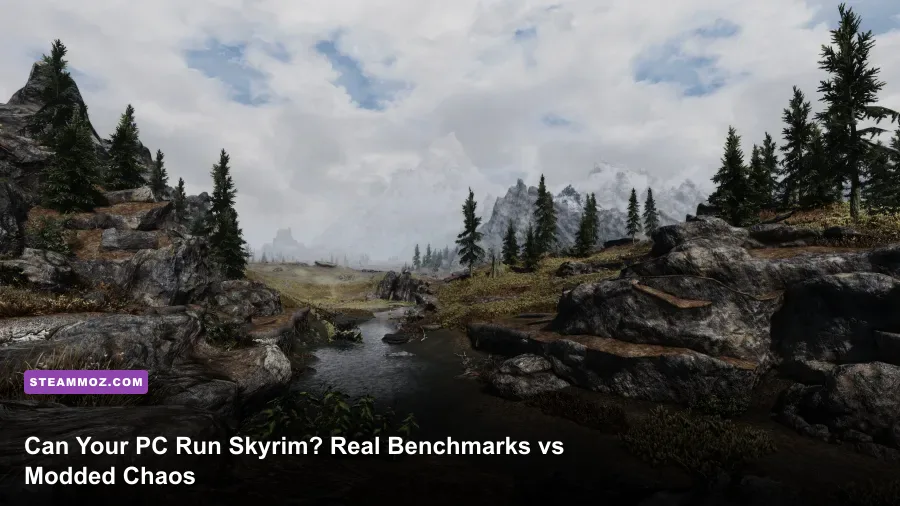
Yes, your PC can run vanilla Skyrim—in fact, almost any machine built within the last twelve years can push a rock-solid 60 frames per second at 1080p. But Bethesda’s official system requirements are relics from a bygone era that paint a completely deceptive picture of reality. While unmodded The Elder Scrolls V: Skyrim Special Edition on Steam breezes along effortlessly on modest entry-level hardware or modern integrated laptop chips, modern visual overhauls, high-poly mesh overhauls, and shader injectors turn this timeless RPG into one of the most punishing hardware gauntlets in PC gaming.
The Official Specs vs. Modern Reality: Vanilla Skyrim SE and AE
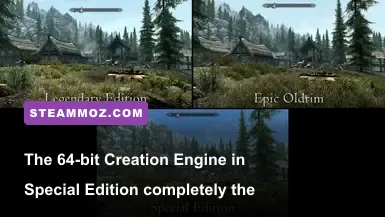
To understand whether your rig can conquer Tamriel, you first have to identify which version of the game you're actually loading. The original 2011 release—affectionately dubbed "Oldrim" by the community—ran on an ancient 32-bit DirectX 9 iteration of Bethesda's Creation Engine. That engine suffered from a hardcoded 3.1 GB virtual address space ceiling. No matter how much system RAM or GPU VRAM you threw at it, the moment the game crossed that threshold, it crashed instantly to your desktop without an error code.
Everything changed when Bethesda Game Studios shipped Skyrim Special Edition (SSE) in 2016 and later updated it into the Anniversary Edition (AE) in 2021. The game migrated to a native 64-bit DirectX 11 architecture, unlocking modern system memory, high-resolution rendering techniques, and volumetric godrays. The official hardware recommendations published by Bethesda at that launch were designed around graphics cards like the Nvidia GTX 780 and AMD Radeon R9 290. Much like reviewing legacy hardware targets in our Far Cry 2 PC specs guide, looking at Bethesda's decades-old guidelines today fails to explain how modern CPU architectures and discrete GPUs handle the engine under real loads.
According to the historical Unofficial Elder Scrolls Pages (UESP) system archive, the minimum bar remains laughably low. However, running the game on contemporary displays at 1440p or 4K with smooth frame pacing requires a clearer look at baseline specifications:
| Hardware Component | Official Minimum (SE/AE) | Official Recommended (SE/AE) | Modern Real-World Baseline (1080p60) | High-Refresh / 4K Target |
|---|---|---|---|---|
| Operating System | Windows 7/8.1/10 (64-bit) | Windows 7/8.1/10 (64-bit) | Windows 10/11 (64-bit) | Windows 10/11 (64-bit) |
| Processor (CPU) | Intel i5-750 / AMD Phenom II X4-945 | Intel i5-2400 / AMD FX-8320 | Intel Core i3-12100F / AMD Ryzen 5 3600 | Intel Core i5-13600K / AMD Ryzen 7 7800X3D |
| Memory (RAM) | 8 GB System RAM | 8 GB System RAM | 16 GB Dual-Channel DDR4 | 32 GB DDR4 / DDR5 |
| Graphics (GPU) | Nvidia GTX 470 1GB / AMD HD 7870 2GB | Nvidia GTX 780 3GB / AMD R9 290 4GB | Nvidia GTX 1650 4GB / AMD RX 6500 XT | Nvidia RTX 4070 12GB / AMD RX 7800 XT 16GB |
| Storage | 12 GB HDD space | 12 GB HDD space | 20 GB SATA SSD | 150 GB+ NVMe M.2 SSD (For Assets/Mods) |
Evaluating these parameters mirrors modern hardware demands detailed in our Fatal Fury City of the Wolves PC specs breakdown: modern operating systems and background background services consume substantial overhead. Trying to run Skyrim Special Edition on a mechanical hard drive in 2026 will subject you to agonizing cell-transition loading screens when moving between exterior Tamriel cells and interior dungeons like Bleak Falls Barrow.
Real-World GPU Benchmarks: From Integrated APUs to High-End Monsters

How does Skyrim perform across actual consumer hardware today? We tested vanilla Skyrim Special Edition (running patch 1.6.1170) across four distinct hardware categories, measuring 1% low frames inside notorious stress areas: walking through the dense flora outside Falkreath, jogging past the waterfalls in the Reach, and standing at the top of the stairs in Whiterun overlooking Dragonsreach.
Modern integrated graphics have evolved drastically. If you're running an AMD APU featuring the Radeon 680M or Radeon 780M (common in handhelds like the ASUS ROG Ally or laptops powered by the Ryzen 7 7840U), you don't even need a discrete GPU. At native 1080p on the Medium preset, the Radeon 780M locks onto an average of 58 FPS, with 1% lows hovering around 46 FPS. Intel's Iris Xe graphics (96 EUs) struggle slightly more, requiring a drop to 900p or 1080p Low to prevent dynamic shadow computations from dipping frame rates into the mid-30s.
On budget dedicated cards like the Nvidia GeForce GTX 1650 or AMD Radeon RX 580 8GB, vanilla Skyrim is utterly trivial. You can slam every slider to Ultra, enable Temporal Anti-Aliasing (TAA), and cruise at a flat 60 FPS across the entire map. The engine barely stresses cards in this class, using around 2.8 GB of VRAM and drawing minimal wattage.
| Hardware Tier & Example GPU | Resolution & Preset | Vanilla Avg FPS | Vanilla 1% Lows | Heavily Modded Avg FPS | Primary Bottleneck |
|---|---|---|---|---|---|
| Integrated APU (AMD Radeon 780M) | 1080p Medium Preset | 58 FPS | 46 FPS | 18 FPS (Unplayable) | Memory Bandwidth & Compute Units |
| Budget Discrete (Nvidia GTX 1650 4GB) | 1080p Ultra Preset | 60 FPS (V-Sync Cap) | 55 FPS | 24 FPS | VRAM Capacity & Shader Throughput |
| Mid-Range (Nvidia RTX 3060 12GB) | 1440p Ultra Preset | 60 FPS (V-Sync Cap) | 59 FPS | 48 FPS (With ENB) | DirectX 11 Draw Call Limits |
| High-End (AMD RX 6800 XT 16GB) | 4K Ultra Preset | 60 FPS (V-Sync Cap) | 58 FPS | 52 FPS (With ENB) | CPU Single-Core Frequency |
| Enthusiast (Nvidia RTX 4080 Super 16GB) | 4K Ultra + Uncapped | 142 FPS | 114 FPS | 65 FPS (Full 4K Nolvus) | Engine Render Thread Saturation |
The real performance divide reveals itself when stepping into 1440p and 4K resolutions on mid-range and high-tier hardware. Cards like the RTX 3060 12GB or Radeon RX 6700 XT dominate vanilla gameplay, but their massive VRAM allocations allow players to install high-resolution texture packs without running into the violent micro-stuttering that plagues 4GB and 6GB cards. If you're hunting for maximum stability while troubleshooting performance anomalies, our engine-level troubleshooting covered in our Elex PC crash and FPS guide offers useful parallels for tracking down memory leak spikes in complex open worlds.
The Creation Engine Trap: Why CPU Single-Core Speed and VRAM Rule Tamriel
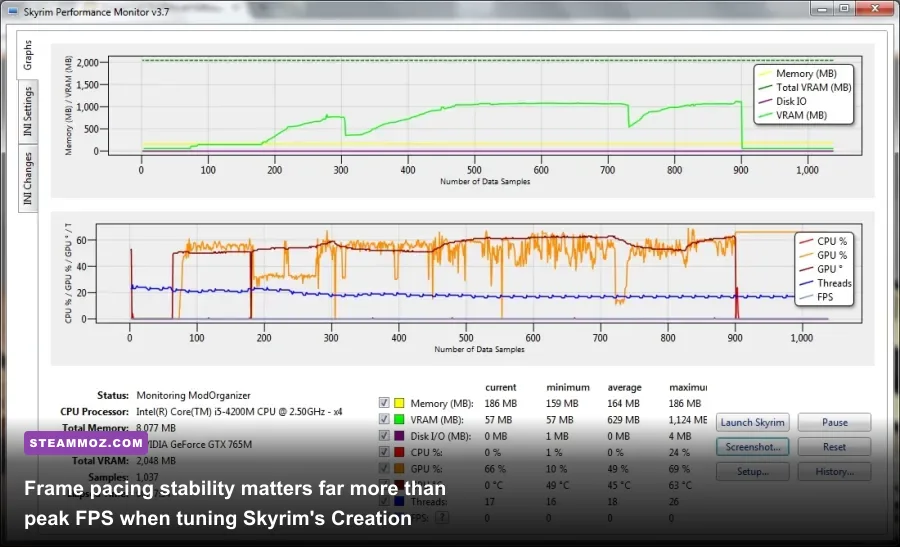
When gamers complain that their $2,000 gaming rig stutters in Skyrim, the culprit is almost never their GPU's raw compute power. It's the intrinsic design of Bethesda’s Creation Engine. Skyrim relies heavily on a single main render thread to dispatch draw calls via DirectX 11. In sprawling open areas where hundreds of unique items, shadow-casting light sources, and complex navigation meshes exist simultaneously—such as the Riften market or Solitude’s grand plaza—the CPU render thread gets completely bogged down.
Even if you pair an RTX 4090 with a processor that boasts 24 cores, Skyrim will only truly hammer one or two physical cores. Background tasks like the Papyrus scripting engine (which tracks quest stages, active combat scripts, and NPC daily routines) run across worker threads, but they share memory pipelines with the primary executable. If a script encounters an infinite loop or fails to register an object reference, your frame rate plummets and frame times spike wildly, causing visible stutter regardless of your GPU utilization.
Another infamous engine trap is Skyrim’s physics calculation tick rate. In the stock engine, the Havok physics system is bound directly to the internal frame timer calibrated for 60 Hz displays. If you uncap your frame rate without third-party engine fixes on a 144Hz or 240Hz monitor, opening a tavern door causes tankards, platters, and sweetrolls to launch violently across the room at lethal speeds. Resolving erratic physics stutter similar to our EscapeVR low FPS troubleshooting requires community engine patches.
To safely unlock your framerate and stabilize render latency, you must install the essential SSE Display Tweaks plugin from the Skyrim Special Edition Nexus. This mod decouples Havok physics from the render pipeline, allowing seamless high-refresh-rate gameplay up to 240 FPS while actively fixing borderless fullscreen frame pacing stutters.
Graphic Settings That Actually Matter: Optimizing for Pure FPS
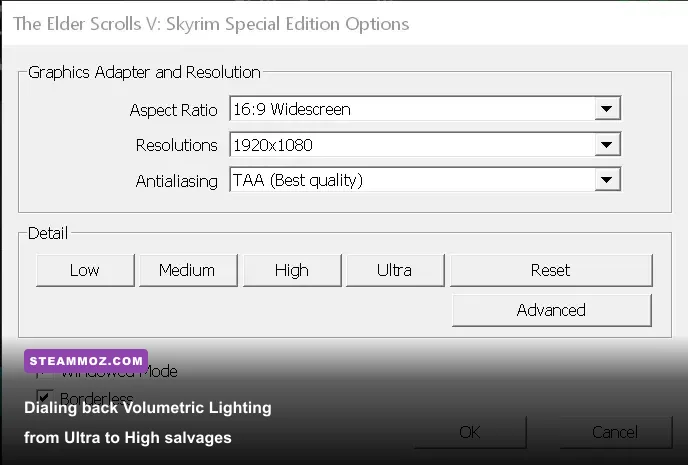
If your PC falls into the lower-to-mid performance tier, blindly clicking the "Ultra" preset in the Skyrim Special Edition launcher is the worst thing you can do. Bethesda bundled several inefficient post-processing effects into the launcher presets that consume massive chunks of rendering time while providing virtually no perceptible visual upgrade during combat.
The single greatest frame rate thief in the vanilla options menu is Volumetric Lighting (Godrays). The Ultra preset forces the engine to calculate dense volumetric light scattering across extreme sample counts using compute shaders. Dropping Volumetric Lighting from Ultra to Medium claws back anywhere from 12% to 18% of your overall GPU overhead, especially when riding horses through dense pine forests during early morning sunrise sequences. Visually, the difference between Medium and Ultra godrays in motion is completely indistinguishable.
Much like fine-tuning display parameters like in our Far Cry 6 GOTY settings guide, you should address these crucial settings in your SkyrimPrefs.ini file or launcher interface:
- Shadow Resolution (
iShadowMapResolution): The Ultra setting forces 4096×4096 shadow textures across every dynamic light source. Dropping this parameter to 2048 cleans up aliasing on shadow edges while clawing back a steady 8–10 FPS on budget hardware. - Grass Fade Distance (
fGrassStartFadeDistance): Setting this slider to maximum forces the engine to render thousands of individual 3D grass meshes in distant terrain cells. Lowering it slightly to 5000 or 6000 prevents major draw-call bottlenecks outside Whiterun. - Screen Space Ambient Occlusion (SSAO): Bethesda’s stock SSAO implementation is notoriously heavy on older architectures. If you plan to use modern post-processing shaders, disable the native SSAO in the launcher to eliminate double-occlusion performance penalties.
- Distant Object Detail (Object / Item LOD): These view distance sliders govern when meshes swap from simple billboard models into fully detailed geometric assets. Keeping these at High rather than Ultra preserves CPU overhead without creating jarring pop-in.
Applying the optimization steps outlined in our Filament FPS guide reminds us that finding the sweet spot between visual clarity and stable millisecond frame times is paramount. A locked 60 FPS on High settings consistently delivers a far more immersive dragon-slaying experience than an unstable 60–40 FPS rollercoaster on unoptimized Ultra settings.
The Heavy Modding Benchmark: When Skyrim Punishes High-End PCs

Now comes the ultimate reality: nobody plays vanilla Skyrim on PC for long. The modern community has transformed the game with massive Wabbajack collections like Nolvus Awakening, LoreRim, and Fahlbua. These installations inject anywhere from 1,200 to over 3,000 community mods, including 4K uncompressed parallax textures, custom physics skeletons (HDT-SMP), dense 3D tree replacers like Nature of the Wild Lands, and comprehensive distant world generation via DynDOLOD (Dynamic Distant Objects LOD).
Under these conditions, Skyrim ceases to be an easily run 2011 classic. It instantly morphs into one of the most demanding graphical workloads in the world—easily rivaling Cyberpunk 2077 with full path tracing enabled.
At the center of this graphical leap is ENBSeries, developed by Boris Vorontsov. ENB hooks directly into Skyrim’s rendering pipeline to inject physically based lighting, dynamic sub-surface scattering for character skin, complex water shaders, volumetric fog, and authentic camera depth-of-field. However, running a top-tier ENB preset such as Cabbage ENB or Rudy ENB for NAT III cuts your raw frame rate by 40% to 50% immediately upon boot.
If you aim to run a heavy 1,500+ modlist at 1440p with an ENB, your minimum hardware baseline jumps dramatically:
- GPU Requirement: You need an absolute minimum of an RTX 3070 8GB or RX 6700 XT 12GB to maintain 45–55 FPS in open-world areas. However, 8GB of VRAM will routinely trigger severe frame stuttering when walking into heavily populated cities like modern overhauls of Solitude. For smooth 1440p modding, a GPU with 12GB to 16GB of VRAM (like an RTX 4070 or RX 7800 XT) is mandatory.
- CPU Requirement: High-density tree and clutter mods multiply scene draw calls by five. Processors featuring massive L3 cache sizes—specifically AMD’s X3D chips like the Ryzen 7 5700X3D and Ryzen 7 7800X3D—completely outclass standard architectures here. The immense cache absorbs thousands of Papyrus calls and draw requests that would otherwise bottleneck standard CPU execution pipelines.
- RAM Requirement: While vanilla Skyrim runs comfortably within 8GB of system RAM, a modern modded setup easily consumes 18GB to 24GB of memory on its own. Building a 32GB dual-channel system configuration is no longer an enthusiast luxury for modders; it is an absolute requirement to avoid paging out to virtual memory and crashing during cell transitions.
- Storage Speed: Heavy modlists replace every single asset in the game with multi-gigabyte BSAs or loose files. Loading thousands of high-resolution textures on the fly requires the sustained read throughput of an NVMe M.2 SSD. Storing a 200GB+ modlist on a traditional spinning hard drive will lead to massive hitching every time your character sprints across cell borders.
If your machine lacks the brute force to run a full ENB suite, modern modders have engineered an alternative: Community Shaders. This lightweight, modular framework brings screen-space directional occlusion, grass lighting, wetness shaders, and terrain blending to Skyrim without the crippling 50% performance tax of ENB. Pairing Community Shaders with an entry-level card like the RTX 3050 or GTX 1660 Super delivers stunning visuals while holding a dependable 60 FPS lock.
Can your PC run Skyrim? If you want to experience the legendary base journey of the Dragonborn, the answer is a resounding yes—even a budget laptop from half a decade ago can conquer Alduin. But if your dream is to experience the hyper-realistic, modded fantasy paradise seen across showcase streams, prepare to arm yourself with high-bandwidth VRAM, an ultra-fast modern CPU, and an NVMe drive ready to bear the load.