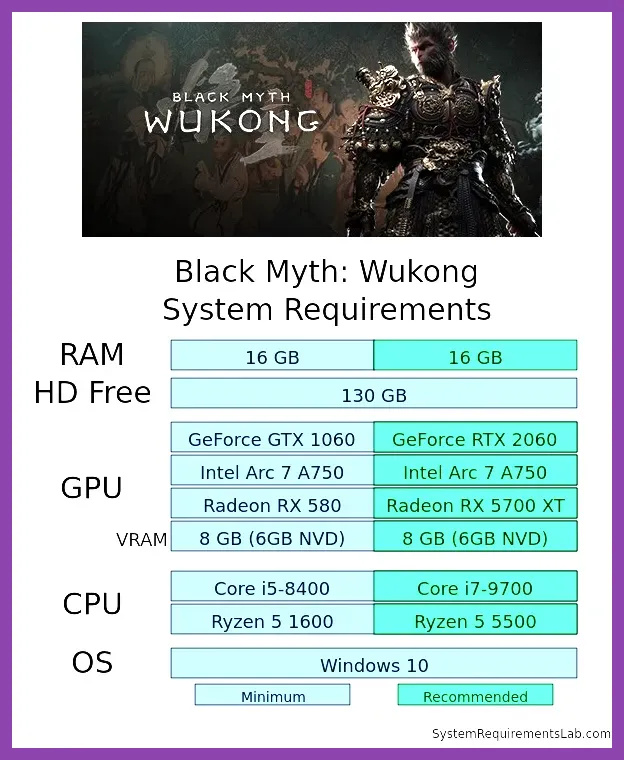
Running Black Myth: Wukong at smooth frame rates requires knowing exactly how hardware components handle Game Science's ambitious Unreal Engine 5.5 render pipeline. At absolute minimum, Black Myth: Wukong requires an Intel Core i5-8400 or AMD Ryzen 5 1600 CPU paired with an NVIDIA GeForce GTX 1060 (6GB) or AMD Radeon RX 580 (8GB), 16GB of System RAM, and 130GB of storage space (an SSD is strongly recommended over an HDD). For fluid 1080p gameplay at 60 FPS on High settings without path tracing, the recommended hardware scales up to an Intel Core i7-8700 or AMD Ryzen 5 3600X, combined with an NVIDIA GeForce RTX 2060, AMD Radeon RX 5700 XT, or Intel Arc A750. If you intend to enable Full Ray Tracing (Path Tracing) at 4K resolution, you will need top-tier enthusiast hardware such as an NVIDIA GeForce RTX 4080 or RTX 4090 alongside 32GB of RAM.
Official Black Myth: Wukong System Requirements Breakdown
Game Science released detailed system specifications covering multiple target resolutions, expected frame rates, and graphic presets. Understanding these tiers helps you determine whether your system can run the game natively or if you will need to rely heavily on temporal upscaling technologies like DLSS, FSR, or TSR. Because the title makes extensive use of virtualized geometry and dynamic global illumination, hardware targets shift significantly depending on whether Ray Tracing is enabled.
Below is the complete official system requirements breakdown for standard rasterized rendering (Ray Tracing Disabled):
- Minimum Specifications (1080p Low, ~30 FPS):
- OS: Windows 10 / 11 64-bit
- Processor (CPU): Intel Core i5-8400 / AMD Ryzen 5 1600
- Graphics Card (GPU): NVIDIA GeForce GTX 1060 (6GB VRAM) / AMD Radeon RX 580 (8GB VRAM)
- Memory (RAM): 16 GB
- DirectX Version: Version 12
- Storage Space: 130 GB available space (HDD Supported, SSD Recommended)
- Recommended Specifications (1080p High, ~60 FPS):
- OS: Windows 10 / 11 64-bit
- Processor (CPU): Intel Core i7-8700 / AMD Ryzen 5 3600X
- Graphics Card (GPU): NVIDIA GeForce RTX 2060 / AMD Radeon RX 5700 XT / Intel Arc A750
- Memory (RAM): 16 GB
- DirectX Version: Version 12
- Storage Space: 130 GB available space (SSD Required)
- Ultra 4K Specifications (4K Ultra, ~60 FPS without RT):
- OS: Windows 10 / 11 64-bit
- Processor (CPU): Intel Core i7-10700K / AMD Ryzen 7 5800X
- Graphics Card (GPU): NVIDIA GeForce RTX 4070 (12GB VRAM) / AMD Radeon RX 7800 XT (16GB VRAM)
- Memory (RAM): 32 GB
- DirectX Version: Version 12
- Storage Space: 130 GB available NVMe SSD space
If you encounter technical glitches or persistent desktop crashes when launching the game on high-end hardware, check out our guide on how to fix crashing on PC in Black Myth Wukong to clear up common compilation errors.
Detailed Specs Matrix: Minimum, Recommended, and 4K Ultra
To help you evaluate your rig quickly, we have organized the full operational thresholds across standard rasterization and Full Ray Tracing modes into a comprehensive performance matrix. Note that all official framerate targets assume the use of spatial or temporal upscalers set to Quality mode.
| Target Tier | Resolution & Target FPS | Preset | CPU | GPU | RAM | VRAM |
|---|---|---|---|---|---|---|
| Minimum | 1080p @ 30 FPS | Low | Core i5-8400 / Ryzen 5 1600 | GTX 1060 (6GB) / RX 580 (8GB) | 16 GB | 6 GB |
| Recommended | 1080p @ 60 FPS | High | Core i7-8700 / Ryzen 5 3600X | RTX 2060 / RX 5700 XT / Arc A750 | 16 GB | 6 GB - 8 GB |
| 1440p Performance | 1440p @ 60 FPS | High / Very High | Core i5-12400F / Ryzen 5 5600X | RTX 3070 (8GB) / RX 6700 XT (12GB) | 16 GB | 8 GB - 12 GB |
| 4K Ultra Baseline | 4K @ 60 FPS | Cinematic | Core i7-10700K / Ryzen 7 5800X | RTX 4070 / RX 7800 XT | 32 GB | 12 GB+ |
| 1080p Full RT | 1080p @ 60 FPS (RT On) | Medium RT | Core i5-12400F / Ryzen 5 5600X | RTX 3060 (12GB) / RTX 4060 (8GB) | 16 GB | 8 GB+ |
| 4K Full Path Tracing | 4K @ 60+ FPS (RT Very High) | Cinematic RT | Core i9-13900K / Ryzen 7 7800X3D | RTX 4080 Super / RTX 4090 | 32 GB | 16 GB+ |
Hardware targets vary based on environmental geometry and background calculation load. For instance, when engaging dense groups of enemies or executing swift stance shifts during combat, frame time fluctuations can occur if VRAM limit thresholds are breached. Keeping your graphics card drivers up to date via NVIDIA GeForce Experience or AMD Software: Adrenalin Edition is critical for securing game-specific optimization patches.
Unreal Engine 5 Feature Impact: Lumen, Nanite, and Ray Tracing
Black Myth: Wukong is built upon the Unreal Engine 5 framework. Consequently, visual elements rely heavily on hardware-accelerated processing features that heavily impact your GPU's shader cores and Ray Tracing (RT) pipelines.
1. Nanite Virtualized Geometry
Nanite eliminates classical polygon budget limits by streaming high-detail geometric meshes directly into render memory. While this keeps rock structures, tree bark, and ancient temple ruins looking detailed up close, it places high demands on memory bandwidth. Systems running on traditional Mechanical Hard Drives (HDDs) will experience aggressive asset pop-in, micro-stutters, and temporal tearing during rapid camera sweeps. Installing the game on a high-speed NVMe PCIe 3.0 or 4.0 SSD removes this bottleneck entirely.
2. Software Lumen vs. Full Path Tracing
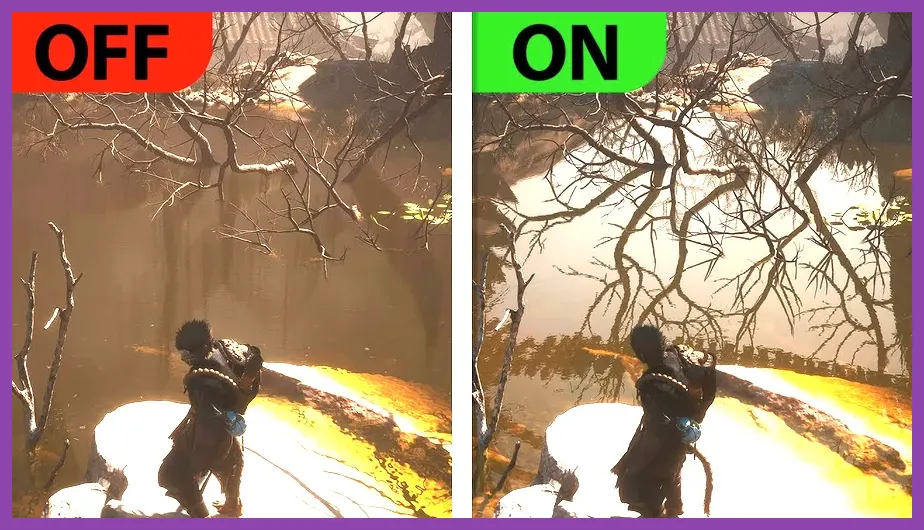
By default, Black Myth: Wukong uses UE5's Software Lumen system to calculate dynamic light bounces, global illumination, and water surface reflections. This mode offers a strong balance between performance and visual detail on mid-range cards like the RTX 3060 or RX 6700 XT. However, toggling Full Ray Tracing switches the engine into a full Path Tracing pipeline, calculating light paths, caustics, and real-time translucency across thousands of light rays per pixel. Full Path Tracing causes GPU performance costs of 40% to 60%, making it realistic only on NVIDIA RTX 40-series cards that can leverage DLSS 3 Frame Generation.
Preparing your character for tough encounters while maintaining rock-solid 60 FPS gameplay requires balancing visual clarity with high responsiveness. If you are diving into early chapter encounters, check out our strategy guide on how to beat every early boss in Black Myth Wukong.
Best Graphics Settings for FPS and Visual Clarity

If your PC sits near the Recommended spec tier (e.g., RTX 2060, RX 5700 XT, or RTX 3060), running the game on the default "Cinematic" or "Very High" global presets will often cause framerates to dip into the 35–45 FPS range during chaotic fights. Fortunately, adjusting individual graphical settings allows you to reclaim 30% to 50% extra frame rate performance with minimal reduction in overall visual quality.
Use the optimized settings profiles below to achieve steady frame pacing without sacrificing detail:
Optimized Performance Profile (Mid-Range GPUs: RTX 2060, RTX 3060, RX 6600, RX 5700 XT)
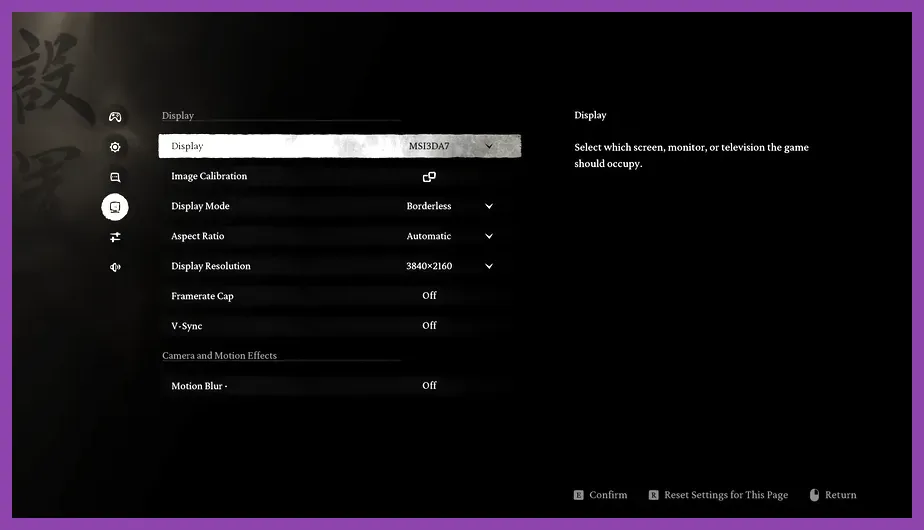
- Display Mode: Fullscreen
- Super Resolution Sampling: DLSS / FSR / TSR (Enabled)
- Super Resolution Scale: 62 to 75 (Quality Mode equivalent)
- Frame Generation: ON (If using RTX 40-series or FSR 3.1 compatible hardware)
- Full Ray Tracing: OFF
- Shadow Quality: Medium (Massive FPS gain; reduces shadow map resolution without losing depth)
- Global Illumination: Medium or High (Controls bounce lighting resolution; Medium yields ~12% higher FPS)
- Visual Effects: Medium (Crucial setting to prevent frame drops during spell casts and heavy particle combat)
- Post-Processing: High
- Hair Quality: Medium (Reduces strand geometry render pass overload on the main character model)
- Vegetation Detail: High (Maintains rich forest density in Chapters 1 & 2 without choking rendering bandwidth)
- View Distance: High
- Texture Quality: High (8GB VRAM) or Very High (12GB+ VRAM)
- Reflections: Medium
- Anti-Aliasing: High
For players leveling up rapidly to unlock late-game transformation skills, maintaining 60 FPS during chaotic combat scenes is vital for landing precise parries and dodges. Learn how to optimize your character progression efficiently with our guide on how to level up fast in Black Myth Wukong.
Upscaling & Frame Generation Guide: DLSS, FSR, and TSR
Due to the dense geometry processing requirements of Unreal Engine 5, running Black Myth: Wukong at 100% Native Resolution (Render Scale 100) is inefficient for almost all GPUs. The game incorporates three major upscaling technologies alongside AI Frame Generation to boost frame rates.
1. NVIDIA DLSS 3.5 (Deep Learning Super Sampling)
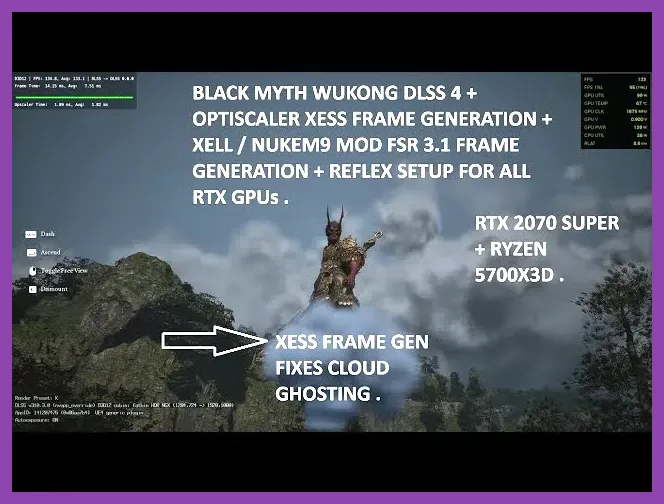
Exclusive to NVIDIA RTX graphics card owners, DLSS remains the highest quality upscaling solution in the game. Setting the Super Resolution slider to 67 (Quality) or 58 (Balanced) reconstructs fine details—such as fur, leaf edges, and ambient fog—better than native resolution with TAA, while recovering 35% to 50% of your framerate. RTX 40-series users should enable DLSS Frame Generation, which inserts AI-generated frames to double perceived motion smoothness, easily pushing 1440p performance beyond 90 FPS.
2. AMD FSR 3.1 (FidelityFX Super Resolution)
AMD users and owners of older GTX-series cards can use AMD FSR 3.1. It features improved temporal stability over older iterations, significantly reducing edge shimmer on foliage. FSR 3.1 also introduces open-source Frame Generation that can be toggled on non-RTX GPUs (including AMD RX 6000/7000 series and GTX 10-series), though running it requires a baseline frame rate of at least 45 native FPS to avoid input latency issues.
3. Unreal Engine TSR (Temporal Super Resolution)
TSR is Unreal Engine 5's native upscaler. If you experience visual artifacting with FSR or run an Intel Arc graphics card, TSR set to 65% Scale provides sharp image reconstruction and strong frame stability. Combine TSR with Steam platform performance tracking tools to monitor frametime consistency in real-time.
When reallocating points into combat stances or tuning spell trees, solid frame timing ensures your input commands execute instantly. If you need to reconfigure your character attributes for high-tier boss encounters, consult our breakdown on how to respec skill points in Black Myth Wukong.
CPU, RAM, and Storage Optimization Strategies
While Black Myth: Wukong is primarily GPU-bound at higher resolutions, system memory configuration and storage throughput play critical roles in preventing stuttering and long load times.
RAM Allocation and Dual-Channel Requirements
Running the game on a system with 16GB of RAM is sufficient for standard 1080p and 1440p gaming. However, background applications like web browsers or recording software can force Windows to spill active process memory into the system pagefile, causing hitching when crossing region boundaries. Upgrading to 32GB of DDR4 or DDR5 RAM running in Dual-Channel mode eliminates these memory spikes and ensures stable frame delivery across all chapters.
Storage Speed: SSD vs. Mechanical Drives
We strongly advise against running Black Myth: Wukong from a 7200 RPM traditional Mechanical Hard Drive (HDD). UE5 dynamically streams gigabytes of high-resolution textures and Nanite meshes into system memory as you move between regions. An HDD will cause severe micro-stutters during area transitions, delayed texture loading, and prolonged initial shader compilation times. Installing the game on a standard SATA SSD or NVMe M.2 SSD cuts loading screens from over 45 seconds down to under 6 seconds, while keeping frame delivery consistent.
Optimizing your system setup guarantees smooth performance across every stage of your journey—from early exploration to high-level endgame challenges. Once your graphics and performance settings are dialed in, refine your combat setup with our comprehensive analysis on mastering the endgame build in Black Myth Wukong.