
Nixxes delivered an exceptional PC port for Marvel’s Spider-Man: Miles Morales, but the modding scene turns this brisk winter adventure into an infinitely replayable playground. If you want to radically overhaul your web-swinging kinetics, lift the engine's built-in speed restrictions, install movie-accurate suits with hand-crafted physics, or force Roxxon enforcers into relentless combat routines, community mods are non-negotiable. With just a handful of targeted tweaks, you can strip away the hand-holding and unlock a razor-sharp, cinematic superhero simulator.
Modding this title isn't complicated, but running unstable asset injections will quickly tank your frame times or introduce crash-to-desktop errors during intense set pieces. Just as you need to fine-tune visual overhead when balancing Far Cry 6 GOTY upgrade pass settings for max FPS, tailoring your Miles Morales mod list requires understanding which scripts play nice with the asset pipeline. Let's break down the essential toolchain, the finest gameplay transformations, and the visual upgrades you need installed right now.
Core Utility: Setting Up Your Mod Manager Stack
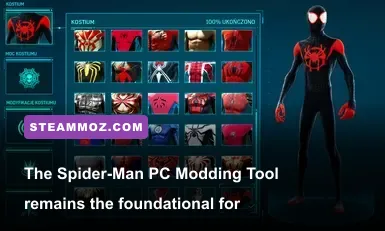
Before you start downloading aesthetic overhauls, you must set up the proper mod loading infrastructure. The PC release of Miles Morales packages its geometry, audio, and visual shaders into monolithic archive files. Trying to manually overwrite these will corrupt your install. You need dedicated tools designed to build clean table-of-contents (TOC) manifests.
The gold standard remains the Spider-Man PC Modding Tool (SMPCTool) originally developed by jedijosh920, paired alongside the indispensable Suit Mod Installer (SMI). These utilities interact with the game’s asset_archive directory, reading .stage files and safely merging third-party assets without destroying baseline data. When game updates drop on Steam, these tools allow you to restore your toc.BAK backup file and re-patch your modifications in seconds.
To establish a clean baseline, always make a physical duplicate of your toc file located in the game's root directory before executing any installation scripts. If you encounter memory allocation stumbles or sudden launch crashes, you'll want to review standard PC debugging procedures similar to resolving ELEX PC fixes that stop crashes and rescue your FPS. Keeping a tidy archive directory ensures you can hot-swap mods without risking corrupted save states.

🎮 FORM
Looking to experience this game? Grab your digital key directly on our store for $14.99.
View on Steammoz Store →Traversal and Animation Overhauls: Unleashing Pure Kinetic Flow

Miles already boasts expressive traversal animations compared to Peter Parker, but Insomniac Games baked aggressive momentum limiters into the physics engine. In the vanilla release, your horizontal swing velocity hits a hard engine cap around 32 meters per second. Once you hit that threshold, the physics engine silently introduces artificial drag to prevent world streaming hitches.
Installing Momentum Mod: Uncapped Traversal combined with the Expressive Web-Swinging Overhaul completely rewires how physics calculations handle downward velocity. When diving off the peak of the Empire State Building, gravity continues to compound your downward momentum. Pulling out of the dive at ground level converts that kinetic energy into pure horizontal velocity, catapulting Miles down Fifth Avenue at speeds exceeding 55 meters per second.
Beyond raw velocity, animation replacement mods breathe new personality into trick combinations. The Miles Morales Animation Framework expands the air-trick system, introducing dynamic transition animations when shifting from horizontal swings into vertical wall-runs. You can blend air-spins into the iconic comic book dive with seamless button inputs, eliminating the micro-stutter that occasionally interrupts vanilla trick chains.
| Mod Name | Category | Tier Rating | Key Mechanical Overhaul | Performance Impact |
|---|---|---|---|---|
| Momentum Mod: Uncapped | Physics & Speed | S-Tier | Lifts the 32 m/s swing velocity cap; compounds gravity acceleration | Negligible (Requires fast SSD for streaming) |
| Expressive Web-Swinging Overhaul | Animation | S-Tier | Adds 25+ dynamic trick transitions and air-dodge cancel animations | Zero FPS Cost |
| Real Swing Physics (Tether Anchors) | Physics Mechanics | A-Tier | Requires physical geometry anchors; eliminates phantom sky webs | Minor CPU Overhead |
| Peter Parker Traversal Ports | Cosmetic / Stunt | B-Tier | Swaps Miles’ loose, flailing style for Peter’s rigid, experienced form | Zero FPS Cost |
When using uncapped momentum mods, asset streaming will stress your storage drive heavily. If your assets stream too slowly, you will notice building geometry popping in with low-polygon LOD models. Make sure your install sits on an NVMe SSD to avoid frame drops, much like optimizing engine streaming in Everspace 2 crash and FPS diagnostics.
The Definitive Suit Roster: Custom Meshes and Cel-Shaded Icons
While the vanilla wardrobe features fantastic designs like the 2020 Suit and the Purple Reign Suit, modders on Nexus Mods have taken Miles’ closet to an entirely new dimension. Early mods merely swapped existing texture files, but current tools support full custom mesh injection, custom bone-rigging, and dedicated UI icons.
The must-have cosmetic is the Across the Spider-Verse (ATSV) Screen-Accurate Suit. Unlike the baseline Into the Spider-Verse suit included by Insomniac, this custom mesh features authentic proportions, hand-painted shading maps, and reactive cel-shaded outlines that accurately mimic Sony Pictures Animation’s rendering pipeline. Pair it with the 12 FPS Comic Stutter Script, which limits Miles’ character rig to a staggered 12 frames per second while keeping the environmental world running at a silky 60 or 120 FPS, recreating the exact animation cadence of the film.
Another showstopper is the Symbiote Miles Overhaul. This isn't just a black re-color of the Classic Suit; modders designed a custom organic suit model covered in pulsing bio-mass textures, complete with dynamic tendril meshes that replace the default web-shooters. Combined with a sound-swap mod that converts standard web thuds into deep, visceral impact audio, your visual identity completely alters the tone of your patrols through Manhattan.
Managing these additions is effortless thanks to the Suit Mod Installer. Instead of replacing vanilla slots and sacrificing default gear, SMI writes new suit entries directly into the game's loadout database, giving you a scrollable wardrobe that holds dozens of fan-favorite community creations simultaneously.
Visual & Lighting Overhauls: Turning Manhattan Into a Cinematic Masterpiece

The winter aesthetic of Miles Morales already delivers striking visual contrast, but post-processing shaders and lighting profiles can take the atmosphere to photorealistic heights. Vanilla color grading tends to favor a slightly warm, cinematic cast. If you prefer a crisp, biting, atmospheric New York winter, graphics mods can give you that chilly Scandinavian-grade naturalism.
The Photorealistic Winter NYC ReShade rework removes the game’s default sepia tone during overcast days, introducing accurate neutral white balancing, localized contrast mapping, and fine-tuned exposure levels. When evening arrives, neon billboards in Times Square pierce through falling snow with sharp visual clarity, rather than bathing the entire block in a generic colored haze.
To complement lighting adjustments, grab the Blizzard & Heavy Snow Weather Overhaul. In the unmodded game, blizzard weather conditions are locked behind scripted story sequences. This mod hooks into the game’s dynamic weather engine, allowing violent snowstorms with reduced visibility, dense atmospheric fog, and intense surface accumulation to occur naturally during free-roam play.
| Visual Mod / Preset | Target Resolution | VRAM Usage Increase | Average FPS Hit | Primary Visual Upgrade |
|---|---|---|---|---|
| Photorealistic Winter NYC ReShade | 1440p / 4K | ~200 MB | 3 - 5% | Removes warm sepia tint; balances neutral whites and shadows |
| RTGI Shader Injection (MartyMods) | 1440p / 4K | ~800 MB | 15 - 20% | Screen-space path-traced global illumination and indirect bounces |
| Blizzard & Heavy Snow Overhaul | Any Resolution | ~100 MB | 1 - 3% | Adds dense weather patterns to dynamic free-roam rotation |
| 4K Puddle & Snow Texture Pack | 4K Native | ~1.5 GB | 5 - 8% | Replaces slush, road salt, and snow drift maps with high-res scans |
If you're running custom shaders and heavy texture packages, watch your frame-pacing closely. Overzealous ambient occlusion and high-res screen-space shaders can push mid-range GPUs into thermal throttling. If you find your framerate fluctuating wildly, dial back minor background passes using profiles similar to Filament Marmalade Edition settings for higher FPS to recover that smooth swinging experience.
Combat and Gameplay Balancing: Punishing Roxxon and The Underground
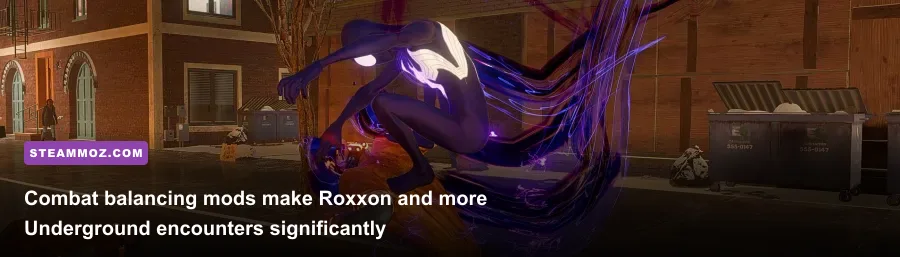
Vanilla Miles Morales gives you an incredibly versatile toolkit: Bio-Electric Venom attacks, Camouflage, and high-tech gadgets like Remote Mines and Gravity Wells. However, on default difficulty settings—even on Spectacular or Ultimate—Miles quickly scales into an unstoppable force. Venom moves stun groups for excessive durations, and enemy telegraphs give you generous parry and dodge windows.
The Brutal Combat & Aggressive AI Mod transforms combat from a flashy button-masher into an intense, tactical dance. This mod adjusts enemy behavior trees across Roxxon Security and The Underground factions. Grunts no longer wait politely in a circle taking turns to strike; sword-wielders and brute enforcers coordinate flank routes, rush you simultaneously, and fire suppression weaponry while you're airborne.
Key combat parameters adjusted by the gameplay overhaul include:
- Telegraph Reduction: Enemy sniper sights and heavy melee telegraph flashes are cut by 40%, forcing you to rely on audio cues and Spider-Sense peripheral flashes.
- Venom Cost Scaling: Venom generation from basic strikes is reduced by 25%, turning bio-electric abilities into calculated tactical decisions rather than spam-friendly crowd-clearers.
- Parry Timing Precision: Perfect Dodge windows are tightened to a razor-thin 150-millisecond threshold, rewarding pinpoint execution with momentum-shifting counter-punches.
- Hyper-Aggressive Ranged Foes: Roxxon rocket troopers lead their shots, firing explosive ordnance directly into your predicted aerial descent path.
This rebalancing brings high-stakes tension back into street-level brawls. Successfully clearing a Roxxon lab requires fluidly chaining gadgets, stealth takedowns, and venom dashes with zero margin for error. The satisfaction of mastering this heightened combat flow matches the tactical rush of learning top-tier gear setups, like comparing loadouts in Far Cry 3 Blood Dragon weapons ranked.
Troubleshooting and Performance Best Practices for Modded Playthroughs
Modding Miles Morales is remarkably stable when done right, but pushing the engine past its intended parameters can occasionally introduce instability. The most common pitfall involves VRAM management. The PC version uses DirectStorage-adjacent decompression routines to stream textures seamlessly across Manhattan. When you install uncompressed 4K suit meshes and high-resolution snow maps, your graphics card's framebuffer can quickly become saturated.
If you encounter random crashes when fast-traveling via the subway or swinging into visually dense districts like Midtown, your GPU is likely running out of memory headroom. To combat this, lower your Ray-Traced Object Range setting from 10 down to 6. This single adjustment drastically cuts VRAM allocation without causing noticeable visual degradation in the street-level reflections ahead of you.
Lastly, keep a clean backup of your original toc file. Whenever an official game patch rolls out on Steam, the executable will rebuild the asset archive manifest, which can cause your modded game to hang on the initial PlayStation Studios splash screen. When this happens, avoid verifying game files through Steam immediately—doing so will re-download gigabytes of data. Instead, launch your Spider-Man PC Modding Tool, hit "Reset TOC," let the tool reconcile the new patch data, and then re-inject your mod pack. Taking these precautions ensures your journey through Harlem remains butter-smooth, visually spectacular, and completely crash-free.