Jumping into Marvel's Spider-Man Remastered on PC without understanding how its momentum mechanics, aerial combo loops, and CPU-heavy render pipelines work is a fast track to frustrating deaths and stuttering frame rates. While the port from Nixxes Software is fundamentally brilliant, treating the game like a standard button-masher or neglecting critical settings will handicap your experience. To survive brutal Fisk mob encounters and weave through high-speed traversal smoothly, you must lock down your display optimization, command air combat, and secure the right skill synergies right out of the opening chapter.
Tweak Nixxes' PC Port Settings Before Touching the Web-Shooters
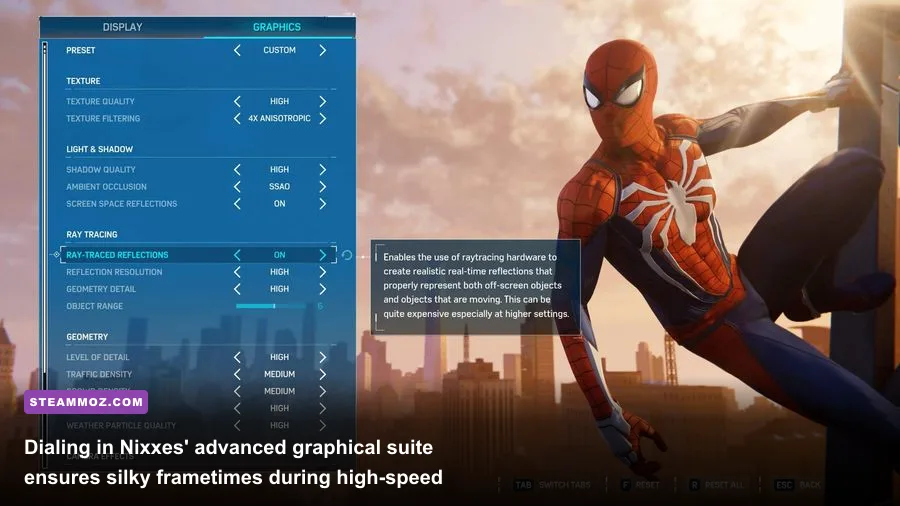
Before you swing an inch through Central Park, take five minutes in the display and graphics menus. Spider-Man Remastered is notoriously demanding on your CPU when moving at high speeds because Manhattan streams assets constantly. If you leave everything cranked at max presets, you'll see wild frametime spikes whenever Peter dives toward crowded street level. Just as we explored in our deep dive on tuning PC settings for maximum FPS, strategic adjustments yield huge performance returns without trashing visual fidelity.
Ray-Traced Reflections look gorgeous on glass skyscrapers, but their calculation cost scales heavily with two settings: Ray-Traced Object Range and Geometry Detail. Dropping Object Range to 6 or 7 preserves high-detail reflections on nearby structures while eliminating severe CPU bottlenecks. If you run into stutter or crash loops, applying targeted hardware fixes—much like troubleshooting steps found in our guide to resolving game crashes and frame drops—will stabilize your baseline.
Here is how to configure your settings for the cleanest balance of visual punch and rock-solid frametimes:
| Graphic Setting | Recommended Value | FPS Cost | Visual Impact & Hardware Impact |
|---|---|---|---|
| Ray-Traced Reflections | On (Medium / High) | High (-20% to -35%) | Massive visual upgrade on windows; heavy on GPU/VRAM. |
| Ray-Traced Object Range | 6 | Moderate (-8% to -12%) | Reduces background ray bounces, salvaging severe CPU load. |
| Crowd Density | Medium | Moderate (-7%) | Significantly cuts down pedestrian draw-call CPU strain. |
| Traffic Density | Medium | Low (-4%) | Lowers vehicle streaming demands during street-level dives. |
| Upscaling (DLSS / FSR 2.1) | Quality / Dynamic Target | Net Gain (+25% to +45%) | Keeps frame rates stable during high-velocity web swings. |
| Weather Particle Quality | Medium | Low (-3%) | Prevents stutter spikes during rainy nighttime story missions. |
For controls, the DualSense controller provides native haptic feedback and dynamic triggers if wired via USB. However, if you're using mouse and keyboard, bind Dodge to a dedicated side thumb button (Mouse 4) and Web Strike to Mouse 5. The default keyboard bindings place too much strain on your left hand when trying to chain slides, leaps, and gadget wheels simultaneously.
Air Superiority Dictates the Entire Combat Flow

Ground combat in Marvel's Spider-Man is lethal on higher difficulties like Spectacular and Ultimate. Staying planted on the pavement invites off-screen gunfire, rocket trails, and charging Brutes that break your standard attack strings. The golden rule of combat: take every engagement into the sky immediately.
Holding the attack button (Square on PlayStation pads, Left Click on PC) triggers an Air Launch that knocks an enemy into the air while propelling Spidey up alongside them. Once airborne, grounded enemies with melee weapons, batons, and stun batons cannot touch you. Even better, standard air combos keep you suspended indefinitely while your basic four-hit air chain deals clean damage and builds Focus charges safely.
To dominate airborne encounters, practice these three foundational moves:
- Air Yank: Hold the Web-Shooter button while airborne to pull grounded targets directly into your air space, continuing your juggling loop without touching asphalt.
- Leap Off: Pressing Jump right after landing an aerial hit bounces you off the target's face, disorienting them while buying you another second of hover time.
- Swing Kick: Hold Dodge while in the air to swing your leg forward, knocking armed snipers clean off building rooftops for instant gravity knockouts.
When you encounter brute-class enemies, do not attack them head-on. Web them up with standard Web-Shooters first to induce a stun state, then launch them or throw nearby debris to crack their poise. Keeping fights vertical negates 80% of enemy aggression patterns.
Prioritize the Right Skills: Innovator and Defender Trees First
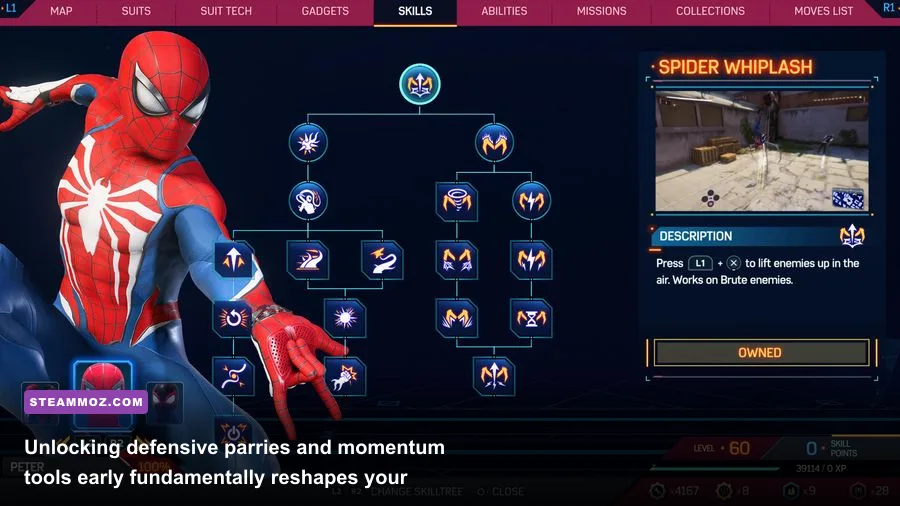
When staring at the three skill branches—Innovator, Defender, and Web Slinger—it's easy to waste your hard-earned Skill Points on flashy maneuvers that don't help your survival. Similar to setting up a focused character build like in our beginner character build breakdown, your early unlocks must shore up defensive vulnerabilities and generate Focus quickly.
Focus is the lifeblood of Spider-Man's kit: it fuels both health recovery and one-shot Finisher moves. The faster you generate Focus, the more aggressively you can shrug off bullet wounds and dispatch heavy enemies. Prioritizing defensive timing windows and environmental throws transforms difficult combat arenas into fluid playgrounds. Understanding progression efficiency—much like our analysis in the fast leveling guide—keeps you from getting bottlenecked during mid-game boss spikes.
| Skill Name | Skill Tree | Point Cost | Combat Advantage & Practical Utility |
|---|---|---|---|
| Perfect Dodge | Defender | 1 Point | Slows down time on blue Spider-Sense alerts; shoots webs directly into enemy eyes. |
| Dodge Window | Defender | 1 Point | Widens the parry/dodge window significantly, easing high-tier counter timings. |
| Web Throw | Innovator | 1 Point | Allows you to grab and spin webbed-up enemies, clearing rooms and knocking foes over. |
| Point Launch Boost | Web Slinger | 1 Point | Massively launches Spidey forward off perches, instantly doubling traversal velocity. |
| Air Tricks | Web Slinger | 1 Point | Grants bonus XP and quick Focus simply for performing rolls while in freefall. |
| Payback | Defender | 2 Points | Instantly execute gun-toting enemies right after a Perfect Dodge without spending Focus. |
Grab Perfect Dodge and Dodge Window immediately. Perfect Dodge generates substantial Focus and automatically blinds shooters, allowing you to instantly eliminate them with a follow-up Web Strike. From there, pick up Air Tricks to farm passive XP during city traversal, speeding up your level gains for stat bonuses.
Master Gadget Combos for Instant Crowd Elimination
The secret to high-level play in Spider-Man Remastered is understanding that gadgets aren't just supplementary utilities—they are lethal one-shot tools when combined with Manhattan's environment. In this game, sticking an enemy against a solid surface (walls, streetlights, parked cars, or floors) completely incapacitates them instantly, removing their health bar entirely.
Instead of punching every thug four to five times, exploit these two gadget combinations:
- The Web Bomb + Concussion Blast Cannon: Toss a Web Bomb into the center of an enemy pack. As soon as it explodes and covers the group in webbing, fire a Concussion Blast. The shockwave propels every webbed thug backward into walls and shipping containers, instantly sticking four to six enemies at once.
- Trip Mine Aggro: Don't just place Trip Mines on doorways or walls. You can shoot a Trip Mine directly onto an enemy's chest. When a nearby mob member steps close, the mine activates, smashing both enemies together in a comedic mid-air collision that glues them both to the floor.
- Impact Web Splatter: When fighting near moving traffic or walls, a single tap of an Impact Web will pin regular goons against vehicles, removing them from combat in under half a second.
For your Suit Power, the early-game Web Blossom is monstrous for room clearing. Activating it sends Spider-Man somersaulting into the air, spraying webs in a 360-degree radius and instantly sticking nearly every grunt in a 15-meter zone to surrounding structures. If you prefer sustained single-target combat, unlock the Classic Suit's Battle Focus, which steadily refills your Focus gauge so you can spam Finishers and healing without pause.
Traversal Mastery: Momentum, Point Launches, and Corner Tethers

Web-swinging feels intuitive from the second you pick up the controller, but there is a massive difference between cruising slowly and flying across the skyline at top velocity. Many new players make the mistake of simply holding down the swing button (Right Trigger or Shift) and waiting for the web line to break. Doing so bleeds momentum and leaves you floating limply at the peak of your arc.
To reach terminal velocity, master the physics of your swing arc:
- Apex vs. Bottom Release: Releasing your swing at the very bottom of the pendulum arc converts vertical drop into pure horizontal speed. Releasing at the top of the arc flings you upward for height, ideal for scaling past skyscraper crowns.
- Point Launch Timing: As you target an antenna or roof corner with L2+R2 (or right mouse + left mouse), tap Jump the microsecond Peter's feet make contact. The Point Launch Boost skill acts like a high-powered slingshot, propelling you forward faster than standard swinging allows.
- Corner Tethering: When rounding street corners at high velocity, hold the Dodge button and push your directional stick toward the turn. Peter will fire a single horizontal web line, pivoting 90 degrees around the skyscraper edge without losing a single frame of forward momentum.
- Dive-to-Swing Chaining: Always click the left stick (L3) to dive straight down toward the street from high towers. Letting your velocity build up during freefall before latching onto a low web line catapults Peter forward at blistering speeds.
Maintaining high traversal speed isn't just fun—it also makes chasing Taskmaster drones, tracking city crimes, and completing research station missions far more manageable. If you find high-speed city streaming creates hitching or audio desync, check out our guide on optimizing system throughput for higher FPS and verify that your game files are installed on a fast NVMe SSD rather than a mechanical hard drive.
Suit Mods and Token Economy: Spend Wisely
As you clear Manhattan's districts, you'll accumulate Backpack Tokens, Landmark Tokens, Research Tokens, and Base Tokens. Do not waste these blindly on every aesthetic suit that catches your eye in the first few hours. Suit appearances are purely cosmetic once unlocked, but the Suit Mods that come attached to them provide game-changing passive buffs.
Aim to assemble this setup as early as possible:
- Kinetic Power Cells: Substantially increases the rate at which you generate Focus during melee attack strings.
- Ballistic Inserts: Cuts incoming bullet damage significantly. On higher difficulties, sniper rifles and automatic rifles can drop you from full health in two shots; this mod provides crucial damage dampening.
- First Aid: Amplifies the amount of health restored per segment of Focus spent, giving you massive sustain during chaotic demon wave battles.
Always hold onto at least two to three Base and Challenge Tokens rather than spending them instantly. Upgrades for your primary gadgets—such as extending Web Bomb radius or carrying additional Impact Web rounds—deliver far higher combat utility than collecting every cosmetic outfit during Act 1. For comprehensive game mechanics details, consult the official documentation at Insomniac Games.
Mastering Marvel's Spider-Man Remastered on PC comes down to respecting the rhythm of combat and tuning your rig to handle the port's demanding streaming engine. Take fights to the skies, chain your gadgets with the surrounding environment, keep your momentum redlined across the skyline, and Manhattan's criminal underworld won't stand a chance.