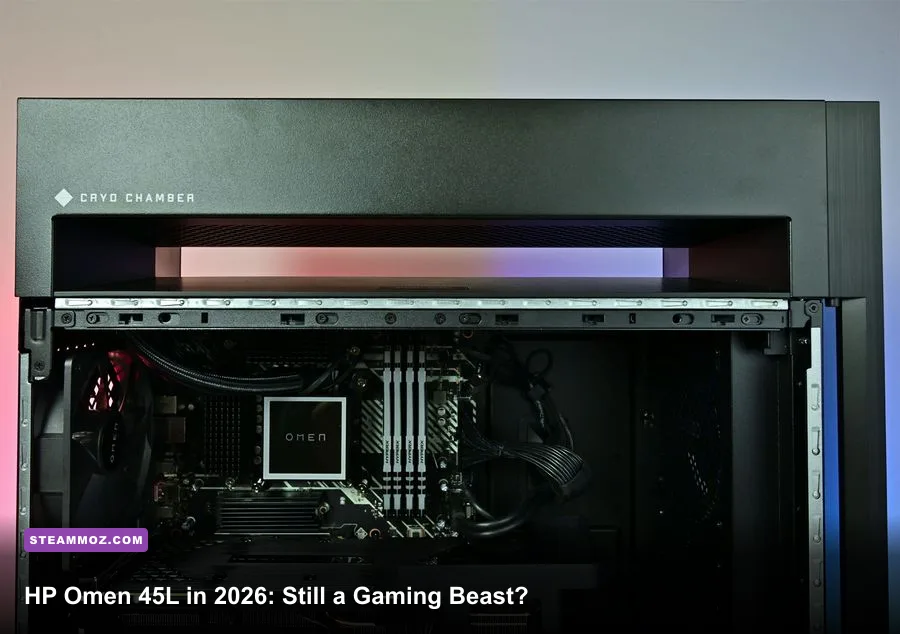
Yes, the HP Omen 45L is still worth buying in 2026—but only at the right price and with the right configuration. A model carrying an RTX 4080 Super or RTX 4090, a modern Core i7 or Ryzen 7 processor, 32GB of RAM, and a 2TB NVMe SSD remains a seriously capable 1440p and 4K gaming machine. An older RTX 3060 Ti or RTX 3070 version is a different story: it can still play today’s games, but it no longer deserves premium-prebuilt money. The short version is simple: buy the chassis and cooling for a discount, not the HP badge at any price.
This review focuses on the Omen 45L platform as buyers will encounter it in 2026, including late-generation Intel configurations and the older RTX 30-series and RTX 40-series stock that still appears through retailers, clearance sales, and the refurbished market. HP has changed the CPU, GPU, memory, and storage combinations repeatedly, so the model name alone never tells you enough. The graphics card is the deal-breaker, while the unusual Cryo Chamber remains the machine’s biggest engineering advantage.
The Omen 45L’s hardware still makes sense
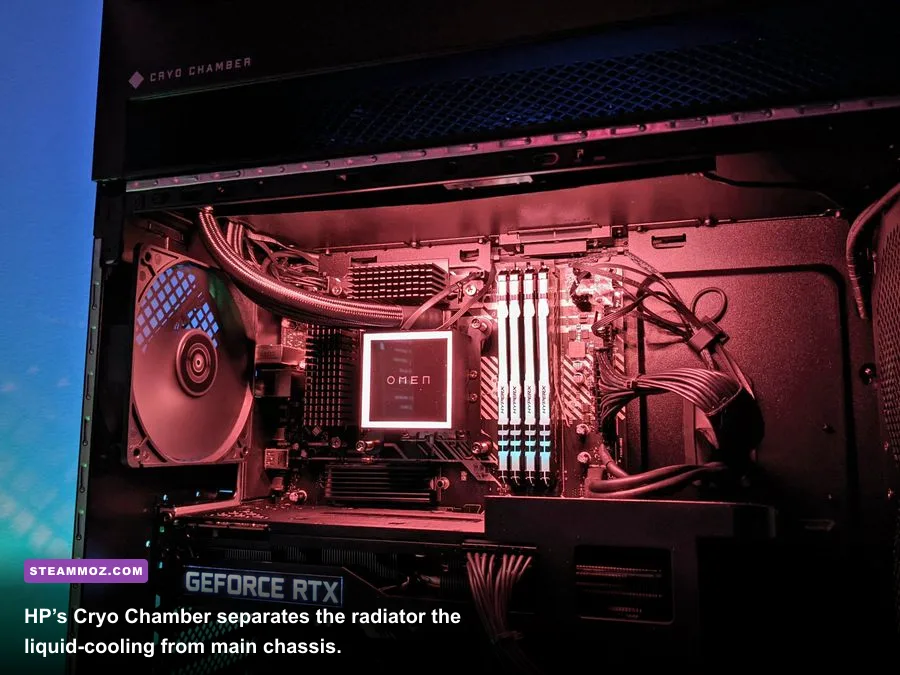
The defining feature is HP’s Cryo Chamber, a separated upper compartment that houses the liquid-cooling radiator and pulls radiator heat away from the motherboard, memory, and graphics card area. It doesn’t magically defeat thermodynamics, but it gives the Omen 45L a cleaner thermal layout than many closed-front gaming towers. The 240mm all-in-one liquid cooler handles compatible Core i7 and Core i9 chips well when the system is configured correctly.
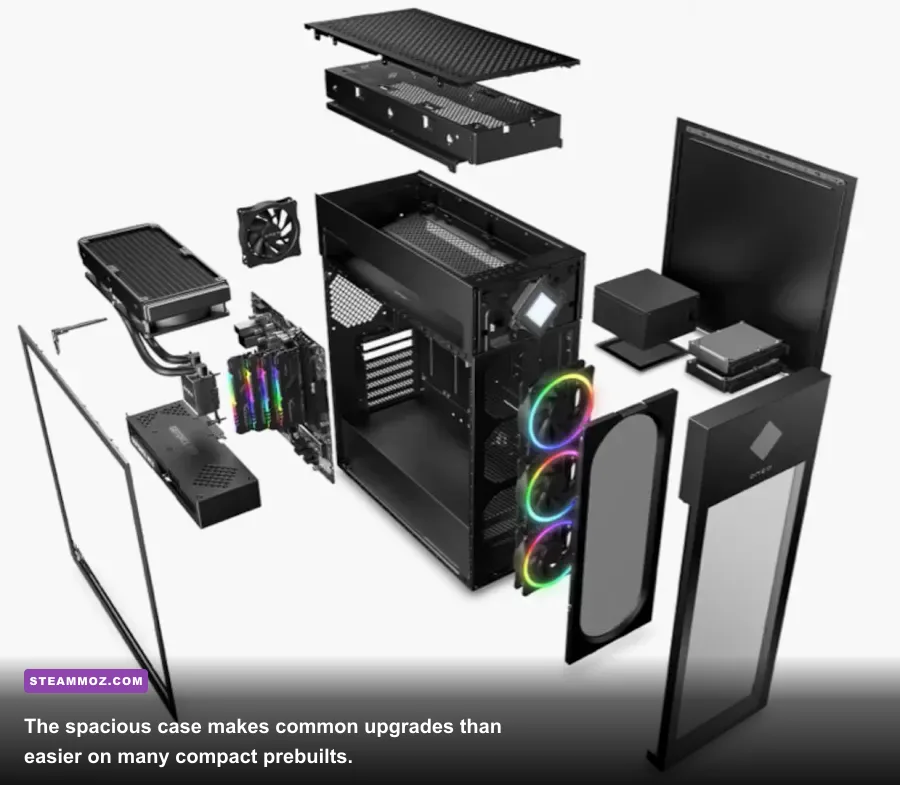
The case is also refreshingly practical. You get a full-size tower rather than a cramped proprietary box, tool-less side panels, standard DIMM slots, accessible M.2 storage positions, and a conventional ATX-style power supply in many configurations. That doesn’t mean every part is perfectly standard—HP can use custom firmware, board layouts, and wiring—but replacing RAM or adding storage is far less intimidating than upgrading a tiny office-style prebuilt.
CPU choice matters less than GPU choice for gaming, but there are still sensible pairings. The Core i7-13700K and Core i7-14700K offer plenty of gaming headroom, while the Ryzen 7 7700 and Ryzen 7 7800X3D variants are especially attractive if you find them discounted. A Core i9-13900K or i9-14900K can deliver excellent productivity performance, but it also draws more power and produces more heat. For a gaming-first buyer, the money is usually better spent moving from an RTX 4070 Ti to an RTX 4080 Super.
| Component | 2026 Buying Target | Still Acceptable | Skip at Premium Pricing |
|---|---|---|---|
| GPU | RTX 4080 Super, RTX 4090 | RTX 4070 Ti Super, RTX 4070 Super | RTX 3060 Ti, RTX 3070 |
| CPU | Core i7-14700K, Ryzen 7 7800X3D | Core i7-13700K, Ryzen 7 7700 | Older Core i5 with a high-end GPU |
| Memory | 32GB DDR5 | 32GB DDR4 | 16GB unless easily upgraded |
| Storage | 2TB NVMe SSD | 1TB NVMe SSD | HDD-only or 512GB boot drive |
| Power supply | 850W or higher for flagship GPUs | 750W for RTX 4070-class cards | Unclear wattage or no upgrade headroom |
Before ordering, compare the exact listing with HP’s official OMEN gaming desktop page and its configuration details. Retailer names such as “Omen 45L GT22” identify the family, not the precise internals. Two machines that look identical can have dramatically different frame rates because one uses an RTX 4070 and the other uses an RTX 4090.

🎮 FORM
Looking to experience this game? Grab your digital key directly on our store for $14.99.
View on Steammoz Store →2026 gaming performance: what the numbers really mean
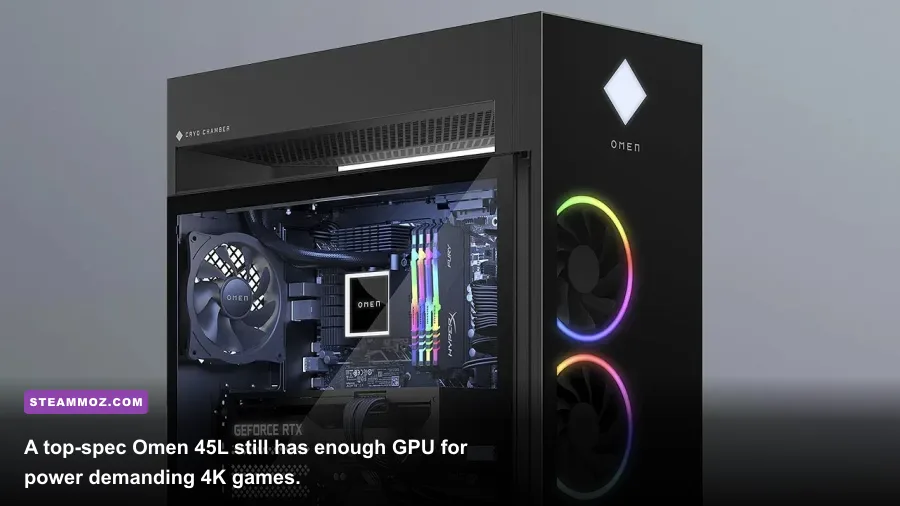
For a meaningful performance test, separate the GPU tiers. An RTX 4090 Omen 45L is still overkill for 1440p rasterized gaming and remains one of the strongest 4K options in a prebuilt tower. An RTX 4080 Super sits in the more comfortable sweet spot: enough performance for high-refresh 1440p, excellent 4K results, and a less absurd power budget. An RTX 4070 Super or 4070 Ti Super is still strong, but you’ll rely more often on upscaling and frame generation in new ray-traced releases.
The figures below are realistic performance ranges for a properly cooled system using current Windows drivers, a performance power profile, and dual-channel memory. They are not a promise for every Omen 45L because BIOS versions, GPU power limits, game patches, and the exact processor can move results noticeably. The important pattern is the gap between GPU classes, not a single flattering benchmark number.
| Game and Preset | RTX 4090 Omen 45L | RTX 4080 Super Omen 45L | RTX 4070 Super Omen 45L |
|---|---|---|---|
| Cyberpunk 2077, 4K Ultra, RT off | 105–125 FPS | 85–105 FPS | 65–80 FPS |
| Cyberpunk 2077, 4K RT Ultra, DLSS Quality | 75–95 FPS | 60–78 FPS | 45–60 FPS |
| Starfield, 1440p Ultra | 95–120 FPS | 85–105 FPS | 70–90 FPS |
| Hogwarts Legacy, 1440p Ultra RT | 115–145 FPS | 95–125 FPS | 75–100 FPS |
| Forza Motorsport, 4K Ultra | 135–170 FPS | 105–135 FPS | 80–105 FPS |
| Counter-Strike 2, 1080p competitive | 380–520 FPS | 350–480 FPS | 300–430 FPS |
These results expose the Omen’s best use case: high-refresh 1440p or smooth 4K, not simply “the highest possible benchmark score.” At 1080p, a fast CPU can become the limiting factor in esports games, while at 4K the GPU does nearly all the heavy lifting. A 240Hz monitor makes sense with the RTX 4090 only for competitive titles; in demanding single-player games, a 144Hz or 165Hz 1440p panel is a more balanced pairing.
Ray tracing also changes the buying equation. NVIDIA’s official RTX 4090 specifications explain the raw hardware, but actual playability depends on DLSS, frame generation, and the game engine. Turn on DLSS Quality before dropping texture quality. The RTX 4080 Super and 4090 have enough VRAM for high-resolution texture packs, whereas older 8GB cards can stutter when a game’s texture budget exceeds their memory.
Best graphics settings for smooth 1440p and 4K

The Omen 45L is quick enough that you rarely need to destroy image quality for speed. Start with the Ultra preset, then tune the settings that actually cost frames. Shadow quality, volumetric fog, screen-space reflections, and ray-traced lighting can be expensive; texture quality usually affects VRAM more than frame rate. This is especially useful on RTX 4070-class models, where lowering a few heavy effects can create a much steadier experience.
| Setting | Recommended Value | Typical FPS Impact | Visual Trade-Off |
|---|---|---|---|
| Resolution | Native 1440p or 4K | Very high | Biggest image-quality and performance control |
| DLSS | Quality; Balanced at 4K if needed | +20–45% | Small softness increase, usually worth it |
| Frame Generation | On for single-player games | Higher displayed FPS | Can add latency or artifacts |
| Ray-Traced Lighting | Medium or High | -15–35% | Reflections and lighting lose some accuracy |
| Volumetric Fog | Medium | +5–15% | Less dense smoke and atmosphere |
| Textures | Ultra with 12GB+ VRAM | 0–5% | Keep high unless VRAM stutters appear |
| Motion Blur | Off | Negligible | Sharper camera movement |
Use OMEN Gaming Hub to compare Quiet, Balanced, and Performance modes rather than leaving the machine permanently in its loudest profile. Performance mode can raise fan speed and CPU boost behavior, but it may only add a few frames in GPU-limited games. HP’s OMEN Gaming Hub support documentation is useful when a menu, lighting control, or fan option behaves differently after an update.
For competitive shooters, disable frame generation and prioritize consistent input latency. Use a capped frame rate just below your display’s refresh rate, enable the monitor’s variable-refresh feature, and avoid an unnecessarily hot CPU profile. For story-driven games, frame generation is much easier to recommend because the extra smoothness matters more than tournament-grade responsiveness.
Thermals, noise, and the Cryo Chamber reality
The Cryo Chamber is not just marketing decoration. In sustained CPU-heavy workloads, separating the radiator from the main chamber helps keep the liquid cooler from recycling hot GPU exhaust. A healthy Omen 45L with a 240mm radiator typically keeps a gaming CPU in the mid-60s to mid-80s Celsius during games, while the GPU generally lands in the upper 60s to low 80s depending on the graphics card, room temperature, and fan curve.
That said, “cooler” doesn’t mean silent. High-end GPUs can produce audible fan noise, and Intel Core i9 chips may briefly run aggressively under rendering or shader-compilation workloads. Some Omen systems also ship with conservative fan curves that prioritize quiet desktop behavior before suddenly ramping up. A custom curve in OMEN Gaming Hub can smooth that transition.
Dust is the long-term enemy. Clean the front intake, top radiator area, and GPU fans every few months, particularly if the tower sits on carpet. Don’t block the front mesh with a wall or cabinet panel. If temperatures climb sharply after a year, check whether the radiator fans are spinning correctly and whether the pump is detected. An all-in-one cooler is a consumable part; a five-year-old unit deserves more scrutiny than a new discounted desktop.
| Scenario | Healthy Target | Warning Sign | Recommended Action |
|---|---|---|---|
| GPU gaming temperature | 65–82°C | Consistent 85°C+ | Clean intake and review fan curve |
| CPU gaming temperature | 60–85°C | 90°C+ for long sessions | Check cooler contact and power profile |
| SSD temperature | 35–70°C | 80°C+ under games | Verify heatsink and airflow |
| Fan behavior | Gradual ramping | Repeated sudden surges | Update BIOS and tune OMEN Gaming Hub |
If you’re troubleshooting frame drops rather than temperatures, start with drivers, background overlays, and storage health. Our guides on PC crash and FPS fixes and high-FPS graphics settings cover the same diagnostic basics even though they focus on different games.
Upgrades, software, and the compromises
The Omen 45L is more upgrade-friendly than most branded gaming PCs, but it isn’t a completely open-ended DIY platform. RAM and M.2 storage are the easiest upgrades. Move to 32GB if your configuration has 16GB, and choose a matched two-stick kit rather than mixing random modules. A second 2TB NVMe drive is also a strong quality-of-life upgrade if the original 1TB drive is filling with modern 100GB-plus installations.
GPU upgrades need a measuring tape and a power-supply check. Large RTX cards can fit physically, but connector clearance, bracket support, and the installed PSU all matter. An RTX 4090-class card should be paired with a dependable 850W or higher supply, while a 750W unit is generally more appropriate for RTX 4070-class hardware. Never assume a new GPU’s adapter can be bent sharply against the side panel.
HP’s software bundle is mixed. OMEN Gaming Hub is genuinely useful for lighting, fan modes, performance profiles, and some system monitoring. Automatic update utilities can be convenient, but they can also add background processes you don’t need. After setup, uninstall trial antivirus software and unwanted promotions, update the BIOS and chipset drivers, then create a restore point before aggressive tuning. HP’s official support portal should be your first stop for model-specific BIOS and driver files.
| Upgrade | Difficulty | Worth Doing? | Important Check |
|---|---|---|---|
| 16GB to 32GB RAM | Easy | Yes, for modern gaming | Match DDR generation and speed |
| Add 2TB NVMe SSD | Easy | Yes, if the library is large | Confirm an open M.2 slot |
| Replace graphics card | Moderate | Only after checking value | Length, thickness, PSU, connector clearance |
| Replace CPU | Moderate to difficult | Rarely worthwhile | Socket, BIOS support, cooler capacity |
| Replace liquid cooler | Moderate | Useful on older units | Radiator size and mounting hardware |
Compared with building a PC yourself, the trade-off is obvious. You give up granular component selection and sometimes get a less elegant motherboard or power-cable layout, but you gain a finished machine, Windows licensing, warranty coverage, and a case that is far more serviceable than many compact prebuilts. If the discount is only $50 below equivalent retail parts, build your own. If the Omen is $200 to $400 cheaper during a clearance sale, the convenience becomes compelling.
Should you buy the HP Omen 45L in 2026?
Buy it when the configuration is balanced and the price reflects its age. An RTX 4080 Super Omen 45L with a Core i7-13700K or newer processor, 32GB of memory, and a 2TB SSD is still an excellent 4K gaming desktop. An RTX 4090 model is even more capable, though its price needs to be compared against newer-generation systems rather than judged by the Omen’s original MSRP.
Be cautious with older stock. The RTX 3060 Ti and RTX 3070 can still handle 1080p and 1440p gaming, but their 8GB VRAM limits are increasingly uncomfortable in demanding releases. If an older Omen costs nearly as much as a newer RTX 4070 Super desktop, walk away. The same applies to 16GB configurations, small boot drives, and unknown power supplies.
| Omen 45L Configuration | 2026 Verdict | Fair Buying Logic | Who Should Choose It? |
|---|---|---|---|
| RTX 4090, 32GB, 2TB | S-Tier | Buy if meaningfully discounted | 4K enthusiasts and creators |
| RTX 4080 Super, Core i7, 32GB | A-Tier | Excellent around modern prebuilt pricing | High-refresh 1440p and 4K gamers |
| RTX 4070 Super, 32GB | A-Tier value | Strong if cheaper than newer alternatives | Mainstream enthusiasts |
| RTX 3070, 16GB | B-Tier | Only as a low-cost used machine | 1080p and budget 1440p players |
| RTX 3060 Ti, 16GB | C-Tier | Buy only at a steep clearance price | Budget buyers willing to upgrade |
The Omen 45L also remains a better choice than a sealed compact gaming desktop if you care about future repairs. Its large interior, accessible storage, and unusual cooling design give it a real second life. Just remember that a premium chassis cannot rescue weak internals. Shop by GPU first, inspect the PSU and memory next, and treat the CPU as the final tie-breaker.
Final verdict: the HP Omen 45L is still worth buying in 2026 as a discounted RTX 4070 Super, RTX 4080 Super, or RTX 4090 system. Its cooling, upgrade access, and 4K performance remain genuinely good. It isn’t worth buying simply because it says Omen, and an aging RTX 30-series configuration should be priced like an older PC—not a current flagship. For more hardware-focused troubleshooting, our crash and low-FPS repair guide is a useful follow-up after installation.
Ultimately, the Omen 45L earns a cautious recommendation: excellent hardware when discounted, mediocre value when overpriced, and an easy pass when the listing hides the graphics card or power supply. That’s the honest answer for 2026.