You won't find Valorant sitting natively on Valve's digital storefront, but millions of tactical shooter fans routinely run Riot's competitive powerhouse through their Steam ecosystem to consolidate libraries, access custom controller configs, and utilize the Steam Overlay. Before you try launching Riot's 5v5 tactical shooter through Steam or testing it on a handheld, you need to understand the technical roadblocks erected by Riot Vanguard, the unforgiving gunplay physics that punish run-and-gun habits, and the strict in-game economy rules dictating every match. Jumping in blindly guarantees brutal losses, so here is the exact tactical and technical breakdown you need before queueing your first unrated match.
The Steam Reality Check: Native Client, Non-Steam Shortcuts, and Vanguard
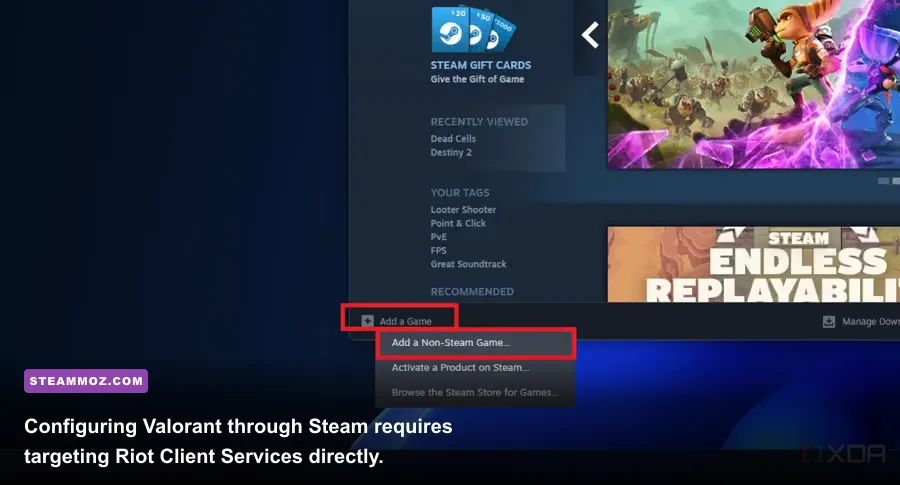
Let's clear up the primary point of confusion right away: Valorant does not have an official Steam store page. Riot Games distributes the game exclusively through its proprietary Riot Client on PC and consoles. If you see third-party downloads claiming to be a "Valorant Steam Edition," steer clear. However, you can seamlessly add Valorant as a Non-Steam Game to launch it alongside your favorite titles. Open Steam, click Games on the top menu, select Add a Non-Steam Game to My Library, and browse to your storage drive.
Crucially, do not point Steam directly to VALORANT.exe. Doing that causes prompt errors because the game must boot alongside its anti-cheat framework. Instead, point your Steam shortcut to RiotClientServices.exe (usually found in C:\Program Files\Riot Games\Riot Client\), open the shortcut's Properties in Steam, and append the following target flags at the end of the Target field:
--launch-product=valorant --launch-patchline=liveIf you're hoping to play on a Steam Deck running default SteamOS, you're out of luck. Riot Vanguard operates as a kernel-level driver (Ring 0) requiring Windows TPM 2.0 and Secure Boot. Valve's Linux-based Proton compatibility layer cannot emulate these kernel calls, meaning launching the game in SteamOS throws immediate connection errors like VAN 9001 or VAN 1067. The only workaround for handheld enthusiasts is wiping or partitioning the internal SSD to install a full Windows 10 or 11 environment. If your installation ever runs into random launch freezes or background conflicts, check out our guide on resolving low FPS and sudden crashes to diagnose driver-level hitches.
Gunplay Physics: Why Running and Shooting Destroys Your Aim
Coming from fast-paced arena shooters like Apex Legends or Call of Duty will actively harm your performance here. In Valorant, movement speed translates directly into severe weapon bloom. If your agent is walking, running, falling, or jumping when you click the left mouse button, your crosshair becomes a polite suggestion rather than an accurate point of impact. Even sidearm bullets will fly at wild, unpredictable 45-degree angles when fired mid-stride.
To land reliable shots, you must master counter-strafing. When moving left by holding the A key, you cannot merely let go of the key and wait for friction to halt your character model. Instead, instantly tap the opposite directional key (D) to bring your velocity to an immediate zero. In that split second of dead stoppage, your gun achieves dead-center accuracy. Mastering this tap-to-stop cadence turns lethal peeks into second nature.
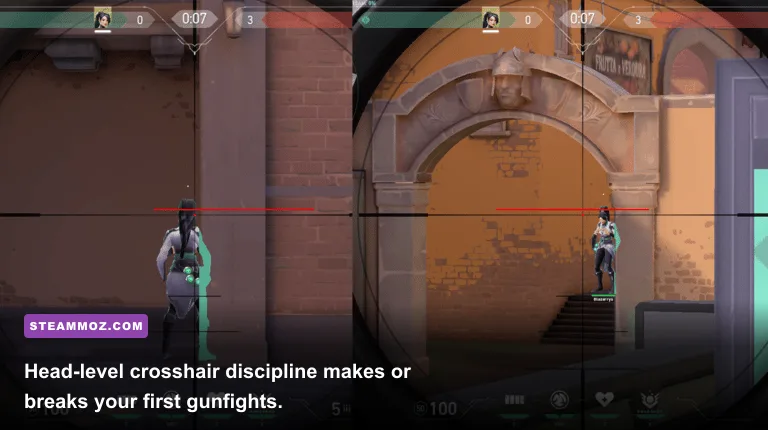
Pair counter-strafing with strict crosshair placement. Beginners constantly drag their reticle across floorboards and waist levels while moving through corridors. Every map—from the tight hallways of Split to the wide courtyards of Haven—features visual indicators like wall crates, doorframes, and horizontal stripes aligned perfectly with agent head height. Keep your crosshair glued to those head-level horizontal planes before you round a corner, eliminating the need to flick onto targets when swinging an angle.
The Weapon Hierarchy: Vandal, Phantom, and the Tactical Arsenal

Riot balances its weapon pool with extreme intention. While submachine guns like the Spectre and Stinger excel in tight eco-rushes, the competitive meta orbits around two primary rifles: the Vandal and the Phantom. Deciding between them depends entirely on your mechanical strengths, role, and the engagement ranges of the specific bombsite you intend to hold.
The Vandal costs 2,900 Creds and delivers an uncompromising stat profile: 160 damage to the head at any range. If you click an enemy's skull from across the map on Breeze, they die instantly, even through full heavy armor. The trade-off is a punishing recoil curve after the third bullet and a lower base rate of fire (9.75 rounds per second). The Phantom, also 2,900 Creds, offers a faster fire rate (11 rounds per second), superior spray recovery, a 30-round magazine, and silenced fire that eliminates bullet tracers through smoke screens. However, beyond 15 meters, the Phantom's headshot damage falls from 156 down to 140, requiring a secondary body tag to secure the kill.
If you enjoy analyzing weapon tiering and learning how loadout viability shifts, take a look at our ranked weapon tier analysis for a deep look at mechanical design tradeoffs.
| Weapon | Cost (Creds) | Headshot Damage (0-15m / 30m+) | Recoil / Spray Style | Optimal Combat Scenario |
|---|---|---|---|---|
| Classic | Free (0) | 78 / 66 | Low initial spread; right-click burst | Pistol rounds, jumping right-click close defense |
| Ghost | 500 | 105 / 87 | Crisp tap-firing; silenced tracers | Pistol round sniper picks, silent lurk plays |
| Sheriff | 800 | 159 / 145 | Severe kick; massive visual bloom | Save-round headshot punishes under 30 meters |
| Spectre | 1,600 | 78 / 66 | High rate of fire; manageable run-and-gun | Anti-eco rounds, close-quarters site rushes |
| Phantom | 2,900 | 156 / 124 | Tight horizontal spread; no bullet tracers | Smoking choke points, close to medium skirmishes |
| Vandal | 2,900 | 160 / 160 | Heavy kick after round 3; strict tap-reset | Long-range duels, holding open bomb sites |
| Operator | 4,700 | 255 / 255 | Single-shot bolt action; zero moving accuracy | Defensive angle holding, instant man-advantage kills |
The Economy Rulebook: When to Buy, Save, and Force
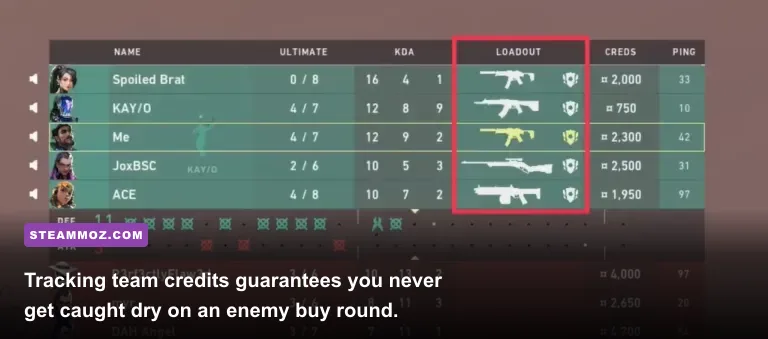
Treating every round like a shopping spree will trap you in the lowest ranks indefinitely. Valorant runs on a strict round-by-round credit system, and individual wealth means nothing if your four teammates are armed with sidearms while you buy a lone rifle. If you cannot afford weapons together, you coordinate your purchases as a cohesive unit.
The economy engine operates on transparent reward tiers. You earn 3,000 Creds for winning a round, 1,900 Creds for your first loss, 2,400 Creds for a second consecutive loss, and 2,900 Creds for hitting max loss bonus (three or more consecutive losses). Securing an individual kill grants 200 Creds, and planting the Spike yields 300 bonus Creds across the entire attacking roster, win or lose. Pressing the Tab key brings up the scoreboard, displaying every teammate's and enemy's exact bankroll for the upcoming round.
Understanding these thresholds tells you when to commit funds. A true "Full Buy" requires 3,900 Creds (2,900 for a rifle plus 1,000 for Heavy Shields), plus an extra 400 to 800 Creds for agent abilities. However, high-tier competitive teams regularly deploy the "Light Shield Meta." Because the Vandal hits for 160 headshot damage, buying a Light Shield (400 Creds for 25 armor, yielding 125 total HP) leaves you just as dead to a headshot as a Heavy Shield (150 total HP), saving you 600 Creds every single buy phase. For a wider perspective on resource budgeting and progression management, check out our guide on early build balancing and asset planning.
| Economy Callout | Team Bank Target | Purchase Execution | Core Strategic Objective |
|---|---|---|---|
| Eco / Save | Below 2,000 Creds | Free Classic or cheap Ghost; minimal utility | Ensure 3,900+ Creds for next round's full buy |
| Half Buy / Bonus | 2,500 – 3,500 Creds | Spectre, Outlaw, or Sheriff + Light Shield | Damage enemy economy without compromising next round |
| Force Buy | Depleted after a loss | Spend every Cred on Bulldogs, Marshals, Shields | High-risk gamble to break an opponent's snowball |
| Full Buy | 3,900 – 5,000+ Creds | Vandal / Phantom / Operator + Full Utility + Armor | Max combat power for critical round control |
Role Mastery: Finding Your Place in the Tactical Sandbox
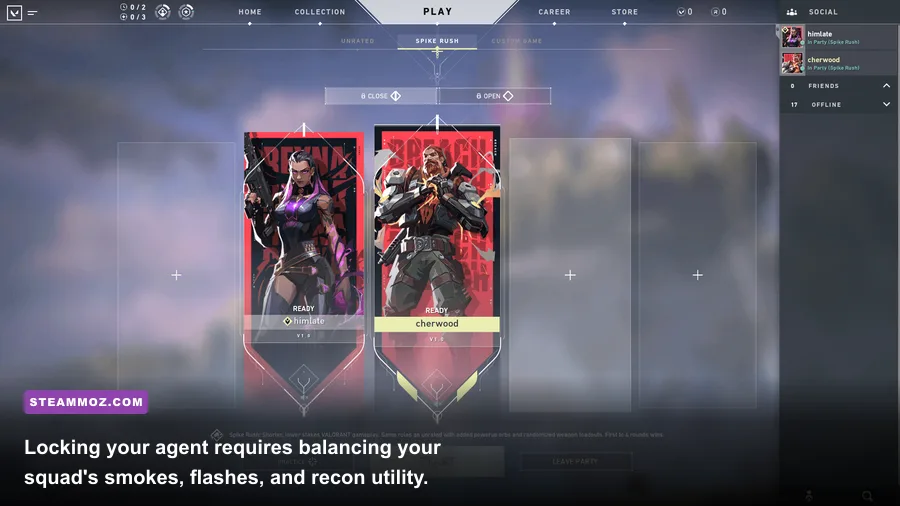
Selecting an agent isn't just about choosing cool aesthetic designs; it defines your operational role in the round. Unlike hero shooters where tanks soak damage, every agent in Valorant shares the exact same health pool and hitboxes. The difference lies in how their utility sets the stage for clean gunfights. Never lock your agent instantly during the pre-game lobby without verifying your team composition on the official Valorant website roster.
Duelists (Jett, Reyna, Raze, Phoenix, Yoru, Iso)
Duelists are the frontline entry-fraggers. Their job is not sitting back to protect their personal Kill/Death ratio; their job is bursting onto dangerous sites, taking first contact, and carving out physical territory for the squad. Jett's Tailwind and Raze's Blast Packs disrupt enemy crosshairs, forcing defenders to turn away from main chokepoints and opening easy trade kills for trailing teammates.
Controllers (Omen, Brimstone, Viper, Astra, Clove)
Controllers represent the backbone of every viable team. By placing vision-blocking smoke screens across common defender sniper nests and sniper lines (like Heaven on Ascent or A-Site Long on Haven), Controllers neutralize defensive line-of-sight. If you enter a site without smoke coverage, your team walks straight into crossfires.
Initiators (Sova, Fade, Breach, Skye, Gekko, Tejo)
Initiators flush enemies out of secure hiding spots and gather real-time intelligence. Sova's Recon Bolt and Fade's Haunt scan geometry to paint silhouettes through walls, while Breach's Fault Line concusses defenders hiding in deep corners. When playing Initiator, your utility must precede your Duelist's entry swing by two seconds.
Sentinels (Killjoy, Cypher, Deadlock, Chamber, Sage)
Sentinels are defensive anchors. Cypher's Trapwires and Spycam or Killjoy's Turret and Alarmbot lockdown entire map regions autonomously. On defense, a solo Sentinel can delay a five-man rush long enough for teammates to rotate. On attack, they guard the rear flank, preventing defenders from catching your squad off guard from behind.
Performance Tuning: Input Latency, Vanguard Settings, and Tickrate
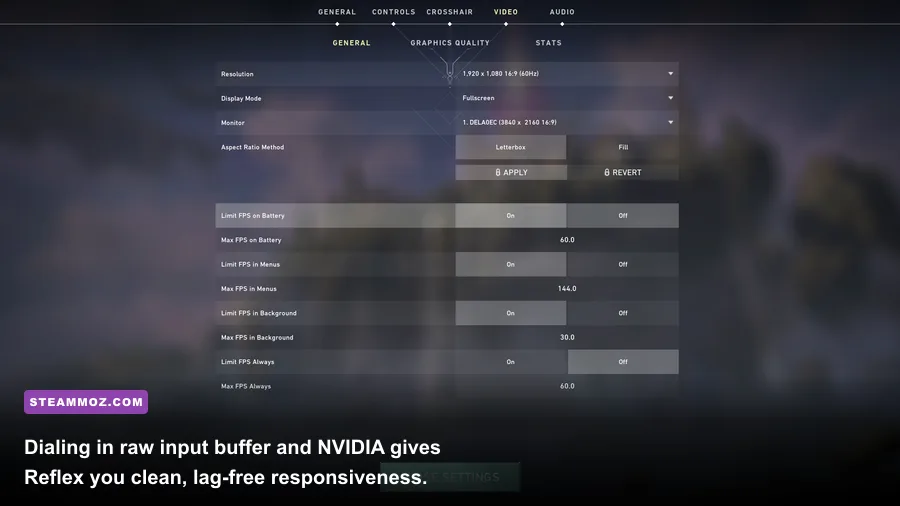
Every match in Valorant runs on proprietary 128-tick servers provided by Riot Direct. This means the game calculates bullet positions and character movements 128 times every single second—double the tickrate of legacy standard matchmaking in older shooters. To take full advantage of this high-frequency infrastructure, your local PC performance needs to run without micro-stutters or input delay.
Head into the game's Video settings and verify these critical toggles:
- RawInputBuffer: Turn this ON. If your gaming mouse operates at an 8,000Hz or 4,000Hz polling rate, this setting bypasses Windows OS API overhead, sending raw hardware packets straight to the game engine for sub-millisecond responsiveness.
- NVIDIA Reflex Low Latency: Set this to On + Boost. This eliminates GPU render queue queuing, delivering immediate frame presentation directly to your display panel.
- Graphics Quality Presets: Set Material, Texture, Detail, and UI Quality to Low. While high textures look pretty, low settings strip visual clutter, make enemy agent outlines pop against background walls, and drastically reduce frame-time spikes during explosive utility dumps.
If you experience weird frame pacing while running your game through Steam, disable the Steam Overlay for Valorant entirely. Because Vanguard constantly monitors memory injections to prevent cheat hooks, third-party software overlays (including Steam, Discord, and RivaTuner) can occasionally trigger micro-stutters. For detailed troubleshooting steps regarding system-wide frame drops, read through our breakdown on PC fixes that rescue your FPS and our dedicated recommendations for tweaking settings for higher FPS.
If Vanguard flags your operating system or encounters installation hurdles with Secure Boot settings on custom PC rigs, consult the official diagnostic steps via Riot Games Support, and check your hardware interface status through the Steam Support portal. Armed with proper counter-strafing discipline, economic patience, and a dialed-in system, you are ready to tackle competitive matchmaking and climb the ranks.