If you want to know whether your gaming rig can run Uncharted: Legacy of Thieves Collection, here is the unvarnished bottom line: an ancient GTX 960 (4GB) or AMD R9 290X will boot the game at 720p on Low settings, but you will barely scrape 30 FPS while Nathan Drake's facial hair turns into a blurry smudge. If you want a smooth, cinematic 1080p experience locked at 60 FPS on High settings, the real-world baseline demands an Nvidia GeForce RTX 2060 (6GB) or an AMD Radeon RX 5700, backed by a solid 6-core processor and a fast solid-state drive. Anything less turns explosive set-pieces into choppy slideshows.
The Official Specs vs. Real-World Hardware Demands
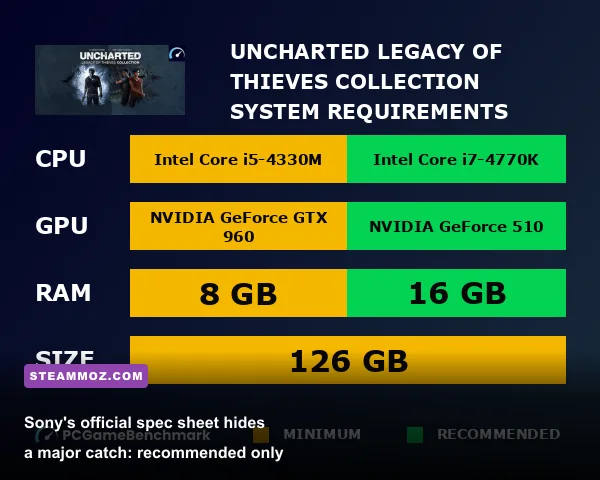
When Sony and port developer Iron Galaxy rolled out the official system requirements for the PC release via the Steam store page, they pulled a classic publisher trick: the "Recommended" specification targets 1080p at 30 FPS, not 60 FPS. For modern PC enthusiasts, playing an agile third-person shooter at 30 FPS feels like wading through wet cement. Aiming your pistol during frantic firefights requires responsive mouse tracking, and low frame rates introduce sluggish input latency that ruins the gunplay.
Much like checking modern hardware expectations against fighting releases in our modern PC fighting game spec breakdown, understanding how modern ports distribute engine workloads across your components is critical. The proprietary Naughty Dog engine was engineered specifically for the PlayStation 4 and PlayStation 5 architecture. Translating those custom compute pipelines over to Windows means DirectX 12 takes full control of your hardware, making your VRAM pool and CPU instruction sets vital bottlenecks.
| Hardware Tier | Target Resolution & Framerate | Processor (CPU) | Graphics Card (GPU) | RAM & Storage |
|---|---|---|---|---|
| Official Minimum | 720p @ 30 FPS (Low) | Intel i5-4330 / Ryzen 3 1200 | GTX 960 (4GB) / R9 290X (4GB) | 8 GB RAM | 126 GB HDD |
| Official Recommended | 1080p @ 30 FPS (High) | Intel i7-4770 / Ryzen 5 1500X | GTX 1060 (6GB) / RX 570 (4GB) | 16 GB RAM | 126 GB SSD |
| Real-World Sweet Spot | 1080p @ 60 FPS (High) | Intel i5-10400F / Ryzen 5 3600 | RTX 2060 (6GB) / RX 5600 XT | 16 GB RAM | 126 GB NVMe SSD |
| High-Refresh Enthusiast | 1440p @ 60-80 FPS (Ultra) | Intel i5-12600K / Ryzen 5 5600X | RTX 3070 (8GB) / RX 6700 XT | 16-32 GB RAM | Fast NVMe SSD |
| True 4K Cinematic | 4K @ 60+ FPS (Ultra w/ DLSS/FSR) | Intel i7-13700K / Ryzen 7 7800X3D | RTX 3080 (10GB) / RX 6800 XT | 32 GB RAM | High-Speed NVMe SSD |
Notice the storage requirement: while the minimum tier lists a mechanical hard drive, installing this game on an HDD causes severe texture streaming hitching. During dynamic camera transitions or rapid vehicle sequences, an HDD simply cannot shovel assets into VRAM fast enough, producing massive 1% low frame spikes.
Real Benchmark Breakdown: From Budget Cards to High-End Rigs
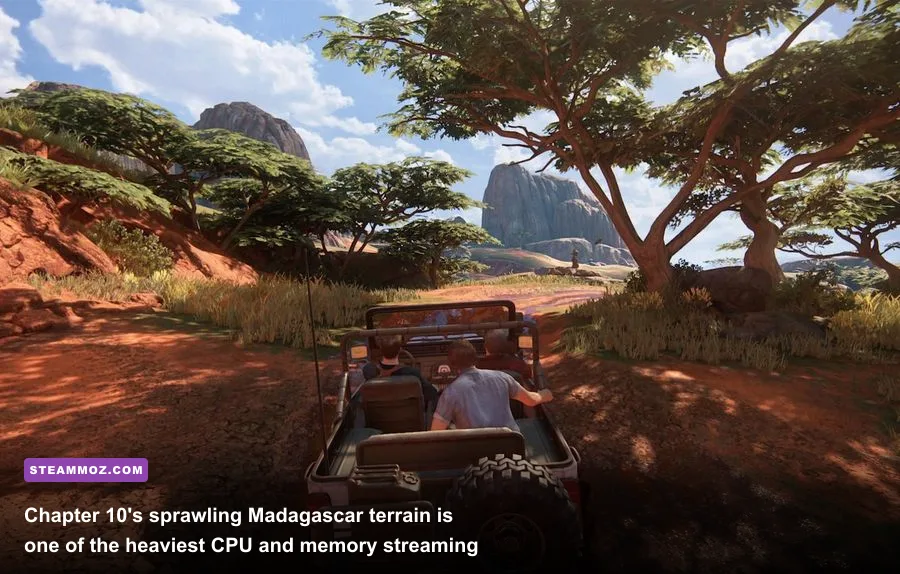
To establish how the collection actually behaves under fire, benchmark runs across Uncharted 4: A Thief's End and The Lost Legacy demonstrate clear performance tiers. Testing highlights two notorious trouble spots: Chapter 10's open-world Madagascar plains, where wide draw distances hammer memory bandwidth, and Chapter 11's dense King's Bay marketplace shootout, which floods the screen with destructible cover, volumetric smoke, and complex AI navigation routines.
On budget hardware like the venerable GTX 1060 (6GB) or AMD Radeon RX 580, running native 1080p at High settings produces an average of roughly 38 to 44 FPS. Frame times fluctuate wildly when explosions ignite surrounding vehicles. To maintain a playable baseline above 50 FPS on these older architectures, you have to lower visual fidelity to Medium and engage FSR 2 in Quality mode. While older retro shooters like those discussed in our look at classic Far Cry 2 hardware benchmarks could be powered through sheer GPU clock speed brute-force, Uncharted requires modern compute shaders to render lighting passes without tanking frame delivery.
Mid-range workhorses like the RTX 3060 (12GB) and Radeon RX 6600 (8GB) sit in the comfort zone. At 1080p native on the High preset, an RTX 3060 delivers a reliable 72 to 84 FPS. When stepping up to 1440p, activating DLSS or FSR 2 in Quality mode stabilizes gameplay right at 62 to 68 FPS, even during the chaotic Madagascar convoy chase where Drake leaps across moving trucks amidst volumetric dust storms.
For high-end silicon—such as the RTX 4070, RTX 3080, or Radeon RX 7800 XT—1440p Ultra is a total breeze, hovering well above 95 FPS natively. Pushing to native 4K, however, will push 8GB and 10GB cards right to the edge of their memory buffers. Enabling DLSS Quality at 4K allows cards like the RTX 3080 to maintain an unwavering 75 FPS average, preserving razor-sharp detail on cloth weaves and weathered jungle relics.
Optimized Graphics Settings: Reclaim 25% FPS Without Sacrificing Visuals
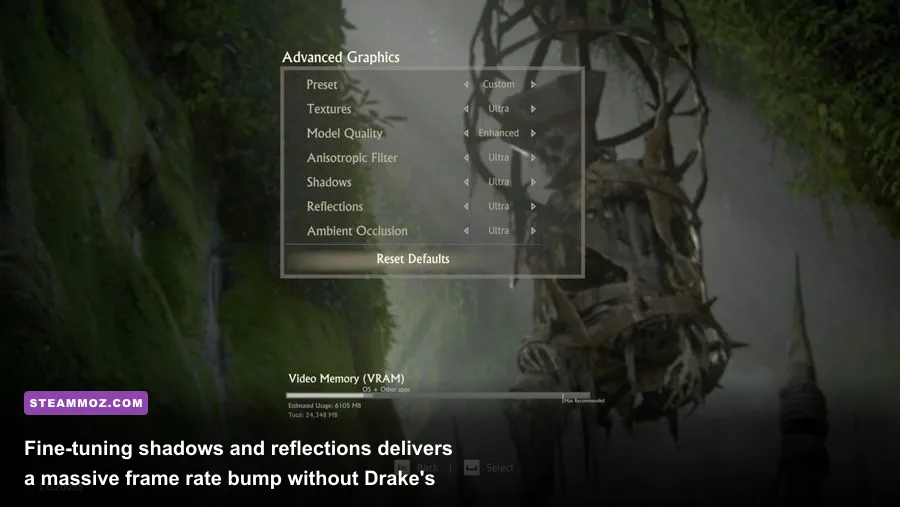
The visual gap between the High and Ultra presets in Uncharted on PC is remarkably narrow, but the performance cost of Ultra is punishing. You can optimize your configuration to claw back 20% to 30% of your frame rate while retaining nearly identical image quality, following principles similar to our guide for optimizing visual presets for maximum FPS.
| Graphics Setting | Recommended Value | FPS Impact | Visual Impact & Optimization Tip |
|---|---|---|---|
| Textures | High (6GB+ VRAM) / Medium (4GB) | Low (VRAM bound) | Ultra requires 8GB+ VRAM; High maintains crisp environmental decals without hitching. |
| Shadows | High | High (~9% savings) | Ultra softens distant penumbras slightly, but High looks sharp and restores heavy GPU bandwidth. |
| Reflections | Medium or High | Moderate (~6% savings) | Screen Space Reflections at Ultra tank frames near muddy puddles and shorelines. High is optimal. |
| Ambient Occlusion | High | Low (~3% impact) | Keep this turned on; disabling it flattens lush jungle foliage and makes geometry look disconnected. |
| Anisotropic Filtering | 16x / High | Negligible (<1%) | Leaves road textures and stone ruins crisp at sharp angles with virtually zero performance penalty. |
| Model Quality | Standard / High | Moderate (~4% savings) | Controls LOD transitions. High prevents visible geometry pop-in when speeding through outdoor terrain. |
| Volumetric Fog | Medium | Moderate (~5% savings) | Reduces sampling density in foggy caverns and Scotland tombs while preserving cinematic atmosphere. |
Adjusting these critical parameters shifts the compute balance back in your favor. If you are struggling with intermittent frame drops across various modern PC releases, checking out tactical tweaks like those in our guide to tuning settings for higher frame rates can help identify engine overhead outside of standard resolution scaling.
CPU Bottlenecks, Shaders, and Stutter Fixes

If your hardware exceeds the recommended specs but you still experience nasty hitching, the culprit is almost certainly shader compilation or input polling conflicts. Uncharted builds a local shader cache on your drive, detailed directly on the official PlayStation PC technical blog. When you first launch the game, look at the bottom right corner of the main menu. You will see a progress bar indicating that shaders are compiling.
Do not start playing until this counter reaches 100%. Jumping straight into the prologue while your CPU compiles background shaders forces your processor to peg at 100% utilization across all threads. This causes violent frame drops and audio de-sync during cutscenes. Letting the compilation complete takes 5 to 15 minutes depending on your CPU, but it permanently eliminates background compilation stutters.
Another quirky bug in Iron Galaxy’s port involves high-polling gaming mice. If your frame counter displays a steady 75 FPS but panning the camera feels jerky or skips pixels, your mouse polling rate is interfering with the game’s raw input handler. Drop your mouse polling rate in your peripheral software (such as Razer Synapse or Logitech G Hub) from 1000Hz down to 500Hz or 250Hz. This resolves micro-stutters instantly. For players wrestling with stubborn PC gaming stability hiccups, applying general troubleshooting methods from our PC fixes that stop crashes and rescue FPS will keep your background Windows processes clean and primed for heavy DX12 titles.
Upscaling Showdown: DLSS vs. FSR 2 in Uncharted
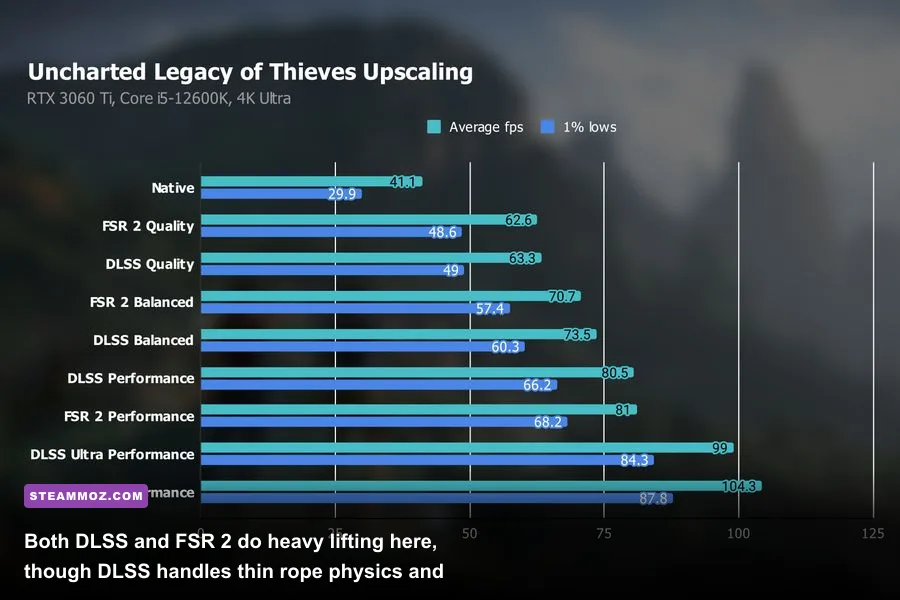
Because Naughty Dog's presentation relies on fine geometric elements—such as dense jungle undergrowth, hanging ropes, and intricate wire rigging in urban plazas—your choice of upscaler matters tremendously. The port natively integrates Nvidia Deep Learning Super Sampling (DLSS 2.4) and AMD FidelityFX Super Resolution (FSR 2.0). Both technologies allow you to render the game internally at a lower resolution, reconstructing the final image to match your display output.
If you own an Nvidia RTX graphics card, DLSS is the clear winner. The AI temporal model handles fine lines and rope meshes gracefully. When Nathan Drake swings across chasms on his grappling hook, DLSS maintains clean line definition without visible edge shimmering or buzzing artifacts.
For GTX owners and AMD Radeon pilots, FSR 2 is a fantastic performance booster that easily yields an extra 20 to 35 FPS depending on your base resolution. However, FSR 2 displays slight ghosting and disocclusion fizzle around rapidly moving objects, particularly Drake's hair when sprinting in direct sunlight or foliage rustling in torrential rain. To minimize these temporal artifacts, avoid using FSR 2's "Performance" mode at 1080p. Keep the profile locked to "Quality" mode so the algorithm has enough raw pixel data to construct a crisp, stable image that does justice to the game's stellar art direction, crafted by the veterans at Naughty Dog.