
Looking for the best offline games that won’t choke a low‑end PC? Here are the top titles that run smoothly on modest hardware, ranked by tier and backed by exact system requirements.
S-Tier: Must-Play Offline Games for Low-End PC
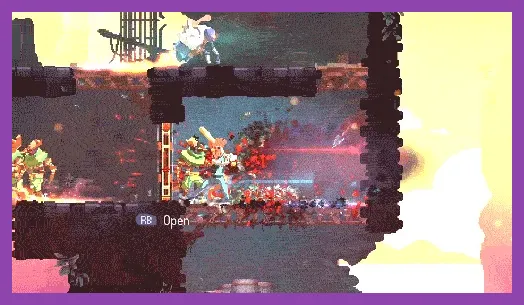
These three titles deliver exceptional gameplay while staying friendly to outdated CPUs, integrated graphics, and limited RAM.
Hollow Knight
System requirements: Dual‑core 2.0 GHz CPU, 2 GB RAM, OpenGL 3.3 compatible GPU, 9 GB SSD space. The game’s hand‑drawn world runs at 60 fps on low settings with textures set to Medium and shadows off. Core combat revolves around the Nail weapon; you can equip up to three Charms (e.g., Sharp Shadow, Longnail, Grubfly) to tweak damage, mobility, or healing. Boss fights such as Hornet and the Soul Master test pattern recognition without taxing the GPU.
Celeste
System requirements: 2 GHz CPU, 2 GB RAM, Intel HD 4000 or better GPU, 1.5 GB storage. The pixel‑art platformer stays buttery smooth even on integrated graphics when you set V‑Sync off and limit the resolution to 720p. Celeste’s core mechanic is the eight‑direction dash, which you can chain with wall jumps and air‑dashes to navigate tight spikes. The Assist Mode lets you slow game speed, grant invincibility, or provide infinite stamina—perfect for low‑end tweaks.
Stardew Valley
System requirements: 2 GHz CPU, 2 GB RAM, Shader Model 3.0 GPU, 500 MB storage. This farming sim runs flawlessly at 1080p on low‑end laptops when you disable ambient occlusion and set draw distance to 75%. Activities include planting crops (e.g., Parsnip, Kale, Strawberry), mining in the Skull Cavern (where you encounter Iridium nodes and the dangerous Shadow Brute), and building relationships with villagers like Abigail and Shane. The game’s save file is tiny, making backups painless.
A-Tier: Strong Contenders

These games need slightly more tweaking but still provide hours of offline fun on modest rigs.
Dead Cells
System requirements: 2 GHz CPU, 2 GB RAM, 512 MB GPU, 500 MB storage. The roguelite runs at 60 fps on low settings with texture quality set to Low and particle effects reduced. Core combat relies on a rotating arsenal of weapons—such as the Broad Sword, Ice Bow, and Tactical Shield—each with unique attack patterns. Biomes like the Promenade of the Condemned and the Ramparts feature procedural enemy placements that keep runs fresh without heavy CPU load.
Enter the Gungeon
System requirements: 2 GHz CPU, 2 GB RAM, 512 MB GPU, 2 GB storage. This bullet‑hell shooter stays smooth when you cap the frame rate to 60 and disable motion blur. The gun roster includes iconic weapons like the MKII (a rapid‑fire pistol), the Flamer (short‑range flame thrower), and the Sniper Rifle (high‑damage, slow‑fire). Each floor introduces new enemy types (e.g., Bullet Kin, Gun Nut) that test pattern recognition while staying light on GPU draw calls.
Hotline Miami
System requirements: 2 GHz CPU, 2 GB RAM, 512 MB GPU, 1 GB storage. The top‑down action runs at 60 fps even on Intel HD graphics when you set the resolution to 800×600 and turn off post‑processing. Combat hinges on melee weapons (e.g., Baseball Bat, Katana) and firearms (Shotgun, SMG) that you can pick up from fallen enemies. The game’s fast‑paced restart loop encourages trial‑and‑error without long loading times.
Braid
System requirements: 1.5 GHz CPU, 1 GB RAM, Integrated GPU, 300 MB storage. This puzzle‑platformer uses time‑manipulation mechanics (rewind, fast‑forward, slow‑motion) that are CPU‑light. Each world introduces a new rule (e.g., time is tied to movement, shadows act independently) that challenges your logic without demanding graphical horsepower.
B-Tier: Good Options with Caveats
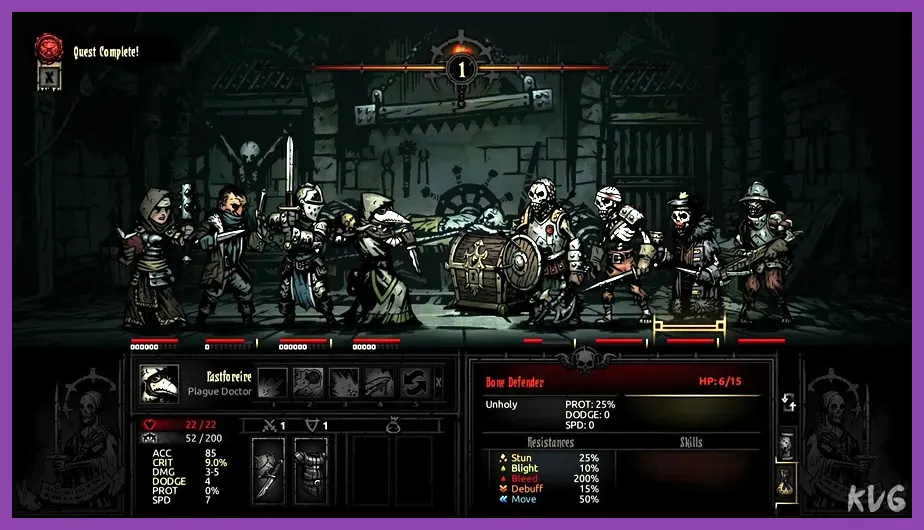
These titles are enjoyable but may require lowering resolution or disabling certain effects to stay playable.
Terraria
System requirements: 2.0 GHz CPU, 2 GB RAM, 128 MB GPU, 200 MB storage. The 2‑D sandbox runs smoothly at 720p when you set graphics to Low and limit max FPS to 60. Core activities include digging for ores (Copper, Iron, Silver, Gold), building houses for NPCs (Guide, Merchant, Nurse), and summoning bosses like the Eye of Cthulhu and the Wall of Flesh. The game’s world size can be adjusted (Small, Medium, Large) to reduce CPU load.
Papers, Please
System requirements: 2 GHz CPU, 2 GB RAM, Integrated GPU, 250 MB storage. This dystopian document‑checking sim runs at 60 fps on the lowest settings. You inspect passports, grant or deny entry, and manage daily wages while coping with random events (e.g., terrorist attacks, family illness). The game’s minimalist art style ensures negligible GPU usage.
FTL: Faster Than Light
System requirements: 2 GHz CPU, 2 GB RAM, Integrated GPU, 300 MB storage. The spaceship rougelike runs flawlessly on low‑end hardware when you disable animations and set the frame rate to 30. Core gameplay involves managing power distribution among systems (Engines, Shields, Weapons, Oxygen) and making jump‑point decisions that affect sector outcomes. Random events (e.g., pirate encounters, asteroid fields) keep each run fresh without taxing the CPU.
Honorable Mentions: Niche Titles Worth Trying

These games fly under the radar but offer deep experiences on modest machines.
Into the Breach
System requirements: 2 GHz CPU, 2 GB RAM, Integrated GPU, 300 MB storage. This turn‑based tactics game runs at 60 fps on the lowest settings. You command three mechs (e.g., Brute, Science, Shield) to defend cities from alien Vek. Each mission lasts 5‑10 minutes, making it perfect for short sessions. The deterministic combat system ensures that success hinges on positioning, not reflexes.
Darkest Dungeon
System requirements: 2 GHz CPU, 2 GB RAM, 512 MB GPU, 2 GB storage. The gothic RPG runs smoothly when you set texture quality to Low and disable shadows. Core mechanics include managing hero stress (which can cause afflictions like Paranoia or Masochistic) and exploring procedurally generated dungeons (e.g., Ruins, Weald, Cove). Boss fights such as the Heart of Darkness test both strategy and resource management.
Optimizing Your Low-End PC for Offline Gaming
Even the best‑chosen titles can benefit from a few system‑wide tweaks.
- Resolution and Refresh Rate: Drop to 720p or 800×600 and cap FPS at 60 (or 30 for very weak GPUs). This cuts the pixel‑fill rate dramatically.
- Graphics Settings: Set Texture Quality to Low or Medium, turn off Shadows, Ambient Occlusion, Motion Blur, and Anti‑Aliasing. These are the biggest GPU hogs.
- Driver Updates: Install the latest GPU drivers from NVIDIA/AMD/Intel. New drivers often include performance optimizations for older hardware.
- Background Processes: Use Task Manager to close unnecessary apps (Chrome tabs, Discord, Steam overlay). Consider enabling Windows Game Mode to prioritize CPU/GPU resources.
- Launch Options: In Steam, right‑click a game → Properties → Launch Options and add commands like -novid, -high, or -threads 2 to reduce startup overhead.
- Storage: If possible, install games on an SSD. Even a SATA SSD cuts load times and reduces stutter caused by HDD latency.
- Power Settings: Set Windows Power Plan to High Performance and ensure the laptop is plugged in; power‑saving modes can throttle CPU/GPU clocks.
Applying these tweaks, combined with the game selections above, will let you enjoy hours of offline entertainment without needing a costly upgrade.
For more performance‑focused reads, check out our guides on Elden Ring Shadow of the Erdtree settings for max FPS, best settings for max FPS, and fixing crashes on Black Myth Wukong.