So you finally booted up Elden Ring: Shadow of the Erdtree, cracked your knuckles, summoned your favorite mimic tear, and then your PC decided to tank to 30 FPS the second a Messmer soldier clipped through your screen. Yeah, we've all been there. FromSoftware's gorgeous DLC is brutal on hardware — but it doesn't have to be. Let's fix that.
Below is the no-nonsense, frame-rate-maximizing setup that'll keep the Lands of Shadow running silky-smooth without turning the game into a PlayStation 3-era slideshow. And if you want broader gaming guides or more PC gaming content, we've got you covered.
Start With the Bare Minimum Spec Check
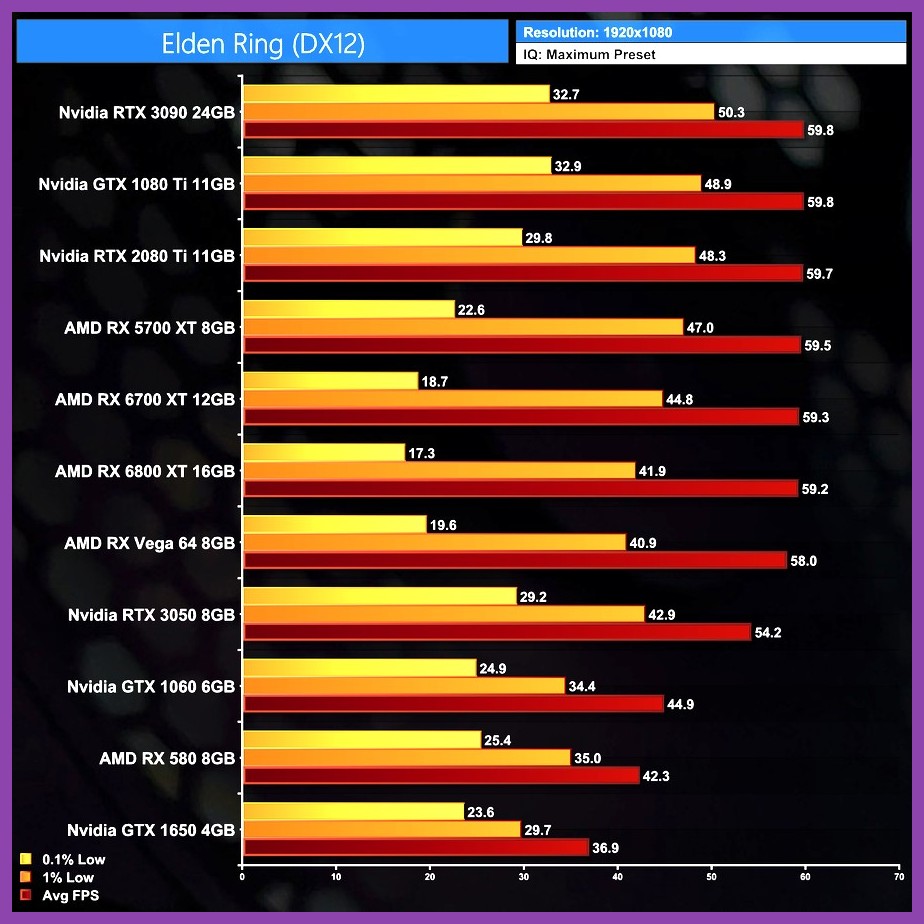
Before we touch a single slider, let's get real about your rig. Shadow of the Erdtree is basically Elden Ring's DLC on steroids, so the base game requirements get a spicy upgrade. The official Elden Ring website lists the spec jumps, but here's the short version: a GTX 1060 / RX 580 will still boot the game, but don't expect maxed-out fidelity. For actual smooth gameplay in the new zone, you'll want at least an RTX 3060 or RX 6700 XT with 16GB of RAM. The Steam page breaks down the full requirements.
Display Settings: The Biggest FPS Wins
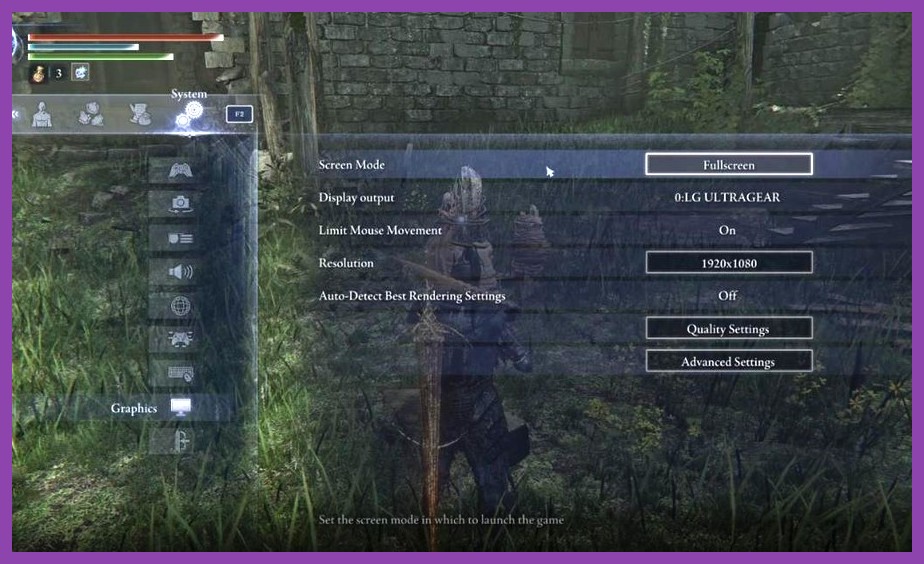
This is where the magic happens. Most of your frame-time lives or dies in the display tab.
Screen Mode and Resolution
Keep it on Fullscreen — borderless windowed adds 5-10% overhead depending on your setup. If you're on a 1440p monitor and your GPU is gasping, drop to 1080p temporarily or use Dynamic Resolution Scaling. The game actually handles DRS really well, and most players can't spot the difference in motion.
Frame Rate Target
Cap your FPS slightly below your monitor's refresh rate. If you've got a 144Hz panel, lock to 141. This eliminates microstutter and lets your GPU breathe. Pair it with VSync OFF in the driver panel to avoid the input lag spike.
Graphics Quality: Where to Slash and Where to Spare
Here's the cheat sheet for each setting, ranked by FPS cost vs. visual gain.
Texture Quality
VRAM-hungry, but barely affects FPS if you have the headroom. High if you've got 8GB+ VRAM, Medium if you're running 6GB. Don't drop this past medium — the difference is jarring.
Shadow Quality
Biggest frame-killer in dense areas like Belurat or the Shadow Keep. Drop this to Medium for an easy 8-12% FPS boost with minimal visual loss. The shadows in this DLC are moody but you really won't notice the downgrade mid-combat.
Lighting and Effects
Effects Quality is another brutal one — every Messmer fire spell and DLC particle effect will drag your framerate into the dirt. Set it to Low or Medium. Lighting can stay on High for atmosphere since it costs less than you'd think. For more on optimizing other FromSoft experiences, check out our fast leveling guide for Shadow of the Erdtree.
Anti-Aliasing
Drop AA entirely if you're chasing frames. The DLC's jaggies are mostly hidden by the dark art style anyway. If you really want smoothing, enable FXAA or TAA at low.
Volumetric Quality
Set this to Low. Volumetric fog in the Realm of Shadow is gorgeous, but it's a frame-time monster in boss arenas.
Ray Tracing: Just Don't (Unless You're Loaded)
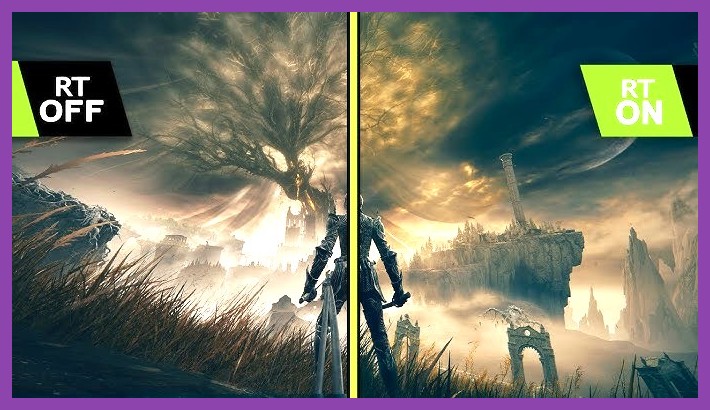
Look, ray tracing in Elden Ring looks stunning. It also murders your FPS. On an RTX 4070, you'll lose 25-30% of your frames enabling it. Unless you're rocking an RTX 4080 or higher, keep it OFF. Use the saved frames to actually dodge Rellana's dual blades instead of watching them at 20 FPS.
Upscaling: DLSS, FSR, and XeSS Are Your Best Friends
If you've got an RTX card, DLSS Quality mode is mandatory. The visual hit is almost nothing and you'll net a massive 30-50% FPS boost. AMD users, FSR 2 Quality works great here too — just enable Frame Generation if your GPU supports it. Intel Arc owners, XeSS is finally catching up and is worth a shot.
For more build advice that pairs perfectly with a smooth framerate, hit our endgame build guide and our best weapons tier list.
Final Driver and Background Tweaks
Update your GPU drivers — NVIDIA and AMD both pushed Shadow of the Erdtree-specific optimizations. Kill background apps, set your power plan to High Performance, and disable any overlay bloat (Discord, Xbox Game Bar, GeForce Experience). These alone can claw back 5-10 FPS. If you're still crashing or hitching, our crash-fix guide has tips that translate across demanding PC titles.
Now go forth, Tarnished. The Shadow Realm isn't going to conquer itself — and it definitely won't wait for your framerate to catch up. If you need more DLC help, peep our best solo class guide or jump back to the RPG section for more soulslike goodness.