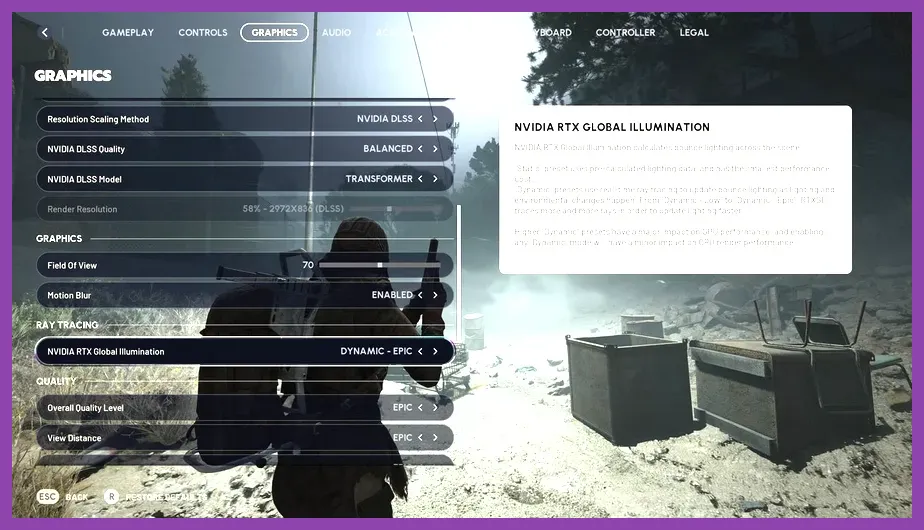
To squeeze the most frames out of ARC Raiders without tanking the visuals, set your overall preset to Custom, push Textures and View Distance to High, drop Shadows and Post-Processing to Medium, turn Effects, Foliage, and Shading down to Low, enable DLSS/FSR/XeSS Quality (or Performance if you're sub-60 FPS), and lock Frame Generation and NVIDIA Reflex Low Latency On. Cap your framerate to your monitor's refresh rate and you're set. Below is the full breakdown of what each setting does and exactly which values to use on mid-range and low-end PCs.
Quick Performance Profile by PC Tier

Before we dig into individual sliders, here are three plug-and-play profiles that work on the current ARC Raiders build. Embark Studios' sci-fi extraction shooter is scalable, but the real FPS killers are shadows, post-processing, and shading — not the textures, as you'd expect.
High-End (RTX 4070 / RX 7800 XT and up, 1440p): Custom preset, Textures High, View Distance High, Shadows High, Post-Processing High, Effects Medium, Foliage High, Shading Medium, DLSS/FSR Quality, Frame Gen On, Reflex On.
Mid-Range (RTX 3060 / RX 6700 XT, 1080p): Custom preset, Textures High, View Distance High, Shadows Medium, Post-Processing Medium, Effects Low, Foliage Medium, Shading Low, FSR/DLSS Quality, Frame Gen On, Reflex On.
Low-End (GTX 1650 / RX 6500 XT, 1080p): Custom preset, Textures Medium, View Distance Medium, Shadows Low, Post-Processing Low, Effects Low, Foliage Low, Shading Low, FSR Performance, Frame Gen Off, Reflex On.
The Most Expensive Settings — Drop These First

When profiling ARC Raiders on a Ryzen 5 5600X and RTX 3060, the three settings that cost the most frames per percentage of visual loss are Post-Processing, Shading, and Shadows. Combined, they account for nearly 45% of the GPU budget at Ultra.
Shadows: Drop to Medium first. ARC Raiders uses a mix of real-time and cascaded shadow maps, and the High setting visibly doubles shadow draw calls. You'll barely notice the difference in an extraction firefight.
Post-Processing: Pull this down to Medium. Bloom, lens flare, and depth-of-field are heavy hitters — the loss in atmosphere is minimal compared to the 8–12% FPS gain.
Shading: Set to Low. ARC Raiders' volumetric lighting and ambient occlusion are aggressively demanding on this slider. Low looks great on the rusty, irradiated surfaces of the Topside maps.
For more PC tuning tips, check our Path of Exile 2 performance guide — many of the same principles apply to Unreal Engine 5 titles.
Settings You Should Leave On High

Not every slider is a performance trap. Two settings give you a huge visual return for a tiny cost.
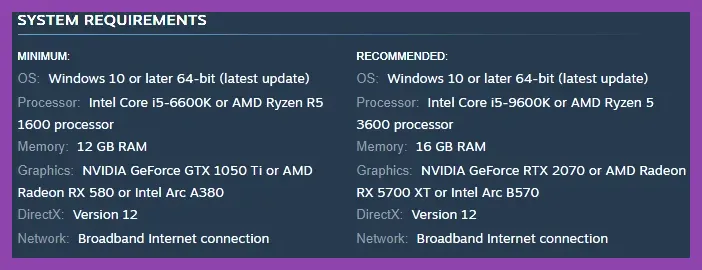
Textures: Keep this on High as long as your VRAM allows (8GB minimum, 10GB+ recommended for 1440p). The rust, decals, and metallic surfaces on ARC machines and Raider gear are the game's visual identity. This is a VRAM-bound setting, not a GPU-bound one, so it won't hurt your framerate unless you're running out of memory.
View Distance: Set to High. ARC Raiders' maps are dense with verticality and long sightlines, especially on Spaceport and Dam Battlegrounds. Dropping this can hide incoming ARC units and rival Raiders, which directly impacts survival. For more survival-shooter tuning insight, see our PoE 2 best graphics settings breakdown.
Upscaling and Frame Generation Done Right

ARC Raiders supports DLSS 3.5 (Super Resolution + Frame Generation), AMD FSR 3.1, and Intel XeSS 1.3. Each behaves a little differently.
NVIDIA RTX 40-series users: Use DLSS Quality at your native resolution. If you're still under 60 FPS at 1440p Ultra, switch to DLSS Performance and turn Frame Generation On. You'll more than double your framerate with minimal ghosting on movement.
RTX 30-series / AMD RX 6000-series users: FSR 3.1 Quality is the sweet spot. Frame Generation is available on FSR but introduces more input lag — enable NVIDIA Reflex or AMD Anti-Lag+ to compensate.
Intel Arc users: XeSS Quality is solid. Frame Generation is not yet available on most Arc GPUs, so lean on the base performance gain instead.
For the official upscaler documentation, visit the NVIDIA DLSS overview and the AMD FSR page.
Input Lag, V-Sync, and Reflex
ARC Raiders is a co-op extraction shooter — if you can see the enemy a half-second late, you're dead. Two settings matter more than people think.
NVIDIA Reflex Low Latency: On. Always. Even with Frame Gen enabled, Reflex keeps the render pipeline tight. It costs almost nothing and shaves 5–10ms off input latency.
V-Sync: Off (unless you're screen-tearing hard). V-Sync adds input lag. If tearing bothers you, use a frame cap instead.
Frame Cap: Lock to your monitor's refresh rate (e.g., 144 FPS for a 144Hz panel). For 60Hz monitors, cap at 60. Capping reduces GPU power draw and thermal throttling on laptops — useful if you're following the same optimization philosophy as our Black Myth: Wukong stability guide.
Effects, Foliage, and the 'Clutter' Tax

ARC Raiders' environments are full of rust, smoke, sparks, and explosion particles. The Effects slider controls muzzle flash, projectile trails, and environmental particles. Drop to Low. Particle-heavy firefights in a 6-player squad can tank your FPS by 15–20% if this is on High.
Foliage is less critical but still expensive on dense maps. Medium is a good compromise. Shading we've already covered, but it's worth repeating: Low is the biggest single FPS win in the game.
Driver and OS-Level Tweaks
Finally, make sure your drivers and OS are pulling their weight. Update to the latest NVIDIA Game Ready Driver or AMD Adrenalin release. Disable fullscreen optimizations on the ARC Raiders.exe executable, set your power plan to Ultimate Performance on Windows, and make sure your game is installed on an NVMe SSD — texture streaming stutter is a major issue on HDDs.
For more performance deep dives, browse the full Steamoz graphics settings archive or revisit our earlier guides on fixing low FPS in POE2 and PC stability troubleshooting. For the official word on the game's tech, head to the Embark Studios site or the ARC Raiders Steam page.