
Player First Games packed MultiVersus on Steam with absurd amounts of Warner Bros. history, but if you are solely focused on wave-dashing, fast-falling, and landing optimal aerial loops, you are walking right past a goldmine of interactive environmental details and jaw-dropping lore callbacks. Playing on PC opens up an even deeper layer of discoveries. Thanks to uncapped frame rates, custom ultrawide aspect ratios, and sharper texture rendering, PC players can spot background assets, asset swaps, and stage-specific reaction mechanics that console viewports completely crop out.
From interactive computer terminals in Gotham to background spirits in the Haunted Mansion that only react when specific character match-ups collide, the arena designs hide deliberate design choices that double as tactical indicators. Whether you are hunting for nostalgic comic book references or trying to decipher how stage hazards telegraph their hitboxes before blasting you into the upper boundary, these are the best secret locations, background gags, and hidden interactions in MultiVersus you completely missed.
Batcave Terminal Secrets and Alfred’s Hidden Feeds
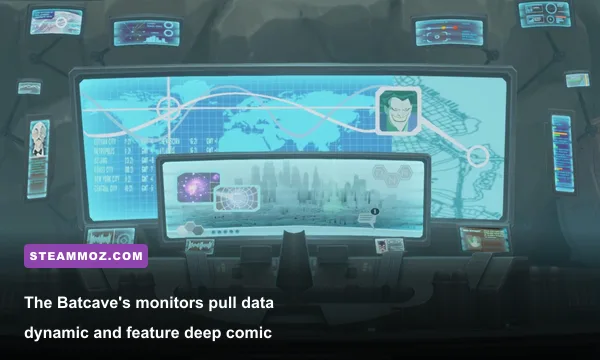
The Batcave stands as one of the most mechanically tense competitive stages in MultiVersus, largely due to the destructible floor panels and the low-ceiling blast zones. Yet the massive Batcomputer looming in the upper backdrop is not merely an animated wallpaper; it runs a live-reactive diagnostic program that actively monitors what happens on the stage. When Batman is on the field, the terminal screens populate specific schematics pulled directly from the 1992 Batman: The Animated Series design bibles, including the blueprints for the Batwing and the thermal signatures of the Batmobile parked in the lower cavern.
More impressively, the side monitors display real-time tactical overlays. If a fighter gets knocked into high hitstun or racked up past 100% damage, the side screens flicker red with WayneTech bio-metric alert readouts. Throw The Joker onto the stage against Batman, and the terminal displays an encrypted file label marked 'ARKHAM-TRANSFER-LOG', complete with a visual silhouette of the classic laughing gas canister. If you spend time exploring games with hidden world lore, like tracking clues in an Everspace 2 secret locations and hidden rewards guide, you will appreciate how much love went into WayneTech's micro-details.
There is also an interactive combat trick tied directly to the stage assets. Hitting the lower elevator switches activates security drones in the background that illuminate the dark water below. In this lower trench, you can catch brief visual silhouettes of the giant mechanical T-Rex and the oversized Lincoln penny resting quietly in Batman's trophy wing. These props do not have active physical collision, but high-damage shockwaves hitting the lower blast zone trigger subtle dust-cloud particle effects around the base of the dinosaur model.
🎮 1bitHeart
Looking to experience this game? Grab your digital key directly on our store for $2.99.
View on Steammoz Store →Scooby's Haunted Mansion: Pressure Plates, Secret Traps, and Spooky Cameos
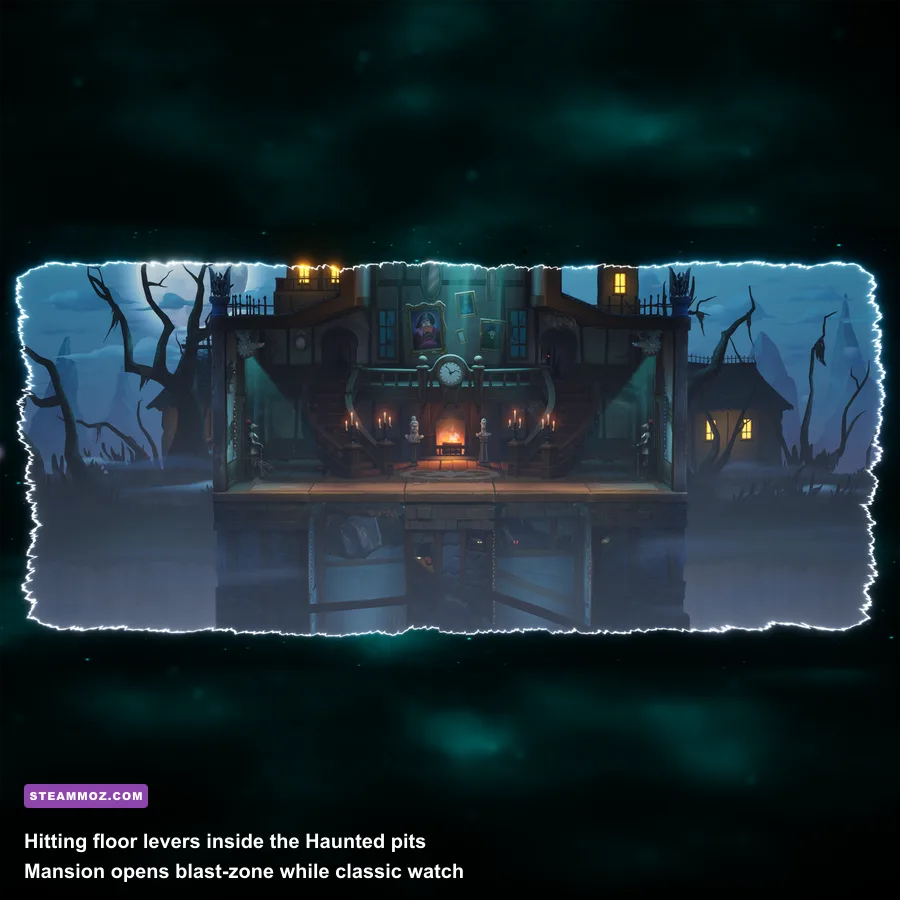
Scooby's Haunted Mansion is an absolute nightmare for stage control if you do not understand its layout, but it is also the richest stage for classic Hanna-Barbera Easter eggs. The most obvious environmental feature is the pair of red floor switches situated near the inner doorways. Stomping or striking these switches with an attack carrying at least 12 base damage flips the trapdoor platforms on the lower level, exposing fighters directly to the bottom blast zone. What most casual players do not realize is that the chandeliers dangling above do not swing randomly; their sway velocity synchronizes with the speed of fighters moving across the attic rafters.
The portrait gallery in the backdrop is where the real horror comedy hides. On standard 16:9 console displays, the outer edges of the walls cut off abruptly. But boot the game up on an ultrawide monitor with maximum draw distance enabled, and you can see classic Scooby-Doo, Where Are You! villains lurking behind the floorboards. The Creeper, Miner 49er, and the Spooky Space Kook make background appearances inside the rotating picture frames whenever a character is eliminated.
Furthermore, the grandfather clock on the left edge strikes midnight with a muffled chime whenever a player enters their final stock. If Shaggy is in the match and enters his Super Saiyan-inspired 'Enraged' state by charging up a sandwich, the spectral eyes inside the grandfather clock bulge out in sheer terror, complete with a tiny audio-sampled squeak that gets layered beneath the main audio mix. Discovering these subtle atmospheric touches feels just as rewarding as uncovering secret locations and hidden rewards worth hunting in atmospheric adventure games.
Dexter’s Lab and Townsville: Dynamic Stage Hazard Logic and Cartoon Network References
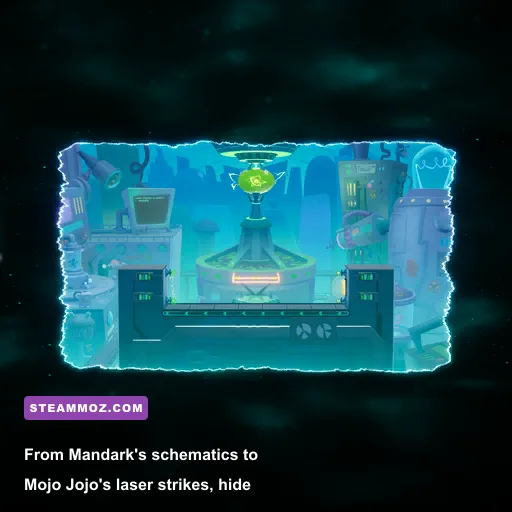
When Player First Games introduced stages inspired by classic Cartoon Network properties, they integrated dynamic environmental scripts that change the flow of combat. Dexter's Laboratory features two distinct variations: a standard flat competitive layout and an auto-scrolling labyrinth packed with conveyor belts and laser barriers. If you stop fighting and inspect Dexter's chalkboard in the background of the scrolling variant, the equations scribbled in chalk are actual scientific physics equations for kinetic velocity and gravitational acceleration—interspersed with cartoon blueprints for Mandark's towering bipedal war mech from Dexter's Laboratory: Ego Trip.
The Townsville stage, dominated by Mojo Jojo hovering in his flying saucer, goes even further with stage reactivity. Mojo Jojo attacks with mechanical laser sweeps, lobbed bomb clusters, and oversized magnet pulses. But while dodging his 18-damage bomb attacks, glance at the skyline behind City Hall. You can spot the Mayor of Townsville's hotline phone frantically bouncing on an office desk through the transparent window texture, signaling that the citizens are begging the Powerpuff Girls for backup.
To help you navigate these hazardous arenas without throwing away your stocks, here is a breakdown of the primary interactive stage secrets, their activation methods, and their hidden effects across the competitive pool:
| Stage Name | Interactive Secret / Easter Egg | Activation Requirement | In-Game Effect / Lore Callback |
|---|---|---|---|
| The Batcave | WayneTech Bio-Alerts & T-Rex Silhouette | Hit 100%+ damage or strike bottom elevator levers | Terminals flicker red; reveals Batman's classic dinosaur and penny trophies in the deep background. |
| Scooby's Haunted Mansion | Ghoulish Portrait Shifts & Clock Chime | Stock loss or charging Shaggy's Enraged state | Background portraits swap to Miner 49er and Creeper; grandfather clock eyes pop out in terror. |
| Dexter's Laboratory | Mandark Mech Blueprints & Gravity Levers | Striking the wall-mounted circuit boxes | Flips conveyor direction; reveals chalkboard schematics referencing the classic film Ego Trip. |
| Townsville (Mojo Jojo) | Mayor's Hotline & Saucer Targeting Glitch | Reflecting Mojo's bombs back into his cockpit | Mojo's ship sparks out, disabling his lasers for 15 seconds; Mayor's office phone flashes frantically. |
| Cromulons | Dynamic Track Decomposition | Breaking the outer speaker tower hitboxes | Muffles bass instruments in 'Show Me What You Got' remix; Cromulon heads frown in disappointment. |
| Trophy's E.R.E. | ACME Crate Stashes & Gremlin Cocoons | Using high-knockback hits near the blast boundaries | Kicks up classic cartoon sound effects; background silhouettes expose Gizmo and Stripe's origins. |
Notice how interacting with Mojo Jojo's saucer does not just trigger an Easter egg—it awards a massive tactical advantage. By knocking his projectile back using a well-timed reflector move (like Bugs Bunny's safe bat swing or Wonder Woman's Amazon Shield), you completely neutralize his laser sweeps for a generous 15-second combat window, turning a messy casual stage into a pure neutral boxing ring.
The Rifts Mode Lore: Hidden Dialogue Triggers and Obscure Stage Modifiers
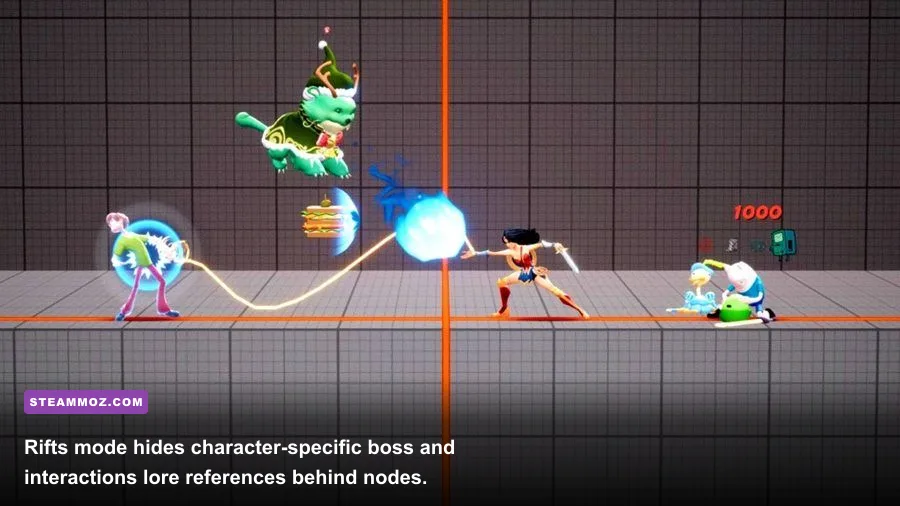
The PvE Rifts mode introduced in the full release is not just a glorified tutorial mode or currency farm; it contains exclusive stage variants and character interaction scripts that never play during standard PvP matchmaking. As you progress along the Rift node maps, certain paths diverge into secret encounters marked by shimmering purple rifts. Unlocking these nodes requires matching specific elemental Gem combinations—such as stacking Chaos or Horror Gems up to level 9—or clearing match objectives with unconventional fighter combinations.
Once inside these hidden rift battles, the game unleashes unhinged narrative banter. If you enter the 'Chaos' Rift boss stage using Jason Voorhees alongside The Iron Giant, the game triggers a completely unprompted pre-fight exchange where Jason inspects the Giant's scrap metal, prompting the Iron Giant to query: 'Friend? Or weapon?' When playing through these demanding modes, you will want flawless frame stability so you do not drop critical inputs during horde waves. If you ever experience stuttering during flashy cinematic attacks, applying PC performance troubleshooting and crash fixes can dramatically clean up background asset streaming.
Rifts also hide miniature visual references in their reward reward screens. If you inspect the victory podium during the 'Multiversal Mayhem' chapter, you can spot the mysterious green glyphs from The Matrix cascading down the side pillar textures. This was the earliest teaser Player First Games hid in plain sight before officially revealing Agent Smith as a playable Marksman fighter. Tracking down these clues feels just as satisfying as uncovering hidden progression tricks in an Empires of the Undergrowth fast leveling guide.
Cromulons and Trophy’s E.R.E.: Audio Cues and Unreal Engine Quirks
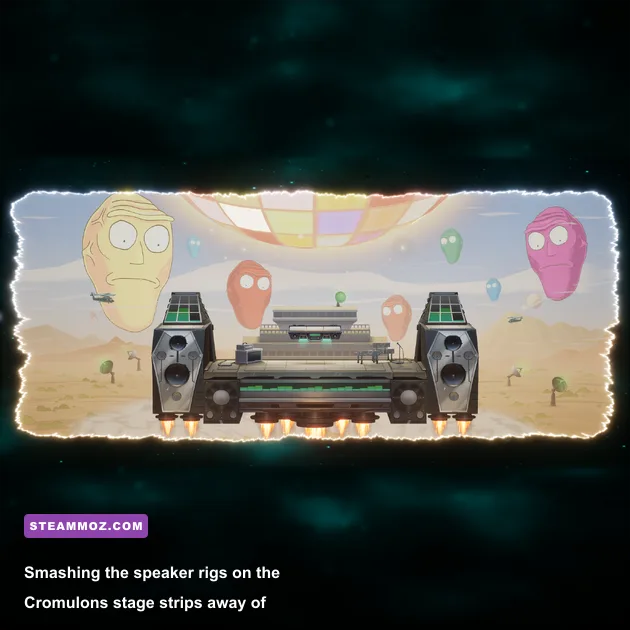
The Cromulons stage, straight out of Rick and Morty, features two gigantic alien heads watching your fight from deep space, judging whether your performance is worthy of survival. Most players realize that the giant heads react when someone gets launched into the upper blast zone—screaming their iconic 'DISQUALIFIED!' line—but few notice the stage's reactive dynamic audio stems. The speaker towers flanking the left and right edges are fully destructible objects with roughly 40 points of internal durability.
If you pummel these speakers until they shatter, the stage's background track instantly strips away its heavy sub-bass and percussion tracks. The audio mix morphs into a thin, tinny radio broadcast, mimicking the idea that you literally destroyed the sound system pumping music to the Cromulons. If both speaker stacks are eliminated, the Cromulon heads frown, furrowing their brows in visible disgust, lowering the ambient crowd cheers until the stage structures regenerate.
Meanwhile, Trophy's E.R.E. (the cosmic void filled with floating relics from classic Warner properties) holds fascinating technical secrets for PC enthusiasts. Running the game on an uncapped framerate reveals that the background props—including the WB Water Tower, ACME wooden crates, and glowing containment pods—are actually rendered with real-time physics rather than baked 2D skybox animations. Hitting an opponent with an explosive aerial spike near the outer margins sends invisible shockwave pulses through Unreal Engine's physics volume, causing the distant ACME boxes to gently sway and tumble through the void. Checking the official MultiVersus portal reveals patch notes frequently tweaking these collision volumes to maintain smooth competitive performance.
How to Tune MultiVersus PC for Maximum Secret Hunting and Frame Clarity
If you want to catch every single background reference without ruining your ranked win rate, your graphical pipeline matters. Competitive fighting games demand absolute clarity: you need minimal input latency, instant readouts on character telegraphs, and zero motion blur artifacts obscuring background details. In fast-paced fighters, a split-second distraction from an unoptimized visual setting can mean getting knocked clean out of the arena.
To configure your display for sharp visual fidelity while holding a rock-solid 60 FPS lock (or higher in training modes), use the targeted graphics settings detailed below:
| Graphics Setting | Recommended Value | FPS & Latency Impact | Visual & Secret Clarity Note |
|---|---|---|---|
| Resolution Scaling | 100% (Native) | Moderate | Prevents blurry downsampling; essential for reading background text on Batcave screens. |
| Anti-Aliasing | FXAA or Low TAA | Very Low | High TAA introduces ghosting on moving background assets like the Haunted Mansion portraits. |
| Post-Processing | Low | Low to Moderate | Disables aggressive bloom and lens dirt that obscure distant cameos in Trophy's E.R.E. |
| Shadow Quality | Medium | Moderate | Keeps character ground shadows distinct for juggling reads without choking CPU draw calls. |
| Motion Blur | Disabled | Low | Absolute must. Disabling motion blur keeps background animations crystal clear during fast dashes. |
| Field of View (FOV) | Max (Wide) | Low | Reveals cropped stage assets, secret outer platforms, and background vehicle models on PC. |
Fine-tuning your settings this way ensures you capture every bit of visual humor while maintaining tournament-grade responsiveness, much like tweaking settings for max FPS in competitive PC shooters or dialing in settings for higher FPS in visual puzzle titles. Turn off post-processing bloom, bump your resolution scale to native, and keep your eyes peeled during your next match. Player First Games left a sprawling museum of animation history scattered across their battlefields, and once you know where to look, you will never see these stages the same way again.