
The best way to transform a PC into a convincing console-style machine is to combine controller-first software with a small group of proven game mods: SkyUI and Engine Fixes for Skyrim, Buffout 4 and High FPS Physics Fix for Fallout 4, SMAPI with Stardew Valley Expanded, and Sodium with Iris for Minecraft. Add Steam Input or Playnite, install everything through reputable managers, and you get faster loading, cleaner menus, stronger performance, and substantially deeper games without turning every session into a troubleshooting expedition.
Start with the PC console foundation
Mods can't fix a living-room setup that feels awkward. Before adding content, make the machine behave like a console. Steam Input is the first layer because it lets you map keyboard commands, radial menus, action layers, gyro aiming, and long-press functions to almost any controller. A standard Xbox layout works immediately in most games, while a DualSense can use its touchpad as a mouse or extra menu button.
For a library that stretches beyond Steam, Playnite's fullscreen mode is the better front end. It can import games from Steam, Epic Games Store, GOG, Xbox, and emulators, then present them in a controller-friendly grid. Set Playnite to launch with Windows, hide the taskbar, and assign its shortcut to the central controller button. That removes the biggest PC-console annoyance: reaching for a mouse every time you want to change games.
Keep modded games on an SSD with at least 20 percent free space. Skyrim Special Edition can load a 1,000-mod profile, but a modest 80-to-150-mod setup is easier to maintain and usually delivers the best stability. Use a separate profile for each game, never overwrite a clean installation, and back up saves before installing anything that changes quests, scripts, or worldspaces.
| Foundation | Recommended Choice | Why It Matters | Console-Style Benefit |
|---|---|---|---|
| Controller mapping | Steam Input | Supports custom actions and layered bindings | Fewer keyboard or mouse interruptions |
| Game launcher | Playnite Fullscreen | Combines multiple libraries in one interface | One couch-friendly game menu |
| Mod management | Mod Organizer 2 or Vortex | Keeps files and load orders reversible | Fast profiles and safer troubleshooting |
| Storage | SSD with 20% free capacity | Improves streaming and reduces stutter | Shorter, more predictable loading |
For an official starting point, check the Steam Input documentation and Playnite's official site. These aren't glamorous upgrades, but they shape the entire PC console experience.

🎮 FORM
Looking to experience this game? Grab your digital key directly on our store for $14.99.
View on Steammoz Store →Skyrim's essential mod stack
Skyrim Special Edition remains the strongest showcase for a modded PC console, but its original interface was designed around a mouse and keyboard. Start with SKSE64, the Skyrim Script Extender required by many modern mods. Then install SkyUI. It replaces the vanilla inventory with sortable columns, weight values, search filters, and clearer categories. On a controller, that means less scrolling through 47 nearly identical potions before a dragon lands on your head.
Next comes the Unofficial Skyrim Special Edition Patch, which repairs thousands of quest, object, navmesh, and scripting problems. It won't turn a broken mod list into a stable one, but it removes a huge number of base-game bugs. Pair it with SSE Engine Fixes, which addresses memory allocation, form caching, animation issues, and several long-standing engine problems. Follow the exact installation instructions because its Part 2 files belong in the game directory rather than the regular mod folder.
For a smoother opening, Alternate Start - Live Another Life lets you skip Helgen and choose a starting background. That matters on a living-room machine because it cuts a roughly 20-minute scripted sequence from every new character. Choose the camping or guild options when you want to test a build quickly, but avoid starting with high-level gear if you still want Skyrim's progression curve to feel earned.
Ordinator - Perks of Skyrim is the major gameplay transformation. The vanilla skill trees contain 251 perks; Ordinator expands that system to more than 400, making focused builds much more viable. A Restoration character can use False Light to damage enemies through healing effects, while a Two-Handed build can invest in Massacre for escalating attack power. Don't install Ordinator halfway through a save and expect every perk to convert cleanly. Begin a fresh character or use a dedicated perk reset tool.
| Mod | Tier | Core Improvement | Best Situation |
|---|---|---|---|
| SKSE64 | S-Tier | Framework for modern gameplay and UI mods | Every serious Special Edition profile |
| SkyUI | S-Tier | Searchable, sortable inventory and magic menus | Controller play and large item collections |
| Unofficial Patch | S-Tier | Repairs quests, records, objects, and scripts | Any new or long-term playthrough |
| SSE Engine Fixes | S-Tier | Reduces engine-related crashes and memory problems | High-mod-count profiles |
| Alternate Start | A-Tier | Skips Helgen and offers custom openings | Replay characters and testing builds |
| Ordinator | A-Tier | Expands perks and creates specialized builds | Players tired of vanilla skill trees |
For visual upgrades, resist the urge to install every 4K texture pack at once. A 2K landscape pack, Cathedral Weathers, and a restrained ENB preset normally produce a better balance than ultra-heavy textures that push VRAM beyond 8GB. If Skyrim starts hitching near Whiterun or Solitude, reduce shadow resolution from 2048 to 1024 before lowering textures. Shadows are often the larger performance hit.
Steamoz's guide to PC crash and FPS fixes is also useful when diagnosing general Windows issues that can look like mod instability.
Fallout 4 needs stability before spectacle

Fallout 4 is fantastic on a television, but its physics and scripting systems become temperamental when frame rates climb above the game's 60 FPS target. Start with the Fallout 4 Script Extender, then install Buffout 4. Buffout 4 adds crash logging and repairs several engine behaviors, giving you an actual clue when a settlement object, animation, or script causes a crash instead of a mysterious desktop return.
High FPS Physics Fix is the must-have performance mod. Fallout 4's physics are tied too closely to frame timing in the unmodified game: doors, elevators, ragdolls, and workshop objects can behave incorrectly at high refresh rates. Configure the mod to let rendering exceed 60 FPS while keeping physics and game logic at safe timing. On a 120Hz television, a locked 60 FPS profile is still the sensible choice if your GPU cannot hold a stable 120. A consistent frame time beats occasional peaks.
Sim Settlements 2 is the content choice that changes Fallout 4 most dramatically. Instead of manually placing every bed and shop, settlers can build plots that grow into functioning communities. Its story campaign introduces new quests and characters, but it also increases script activity. Give it a clean load order, avoid piling on multiple settlement overhauls, and expect a heavier CPU load in large settlements such as Sanctuary Hills.
Place Everyone's Best Friend after your dog-related mods if you want Dogmeat alongside another companion, but check compatibility with companion frameworks. Fallout 4 normally limits you to one active human companion or Dogmeat. The mod changes that rule, creating useful combinations such as Dogmeat plus Nick Valentine, but extra followers also increase combat pathfinding and dialogue conflicts.
| Setting or Mod | 60 FPS Profile | 120 FPS Profile | Performance Trade-Off |
|---|---|---|---|
| God Rays | Medium | Low or Medium | Large GPU cost outdoors with modest visual gain |
| Shadow Distance | High | Medium | Lower values reduce distant flicker and frame spikes |
| Weapon Debris | Off on older Nvidia GPUs | Off | Can cause severe crashes in some configurations |
| High FPS Physics Fix | Enabled, physics capped | Enabled, physics capped | Separates smooth rendering from unstable simulation |
| Sim Settlements 2 | Recommended | Recommended | More CPU scripting in developed settlements |
If you enjoy the series but keep fighting technical problems, Steamoz has a useful breakdown of graphics settings for maximum FPS. The same principle applies here: cut volumetric effects and shadows first, not texture quality.
Stardew Valley gets a full second life
Stardew Valley is a near-perfect couch game, and its mod scene expands it without demanding a powerful PC. Install SMAPI first; it is the framework that loads most Stardew mods and reports conflicts in a readable console window. Use the official SMAPI site to match the installer to your game version, then launch through the generated SMAPI entry in Steam.
Stardew Valley Expanded is the headline addition. It introduces new areas, characters, events, crops, fish, and quests while fitting around the existing Pelican Town story. The mod adds a large amount of dialogue, so it works best when you are ready for a full replay rather than a quick drop-in. Its new locations also make movement-speed bonuses more valuable: Coffee gives a +1 Speed buff, while Triple Shot Espresso gives +1 Speed for four minutes and 12 seconds, stacking with food buffs but not with another drink.
Automate is the quality-of-life mod every serious farmer should try. Put a chest beside machines such as kegs, furnaces, or preserves jars, and the machines pull inputs and return finished products automatically. It doesn't erase planning: you still need to grow crops, gather ore, and maintain the farm. It simply removes repetitive loading and unloading, especially useful when playing from a sofa with a controller.
Lookup Anything is perfect for blind-but-efficient runs. Press its configured key on a crop, villager, fish, or machine to see gift preferences, sell prices, growth times, and requirements. Combine it with Generic Mod Config Menu so you can change settings without editing files. Keep the first year organic, though. Installing every automation mod immediately can flatten the satisfying rhythm of planting, watering, and upgrading tools.
| Mod | Tier | What It Adds | Best Use |
|---|---|---|---|
| SMAPI | S-Tier | Mod loader, error reports, and compatibility framework | Required foundation |
| Stardew Valley Expanded | S-Tier | New maps, NPCs, events, quests, and collectibles | Full replay after year one |
| Automate | A-Tier | Chest-linked machine processing | Late-game farms and controller play |
| Lookup Anything | A-Tier | In-game information without wiki tab switching | Planning crops, gifts, and bundles |
| Generic Mod Config Menu | B-Tier | Adjustable settings inside the game | Large mod lists and shared saves |
The official Stardew Valley site is the right place to verify game updates before updating SMAPI or a large content mod. Version mismatches are the most common reason a previously stable farm stops loading.
Minecraft performance mods that actually matter

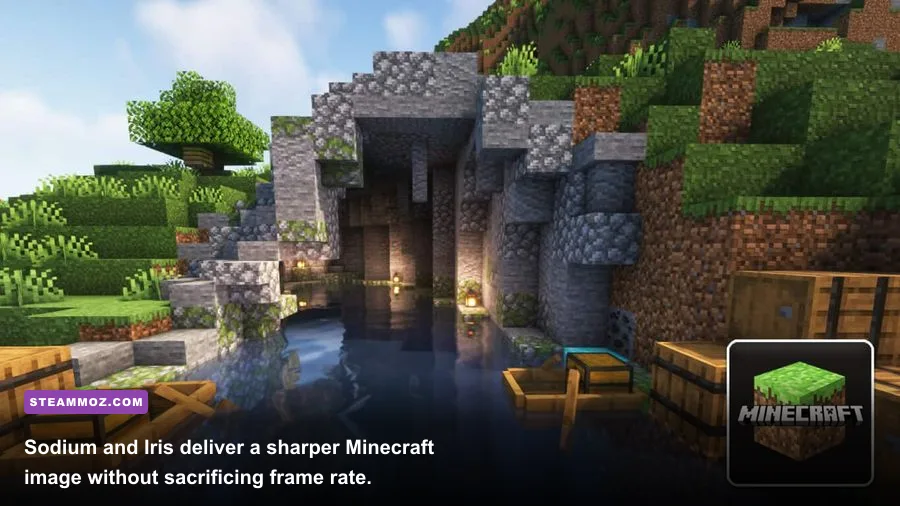
For Minecraft Java Edition, the strongest essential stack is Sodium, Lithium, FerriteCore, and ImmediatelyFast. Sodium replaces the renderer and can dramatically improve frame rates, especially when the original renderer is bottlenecking the GPU. Lithium optimizes game logic, pathfinding, and ticking without changing the intended mechanics. FerriteCore reduces memory use, while ImmediatelyFast improves rendering for entities, screens, and particles.
Iris Shaders is the visual layer. It supports many OptiFine shader packs while working with Sodium, but shader quality has a direct cost. A lightweight Complementary Reimagined preset can run smoothly at 1080p, while high shadow resolution, volumetric lighting, and distant terrain can cut frame rates in half at 1440p. Set render distance to 12 chunks and simulation distance to 8 before increasing shader quality; simulation distance affects active farms, redstone, and mobs, so lowering it can improve CPU frame times.
| Component | Minimum Profile | Recommended Profile | Expected Impact |
|---|---|---|---|
| Render distance | 8 chunks | 12-16 chunks | Major CPU and GPU scaling factor |
| Simulation distance | 6 chunks | 8-10 chunks | Controls active entities, farms, and redstone |
| Sodium | Installed | Installed with compatible loader | Large renderer and frame-time improvement |
| Iris shader preset | Low or performance | Medium Complementary preset | Better lighting at a measurable GPU cost |
| Entity distance | 75% | 100% | Lower values reduce crowded-scene rendering |
Use the official Minecraft site for the correct Java Edition version, and don't mix Forge-only and Fabric-only mods casually. Fabric profiles are usually the cleanest route for Sodium and Lithium. Install Mod Menu as well, because it exposes configuration screens and quickly shows whether a dependency is missing.
Build profiles instead of one enormous mod list
The most important modding habit is separation. Make a vanilla profile, a stability profile, and a content profile. Test after every five to ten changes, launch into a save, travel between two demanding areas, and play for at least 15 minutes. If something breaks, you know which small group to inspect. Dumping 150 files into one profile and hoping LOOT solves everything is how a relaxing PC console becomes a weekend of detective work.
Read every dependency note and check the last update date. A popular mod can still be unsafe if its required framework has moved on. In Skyrim, load order changes can alter leveled lists and scripts; in Fallout 4, settlement and companion mods frequently edit the same records; in Stardew Valley, content packs may require Content Patcher. Mod managers help, but they don't replace reading.
Keep backups outside the game folder. Save files, mod profiles, and configuration folders should each have a dated copy. Never remove a script-heavy mod from the middle of an active quest unless its author provides an uninstall procedure. For Skyrim and Fallout 4 especially, a clean new save is often faster than trying to rescue a corrupted one.
| Profile | Mods to Include | Target Result | When to Use It |
|---|---|---|---|
| Vanilla safe | Bug fixes only | Maximum compatibility | New patches and troubleshooting |
| Comfort | UI, performance, and quality-of-life mods | Console-like convenience | Long-term main save |
| Content | New quests, areas, perks, and systems | A substantially different game | Fresh characters and replays |
| Experimental | Beta, visual, and major overhaul mods | Testing new ideas | Disposable saves only |
For more PC troubleshooting habits, Steamoz's guides covering crashes and low FPS and performance settings are worth keeping bookmarked.
The smartest upgrade is a controlled one
Don't measure a successful modded PC console by the number beside your load order. Measure it by how quickly you reach the game, how consistently it holds its frame rate, and whether the additions solve a real annoyance. SkyUI makes Skyrim readable, High FPS Physics Fix keeps Fallout 4 stable, SMAPI opens Stardew Valley's enormous second act, and Sodium gives Minecraft the performance it should have had from the start.
Install those foundations first, test them, and only then add ambitious content. A carefully curated 30-mod profile will feel better than a fragile 300-mod showcase. The goal isn't to turn your PC into a science project. It's to press one button, grab the controller, and disappear into a better version of the games you already love.