Intergalactic Fishing is an exceptionally easy game to run: the official Steam listing asks for only a modest Windows PC, and there is no published high-end recommended tier. For a sensible target, aim for a dual-core or quad-core processor, 4 GB of RAM, an integrated GPU from the last decade, and roughly 1 GB of free storage. If your computer can comfortably run ordinary 2D indie games, it should handle this space-fishing adventure without trouble.
That answer needs one important distinction, though. Steam’s listed minimum is a compatibility floor, not a promise of perfectly smooth play on every old laptop. Background applications, outdated graphics drivers, aggressive power-saving modes, and display scaling can matter more here than raw GPU power. Intergalactic Fishing is not a game that needs a GeForce RTX card, but it can still feel unpleasant if Windows is choking the application or forcing it through an inefficient integrated-graphics profile.
Below, you’ll find the official minimum information, a realistic recommended target, laptop advice, expected performance, storage guidance, and practical settings that make sense for this particular game. I’ve also separated confirmed requirements from sensible editorial recommendations, because the developer has not published a detailed, benchmark-based recommended specification list.
Intergalactic Fishing system requirements at a glance
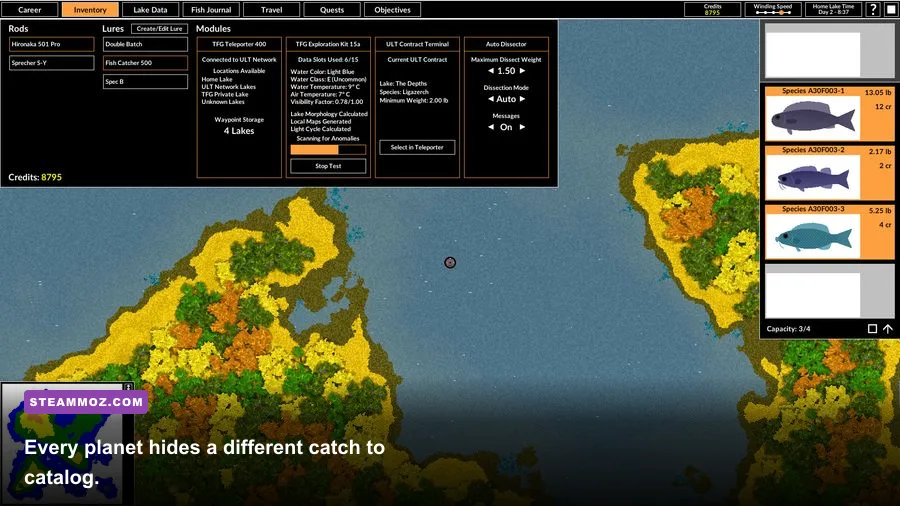
The first thing to know is that the game’s published requirements are extremely light. Intergalactic Fishing focuses on exploration, procedural discovery, and a stylized fishing system rather than dense 3D environments, cinematic effects, or demanding real-time lighting. That keeps the workload low on both the processor and graphics hardware.
| Component | Official minimum | Practical recommended target | Why it matters |
|---|---|---|---|
| Operating system | Windows 7 or later, according to the Steam listing | Windows 10 or Windows 11 64-bit | Newer Windows versions offer better driver support and power management |
| Processor | 2 GHz-class CPU | Modern dual-core or quad-core CPU, such as a recent Core i3 or Ryzen 3 | Helps with menus, world generation, background tasks, and stable input response |
| Memory | At least 2 GB RAM on the published listing | 4 GB RAM, with 8 GB preferred for a busy Windows desktop | The game is light, but Windows and browser tabs are not |
| Graphics | Basic DirectX-compatible graphics hardware | Intel UHD, Intel Iris Xe, AMD Vega, or any entry-level discrete GPU | No modern gaming GPU is required for the game’s 2D presentation |
| Storage | A small installation footprint; check the current Steam listing before installing | 1 GB of free space | Leaves room for updates, shader caches, and save backups |
The minimum processor figure is best read as “the game can launch on old hardware,” not “every 2 GHz chip performs identically.” A newer low-voltage Core i3 can beat an old desktop Pentium despite having a similar headline clock speed. Architecture, single-thread performance, and thermal throttling all count. The same rule applies to integrated graphics: a recent Intel UHD solution is a far safer bet than an ancient laptop GPU with nominal DirectX support.
The official Steam page is the final authority if the store metadata changes. Before buying or installing, check the Intergalactic Fishing Steam page for the current operating-system and storage notes. The developer’s Steam developer page is also worth checking for patches and related support information.

🎮 Intergalactic Fishing
Looking to experience this game? Grab your digital key directly on our store for $3.74.
View on Steammoz Store →What “recommended” really means for this game

There is no detailed official recommended specification tier to quote in the same way you might for a modern open-world RPG. That is not a warning sign. It simply reflects the game’s modest technical demands and the fact that a separate “recommended” column would add little value for most players.
For Steamoz testing and buying advice, the practical recommended target is 4 GB of RAM, a recent dual-core CPU, a graphics chip with current DirectX support, and Windows 10 or 11. An 8 GB machine is even better—not because Intergalactic Fishing itself needs that much memory, but because it prevents the operating system, Discord, a browser, and cloud-sync software from fighting over the same limited pool.
| PC class | Example hardware | Expected experience | Verdict |
|---|---|---|---|
| Older office desktop | Dual-core CPU, 2–4 GB RAM, basic integrated graphics | Playable at native resolution if drivers are healthy | Meets the spirit of minimum |
| Budget laptop | Recent Core i3 or Ryzen 3, 4–8 GB RAM, Intel UHD or AMD Vega | Smooth gameplay with plenty of headroom | Best value target |
| Mainstream gaming PC | Core i5 or Ryzen 5, 8–16 GB RAM, GTX 1650 or newer | Runs effortlessly; hardware is substantially overqualified | Excellent, but unnecessary |
| Modern high-end PC | Core i7 or Ryzen 7, 16 GB RAM, RTX 3060 or better | No meaningful visual advantage over budget hardware | Overkill for this game |
That last row is worth emphasizing. A powerful GPU won’t transform the game’s art style or suddenly reveal a more detailed galaxy. If you’re shopping specifically for Intergalactic Fishing, spending extra on graphics hardware makes no sense. Put that money toward a larger SSD, more RAM, or a better display instead.
Can it run on an integrated GPU?
Yes, that’s the realistic expectation for most recent integrated graphics. Intel UHD Graphics, Intel Iris Xe, AMD Radeon Vega, and newer Radeon 680M-class solutions all have far more capability than this game’s visual workload requires. Older integrated chips may also work, but driver quality and the laptop’s native resolution become the deciding factors.
If you’re using a very old machine, start at 1280×720 or the display’s native resolution and test from there. The goal is not to chase a three-digit frame rate. It’s to avoid input delay, uneven frame pacing, or a display mode that causes the game to scale awkwardly.
Expected FPS and resolution performance
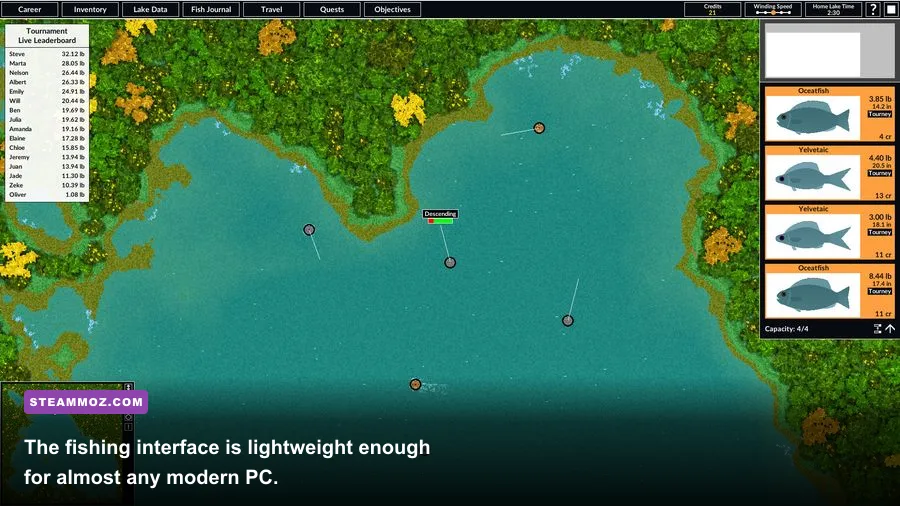
Intergalactic Fishing does not need the sort of benchmark treatment demanded by a competitive shooter. There are no reaction-critical firefights where a jump from 60 to 144 frames per second changes your entire performance. A stable 60 FPS is the sensible target, and many modern PCs should exceed it if the game’s frame-rate behavior allows.
The biggest variable is often the display rather than the GPU. Running a lightweight 2D game on a 4K monitor can introduce scaling quirks, while borderless windowed mode may behave differently from exclusive fullscreen depending on your Windows version. If the picture looks soft, try native resolution first, then compare fullscreen and borderless modes.
| Hardware profile | Resolution to try | Likely result | Recommended approach |
|---|---|---|---|
| Very old integrated graphics | 1280×720 or native laptop resolution | Playable if the CPU and drivers are stable | Close background apps and use a simple display mode |
| Recent office laptop | 1600×900 or 1920×1080 | Generally smooth at 60 FPS | Use native resolution and keep Windows power mode balanced |
| Budget gaming PC | 1920×1080 | Comfortable headroom | Prioritize clean scaling over excessive frame-rate chasing |
| High-refresh gaming setup | 1080p or 1440p | Hardware is unlikely to be the bottleneck | Use the most stable fullscreen or borderless mode |
There’s a useful lesson here for low-end PC owners: stable frame pacing beats a fluctuating maximum. If your laptop reports 120 FPS but periodically drops frames while the operating system wakes a background task, the game can feel worse than a locked 60 FPS. Cap the frame rate through your GPU control panel only if you notice uneven pacing; otherwise, leave the game’s default behavior alone.
For broader troubleshooting habits, our guide to stable FPS in Kujlevka covers many of the same Windows-side issues, including power profiles and background processes. The game-specific settings differ, but the diagnostic logic carries over.
Best graphics settings for weak PCs
Intergalactic Fishing is not packed with dozens of demanding graphics options, and that’s good news. You don’t need to spend an hour building a competitive settings profile. Start with native resolution, use the default visual preset, and only reduce quality if you see actual stutter or scaling problems.
| Setting or adjustment | Recommended value | Performance impact | Visual trade-off |
|---|---|---|---|
| Display resolution | Native resolution first; 1280×720 for very old hardware | Low to moderate on integrated graphics | Lower resolutions look softer |
| Display mode | Test fullscreen and borderless | Usually small, but system-dependent | Borderless is more convenient; fullscreen can reduce interference |
| V-Sync | On if you see tearing | Small latency and frame-pacing cost | Cleaner motion with V-Sync enabled |
| Windows scaling | Keep the recommended desktop scaling | Usually negligible | Prevents blurry text and oversized interface elements |
| Background applications | Close browsers, launchers, and overlays when testing | Can be significant on 2–4 GB systems | No in-game visual loss |
Don’t automatically disable every visual feature. On a game this light, aggressive reductions may make the interface harder to read without solving the real problem. If performance is poor, check whether the laptop is plugged in, whether Windows has selected the correct GPU, and whether the graphics driver is current before you start sacrificing resolution.
A sensible low-end troubleshooting order
First, restart the PC and launch only Steam and the game. Then switch the laptop to its balanced or best-performance power mode while plugged in. Update the integrated-graphics driver through the laptop manufacturer or Intel/AMD support page, and verify the game files in Steam if behavior changed after an update.
Next, test fullscreen at 1280×720. If that fixes the issue, the problem is likely resolution scaling or the desktop compositor rather than the game’s core workload. If it doesn’t, watch Task Manager while playing. A memory graph pinned near 100 percent points to RAM pressure; a CPU graph pinned at 100 percent suggests background activity or severe thermal throttling.
Our Kholat graphics-settings guide has a useful checklist for driver updates, overlays, and power settings. You can also compare it with these PC fixes for Koa and the Five Pirates of Mara if Steam launches the game but the display behaves strangely.
Storage, saves, and installation advice
Storage is not a serious barrier here. The installation is small compared with modern games, and you don’t need a dedicated SSD to make the game playable. An SSD is still preferable because it makes Steam updates, launching, and general Windows use faster, but a healthy hard drive should be adequate.
Keep at least 1 GB free even if the store reports a much smaller installation footprint. That buffer accounts for temporary update files, Steam’s download process, shader or compatibility caches, and save backups. A drive that is nearly full can make a lightweight game appear unreliable when the real issue is Windows struggling to create temporary files.
Because the game’s appeal comes from discovery and collection, save protection matters more than storage speed. Steam Cloud availability can depend on the current store configuration and game build, so check the game’s Steam properties rather than assuming it is enabled. If you’ve invested many hours cataloging catches, periodically back up the game’s local save folder before changing PCs or reinstalling Windows.
Don’t delete local files blindly, though. Find the game’s actual save location through Steam discussions or the developer’s support posts, copy the folder to a separate drive, and restore it only after confirming the game is closed. The safest backup is a dated copy that you leave untouched.
Will your laptop run Intergalactic Fishing?
Almost certainly, provided it isn’t an unusually old Windows machine with broken graphics drivers. The most common laptops that should run it comfortably include office models with Intel UHD graphics, AMD Ryzen laptops using Radeon Vega graphics, and older gaming notebooks with entry-level GeForce or Radeon cards.
There are only a few warning cases. A machine with 2 GB of RAM may technically satisfy a minimum listing but leave Windows with almost no breathing room. A very old Atom-based laptop may struggle with responsiveness even if the game launches. Likewise, a device locked to a low-power battery profile can produce inconsistent frame pacing while unplugged.
Before purchasing, compare your computer against the practical target rather than just the minimum label:
- RAM: 4 GB is the sensible floor; 8 GB is better for normal multitasking.
- CPU: A recent dual-core processor is preferable to an old high-clock chip.
- GPU: Integrated Intel or AMD graphics should be sufficient.
- OS: Windows 10 or 11 is the least troublesome modern environment.
- Storage: Reserve around 1 GB rather than filling the drive completely.
If you’re comparing the game with more demanding PC releases, don’t use a 3D survival title as your benchmark. Our Just Cause 3 FPS settings guide deals with a genuinely GPU-heavy open world; Intergalactic Fishing sits at the opposite end of the hardware spectrum.
Final verdict on the PC requirements
Intergalactic Fishing is one of those rare Steam games where the system-requirements question has a reassuring answer: almost any still-serviceable Windows PC should be able to play it. The official minimum points toward old, modest hardware, while a practical recommendation of 4 GB RAM, a recent dual-core CPU, integrated graphics, and Windows 10 or 11 gives you plenty of comfort.
There’s no reason to buy a dedicated gaming GPU for this game, and there’s no benefit in building a special high-refresh setup around it. Focus instead on a healthy operating system, current graphics drivers, enough free storage, and a stable display mode. On older laptops, close background software and play while plugged in. Those small adjustments matter far more than moving from one mid-range graphics card to another.
In short, if your PC can run ordinary modern 2D indie games, it can almost certainly run Intergalactic Fishing. Check the current official Steam listing before installing, leave a little storage headroom, and start at native resolution. The hardware barrier is tiny; the real challenge is resisting the urge to stop exploring after you find one more strange fish.