
Eternal Threads is a fairly approachable PC game: you need Windows 10, 8GB of RAM, and a graphics card around the GeForce GTX 960 or Radeon R9 380 to meet the official minimum. For a more comfortable experience, aim for an Intel Core i7-4770 or AMD Ryzen 5 1600, 16GB of memory, and a GTX 1060 or Radeon RX 580. The game also asks for roughly 7GB of storage and DirectX 11 support.
Those requirements are modest by modern standards, but there’s an important catch. Eternal Threads is built around carefully reading scenes, tracking changes, and revisiting decisions across a timeline. A technically playable 30fps experience is enough to follow the story, yet a stable frame rate makes it much easier to inspect rooms, catch visual clues, and jump between events without distracting stutter. Here’s what the listed hardware means in practical terms.
If you’re checking another older or modest PC game, our guides to Bottle Pilgrim crash and low-FPS fixes and Children of Morta PC requirements cover similar troubleshooting territory.
Eternal Threads minimum and recommended requirements
The official Steam listing gives two useful reference points rather than an intimidating wall of hardware jargon. The minimum configuration is aimed at getting the game running, while the recommended tier should provide more breathing room for higher image quality and steadier performance. Neither specification requires a recent gaming PC, and both graphics-card targets are now common in second-hand systems.
| Component | Minimum | Recommended |
|---|---|---|
| Operating system | Windows 10 | Windows 10 |
| Processor | Intel Core i5-4460 or AMD FX-8350 | Intel Core i7-4770 or AMD Ryzen 5 1600 |
| Memory | 8GB RAM | 16GB RAM |
| Graphics | NVIDIA GeForce GTX 960 or AMD Radeon R9 380 | NVIDIA GeForce GTX 1060 or AMD Radeon RX 580 |
| DirectX | Version 11 | Version 11 |
| Storage | 7GB available space | 7GB available space |
The processor recommendations are older desktop parts, but don’t dismiss the CPU requirement entirely. Eternal Threads is not a twitch shooter, so you won’t be chasing 240fps. However, the game has to process scene transitions, character routines, lighting, and the timeline’s branching state. A modern four-core chip will usually be a better real-world fit than an aging FX-8350, even though both appear in the official minimum line.
The same logic applies to RAM. 8GB is enough for the game itself on a clean Windows installation, but 16GB is the smarter target if you keep a browser, Discord, recording software, or launchers open. The jump from 8GB to 16GB won’t magically double frame rates; it can reduce hitching when Windows starts using the page file.
What the GPU tiers actually mean
The GTX 960 and R9 380 represent the entry point for 1080p gaming with sensible settings. They’re not equivalent in every game, and the Radeon card’s power draw is notably higher, but both sit in the same broad performance class for this requirement list. The GTX 1060 and RX 580 are a more comfortable match for high settings at 1080p.
Don’t compare these cards only by their names. A laptop GTX 960M is substantially slower than a desktop GTX 960, and integrated graphics such as Intel UHD or older Vega solutions may fall below the intended experience. Newer integrated Radeon 680M or 780M graphics can be much stronger, but the official requirements do not guarantee support or a specific frame rate on them.
For the authoritative listing, check the official Eternal Threads Steam page before buying. Hardware drivers and game updates can change how a borderline system behaves.

🎮 Eternal Threads
Looking to experience this game? Grab your digital key directly on our store for $3.99.
View on Steammoz Store →Can a low-end laptop run Eternal Threads?

Yes, potentially—but the answer depends on the graphics hardware more than the processor badge. A laptop with a dedicated GTX 960M, GTX 1050, GTX 1650, Radeon RX 560, or better is a reasonable starting point. A recent CPU with four or more physical cores should handle the simulation side of the game without much drama.
Integrated graphics require more caution. Eternal Threads is a narrative investigation game, not an effects-heavy open-world blockbuster, so newer integrated GPUs may produce a playable result at 720p or 900p. Older Intel HD Graphics chips are a poor bet, especially if the laptop uses single-channel memory. Integrated GPUs borrow system RAM, making memory bandwidth and dual-channel configuration surprisingly important.
| PC profile | Likely target | Recommended approach | Main limitation |
|---|---|---|---|
| Desktop GTX 960 / R9 380, 8GB RAM | 1080p, low to medium | Cap at 30 or 60fps | Older GPU and possible frame-time spikes |
| GTX 1050 Ti / GTX 1650 laptop | 1080p, medium to high | Use the dedicated GPU and updated drivers | Laptop cooling and power limits |
| GTX 1060 / RX 580, 16GB RAM | 1080p, high | Start with the recommended profile | CPU age in older systems |
| Modern integrated Radeon graphics | 720p to 1080p, low | Use dual-channel RAM and reduce shadows | Shared memory bandwidth |
On a laptop, plug in the charger before testing. Battery modes can throttle both the CPU and GPU, turning a system that should meet the requirements into a stuttery mess. In Windows, set the game to use the high-performance GPU if your machine has both integrated and dedicated graphics. Also check that the laptop is not running in a quiet or silent thermal mode.
Storage matters in a less obvious way. The game only needs about 7GB of free space, but installing it on an SSD can improve loading consistency and reduce the annoyance of moving between scenes. An SSD won’t raise average fps, yet it can make a low-end system feel far more responsive.
Best Eternal Threads graphics settings for stable fps

There’s no reason to sacrifice every visual detail on hardware near the recommended specification. Eternal Threads is a story-first game, and its biggest performance costs are generally tied to resolution, shadows, effects, and scene complexity rather than competitive latency. Start at 1080p, test a busy interior scene, and adjust one option at a time.
| Setting or profile | Recommended value | Performance impact | Visual trade-off |
|---|---|---|---|
| Resolution | 1920x1080 on recommended hardware | High | Lowering to 1600x900 or 1280x720 is the fastest rescue option |
| Texture quality | High with 4GB-plus VRAM | Low to medium | Lower settings make surfaces look softer |
| Shadows | Medium on minimum hardware | Medium to high | Reduced contact detail and softer lighting |
| Effects or post-processing | Medium | Medium | Less atmospheric bloom and scene polish |
| Anti-aliasing | Medium or the default option | Low to medium | Lower values produce more jagged edges |
| Frame-rate cap | 60fps, or 30fps on borderline PCs | Can reduce spikes | 30fps feels less fluid during camera movement |
Resolution is the big lever. If your GTX 960 is struggling at 1080p, lowering shadows first may help, but dropping to 900p often produces the clearest gain. Avoid immediately turning every option to its lowest value; flat lighting and muddy textures can make environmental reading harder, which is exactly the wrong compromise for a game built around visual investigation.
A stable cap is also underrated. If your PC swings between 42 and 70fps, a locked 45 or 60fps can feel smoother than an uncapped counter constantly bouncing around. Use the in-game limiter if it behaves well; otherwise, a driver-level limiter or RTSS can help. Keep V-Sync enabled if you see obvious tearing, particularly on a fixed 60Hz display.
How to test performance properly
Don’t judge the game from the opening menu. Walk through a furnished section of the house, trigger a conversation, and move through a transition while watching frame times. The most useful measurement is consistency, not a single peak number. A 60fps reading that repeatedly drops to 25fps feels worse than a locked 40fps presentation.
Close unnecessary overlays while testing. Steam’s overlay is usually harmless, but browser video, RGB utilities, capture software, and hardware-monitoring tools can collectively consume enough memory to hurt an 8GB system. This is especially relevant if you’re trying to meet the minimum specification rather than the recommended one.
Why Eternal Threads benefits from a stronger PC

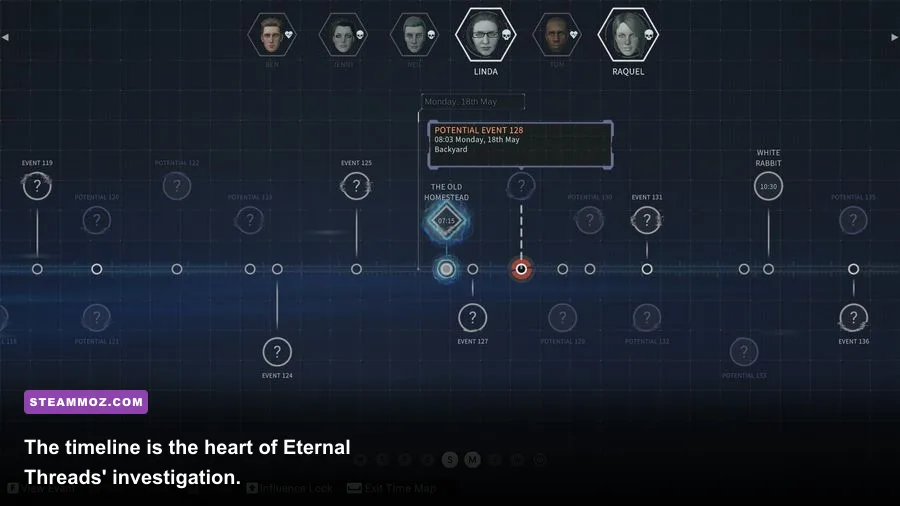
The recommended specification isn’t just about prettier shadows. Eternal Threads asks you to observe how people behave, reconstruct what happened, and make changes that ripple through connected events. The game’s tension comes from comparing outcomes, not from combat. Stutters during a key conversation or a delayed scene transition can interrupt that rhythm and make the timeline harder to read.
There are no weapon builds or skill trees to optimize here. Your main tools are observation, timeline navigation, and the ability to alter decisions. That makes display clarity more valuable than extreme frame rates. At 1080p with stable 60fps, text, character positioning, and environmental details remain easy to parse. At 720p on a weak display, the game can still work, but subtle clues may feel less immediate.
Players coming from more demanding games may find Eternal Threads refreshingly light. For comparison, our Drox Operative PC specs breakdown shows how older hardware requirements can still hide meaningful CPU differences. Likewise, Construction Simulator 2015 demonstrates why an older game can still feel demanding when simulation and scene streaming pile up.
If your system only meets minimum requirements, approach the game with realistic expectations: target 1080p low or medium, accept a 30fps cap if needed, and keep background applications under control. If you meet the recommended requirements, high settings at 1080p should be the sensible starting point rather than a risky gamble.
Final PC verdict for Eternal Threads
Eternal Threads is not a game that demands an expensive modern rig. The official minimum of an i5-4460 or FX-8350, 8GB RAM, and GTX 960 or R9 380 is enough to put the game within reach of older desktops and affordable gaming laptops. The recommended i7-4770 or Ryzen 5 1600, 16GB RAM, and GTX 1060 or RX 580 gives you the best cushion for 1080p and higher settings.
The safest buying rule is simple: prioritize the dedicated GPU, dual-channel memory, and an SSD over chasing a huge refresh rate. A modern four-core-or-better CPU with 16GB RAM will also age better than a system that technically matches the old minimum on paper. If you’re still unsure, compare your exact laptop GPU—not just its family name—with the listed desktop cards.
For updates, patches, and developer information, visit the Cosmonaut Studios official website and the Secret Mode publisher site. And if your broader PC library needs tuning, Steamoz’s guide to Far Cry 6: Lost Between Worlds performance offers a useful contrast: Eternal Threads is considerably kinder to modest hardware, but stable frame pacing still makes the mystery more enjoyable.