Short answer: yes, most gaming PCs from the last five to seven years can run at least one major 2022 MMORPG, but the answer depends heavily on the game. Lost Ark is comfortable on modest hardware, Tower of Fantasy needs a stronger mid-range system, and New World is the real stress test. For 1080p at 60 FPS, aim for a Core i5-10400 or Ryzen 5 3600, 16GB of RAM, an RTX 2060 or RX 5600 XT, and an SSD. A GTX 1650-class machine can work, but expect reduced settings, crowded-city dips, and occasional stutter.
One important clarification: there isn't a single PC game officially titled MMORPG 2022 PC. That search phrase usually refers to MMORPGs released or actively played on PC during 2022. This comparison focuses on Lost Ark, New World, and Tower of Fantasy, with Guild Wars 2 included as a useful lower-demand reference point.
The real 2022 MMORPG PC requirements
Official minimum specifications can be misleading because they target launchability, not a smooth raid experience. Lost Ark's minimum target is an Intel Core i3 or Ryzen 3-class processor, 8GB of RAM, and a GTX 460 or Radeon HD 7870. That will start the game, but it doesn't describe the experience in Vern Castle, a busy Punika hub, or a Legion Raid with heavy visual effects.
New World is a different beast. Its official minimum specification calls for a Core i5-2400 or AMD FX-6300, 8GB of memory, and a GTX 670 or Radeon R9 280. The recommended target rises to a Core i7-2600K or Ryzen 5 1400, 16GB of RAM, and a GTX 970 or RX 580. In practice, 16GB should be treated as the floor because Windows, voice chat, browsers, and the game can push an 8GB system into page-file stutter.
Tower of Fantasy lists an older quad-core CPU, 8GB of RAM, and a GTX 960-class GPU as a baseline. Its open-world traversal and combat effects are more demanding than those figures suggest. Guild Wars 2 is older and generally forgiving, although large World versus World battles can still become CPU-limited.
| Game | Official minimum direction | Practical 1080p target | Main limitation |
|---|---|---|---|
| Lost Ark | 8GB RAM, GTX 460-class GPU | Core i5-8400, 16GB, GTX 1660 | CPU dips in hubs and raids |
| New World | 8GB RAM, GTX 670-class GPU | Core i5-10400, 16GB, RTX 2060 | Open-world streaming and settlements |
| Tower of Fantasy | 8GB RAM, GTX 960-class GPU | Ryzen 5 3600, 16GB, RTX 2060 | Traversal stutter and effects |
| Guild Wars 2 | 4GB RAM, older DX11 GPU | Core i5-10400, 16GB, GTX 1660 | Large-event CPU scaling |
For the developer-side details, check the official Lost Ark site, the New World official site, and the Tower of Fantasy website. Requirements change with patches, but the hardware advice above remains the safer buying guide.
Benchmark truth at 1080p and 1440p
These are realistic performance ranges for a properly configured Windows 10 or Windows 11 system with 16GB dual-channel RAM, the game installed on an SSD, and current GPU drivers. They are not inflated “empty field” numbers. MMORPG performance varies by server population, player effects, weather, combat activity, and asset streaming, so the one-percent-low range is more useful than the headline average.
| Hardware profile | Lost Ark 1080p High | New World 1080p High | Tower of Fantasy 1080p High |
|---|---|---|---|
| GTX 1650, Ryzen 5 3600, 16GB | 60-85 FPS, 40-55 in raids | 38-55 FPS, 28-40 in towns | 45-65 FPS |
| RTX 2060, Core i5-10400, 16GB | 90-130 FPS, 65-85 in raids | 55-75 FPS, 40-55 in towns | 70-95 FPS |
| RTX 3060, Ryzen 5 5600, 16GB | 110-160 FPS, CPU-limited | 70-95 FPS, 50-70 in towns | 85-115 FPS |
| RTX 4070, Ryzen 7 5800X3D, 32GB | 140+ FPS, CPU-limited | 95-130 FPS, 70-95 in towns | 120+ FPS |
At 1440p, the RTX 2060 and RX 5600 XT remain viable if you use High rather than Ultra. Expect roughly 65-90 FPS in Lost Ark, 40-60 FPS in New World, and 50-75 FPS in Tower of Fantasy. An RTX 3060 or RX 6700 XT is the sweet spot for 1440p, though New World still benefits more from CPU speed than from an expensive GPU.
The key warning is frame pacing. A system can report 80 FPS while feeling rough if its one-percent lows fall into the 30s. That usually points to shader compilation, background downloads, insufficient RAM, or a CPU bottleneck. Don't judge MMORPG performance from a quiet beach or an empty dungeon.
Which component matters most for MMORPG performance?
CPU: MMORPGs constantly process player positions, NPC routines, combat events, inventory data, and streaming requests. Six modern cores are the sensible minimum. A Ryzen 5 3600 or Core i5-10400 is still capable; a Ryzen 5 5600, Core i5-12400F, or Ryzen 7 5800X3D gives noticeably better lows in crowded areas. The 5800X3D is especially strong in simulation-heavy games because its large 96MB L3 cache reduces trips to slower system memory.
GPU: An RTX 2060, RTX 3060, RX 5600 XT, or RX 6600 is enough for high-quality 1080p. You don't need ray tracing for these games, and disabling it where available produces a much larger gain than lowering texture quality. At 1440p, 8GB of VRAM is preferable; 6GB cards can still work, but texture settings and crowded scenes may trigger hitching.
RAM: 16GB in dual-channel mode is the baseline. Two 8GB sticks at their rated speed are better than one 16GB stick, particularly for CPU-limited raids. Choose 32GB if you keep Chrome, Discord, OBS, and a browser-based map open while playing. New World is the clearest beneficiary.
Storage: Use an SSD. A SATA SSD is sufficient, while an NVMe drive improves loading and reduces streaming pauses during rapid travel. Installing an MMORPG on a hard drive is still possible, but texture pop-in and long zone transitions are a poor trade for saving a small amount of money.
Best graphics settings for stable FPS
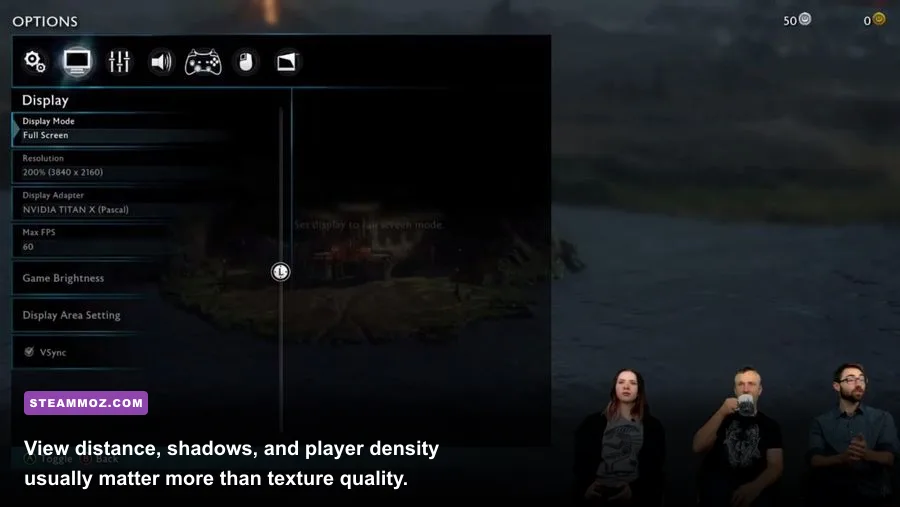
Don't blindly select the Low preset. Most presets slash textures and draw distance first, even though those settings aren't always responsible for the biggest frame-time spikes. Start with High, then target the CPU-heavy options. The following profile is designed for an RTX 2060 or RX 6600-class card.
| Setting | Recommended value | FPS impact | Visual trade-off |
|---|---|---|---|
| Resolution | Native 1080p or 1440p | Very high | Use resolution scaling only when GPU-limited |
| Textures | High | Low to medium | Needs 6-8GB VRAM |
| Shadows | Medium | High | Small loss in contact detail |
| View distance | High, not maximum | High in open zones | Less distant geometry |
| Player density | Medium or optimized | Very high in cities | Fewer character models and effects |
| Effects quality | High; reduce other players' effects | High in raids | Cleaner combat readability |
| Anti-aliasing | TAA or game default | Low | Minor edge softness |
| Motion blur | Off | Small | Sharper camera movement |
For New World, lower terrain detail, shadows, and player-nameplate distance before touching textures. For Lost Ark, reduce other-player effects and combat optimization settings if raids become visually chaotic. Tower of Fantasy responds well to lowering shadows and volumetric effects, while texture quality can usually stay high on a 6GB card.
How to stop stutter before blaming your GPU
First, install the game on an SSD and leave at least 15 percent free space. Then enable your motherboard's XMP or EXPO memory profile; running DDR4 at 2133MHz instead of its advertised 3200MHz can hurt minimum FPS. Update the chipset driver as well as the GPU driver, and use Windows Game Mode with unnecessary overlays disabled.
Watch three metrics with MSI Afterburner or CapFrameX: GPU utilization, CPU thread usage, and one-percent lows. If the GPU sits below 90 percent while one CPU thread is pinned, lowering resolution won't help. Reduce player density, view distance, and shadows instead. If GPU utilization stays near 99 percent, reduce resolution scale, effects, or volumetric quality.
Shader compilation and asset streaming can cause early-session hitching. After a major patch, spend several minutes moving through different zones and effects-heavy combat before judging performance. Don't run a browser with dozens of tabs while testing; memory pressure can turn a perfectly capable 16GB system into a stutter machine.
If your game crashes rather than simply running slowly, our guides to ELEX crash and FPS fixes and general low-FPS troubleshooting cover the same driver, overlay, and file-integrity checks. For older hardware, the Far Cry 2 PC specs breakdown also explains how to separate true GPU limits from configuration problems.
The verdict for your gaming PC
If your system has 16GB of RAM, a six-core processor, an SSD, and a GTX 1660 or better, you can run the major 2022 MMORPGs comfortably at 1080p. An RTX 2060 or RX 6600 makes High settings realistic, while an RTX 3060-class card is the better 1440p purchase. New World is the demanding outlier, especially in settlements and large events, so judge your upgrade against its one-percent lows rather than Lost Ark's much higher average.
Older PCs aren't automatically disqualified. A GTX 1650 paired with a Ryzen 5 3600 can deliver a good Lost Ark experience and a playable Tower of Fantasy profile, provided you accept Medium settings and occasional dips. The upgrade order is straightforward: move from 8GB to 16GB dual-channel RAM, install an SSD, then improve the CPU if city performance is poor or the GPU if utilization is constantly maxed.
For a practical buying target, choose a Ryzen 5 5600 or Core i5-12400F, 16GB of RAM, an RX 6600 or RTX 3060, and a 1TB SSD. That combination won't guarantee a locked 144 FPS in every player-packed event, but it delivers the stable 60-100 FPS experience most 2022 MMORPGs actually need.
For more performance-focused reading, Steamoz also has a max-FPS settings guide that explains the same frame-time balancing approach used here. The principle is simple: protect your one-percent lows, reduce CPU-heavy crowd settings first, and spend GPU power on the details you can actually see.