Modding Diablo 3 on PC isn't like dropping three hundred files into Skyrim’s data folder. Because Blizzard runs Diablo 3 entirely through Battle.net’s server-authoritative architecture, traditional game-file injection will trigger the automated Warden anticheat and vaporize your account. However, you can radically overhaul how Sanctuary looks, controls, and performs by combining client-side post-processing injectors, hardware-level input re-mappers, sound engine hooks, and deep config optimizations. These modifications eradicate the infamous 2012 cartoon-paint visual palette, eliminate engine-level audio lag during four-player Greater Rift 150 pushes, and bring console-style twin-stick controls directly to your desktop rig.
Visual Overhauls: ReShade and the Dark Sanctuary Pipeline

When Diablo 3 dropped in 2012, hardcore fans famously created the "Rainbow Diablo" t-shirt controversy because the world felt too bright, saturated, and painterly. If you want Sanctuary to carry the suffocating, pitch-black grit of Diablo II: Resurrected or Diablo IV, the definitive answer is a tuned deployment through the ReShade official repository. ReShade works strictly in the post-processing render pipeline, intercepting DirectX 11 buffers after the engine draws the frame. This keeps you completely isolated from Blizzard's game memory scanners.
To kill the plastic sheen, you don't want a generic high-contrast LUT that crushes black values into unreadable mud. The sweet spot requires five specific shader passes loaded in an exact chain: qUINT_sharp.fx (Luma sharpening set to 0.45), Levels.fx (input black clipped to 12, input white pushed to 242), Curves.fx (Formula 2 contrast curve with 0.32 saturation retention), prod80_02_CMatrix.fx, and Vignette.fx. This stack targets the desaturation of mid-tone blues and yellows while pushing blood-red and cold torchlight tones straight to the front.
LumaSharpen counteracts Diablo 3’s aggressive internal FXAA, which tends to smear armor textures on classes like the Crusader and Necromancer. Pair this with downscaled saturation on the environmental terrain, and you get razor-sharp metal trim, distinct floor textures, and telegraphed elite affixes—such as Arcane Enchanted lasers and Molten explosions—that pop against a dark, grim environment. Similar to how you adjust visual performance when fine-tuning PC performance settings in modern open worlds, stripping out Blizzard's muddy post-effects recovers visual clarity without sacrificing single-frame performance.

🎮 FORM
Looking to experience this game? Grab your digital key directly on our store for $14.99.
View on Steammoz Store →Input Injection: Delivering Real Controller Play to PC
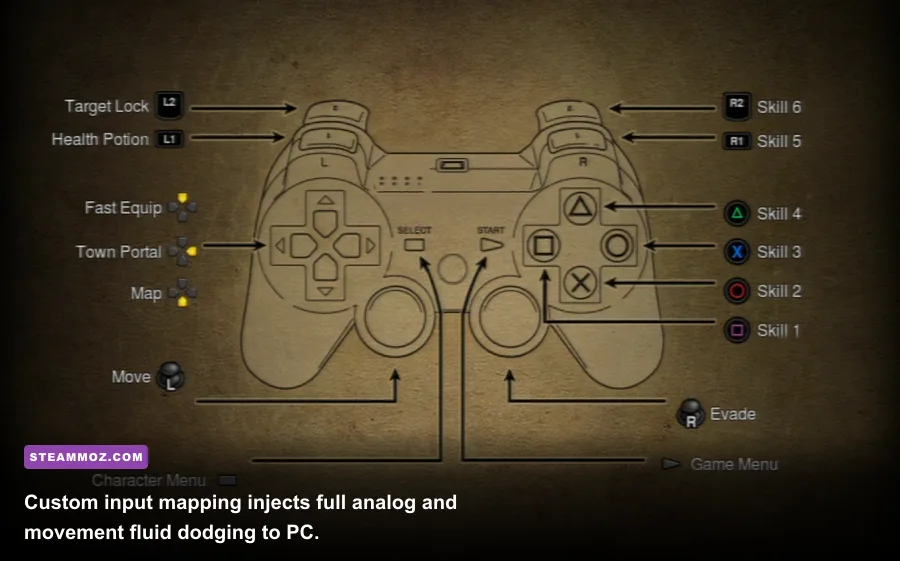
One of the great gaming tragedies of the eighth console generation was that Blizzard built a fantastic native controller scheme—complete with a dedicated directional dodge roll—for PlayStation and Xbox, but flatly refused to patch it into the PC executable. Pointing and clicking through a 15-minute GR150 push on a Gears of the Dreadlands Demon Hunter or a Whirlwind/Rend Barbarian is a direct route to carpal tunnel syndrome.
You can solve this without modifying executable code by deploying virtual controller mapping suites through reWASD mapping software or deep Steam Input configurations. The secret isn't just binding Left Click to a thumbstick; it is building an analog-to-digital translation curve. By setting your left analog stick to emit localized mouse-move commands within a clamped 300-pixel radius centered on your character, your Nephalem tracks your thumb's direction smoothly rather than instantly snapping the cursor across the monitor.
For classes reliant on directional movement, map the right bumper or left trigger to simulate an input macro: holding the trigger casts your primary spender (such as Whirlwind or Strafe) while locking cursor focus at a fixed offset. Combine this with an evade macro mapped to the right analog flick—instantly casting mobility tools like Vault, Teleport, or Dashing Strike toward the thumbstick's vector—and Diablo 3 PC suddenly plays like an agile, modern twin-stick action game. It feels substantially more responsive than the static click-to-move architecture that has aged poorly since the Reaper of Souls launch.
The High-Risk Grey Zone: Interface Overlays and Warden Bans
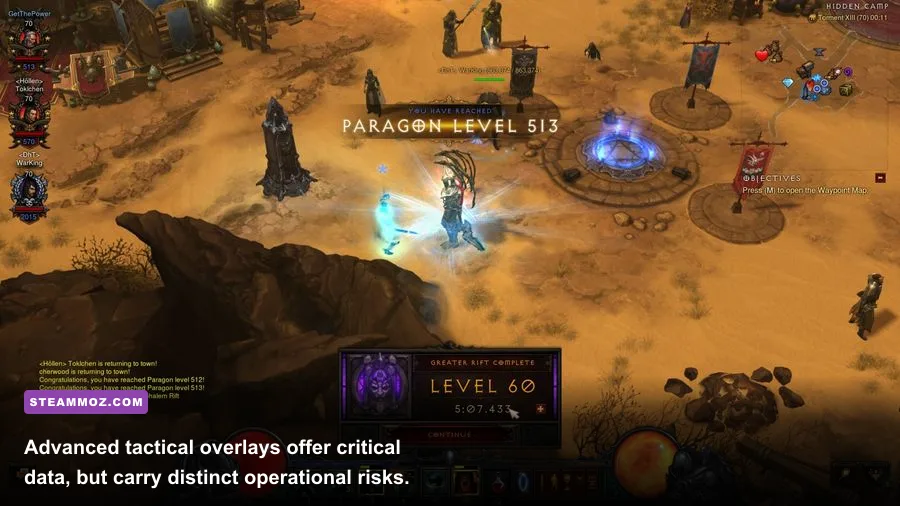
Search any forum for Diablo 3 mods and you’ll inevitably collide with TurboHUD and custom UI overlays. Unlike ReShade, which merely reads frame buffers, UI overlays read the game's active RAM to draw custom elements directly onto your screen. They expose hidden data: exact elite pack health bars, pylons hidden in the fog of war, monster progression percentages down to two decimal places, and the precise rotational status of your Convention of Elements ring.
Here is the unvarnished reality: running memory-reading overlays is a violation of Blizzard's End User License Agreement (EULA) accessible on the official Diablo 3 portal. Blizzard executes Warden ban waves in unpredictable intervals. While thousands of botters and leaderboard pushers run these tools continuously on alternative accounts, logging into your primary account with an active memory-hooking overlay is Russian roulette. If you get caught in a seasonal sweep, your entire Battle.net license is revoked with zero appeals.
If you choose to maximize efficiency, stick to non-invasive external tools. Transparent desktop timers that sync to your keyboard inputs can track Convention of Elements cycles (rotating through elements every 4 seconds) or your Taeguk and Bastions of Will buff uptimes without hooking into Diablo 3's memory space. It gives you the operational pacing you need for high-tier rifting while keeping Warden completely dormant.
| Modification Class | Primary Software | Anticheat Detection Risk | Core Gameplay Benefit | Setup Complexity |
|---|---|---|---|---|
| Visual Post-Processing | ReShade / SweetFX | Zero (Buffer Hook Only) | Eliminates cartoon colors; enhances visibility | Low (Plug & Play) |
| Virtual Controller Suite | reWASD / Steam Input | Zero (OS-Level Input) | Full analog movement; reduces wrist strain | Moderate (Curve Tuning) |
| Memory HUD Overlays | TurboHUD & Forks | Extreme (High Ban Rate) | Elite affixes, map hacks, exact rift progression | High (Frequent Offsets) |
| Input Automation | AutoHotkey / NumLock | Low to Moderate (Pattern Dependant) | Automates Devour, Iron Skin, Cooldowns | Very Low (Built-in or Script) |
| Private Sandbox Clones | Mooege / Open-Source Emulators | Zero (Runs on Localhost) | Total loot-table customization, offline play | Expert (Server Hosting) |
Gothic Audio Overhaul: Restoring Classic Diablo Soundscapes
Diablo 3’s orchestral score is technically polished, but it lacks the iconic dread created by Matt Uelmen’s work on the original games. The constant orchestral brass swells inside Nephalem Rifts can become grating when you're farming hundreds of keys a week. Because you cannot safely unpack and rebuild the game's native .MPQ and CASC storage archives without getting flagged by file validation checks, the solution lies in an external audio routing framework.
Using virtual audio mixers like Voicemeeter alongside dynamic media scripts, you can completely replace the background score. The process involves setting Diablo 3's internal "Music Volume" slider to zero while retaining "Effects" and "Ambient" at maximum. Then, configure an active media player controlled via global hotkeys mapped to your main town portal key (default: T) and your Greater Rift entrance confirmations.
By routing the eerie 12-string acoustic guitar tracks from the original Tristram theme, the cavernous drone of the Catacombs, and ambient dark industrial tracks, the tone shifts immediately. The bone-crunching Foley audio of Diablo 3—corpse explosions, critical hit chimes, and weapon swings—sits cleanly on top of minimalist gothic dark ambient music. This simple configuration strips away the modern cinematic bombast and restores the quiet, lonely menace that defined the golden age of PC action RPGs.
Engine File Tuning: Eliminating High-Density Greater Rift Lag

Even on monster high-end GPUs, Diablo 3 has an engine flaw: high-density spell calculations choke single CPU threads. When four players pull an entire battleground of monsters in a GR150 and start stacking Area Damage procs—such as a Tal Rasha Meteor Sorcerer or a Witch Doctor spamming DoTs—the frame rate plummets and server desync occurs. Much like troubleshooting crash fixes and frame drops in older Euro-RPG engines, unlocking real performance requires editing the local config file directly.
Navigate to your local system storage under Documents\Diablo III\D3Prefs.txt. This configuration file contains hidden engine flags not exposed in the standard in-game options menu. Locate the following lines and modify their integer values:
HardwareClass "4"
ChannelsToUse "16"
DisableTrilinearFiltering "1"
LimitForegroundFPS "1"
MaxForegroundFPS "141"
The single most important edit here is ChannelsToUse "16". By default, Diablo 3 pushes audio calculations to 64 or 128 channels. The engine's legacy software sound buffer attempts to calculate position, decay, and reverb for every single hitting projectile and status effect on 80+ active targets. This sound calculation alone creates massive micro-stutters that gamers often mistake for network latency. Lowering this to 16 completely eliminates the audio buffer bottleneck without degrading spatial cues.
| Engine Setting / Shader Flag | Default Value | Optimized Value | Performance / Visual Impact |
|---|---|---|---|
| ChannelsToUse (D3Prefs) | 64 or 128 | 16 or 32 | Massive CPU frame-time stability in high density |
| DisableTrilinearFiltering | 0 | 1 | Cleans up texture shimmering on distance angles |
| qUINT_sharp (ReShade) | None | Sharpness: 0.40 / Radius: 1.1 | Negates engine blur; razor-sharp weapon models |
| Curves.fx (ReShade) | None | Mode: Formula 2 / Contrast: 0.30 | Restores true gothic blacks without shadow crushing |
| MaxForegroundFPS | 200+ | Display Refresh - 3 (e.g. 141) | Eliminates G-Sync tearing; smooths pacing |
Furthermore, setting your MaxForegroundFPS to match your monitor's adaptive sync ceiling (e.g., 141 FPS for a 144Hz monitor, or 237 FPS for a 240Hz monitor) keeps the engine from wildly fluctuating between empty corridors and dense pack pulls. It flattens the frame-time graph and prevents your hardware from generating wasted heat during menus.
Offline Sandboxes: The Experimental Modding Frontier
What if you want to alter the core rules of the game? What if you want to boost legendary drop rates, test experimental skill combinations with uncapped Attack Speed, or run Diablo 3 completely offline on a laptop without an active internet connection? For this, the modding community relies on open-source GitHub modding projects like local server emulators.
Projects like Mooege and d3proto reverse-engineered the handshake protocol between the Diablo 3 client and Blizzard's infrastructure. By pointing your client's command line to an internal loopback address (127.0.0.1), these tools let you spin up a local server instance. While earlier versions only supported basic act exploration, mature forks allow you to modify drop tables, spawn specific bosses like Belial or Malthael on command, and uncap Paragon points instantly.
This is where true gameplay modding happens. Community creators use these sandboxes to study combat math, much like analyzing ranked weapon performance tiers or tracking hidden game mechanics and loot efficiency in complex single-player campaigns. You can craft experimental legendaries with custom affix multipliers—for example, removing the cooldown from Archon or granting Corpse Explosion infinite radius. It provides a fascinating sandbox to play with Diablo 3's pristine combat mechanics entirely decoupled from seasonal leaderboards or network queues.
Treat Diablo 3 PC modding as a game of finesse rather than blunt force. By layering ReShade for a bleak gothic look, reWASD for smooth analog movement, manual sound routing for atmosphere, and D3Prefs adjustments for rock-solid frame delivery, you eliminate over a decade of visual rust and technical debt. You get an ARPG that looks as foreboding as modern dark fantasy games, while keeping your Battle.net account safe from the automated banhammer.