
Marvel’s Spider-Man Remastered is at its best when you treat Manhattan as a movement playground, not just a map between missions. Before you start, know this: the best early upgrades improve web-swinging and air control, gadgets are more important than button-mashing, challenge tokens are limited by activity type, and PC performance depends heavily on ray tracing, crowd density, and traffic settings. The campaign is forgiving, but understanding those systems early makes the first ten hours dramatically smoother.
Insomniac’s 2018 adventure remains a remarkably generous superhero game. You can rush the main story, hunt every backpack, stop street crimes, solve environmental puzzles, or simply launch yourself off Avengers Tower and lose an hour to the skyline. This guide focuses on the details that prevent wasted resources and make combat, exploration, and PC performance click faster.
Start with movement skills, not flashy damage upgrades
Spider-Man’s skill trees are divided into Innovator, Defender, and Webslinger. All three are useful, but a new player gets the most immediate value from Webslinger and the early traversal upgrades. The city feels good at the start; after a few targeted purchases, it becomes absurdly fluid.
Your first priority should be Quick Zip, which lets Peter pull himself forward in midair. It is the difference between barely clearing a rooftop and chaining several launches across a block. Follow it with Point Launch Boost, which increases the distance gained from a point launch, then grab Air Marshal when you begin using aerial attacks regularly. Air Marshal rewards staying airborne by increasing damage while Peter is in the air, and it pairs naturally with web-swinging into a fight.
On the Defender tree, Perfect Dodge and Perfect Hit are foundational. A blue Spider-Sense indicator means an attack is incoming; tapping dodge at the final moment triggers the white flash of a perfect dodge and automatically fires a web at the attacker. Perfect Hit lets you follow a perfect dodge with a powerful counterattack. This is not just a stylish trick. It creates breathing room against groups and lets you remove a dangerous gunman without abandoning your current target.
The Innovator tree becomes more valuable once enemy types multiply. Web Throw helps you launch webbed enemies into walls, while Collateral Damage improves the impact of environmental attacks. Later, Web Blossom is one of the strongest panic buttons in the game: Peter spins through a group, dealing heavy damage and webbing enemies around him. Save it for shield carriers, brutes, or moments when three different attacks are converging.
| Early Skill | Tree | Why It Matters | Best Use |
|---|---|---|---|
| Quick Zip | Webslinger | Improves midair correction | Crossing wide streets and recovering from missed swings |
| Point Launch Boost | Webslinger | Extends launch distance | Fast rooftop-to-rooftop traversal |
| Perfect Dodge | Defender | Creates a counter window and webs attackers | Gunmen, melee groups, and surprise attacks |
| Web Throw | Innovator | Turns webbed enemies into projectiles | Removing isolated enemies near walls |
| Web Blossom | Innovator | Strong area damage and crowd control | Large groups and elite enemy waves |
Do not obsess over creating a perfect build. You can unlock every skill before the end of the campaign if you complete a healthy selection of side content. The real choice is timing: mobility skills improve every minute of play, while combat skills pay off most when you are struggling with a particular faction.
Learn what each enemy telegraph actually means

Spider-Man’s combat looks chaotic, but its signals are clear. The white Spider-Sense ring means you can dodge normally. A blue flash indicates a projectile or attack that can be countered with a well-timed dodge, while a red warning means the hit is generally not safe to ignore. Dodging away is reliable, but jumping or using a gadget can be even better when the arena is crowded.
Brutes are the first major lesson. Their heavy swings cannot be interrupted by ordinary punches, so use a dodge, a web gadget, or an environmental object before committing to a combo. Once the story introduces miniguns, rockets, and shields, target priority matters more than raw damage. Disarm ranged enemies with Web Yank or a perfect dodge, then use the stolen weapon against the crowd. Shield enemies require an aerial attack or a web-based solution; repeatedly punching their guard only wastes time.
Keep an eye on the focus meter beneath your health. Dealing damage builds focus, and one full segment can be spent on a finisher. Finishers restore health by default, making them your best recovery tool during long encounters. You can also spend focus on gadgets or suit powers, but healing is often the correct choice when your health is low. A finisher against a basic enemy is still valuable if it prevents a later mistake against a brute.
Use the environment aggressively. Throwing a manhole cover, sign, or nearby object costs no gadget ammunition and can stagger multiple targets. Webbing an enemy to a wall is usually faster than defeating them with punches, especially after you unlock upgrades that make web attacks more effective. Rooftop edges are also weapons: launch enemies off the roof and the game will automatically web them safely before they hit the street.
For a dependable combat loop, open with an Impact Web on a dangerous target, dodge toward the nearest threat, aerial-combo a shield enemy, and use a gadget while enemies are grouped. A Web Bomb can web several enemies at once, while Suspension Matrix lifts targets out of the fight and gives you time to reposition. The goal is not to finish one enemy before touching another. It is to reduce the number of active threats every few seconds.
Spend tokens carefully and activate the right suit powers
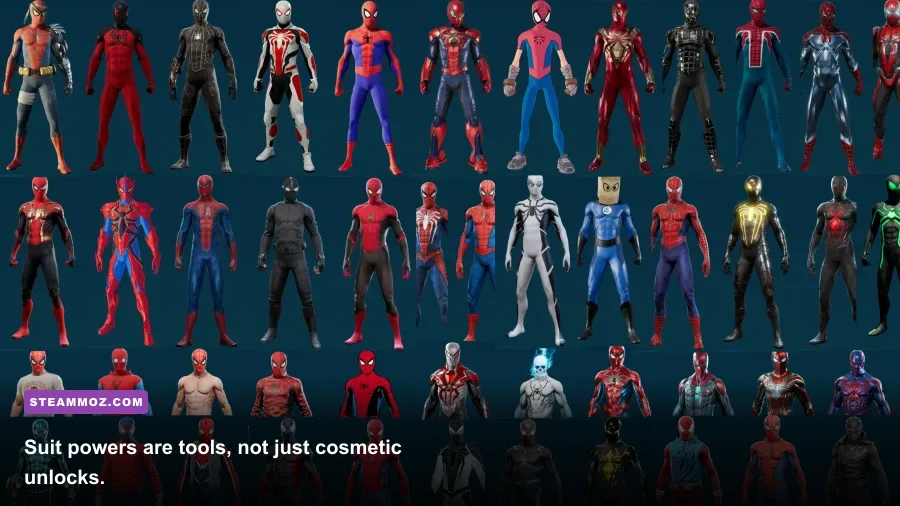
Spider-Man Remastered uses five major resource types: Backpack, Base, Challenge, Landmark, and Research tokens. You earn them from different activities, and each activity becomes available as the story expands. This matters because suits and gadgets have separate unlock costs. A suit may require two Backpack, two Landmark, and one Research token, while a gadget upgrade can demand Crime or Challenge tokens.
Backpacks are the easiest early pickups and reveal small story snippets about Peter’s past. Landmarks provide quick Landmark tokens after you photograph a location, while Research Stations offer short experiments and reward Research tokens. Bases and Taskmaster challenges take more effort but provide larger payouts. You do not need to clear the entire map immediately; the campaign naturally unlocks new activities and higher-level enemy groups.
Buy gadgets before chasing every suit. The Impact Web is excellent for instantly removing enemies near walls, and the Web Bomb is one of the best crowd-control tools in the game. Gadget upgrades improve ammunition capacity and effect strength, which means more reliable control during base missions. Suit powers are powerful, but their cooldowns mean they should complement your gadgets rather than replace them.
The Advanced Suit power, Battle Focus, rapidly fills focus so you can chain finishers or recover health. The Web Blossom suit power damages and webs enemies in a wide area, making it ideal when several factions pile into a fight. The Negative Shockwave suit power is useful against groups, while Quad Damage dramatically increases attack damage for a short window. You can equip any unlocked suit power regardless of the suit you are visually wearing.
| Resource | Earned From | Best Early Spending | Why Save Some |
|---|---|---|---|
| Backpack Token | Backpack pickups | Early suits and gadget upgrades | Several suit recipes use them |
| Landmark Token | Photographing landmarks | First suit unlocks | Useful for multiple gadget recipes |
| Research Token | Research Stations and projects | Gadget ammunition upgrades | Later suit upgrades need them |
| Base Token | Enemy base missions | Suit mods and combat upgrades | Base score bonuses increase the payout |
| Challenge Token | Taskmaster challenges | High-impact suit mods | Gold ratings are harder before upgrades |
Suit mods deserve attention too. Battle Tech boosts gadget damage, Combo Booster increases focus gained from combos, and Threat Sensors slows time briefly after a perfect dodge. For a first playthrough, Combo Booster plus Threat Sensors is a safe general-purpose pairing. If you keep running out of gadget charges, swap in Battle Tech and prioritize environmental attacks.
Do not rush side content, but do not ignore it either
The main story unlocks new mechanics, districts, and enemy factions, so rushing straight through can leave Peter under-equipped. On the other hand, clearing every activity the moment it appears can flatten the progression curve and make later missions feel too easy. The best rhythm is to complete a few side activities whenever a district opens, then return to the campaign.
Crime missions are particularly useful because they appear dynamically and award Crime Tokens for gadget and suit upgrades. Completing optional objectives, such as webbing three enemies to walls or performing aerial attacks, increases your reward. These objectives are worth pursuing when they fit your playstyle, but don't throw a fight just to force a finicky bonus. You can replay completed bases and challenges later.
Fisk Hideouts, Demon Warehouses, Sable Outposts, and Prisoner Camps each test a slightly different combat rhythm. Bases also contain optional bonus objectives and scoring tiers. If you are finding a base difficult, leave it, unlock another skill or gadget upgrade, and return. The game does not punish you for postponing it.
Research Stations are more than busywork. They introduce short mechanics involving spectrographs, electrical relays, water pollution, and movement through a test area. They provide Research Tokens and help you learn how Peter’s science work connects to the story. The lab puzzles are also among the few activities that slow the pace down, which makes them a welcome break after several consecutive fights.
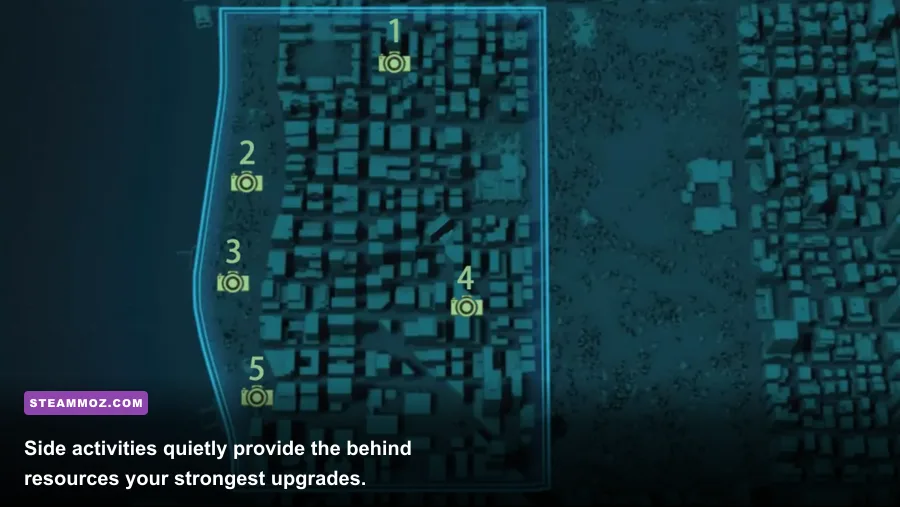
Photographs are required for Landmark Tokens, but you can use the camera creatively. The map tells you the general area, and the camera UI confirms when the subject is framed correctly. Stop moving before taking the shot; the reticle needs to recognize the landmark, not merely point in its direction. Hidden photo opportunities become available later, so don't worry about having every district at 100 percent immediately.
If you enjoy completionist cleanup, the hidden-rewards guide on Steamoz is a useful reminder that exploration games often hide their best upgrades outside the critical path. For performance troubleshooting in other demanding PC releases, Steamoz also has guides covering crashes and FPS drops and PC graphics optimization.
Use these PC settings before changing your difficulty
The PC version is scalable, but Spider-Man Remastered can expose CPU and GPU limits quickly during fast traversal. The official Steam listing places the minimum target at 720p and 30 frames per second with a GTX 950, Core i3-4160, and 8GB of RAM. Recommended 1080p/60 settings call for a GTX 1060 6GB, Core i5-4670, and 16GB of RAM.
Ray tracing is the biggest performance trap. Reflections look excellent on glass towers and wet streets, but ray-traced reflections can cut frame rate hard and increase traversal stutter, particularly on cards with limited VRAM. Start with ray tracing off, establish a stable frame rate, then test medium reflections if your GPU has headroom. A stable 60 feels better than an unstable 90 that collapses whenever you swing through Midtown.
| Setting | Recommended Starting Value | FPS Impact | Visual Note |
|---|---|---|---|
| Ray-Traced Reflections | Off or Medium | Very high | Most expensive option during city traversal |
| Texture Quality | High with 8GB VRAM | Low to medium | Uses VRAM more than raw GPU power |
| Shadow Quality | Medium or High | Medium | Lower this before reducing textures |
| Traffic Density | Medium | Medium CPU impact | Can reduce busy-city traversal spikes |
| Crowd Density | Medium | Medium CPU impact | High settings add people but not major detail |
| Depth of Field | Personal preference | Low | Mostly affects cinematic focus blur |
| Level of Detail | High | Medium | Protects distant geometry during swinging |
Use an SSD if possible. The game streams a huge amount of Manhattan while you swing, and a hard drive can turn fast movement into texture pop-in and hitching. Keep shader compilation enabled, close background applications, and watch VRAM usage rather than relying only on average FPS. If the game feels smooth indoors but stutters between districts, lower crowd density, traffic density, and ray-traced reflections before touching resolution.
For a low-end system, target 720p or 900p, use medium presets, disable ray tracing, and cap at 30 or 45 FPS depending on your monitor. For a mainstream 1080p machine, high settings at 60 FPS are realistic with the recommended GTX 1060-class hardware, though newer GPUs provide a much cleaner experience. The official PlayStation game page also details the PC features, including ultrawide support and ray-traced options.
Make the opening hours work for you
Don't spend your first sessions chasing maximum completion. Play enough story missions to unlock the skill trees, gadgets, and district activities, then build a flexible routine: clear nearby crimes, collect a few backpacks, complete one Research Station, and return to the campaign. That loop keeps resources flowing without turning Manhattan into a checklist.
During missions, scan constantly with R3 to reveal enemies, interactable objects, and nearby objectives. Use stealth when the game offers a perch network; a silent web strike can remove a guard and create a safer arena before combat starts. When stealth breaks, don't stubbornly stay on the ground. Swing to a wall, launch off it, and reset the fight from above.
Difficulty changes enemy damage and resilience, but it does not fundamentally alter the combat toolkit. Friendly Neighborhood is perfect for seeing the story, Amazing is the intended first-playthrough balance, and Spectacular makes enemy groups punish careless positioning. You can change difficulty from the settings menu, so there is no reason to restart if the balance stops feeling fun.
Finally, follow the developer information from Insomniac Games if you want the broader series context, but don't overthink the order. Spider-Man Remastered includes the complete original campaign and The City That Never Sleeps chapters. Learn the swing timing, spend tokens on tools you actually use, and treat every fight as a positioning puzzle. Once those habits settle in, Peter Parker stops feeling like a character you control and starts feeling like a force of nature moving through New York.