Yes, almost any modern Windows PC can run Fibbage XL. The Steam-listed baseline is a Windows 7-or-newer machine with a 2 GHz dual-core processor, 4 GB of RAM, a DirectX 9-compatible graphics card, broadband internet, and roughly 3 GB of free storage. Jackbox Games does not publish a separate official recommended tier, but a Windows 10 or 11 PC with a 2.5 GHz-or-better dual-core CPU, 4 GB of RAM, integrated graphics from the last decade, and a reliable wired or 5 GHz connection is a sensible target for smooth play.
That distinction matters because Fibbage XL is not a game that needs a gaming desktop. It renders flat menus, simple animated backgrounds, text, and occasional video-style presentation elements. Your computer is unlikely to be the bottleneck. Network stability, browser-based phone controllers, display latency, and the condition of your installation matter much more than raw GPU horsepower.
Fibbage XL minimum system requirements

The official Steam specification is low enough to include many office PCs, older laptops, and compact living-room machines. Here is the practical breakdown of the published baseline.
| Component | Official minimum | What it means in practice |
|---|---|---|
| Operating system | Windows 7 or later | Windows 10 or Windows 11 is the safer choice for current drivers and browser compatibility. |
| Processor | 2 GHz dual-core CPU | An older Intel Core 2 Duo, AMD Athlon II, or comparable office processor should be sufficient. |
| Memory | 4 GB RAM | Enough for Fibbage XL itself, but tight if you keep several browsers and streaming tools open. |
| Graphics | DirectX 9-compatible GPU | Older GeForce and Radeon cards, plus most integrated graphics, can handle the game. |
| DirectX | Version 9.0c | No modern ray-tracing or DirectX 12 feature set is required. |
| Network | Broadband internet connection | Bandwidth demands are tiny; packet loss and unstable Wi-Fi are the real problems. |
| Storage | Approximately 3 GB available space | Leave additional room for Steam updates and the operating system. |
Do not read the graphics requirement as a recommendation to run the game on a specific old card. Steam's wording is deliberately broad: DirectX 9 compatibility is the important part, not a particular amount of VRAM. Fibbage XL's visuals are lightweight enough that a basic Intel HD Graphics chip can generally render the game at a normal 1080p desktop resolution.
The 4 GB memory requirement is also about the game, not the entire party setup. Windows may already consume 2 GB or more before Steam launches. If your PC has only 4 GB installed, close Chrome tabs, Discord overlays, launchers, and video editors before starting a room. The game should still run, but multitasking can create stutters that look like a graphics problem.

🎮 Fibbage XL
Looking to experience this game? Grab your digital key directly on our store for $4.99.
View on Steammoz Store →Recommended PC specs for Fibbage XL

There is no separate “recommended” configuration listed on the official Steam page, so the table below is a practical editorial target rather than a manufacturer-certified tier. It is designed for the way people actually play: the game on a television or second monitor, several phones connected, voice chat in the background, and perhaps a capture or streaming application running at the same time.
| Component | Practical recommended target | Why it helps |
|---|---|---|
| Operating system | Windows 10 64-bit or Windows 11 | Better support for current Steam, display drivers, audio devices, and browser-based controllers. |
| Processor | Recent 2.5 GHz dual-core or any modern quad-core CPU | Leaves headroom for Discord, OBS, screen capture, and background applications. |
| Memory | 8 GB RAM | Prevents browser-heavy party setups from competing with the game for memory. |
| Graphics | Intel UHD 620, Radeon Vega 8, or better | Comfortable headroom for 1080p output and video capture without buying a dedicated GPU. |
| Storage | SSD with at least 5 GB free | Faster launch times and enough space for updates, recordings, and temporary files. |
| Network | Stable 5 GHz Wi-Fi or Ethernet | Reduces room disconnects, delayed submissions, and controller pairing frustration. |
A gaming GPU such as a GeForce RTX 3060 or Radeon RX 6600 is massive overkill for Fibbage XL. That is not a criticism; it is useful context. If your machine can play a recent 3D game, it can run Fibbage XL with room to spare. Even a modern integrated GPU should not need aggressive settings changes.
The recommended 8 GB of RAM is mainly about convenience. Fibbage XL uses a small amount of memory, while a party host may simultaneously run a browser for the official Fibbage XL information page, Discord, Spotify, OBS, and a video call. Extra memory prevents those background tools from turning an otherwise smooth session into a sluggish one.
Can Fibbage XL run on integrated graphics?
In most cases, yes. Fibbage XL does not demand a dedicated graphics card. Intel HD Graphics 4000-class hardware is a reasonable minimum expectation for a functional experience, while Intel UHD Graphics, AMD Vega integrated graphics, and recent Radeon 680M systems should have no trouble at 1080p.
There is no traditional graphics preset menu to fine-tune like you would find in a shooter. You generally launch the game, select the appropriate display mode or resolution, and let the simple presentation do its work. If an older laptop struggles, the issue is more likely to be an outdated driver, power-saving mode, an overloaded browser, or a display-output problem than a lack of shader power.
| Hardware profile | Expected result | Best approach |
|---|---|---|
| Older dual-core office PC with 4 GB RAM | Playable if background applications are closed | Use 720p or 1080p, disable overlays, and keep the PC plugged in. |
| Intel HD 4000 / HD 5000 laptop | Generally playable at standard resolutions | Install the latest compatible driver and use High Performance power mode. |
| Intel UHD or AMD Vega integrated graphics | Comfortable 1080p experience | Leave resolution at your display's native setting. |
| Modern dedicated gaming GPU | Far beyond the game's needs | Prioritize capture quality, audio routing, and network reliability instead. |
If you see a black screen, test windowed mode first and confirm that Windows is sending the signal to the correct monitor. A television connected through HDMI can introduce its own handshake issue, especially after the PC wakes from sleep. Updating the GPU driver and restarting Steam often fixes what looks like a performance failure.
For broader troubleshooting habits, our guide to PC crash and low-FPS fixes covers useful steps such as verifying files, checking overlays, and updating drivers. The same basics apply here, even though Fibbage XL is dramatically less demanding than Batman: Arkham Knight.
Fibbage XL performance, resolution, and frame rate
Fibbage XL is a 2–8-player party game built around reading prompts, submitting answers, and choosing the response you believe is genuine. It is not a twitch game, so a constant 60 frames per second is not essential to the rules. Still, stable presentation makes the text easier to read, keeps animations from feeling awkward, and helps a streamed session look professional.
Resolution is the setting worth thinking about. At 1080p, question text is clear on a monitor or television without asking much from the GPU. At 4K, the game may still run perfectly on capable integrated graphics, but your television's scaling, HDMI mode, or Windows desktop configuration can matter more than Fibbage XL itself. If text looks soft, check display scaling and television picture processing before blaming the game.
| Setup choice | Performance impact | Visual and gameplay result | Best use |
|---|---|---|---|
| 1080p fullscreen | Very low | Sharp prompts with minimal GPU demand | Best default for most PCs and televisions |
| 1080p windowed | Very low | Easy access to Discord or a browser | Hosts managing a room on one monitor |
| 1440p output | Low | Cleaner image on a high-resolution monitor | Modern desktops and laptops |
| 4K output | Low to moderate, depending on hardware | Sharper large-screen presentation | Living-room PCs with 4K televisions |
| OBS capture plus Discord | CPU and memory overhead | Usually no visible game difference, but background load rises | Streaming a party session |
Unlike a competitive FPS, Fibbage XL gains nothing meaningful from chasing 144 Hz. The better upgrade is a low-latency television mode, commonly called Game Mode, with motion smoothing disabled. That reduces the delay between the host selecting an option and the room seeing it. If your group is laughing at the answers, nobody will care whether the game is rendering at 60 or 144 frames per second; they will notice a sluggish television immediately.
For a general look at squeezing smoother performance from a PC, see our breakdown of PC settings that make every frame count. Fibbage XL does not need those aggressive optimizations, but the advice about overlays, power profiles, and background recording remains relevant.
Network and controller requirements that matter

The PC runs the game, but players normally use phones, tablets, or a computer browser as controllers. That creates a different set of failure points from a conventional multiplayer title. Fibbage XL needs broadband internet, yet it does not require a fast connection in the download-heavy sense. A stable connection with low packet loss is far more valuable than a huge speed-test number.
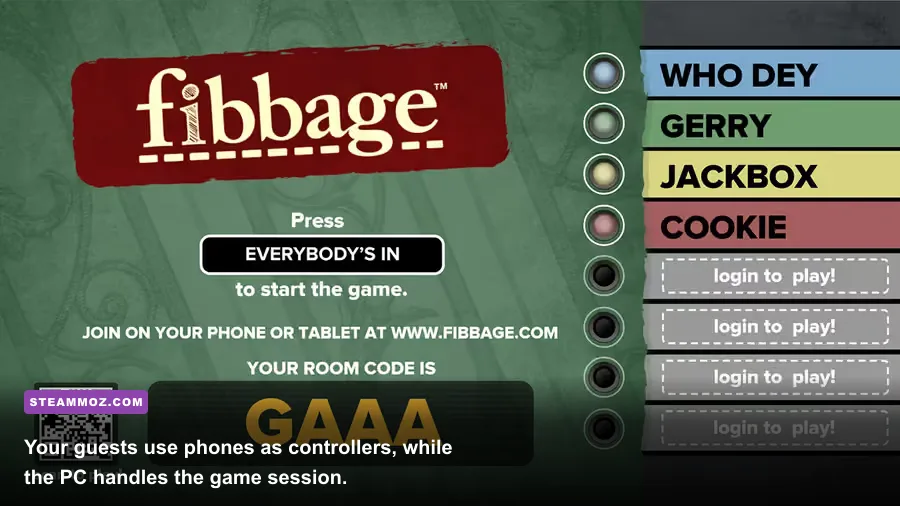
Before inviting everyone, launch the room and display the four-letter room code. Each player visits jackbox.tv on a phone or compatible browser, enters the code, and chooses a name. Keep every device on the same reliable network where possible. If a phone repeatedly disconnects, disable its cellular handoff, turn off battery-saving restrictions for the browser, and move closer to the router.
| Problem | Likely cause | Fastest fix |
|---|---|---|
| Phone cannot join | Wrong room code or unstable browser session | Refresh jackbox.tv, re-enter the current code, and confirm the host has not started. |
| Submission arrives late | Wi-Fi interference or cellular switching | Use stable Wi-Fi, disable battery saver, and stay near the access point. |
| Game audio is delayed | Television processing or Bluetooth latency | Enable Game Mode and use wired or television speakers where possible. |
| Stream viewers see answers early | Public stream delay is too short | Add a delay or use a private room code and moderate the chat. |
| Room disconnects between rounds | Router instability or host PC sleep settings | Use Ethernet, prevent sleep, and restart the room after network changes. |
Fibbage XL supports up to eight active players, with an audience option that lets additional viewers participate in the wider party experience. That makes it a strong choice for a living-room gathering or stream, but it also means the host should test the exact television, audio setup, and network before the guests arrive.
If the room is being streamed, avoid exposing the room code on screen longer than necessary. Viewer participation can be fun, but public codes also invite answer spoilers and unwanted players. A private Discord call or moderated chat keeps the session closer to the intended bluffing format.
How to install and optimize Fibbage XL on Steam
Start with the Fibbage XL Steam page and check the Requirements section against your Windows machine. After installation, leave at least 3 GB free for the title itself, then create a little extra breathing room for Steam updates and Windows temporary files. An SSD is not required, but it makes launch and restart cycles much quicker when a party session needs a reset.
- Update Windows and your graphics driver. This matters more on older laptops than buying new hardware.
- Verify the installation. In Steam, open Properties, select Installed Files, and use Verify integrity of game files if the title crashes or loses assets.
- Set the correct display. Connect the television or monitor before launch, then choose fullscreen or windowed mode based on how you plan to manage the room.
- Close unnecessary overlays. Disable tools that inject overlays into games if you encounter freezes, missing input, or strange focus changes.
- Prevent sleep. A host PC entering sleep mode between rounds can interrupt the room and force every player to reconnect.
- Test audio early. Confirm the correct Windows output device before the first guest joins, especially if HDMI audio and a headset are both connected.
For more general Steam troubleshooting, our guide to checking whether a PC can run a game explains how to compare hardware without relying on a single benchmark number. You can also use our PC settings guide when your party machine doubles as a streaming rig.
The bottom line is refreshingly simple: if your Windows PC was built in the last decade, Fibbage XL is almost certainly within reach. The official minimum is a 2 GHz dual-core CPU, 4 GB of RAM, a DirectX 9-capable GPU, broadband internet, and around 3 GB of storage. For the best hassle-free party night, aim for 8 GB of RAM, a modern integrated GPU, Windows 10 or 11, and stable Ethernet or 5 GHz Wi-Fi. Spend your budget on a good display and dependable network—not a high-end graphics card.
For official technical details, consult the Jackbox Games support center and the Jackbox Games official website. Those sources are the best place to check for compatibility changes, platform updates, and troubleshooting information after Steam installs the game.