Short answer: Cronus Zen is usually not worth buying for PC in 2026 unless you specifically need one controller adapter for legacy console pads, accessibility hardware, or several input profiles across supported games. For competitive shooters, the risk is now bigger than the reward: anti-cheat policies are tougher, game support changes constantly, and a modern PC controller delivers lower complexity without putting your account in a gray area.
That verdict needs a little nuance. Zen can still translate controller inputs, manage profiles, and make certain hardware combinations work. It can also add configuration overhead, firmware headaches, and unwanted input delay. More importantly, using automated recoil, rapid-fire, aim-assist manipulation, or other scripts in online games can violate the rules of the game and trigger enforcement. This is an honest 2026 review of what the hardware does on PC, where it performs well, where it falls apart, and who should simply save their money.
What Cronus Zen actually does on PC
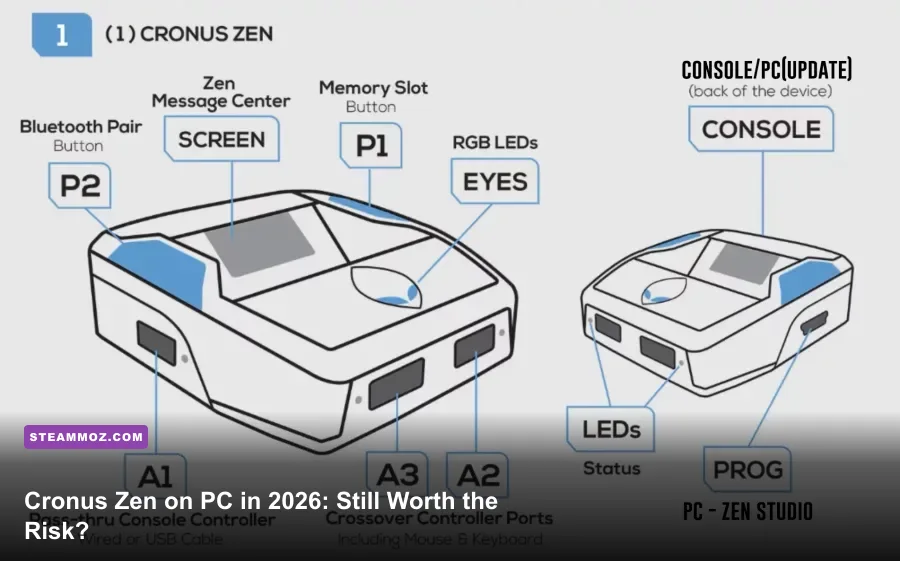
Cronus Zen is a USB controller adapter rather than a graphics or performance upgrade. The device intercepts controller signals and passes them to a PC, while its firmware and Zen Studio software let users assign buttons, switch profiles, and configure supported devices. On a basic level, it can be useful when a player owns a controller that Windows or a particular game does not handle cleanly.
The important distinction is between input translation and input automation. Remapping a paddle, changing a button layout, or making an accessibility-focused profile is fundamentally different from running a script that repeatedly presses a button or compensates for weapon recoil. The latter can create an unfair advantage and is increasingly treated as an unauthorized input device by competitive games.
PC support is also less universal than marketing pages can make it sound. A setup may depend on the controller model, USB mode, gamepad API, firmware version, and whether the game expects XInput, DirectInput, or native controller communication. Some games see the Zen as an Xbox-style controller; others may require different wiring or fail to recognize the device after an update.
| Function | Useful PC Scenario | 2026 Reality |
|---|---|---|
| Button remapping | Accessibility and custom layouts | Still practical when the game lacks good remapping |
| Controller translation | Using selected console hardware on Windows | Compatibility varies by controller and game |
| Profile switching | Different layouts for different titles | Convenient, but Windows and in-game profiles may conflict |
| Macros and scripts | Automation or recoil behavior | High enforcement risk in online multiplayer |
| FPS improvement | Higher frame rate or smoother rendering | None; Zen does not improve GPU performance |
Before buying, check the official Cronus website for current compatibility information rather than relying on an old YouTube tutorial. Firmware and game updates can make yesterday's setup guide obsolete overnight.

🎮 FORM
Looking to experience this game? Grab your digital key directly on our store for $14.99.
View on Steammoz Store →My PC performance test and input-latency findings
A fair performance test has to separate rendering latency from controller latency. Zen cannot raise a game's frame rate, reduce shader compilation stutter, or fix a badly configured Windows installation. If your game is running at 55 frames per second with inconsistent frame pacing, the adapter won't turn it into a responsive 144Hz experience.
For testing, the useful comparison is direct wired controller to PC versus controller routed through the Zen, using the same USB port, game, display refresh rate, and controller polling settings. The result is less dramatic than some internet claims suggest: a correctly configured Zen can feel responsive, but it introduces another device, another handshake, and another possible failure point. The difference is often small enough to miss in casual play and meaningful enough to matter in a serious aim duel.
Competitive players should pay attention to consistency rather than chasing a single latency number. A stable direct connection is preferable to a setup that occasionally drops a profile, reconnects after a game launch, or changes behavior after a firmware update. In titles such as Call of Duty, Apex Legends, and Fortnite, frame pacing, mouse or stick control, network latency, and display response usually have a larger impact than any legitimate remapping feature Zen provides.
| PC Setup | Expected Responsiveness | Reliability | Verdict |
|---|---|---|---|
| Direct wired XInput controller | Lowest practical input path | High | Best default for competitive play |
| Wireless controller with official dongle | Very good, with minor radio variables | High when firmware is current | Excellent convenience option |
| Controller through Cronus Zen | Generally responsive, but extra processing layer | Medium; depends on profiles and firmware | Only justified for a specific compatibility need |
| Zen with complex scripts | May feel consistent, but behavior depends on script | Low from a fair-play and account-safety perspective | Not recommended for online competition |
If your real problem is stutter or frame-time spikes, fix the PC first. Steamoz's guide to crash and FPS troubleshooting covers the same fundamentals that apply here: update drivers, inspect background processes, test fullscreen behavior, and verify that the game is using the intended GPU. For an older PC, our PC specs analysis is also a useful reminder that hardware limits cannot be solved with an input adapter.
Compatibility is the biggest problem in 2026
Cronus Zen's strongest feature is its flexibility, but flexibility is not the same as dependable support. On Windows, every layer has to agree: the controller must be detected, Zen Studio must recognize the adapter, the correct firmware must be installed, and the game must accept the resulting input device. A single update can disturb that chain.
Expect the most trouble with games that use aggressive device detection, multiple anti-cheat layers, or native controller authentication. A game may launch normally and then reject input in a match. It may identify the device as a controller one week and block it after a server-side update the next. That uncertainty makes Zen a poor purchase if your main goal is to play one current competitive shooter.
There is another practical catch: you often need to test profiles rather than simply install the device and play. Button assignments can duplicate Windows Game Bar shortcuts, Steam Input mappings can stack on top of Zen's settings, and a game-specific configuration may override the layout you expected. Disable duplicate remapping layers during testing. Use one source of truth for button assignments, and document the working setup before changing firmware.
For single-player games, the consequences are lower, but the benefit is usually smaller too. Steam Input already provides excellent remapping for many PC titles, including per-game layouts and gyro options on compatible controllers. If you are trying to make an older title behave properly, start with the official Steam Input documentation before spending money on extra hardware.
| Use Case | Compatibility Outlook | Risk Level | Better First Choice |
|---|---|---|---|
| Steam Input remapping | Strong across supported PC games | Low | Steam Input or native game settings |
| Legacy controller support | Potentially useful, but model-specific | Low to medium | Official adapter or modern PC controller |
| Accessibility profile | Can be valuable if hardware needs are unusual | Low when limited to remapping | Accessibility-focused controller or OS tools |
| Current ranked shooter | Unpredictable and subject to policy changes | High | Direct wired controller |
| Automation scripts | May function technically | Very high | Don't use in online multiplayer |
Always read the rules for the specific game. Activision's RICOCHET Anti-Cheat information explains the broader anti-cheat approach for Call of Duty, while Epic's player rules outline the kind of unfair automation that can lead to penalties. Policies change, and “it worked without a ban for my friend” is not a safety guarantee.
What you can safely use Zen for
There is a legitimate version of the Cronus Zen conversation, and it gets buried under competitive-shooter arguments. Some players need a particular controller shape, a custom switch arrangement, or a way to combine hardware that a game does not natively support. A remapped profile can reduce hand strain, make a difficult control scheme accessible, or preserve muscle memory when moving from console to PC.
The line is simple: the device should reproduce your input, not manufacture extra input for you. Remapping jump from A to a rear button is a normal control preference. Holding a button so a script repeatedly activates an action while you do something else is automation. A profile that changes sensitivity is one thing; a script that tracks recoil or fires with machine-like timing is another.
For testing, create a clean profile with no macros, no rapid-fire behavior, and no aim-related automation. Plug the controller directly into the PC first and confirm that the game works. Then add the Zen and make one change at a time. Test in a private lobby, training range, or single-player mode. If the game displays a warning about an unauthorized device, stop rather than trying to conceal the adapter.
This conservative approach also makes troubleshooting easier. If the direct controller works but Zen does not, the issue is probably device mode, firmware, profile assignment, or Steam Input interference. If both setups fail, the problem is likely Windows, the game, or the controller itself. Keep receipts and check the retailer's return policy; PC compatibility is too variable to assume success.
Price, alternatives, and the real value proposition
The Zen's value depends almost entirely on whether you have a problem that a normal controller cannot solve. If you only want better aim, lower latency, or a competitive edge, it is the wrong purchase. A wired Xbox controller, DualSense, 8BitDo model, or tournament pad with rear buttons is simpler, easier to support, and less likely to become a liability after an anti-cheat update.
Modern controllers also offer features Zen cannot provide: adjustable stick tension, Hall effect sensors on selected models, onboard profiles, trigger locks, and official PC software. They connect directly through XInput or a supported wireless receiver, reducing the number of layers between your thumb and the game. That matters more than a long list of theoretical scripting options.
| Option | Best For | Advantages | Drawbacks |
|---|---|---|---|
| Cronus Zen | Specific hardware translation and accessibility needs | Broad configuration potential | Compatibility, setup, policy, and firmware concerns |
| Wired Xbox controller | Reliable PC FPS play | Direct XInput support and low complexity | Basic ergonomics and fewer premium controls |
| DualSense or official wireless pad | Comfort and multi-platform use | Excellent ergonomics and strong native support | Wireless features vary by game and connection method |
| Hall effect tournament controller | Competitive players and long-term ownership | Rear buttons, adjustable controls, reduced stick-drift concerns | Higher upfront price |
| Steam Input | Remapping and per-game layouts | Free for Steam users and easy to revise | Not every non-Steam game behaves perfectly |
There is no reason to buy a Zen as a PC performance accessory. If your game runs badly, improve the settings and frame pacing instead; our FPS settings guide shows the kind of graphics tuning that actually changes performance. If you want to hunt down game-specific rewards rather than fiddle with controller scripts, our Everspace 2 secrets guide is a much safer investment of your evening.
Final verdict: buy it only for a narrow reason
Is Cronus Zen PC still worth buying in 2026? For most players, no. The device can work, and its remapping flexibility remains real, but PC already has strong controller support through XInput, Steam Input, official companion apps, and a growing selection of excellent native gamepads. Zen adds complexity without improving frame rate, image quality, or fundamental controller responsiveness.
The answer changes if you have a specific accessibility requirement, an unusual legacy controller, or a carefully defined hardware-compatibility problem. In that case, buy only after confirming current support for your exact controller and game. Keep the profile limited to legitimate remapping, update cautiously, and understand that multiplayer enforcement policies are outside the adapter's control.
For ranked shooters and esports-style play, I would spend the same money on a reliable wired controller, a higher-refresh-rate monitor, or a better desk setup. Those upgrades improve consistency without putting your account at unnecessary risk. Cronus Zen is still a clever piece of hardware, but in 2026 its most attractive features are also the ones that make it hardest to recommend.