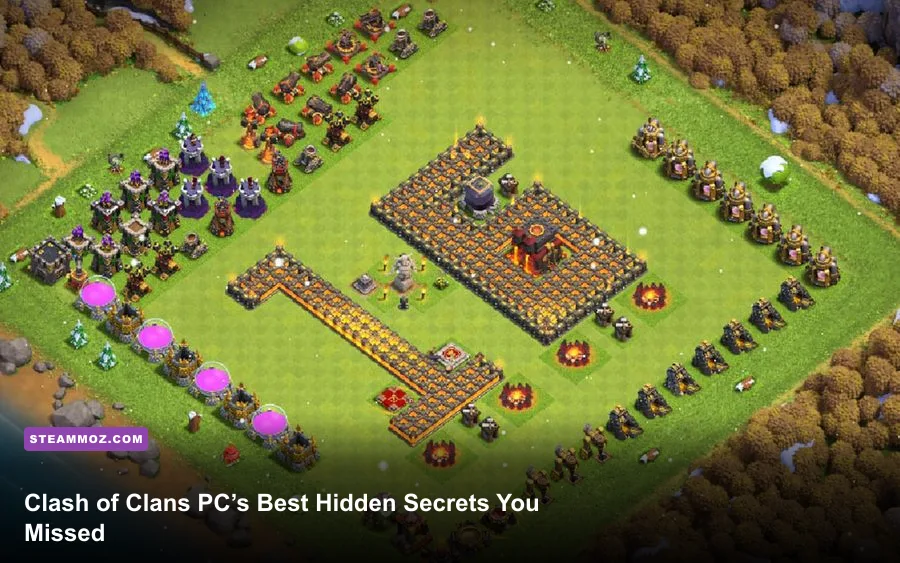
The best “secret locations” in Clash of Clans on PC aren’t hidden caves you can walk into. They’re overlooked parts of the Goblin Map, obstacle spawn rules, clickable scenery details, and defensive mechanics that only reveal themselves under attack. Play through Google Play Games on PC and you can hunt the 25-gem Gem Box, clear every Goblin Map route, trigger Hidden Teslas, inspect Builder Base secrets, and catch Supercell’s visual jokes without relying on fake cheat videos.
One important correction saves you time: Clash of Clans has no separate native Steam edition or free-roaming PC map. The official PC route is Google Play Games for PC, which runs the Android version with keyboard and mouse support. Your village, account progress, and server-side matchmaking remain the same. That means the secrets below work on mobile and PC alike, but a large monitor makes tiny decorations, traps, and scenery interactions much easier to spot.
The Goblin Map hides Clash’s real secret locations

The single-player Goblin Map is the closest thing Clash of Clans has to a hidden campaign. It contains fixed PvE stages away from your home village, and each stage has its own layout, trap placement, defensive timing, and star conditions. You reach it by tapping the boat near your coastline, then selecting the Goblin Map rather than the multiplayer attack button.
Early stages are straightforward resource lessons, but later locations quietly teach attack principles that matter in multiplayer. Some levels funnel troops toward Spring Traps. Others place defenses behind walls so that a cheap troop deployment triggers the wrong target priority. Don’t treat the map as a loot piñata: scout the path, identify the highest-damage defense, and use the minimum force needed to remove it.
The best approach is to use the map as a laboratory. Drop a single Barbarian to test whether a Bomb or Giant Bomb is present, then send the main group only after the danger is exposed. Wall Breakers can reveal compartments, while Archers safely remove isolated buildings that would otherwise drag your tank troops around the outside. Since Goblin Map layouts are fixed, failed attacks are useful information rather than lost trophies.
| Goblin Map Situation | Hidden Danger | Reliable Counter | Why It Matters |
|---|---|---|---|
| Narrow entrance | Spring Traps or Bombs | Test with one cheap troop | Prevents a full group from vanishing |
| Defense behind walls | Troops retarget around the wall | Use Wall Breakers or a tank | Keeps the attack from stalling |
| Isolated cannon or archer tower | Long walk under fire | Use Archers or a ranged unit | Saves your main force |
| Dense central compartment | Multiple defenses activate together | funnel, then deploy the core army | Stops split pathing |
Stars and destruction percentage also expose a common misconception. You don’t need to “find” a secret entrance to complete a Goblin stage; the game rewards normal objectives. The hidden value is learning the reusable patterns. If you want a broader guide-writing example focused on secret areas, Steamoz’s secret locations guide has the same treasure-hunting mindset, but Clash’s puzzles are about pathing rather than exploration.
🎮 1bitHeart
Looking to experience this game? Grab your digital key directly on our store for $2.99.
View on Steammoz Store →Gem Boxes and obstacles follow rules most players miss

Every player recognizes a Gem Box, but plenty of villages leave one sitting behind buildings for days. Clear it for 25 gems. It uses one obstacle-clear action, doesn’t require a special troop, and is one of the most valuable pieces of natural scenery that can appear in a village. The catch is that obstacle generation is capped and controlled by the game’s spawning rules, so covering every open tile with buildings won’t create more Gem Boxes.
Regular obstacles such as trees, bushes, trunks, and mushrooms can be removed for a small random gem payout. The exact cost and reward depend on the obstacle, but the practical rule is simple: remove cheap obstacles when you need space, and clear the Gem Box immediately. Seasonal obstacles are different. They’re collectible decorations tied to events and may not return, so many veteran players leave one copy along the village edge rather than deleting every obstacle for gems.
On PC, use the zoom level and larger display to scan the entire village perimeter. A tree hidden behind a tall building is easy to miss on a phone. Decorations can also be used as intentional visual markers: place rare anniversary or holiday obstacles in a protected row, then build around that row. This won’t improve defense, but it does preserve your account’s history.
| Object | Reward or Value | Best Action | Common Mistake |
|---|---|---|---|
| Gem Box | 25 gems | Clear it as soon as possible | Hiding it behind buildings |
| Normal obstacle | Small random gem payout | Remove when space is needed | Expecting a fixed reward |
| Seasonal obstacle | Rare collectible decoration | Keep one copy if you collect | Deleting an irreplaceable item |
| Village scenery prop | Visual detail only | Tap and inspect it | Assuming every object gives loot |
There’s no legitimate trick that forces a Gem Box to spawn, doubles its reward, or converts decorations into gems. Be especially wary of videos promising a “Gem Box generator” through a hidden PC menu. The official Clash of Clans support pages are the right place to check event and account claims before installing anything.
Tap the scenery for tiny Supercell Easter eggs
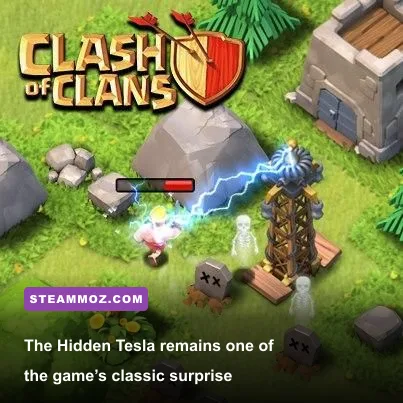
Clash of Clans scenery is more than a background swap. Depending on the scenery equipped, tapping animated props can trigger movement, sound, or a small visual gag. These interactions don’t award resources, but they’re among the easiest Easter eggs to miss because the game never announces them.
Try tapping animated elements around your active scenery: smoke, torches, water features, creatures, signs, and moving props. Zoom in before tapping because the interactive target can be smaller than the decoration itself. The exact behavior can change after updates, and not every scenery item contains an interaction, so don’t assume a silent prop is broken.
There are also character jokes woven into the village animation loop. Barbarians, Archers, Goblins, and Builders have recognizable idle behaviors, while the Builder occasionally abandons a job to react to nearby activity. These are not secret buffs. A Builder working on a building still follows the normal upgrade timer, and tapping him won’t speed construction up.
Scenery is worth inspecting for another reason: it can obscure the battlefield edge and make obstacle management awkward. A dramatic foreground prop may hide a tree or make a defensive layout harder to read. Competitive players often choose simpler scenery for planning because clean visual separation matters more than atmosphere when checking tile gaps.
For a similar look at how game secrets can hide in environmental detail, see Steamoz’s Everspace 2 hidden-rewards guide. Clash is less cinematic, but its best jokes reward the same habit: stop rushing menus and inspect the background.
Hidden Teslas and trap logic reveal themselves in battle
The Hidden Tesla is Clash’s most famous “secret location,” though it’s really a defensive building that stays invisible until an enemy gets close or the base reaches its reveal conditions. It can also activate when the Town Hall is attacked, depending on the current Town Hall and Tesla mechanics. Once revealed, it behaves like a normal defense and can be targeted.
That distinction matters for attackers. A Tesla is not permanently invisible, and it isn’t a random event. If your troops suddenly take electric damage from an empty tile, mark the location mentally. The next attack should start by testing that tile or approaching from a different angle. Sending a fragile hero or a single high-value troop into a known Tesla zone wastes health before the main fight begins.
Defenders can exploit the surprise, but predictable Tesla farms are easy to neutralize. Strong layouts use Teslas to cover a vulnerable defense, protect a Town Hall approach, or create a time-wasting pocket near a corner. They shouldn’t all sit together simply because the reveal animation looks dramatic. Spread them around high-value targets and combine them with traps that punish the path troops are most likely to take.
| Defense or Trap | What Reveals It | Attacker Response | Defender Placement Idea |
|---|---|---|---|
| Hidden Tesla | Troop proximity or attack trigger | Use a cheap test troop, then redirect | Cover a key defense or approach |
| Bomb | Ground troop enters its tile | Spread fragile units | Place near likely funnel points |
| Spring Trap | Ground troop steps on trigger | Send a low-value unit first | Align with narrow paths |
| Air Bomb | Air troops enter its radius | Stagger air units | Protect against mass balloons |
Replays are the secret weapon here. Watch the first defensive activation frame by frame and note the tile, not just the building name. On PC, mouse control makes it easier to pause mentally between deployments, and a larger screen helps you read whether a trap triggered beside a wall, at a junction, or near a collector.
Builder Base has the best overlooked mechanics

The Builder Base contains several mechanics that feel like hidden rooms because the rules differ from the Home Village. The Clock Tower temporarily speeds up building, troop training, and resource production. Its boost is limited, so activating it immediately after logging in can waste part of the effect while you’re still browsing menus.
Use the Clock Tower when multiple timers are active: a Builder working on a defense, collectors producing resources, and troops training at the same time. The boost doesn’t magically finish an upgrade, and it won’t replace Builder Gold or Builder Elixir. It compresses time. That makes it most valuable when you have a full queue and can return before another long idle period.
The Builder Base also uses Versus Battles and a separate resource economy. Your attack result is compared with another player’s result, so a flashy high-destruction attack can still lose if the opponent earns more stars or percentage. Don’t copy Home Village armies blindly. Raged Barbarians, Sneaky Archers, Boxer Giants, Cannon Carts, and Drop Ships each have distinct abilities and pathing roles.
| Builder Base Tool | Primary Function | Best Timing | Hidden Value |
|---|---|---|---|
| Clock Tower | Temporarily speeds timers | When several jobs run together | Reduces idle time across the base |
| Raged Barbarian ability | Temporary speed and damage boost | Breaking through early defenses | Creates a fast opening push |
| Sneaky Archer ability | Brief invisibility | Removing exposed defenses | Enables low-risk surgical damage |
| Cannon Cart ability | Deploys a temporary shielded mode | Finishing a defense or building | Adds damage after the cart is threatened |
Keep an eye on the O.T.T.O progression path as well. It isn’t a secret reward chest, but completing its requirements changes how you manage Builders and upgrades. The requirements have been adjusted across major updates, so check the current official Clash of Clans site rather than trusting an old video.
Town Hall weapons are the late-game “secret”
At advanced Town Hall levels, the biggest surprise is that the Town Hall itself is no longer passive. Town Hall weapons and defensive effects turn the center of the base into an active combat zone. Depending on the current version, the Town Hall can deploy a weapon such as the Giga Inferno and leave a damaging effect when destroyed. Exact values and effects have changed between balance updates, so treat old attack guides as historical references, not guaranteed numbers.
The practical lesson is consistent: don’t dump your entire army onto the Town Hall without checking its weapon behavior. A high-hit-point tank may survive the initial fire while low-health support troops melt behind it. Use a Grand Warden ability, Freeze, Invisibility, or a carefully timed Royal Champion push to control the damage window. The right spell is the one that gets your core force through the Town Hall’s activation and into the next compartment.
Defenders should avoid making the Town Hall the only meaningful threat. A base that spends all its defensive value in the center can collapse once the attacker reaches it. Pair the Town Hall weapon with high-damage defenses, traps, and awkward wall geometry so that destroying the center costs time and spell resources.
| Attack Moment | Main Threat | Counterplay | Timing Mistake |
|---|---|---|---|
| Town Hall entry | Weapon damage and concentrated defenses | Use a tank plus Warden or Freeze support | Sending support troops first |
| Town Hall destruction | Post-destruction damage effect | Move the army through quickly | Pausing on the Town Hall tile |
| Core compartment | Multiple defenses stacking damage | Use ability windows deliberately | Activating every hero ability at once |
| Cleanup phase | Time limit | Reserve ranged units for corners | Using all troops in the opening |
For PC players, stable performance helps with this kind of timing. Google Play Games normally handles the rendering layer, but close background applications, use a consistent window size, and avoid changing display scaling during an attack. Clash isn’t a twitch shooter, yet a delayed spell placement can still cost a star. If another Android game runs poorly on your machine, Steamoz’s crashing and low-FPS fixes offer useful general troubleshooting.
How to hunt secrets without risking your account
Start with the harmless targets: inspect scenery, clear obstacles, and play Goblin Map stages. Then use friendly challenges or replays to study Teslas and traps. Never test a supposed exploit on your main account, and never install a “Clash of Clans PC hack,” modified client, or gem generator. Supercell’s Safe and Fair Play policy makes the risk clear: third-party software can lead to sanctions or account loss.
Keep your account connected to the official sign-in method available in your region, and install Google Play Games only from its official source. Steamoz’s PC troubleshooting coverage is useful if your wider setup is unstable, but no FPS tweak unlocks secret content in Clash. The server decides your rewards, timers, and village state.
The most rewarding discoveries are still practical. A Gem Box gives 25 gems. A Goblin Map teaches you to read traps. A Hidden Tesla exposes lazy pathing. Builder Base timing rewards a full queue. Town Hall weapons punish reckless deployment. That’s why these secrets are worth hunting on PC: the larger screen doesn’t create new content, but it makes the game’s tiny clues much easier to see—and much harder to ignore.