Yes, most modern gaming PCs can run the Batman: Arkham Collection, but the answer depends heavily on which game you mean. Batman: Arkham Asylum and Arkham City are easy targets for entry-level hardware, while Batman: Arkham Knight is the real stress test. For a smooth 1080p experience across all three, aim for a modern four-core or six-core CPU, 16GB of RAM, and a graphics card around the GTX 1060 6GB or Radeon RX 580 class. An SSD is strongly recommended, especially for Knight.
The Steam bundle collects Batman: Arkham Asylum GOTY, Batman: Arkham City GOTY, and Batman: Arkham Knight. It does not include Batman: Arkham Origins, which is a separate PC release. You can verify the package and current ownership details on the official Arkham Collection Steam page. The important catch is that each game has its own system requirements, graphics engine, and performance quirks.

Batman: Arkham Collection system requirements at a glance

There is no single hardware specification for the collection. Arkham Asylum and Arkham City use older Unreal Engine 3 technology and generally run well on modest PCs. Arkham Knight uses a much more demanding version of Unreal Engine 3 with a large streaming city, volumetric effects, heavy rain, Batmobile sections, and optional NVIDIA GameWorks features.
| Game | Minimum PC requirements | Recommended target | Practical expectation |
|---|---|---|---|
| Arkham Asylum GOTY | Intel Pentium 4 3.0GHz or AMD Athlon 64 3500+, 1GB RAM, GeForce 6600 or Radeon X1300, 9GB storage | Dual-core CPU, 2GB RAM, GeForce 7800 GT or Radeon X1900, 12GB storage | 1080p at 60fps on almost any modern dedicated GPU |
| Arkham City GOTY | Intel Core 2 Duo 2.4GHz or AMD Athlon X2 4800+, 2GB RAM, GeForce 8800 GT or Radeon HD 3870, 17GB storage | Intel Core 2 Duo 2.5GHz, 4GB RAM, GeForce GTX 460 or Radeon HD 6850, 17GB storage | 1080p at 60fps with high settings on low-cost hardware |
| Arkham Knight | Intel Core i5-750, AMD Phenom II X4 965, 6GB RAM, GTX 660 2GB or Radeon HD 7870 2GB, 45GB storage | Intel Core i7-3770, AMD FX-8350, 8GB RAM, GTX 760 3GB or Radeon R9 290 4GB, 55GB storage | 1080p at 45-60fps after tuning; 16GB RAM and an SSD are safer today |
Those are the published baseline figures, not a guarantee of identical performance on current Windows systems. The minimum Arkham Knight specification was written around a 30fps target, and its 2GB graphics-memory requirement is especially optimistic by modern standards. A 4GB card is a much more comfortable floor, while 6GB or 8GB gives you room for high textures and less texture streaming.
Storage also deserves attention. The collection can occupy well over 80GB once all three games and downloadable content are installed. Keep at least 100GB free on the drive so Steam updates, shader caches, and temporary files do not become a problem. If your PC struggles with other older ports, our guides on ELEX crash fixes and Far Cry 2 PC requirements cover the same driver, storage, and compatibility traps.
🎮 Batman: Arkham Collection
Looking to experience this game? Grab your digital key directly on our store for $8.99.
View on Steammoz Store →Minimum specs versus recommended specs explained

What the minimum hardware can actually do
A PC close to Arkham Asylum's minimum specification will launch the game, but that hardware is now ancient. Modern integrated graphics may handle Asylum and City at reduced settings, yet Intel UHD and older Vega graphics can vary wildly depending on dual-channel memory and laptop cooling. Do not judge the entire collection by those two games. Arkham Knight is where an old dual-core processor, 8GB of RAM, or a 2GB GPU starts causing stutter.
The published minimum for Knight lists a Core i5-750, a first-generation quad-core CPU, alongside a GTX 660 or Radeon HD 7870. On paper, that sounds approachable. In practice, newer six-core CPUs with better frame pacing are far preferable because Gotham streams geometry and textures while you drive at speed. A system that technically reaches 30fps can still hitch when entering the city, turning rapidly, or triggering a large combat encounter.
The sensible modern recommendation
For the best balance, use a Ryzen 5 3600, Core i5-10400, or anything with comparable single-thread and multi-thread performance. Pair it with 16GB dual-channel RAM and a GTX 1660 Super, RTX 2060, RX 5600 XT, or newer. This tier is not necessary for Asylum or City, but it makes Knight much less temperamental at 1080p.
An SSD is more than a luxury here. Arkham Knight constantly streams Gotham's buildings, roads, interiors, and effects. A hard drive can still run it, but traversal stutter and longer loading are more likely. Install Windows and the games on an SSD, leave the page file system-managed, and avoid filling the drive beyond roughly 90 percent capacity.
| Component | Collection minimum | Recommended for 1080p | Best practical target |
|---|---|---|---|
| CPU | Core 2 Duo for older games; Core i5-750 for Knight | Core i5-10400 or Ryzen 5 3600 | Core i5-12400 or Ryzen 5 5600 |
| GPU | GTX 660 2GB or Radeon HD 7870 2GB for Knight | GTX 1660 Super or RX 5600 XT | RTX 3060, RTX 4060, RX 6600, or faster |
| Memory | 6GB for Knight; 1-2GB for older games | 16GB dual-channel | 16GB, with 32GB useful for multitasking |
| Storage | HDD supported; around 70GB combined published footprint | SATA SSD with 100GB free | NVMe SSD with 100GB or more free |
| Operating system | 64-bit Windows 7-era support listed by the games | 64-bit Windows 10 | Updated Windows 10 or Windows 11 |
Which Arkham game is hardest to run?

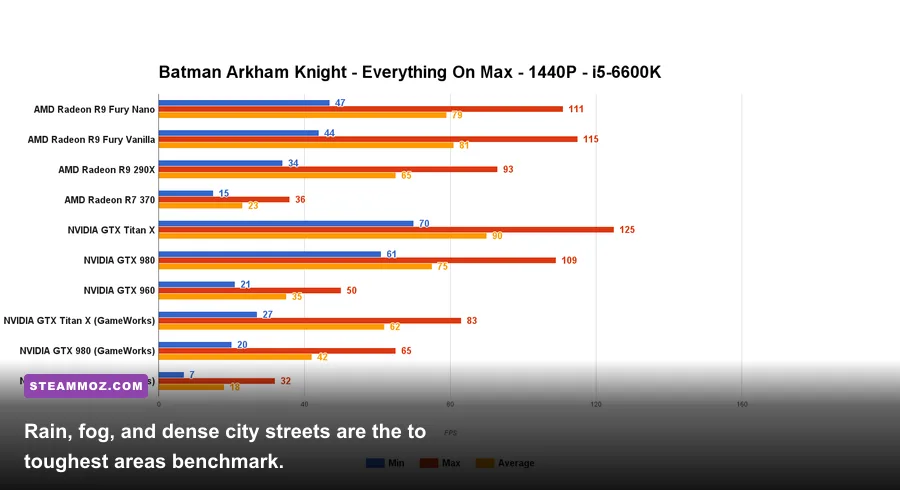
Arkham Knight is decisively the most demanding game in the collection. Its version of Gotham is much larger than the semi-open environments in Asylum and City, and the Batmobile exposes every weakness in CPU scheduling, texture streaming, and frame pacing. Rain, smoke, fog, particles, destructible objects, and long sightlines combine into sudden performance drops even when an indoor fight feels perfectly smooth.
Arkham Asylum is the easiest game by a wide margin. Its compact island facilities load smaller areas, and a GTX 750 Ti or modern integrated GPU can often deliver a stable 60fps at 1080p with sensible settings. City needs slightly more GPU power because of its outdoor district, gliding, snow, and denser street scenes, but it remains comfortable on budget hardware.
Arkham Knight's infamous PC launch problems led to updates, a temporary sales suspension, and extensive community scrutiny. The current PC version is far better than the original release, but it is not magically as consistent as a modern first-party port. The official Arkham Knight Steam listing remains the place to check the supported feature set and current patch information.
| Game | CPU pressure | GPU pressure | Most demanding scenario |
|---|---|---|---|
| Arkham Asylum | Low | Low to moderate | PhysX-heavy combat arenas and large particle effects |
| Arkham City | Moderate in open streets | Moderate | Gliding across the city during snow and large outdoor fights |
| Arkham Knight | Moderate to high during traversal | High, especially with GameWorks | Batmobile chases, heavy rain, smoke, and dense Gotham streets |
If your goal is a locked 60fps, benchmark Arkham Knight outside the GCPD or near the central Gotham streets rather than inside the Batcave. Indoor rooms hide streaming problems. The game can look excellent at 60fps in a hallway and then dip hard during a fast rooftop glide.
Best Arkham Knight settings for smooth 1080p
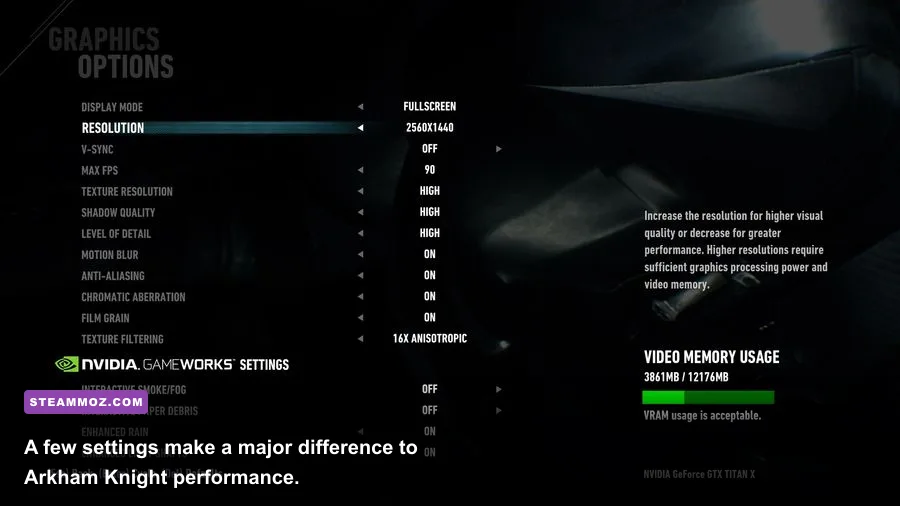
Start with the game's normal preset, then adjust the settings that actually move the frame-rate needle. You do not need to destroy the atmosphere to gain performance. The most expensive options are usually NVIDIA PhysX effects, shadow quality, level of detail, and extended rain or fog effects. Texture quality is comparatively cheap when your graphics card has enough VRAM.
| Setting | Recommended value | FPS impact | Visual trade-off |
|---|---|---|---|
| Resolution | 1920x1080 | Very high if reduced | Keep native resolution; lower only as a last resort |
| Texture Quality | High on 4GB-plus GPUs | Low to moderate | Higher settings improve suit, building, and road detail |
| Shadow Quality | Normal or High | Moderate to high | Lower shadows look softer but preserve most scene detail |
| Level of Detail | Normal or High | Moderate | Controls distant geometry and Gotham density |
| Rain Effects | On, reduce if needed | Moderate | Rain is atmospheric but costly during vehicle sequences |
| Enhanced Rain and Fog | Off for older GPUs | High | Removes some cinematic weather density |
| Reflections | Normal | Moderate | Wet streets lose some crisp reflections |
| NVIDIA PhysX | Normal or Off | High on non-NVIDIA cards | Less cloth, paper, smoke, and debris simulation |
| Motion Blur | Off | Small | Sharper image during fast gliding and driving |
| Anti-aliasing | FXAA or TAA equivalent | Low to moderate | FXAA is softer; stronger AA costs more GPU time |
For a GTX 1060, RX 580, or GTX 1660 Super, try 1080p, high textures, normal shadows, normal level of detail, normal reflections, and GameWorks disabled. Cap the frame-rate at 60fps using your driver or a reliable limiter if frame pacing feels uneven. A stable 50fps often feels better than a wildly fluctuating 70fps with traversal stutter.
On an RTX 3060, RX 6600 XT, or similar card, high settings at 1080p are realistic. Keep enhanced rain and fog off unless you have plenty of headroom. At 1440p, use high textures but drop shadows, reflections, and level of detail before lowering resolution. Arkham Knight benefits more from consistent frame times than from maximum preset bragging rights.
How to fix stutter, crashes, and low FPS
Before changing advanced files, update your GPU driver, verify the Steam installation, and let the game complete any first-launch shader or configuration process. Disable overlays from Steam, Discord, GeForce Experience, and recording software if crashes happen during loading. Arkham games are older PC ports, and overlay hooks can be more troublesome than their age suggests.
Use the right troubleshooting order
- Verify the files. In Steam, open Properties, Installed Files, and choose Verify integrity of game files. This catches missing executable, texture, and configuration files after updates.
- Reset the configuration. If the game crashes before reaching its menu, rename the relevant WB Games or Rocksteady configuration folder in your user Documents directory. The game will create fresh settings on the next launch.
- Turn off GameWorks first. NVIDIA PhysX, enhanced rain, interactive smoke, and turbulence can cause large spikes. Test with all optional effects disabled, then restore them one by one.
- Check VRAM and background use. Close browsers, launchers, and hardware monitoring tools. Texture pop-in and hitching become worse when the GPU runs out of memory.
- Use an SSD and current Windows updates. This will not eliminate every traversal hitch, but it reduces loading delays and helps asset streaming.
- Remove unstable overclocks. A GPU overclock that survives benchmarks can still crash during PhysX-heavy combat or Batmobile sequences.
Do not blindly download random DLL files or unofficial executables. If the issue is a broader PC compatibility problem, compare your symptoms with our crashing and low-FPS troubleshooting guide and Dungeons 3 performance fixes. The same basics—clean drivers, verified files, sane temperatures, and a healthy drive—solve a surprising number of launch failures.
For Arkham City, check that DirectX and Visual C++ redistributables installed correctly if the game closes immediately. For Arkham Asylum, compatibility modes can occasionally create more problems than they solve, so test a normal launch first. On Windows 11, run the game without forced administrator mode unless you have a specific permissions error.
Should you play the collection on a gaming laptop?
Yes, but judge the laptop by its GPU and cooling rather than its advertised CPU generation. A laptop RTX 3050, GTX 1660 Ti, RTX 3060, or Radeon RX 6600M can handle Arkham Knight at 1080p with the tuned profile above. An integrated GPU may run Asylum and City, but Knight is likely to require low settings, reduced resolution, and a 30fps cap.
Plug the laptop into AC power, select its high-performance GPU in Windows Graphics settings, and make sure the game is not using integrated graphics. Keep the rear vents clear. Thermal throttling can look exactly like a weak graphics card: the first ten minutes feel smooth, then Gotham traversal becomes a stuttery mess.
Two memory sticks are also important. Dual-channel RAM can significantly improve integrated graphics performance, and 16GB prevents Windows from constantly paging during Knight's open-world streaming. If your laptop has 8GB in a single module, upgrading memory may help more than lowering every visual setting.
Final verdict on the Arkham Collection PC specs
Arkham Asylum and Arkham City are remarkably accessible today. Almost any recent desktop with 8GB of RAM and a dedicated GPU can run them at 1080p and 60fps, while older systems should still manage 30fps with modest settings. Arkham Knight is the game that should determine whether you buy the collection for PC.
A sensible all-three-games setup is a Core i5-10400 or Ryzen 5 3600, 16GB RAM, an SSD, and a GTX 1660 Super, RX 5600 XT, or better. That combination gives you enough GPU memory for high textures and enough CPU strength to reduce the worst traversal dips. For 1440p or high-refresh play, move toward an RTX 3060 Ti, RTX 4060, RX 6700 XT, or newer and still expect to tune rain, shadows, and PhysX.
For official game details, compare the Arkham Asylum Steam page, the Arkham City Steam page, and the Warner Bros. Games support portal. The short version is simple: if your PC comfortably meets Arkham Knight's requirements and has 16GB of RAM plus an SSD, you're ready to patrol Gotham without turning every rooftop glide into a slideshow.