The best Borderlands 3: Psycho Krieg and the Fantastic Fustercluck graphics settings are a custom mix, not the Ultra preset. Set textures to High, volumetric fog to Low, screen-space reflections to Low, foliage to Medium, and use AMD FSR 2 at Quality if your PC supports it. That combination preserves the cel-shaded look while cutting the worst GPU spikes in Krieg's mindscape. For a stable 60 FPS target, lower shadows, effects, and post-processing before touching texture quality.
This matters more in the Krieg DLC than the average Borderlands 3 map. The campaign constantly throws neon environments, dense particles, fire, elemental beams, floating debris, and multiple psychos into the same frame. The result is a game that can look perfectly smooth while exploring, then suddenly collapse during a Badass encounter or a Vaulthalla run. The settings below are aimed at stable frame times, not inflated benchmark numbers from staring at an empty wall.

Best Borderlands 3 Psycho Krieg Settings for Most PCs
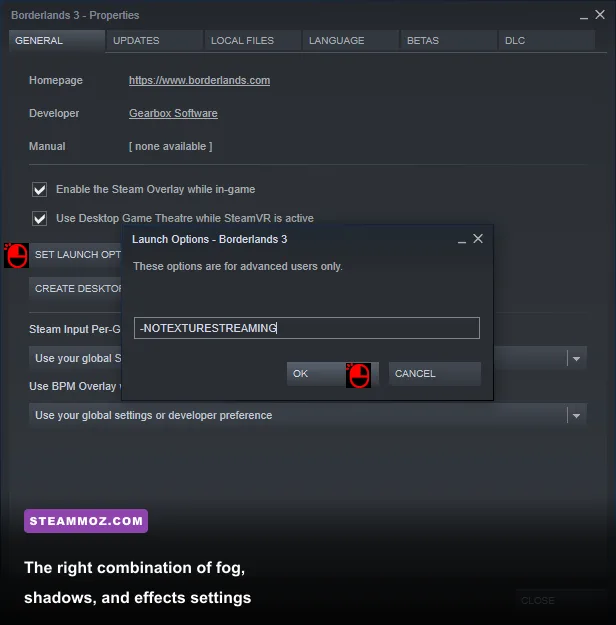
Start with the table below, then adjust resolution and upscaling for your hardware. These recommendations apply to the DirectX 12 renderer, which usually delivers better average performance after its shader cache has been built. DirectX 11 can feel more consistent on older CPUs and GPUs, especially during the first few minutes after launching the game, so test both APIs instead of assuming DX12 is automatically faster.
| Setting | Recommended Value | FPS Impact | Visual Note |
|---|---|---|---|
| Display Mode | Fullscreen | Low | Usually reduces desktop-related frame-time interference. |
| Resolution | Native | Very High | Keep native resolution if the GPU has headroom. |
| Resolution Scale | 100% | Very High | Lower to 90% or 85% before dropping textures. |
| Anti-Aliasing | FXAA or Temporal | Low to Medium | Temporal is cleaner; FXAA can be slightly cheaper. |
| Texture Quality | High | Low FPS, High VRAM | High keeps weapon and environment detail intact. |
| Texture Streaming | Ultra or High | VRAM and stutter risk | Use High with 6GB GPUs; Ultra favors 8GB or more. |
| Shadow Quality | Low | High | One of the safest large performance wins. |
| Draw Distance | Medium | Medium | Medium avoids needless CPU and GPU work in open arenas. |
| Environment Detail | Medium | Medium | Reduces distant clutter without wrecking the art style. |
| Character Detail | High | Low | Keep it high for readable enemy silhouettes. |
| Foliage | Medium | Medium | Low can look unusually bare in outdoor sections. |
| Volumetric Fog | Low | Very High | Low removes costly fog lighting while keeping the scene readable. |
| Screen-Space Reflections | Low | Medium to High | Reflections are expensive and rarely important in combat. |
| Effects Quality | Medium | High | Controls the cost of explosions, elemental effects, and combat clutter. |
| Post Processing | Low | Medium | Reduces bloom and other effects without hurting aim clarity. |
| Motion Blur | Off | Small | Sharper camera movement and easier target tracking. |
| FidelityFX Super Resolution 2 | Quality | High gain | Use Balanced for 1440p or 4K when necessary. |
Texture quality is the setting players most often lower too early. It mainly consumes VRAM rather than directly reducing the GPU's rendering workload. If your graphics card has 8GB or more, High textures are a sensible baseline at 1080p and 1440p. Ultra can trigger streaming hitches when Krieg's arenas load several unique materials, while Medium makes weapon skins and nearby wall surfaces noticeably softer.
Set Effects Quality to Medium before lowering Character Detail. Effects controls the fireworks that actually cause the large drops: elemental explosions, shock arcs, burning ground, splash damage, and debris. Character Detail, by comparison, helps preserve enemy outlines, an important advantage when several psychos rush you through the visual noise.

🎮 Borderlands 3: Psycho Krieg and the Fantastic Fustercluck
Looking to experience this game? Grab your digital key directly on our store for $10.04.
View on Steammoz Store →Which Settings Actually Cost the Most FPS?
Borderlands 3 is built on Unreal Engine 4, and its most expensive options don't always have the most obvious visual payoff. Volumetric fog is the standout offender. Krieg's maps use glowing haze and colored atmospheric layers, so the GPU has to calculate lighting through a large number of pixels. Moving from Ultra to Low can recover a substantial amount of performance in foggy arenas without making the distinctive comic-book presentation look flat.
Shadows are next. High and Ultra shadows add sharper cascaded shadow maps and more distant shadow detail, but Krieg's combat rarely gives you time to admire them. Low shadows still provide grounding beneath characters and props. Screen-space reflections are similarly poor value: they add shine to floors and surfaces, yet they disappear whenever the camera angle changes or combat fills the screen with particles.
| Performance Tier | Key Settings | Expected Use | Best Target |
|---|---|---|---|
| Maximum FPS | 1080p, FSR Performance, shadows Low, fog Low, effects Low | Lowest GPU load, softer image | 120-144 FPS on strong midrange hardware |
| Competitive Smooth | 1080p, native or FSR Quality, textures High, effects Medium | Clear enemies and stable frame times | 90-144 FPS |
| Balanced | 1440p, FSR Quality, textures High, fog Low, shadows Low | Strong image quality with sensible cuts | 60-100 FPS |
| Visual Quality | 1440p or 4K, FSR Quality, textures Ultra, effects High | Sharper materials and richer effects | 60 FPS with a high-end GPU |
Post Processing deserves a low setting for more than performance. Borderlands 3's bloom can make elemental damage and loot beams flare aggressively, particularly in the purple-and-red spaces inside Krieg's head. Lower post-processing keeps weapon sights and enemy health bars cleaner. Turn Motion Blur off in every profile; it costs little, but it makes rapid mouse corrections feel smeared during Psycho Krieg's close-range ambushes.
Draw Distance is more complicated. At Low, distant geometry and props can pop into view as you cross open sections of Castle Crimson. Medium is the sweet spot. High and Ultra improve scenery at a distance, but they can increase CPU work and worsen traversal stutter on older Ryzen and Core processors. If your GPU usage is below 90 percent while FPS falls, draw distance and environment detail are better suspects than textures.
Best FPS Profiles for 1080p, 1440p, and 4K
Choose a profile based on your display rather than chasing a preset label. A locked 60 FPS presentation feels much better than a range that swings from 100 to 48 during every major fight. Use the in-game benchmark first, then verify the result in actual DLC areas such as Castle Crimson, Sapphire's Run, and Benediction of Pain.
1080p high-refresh profile
Use native 1080p or FSR 2 Quality, High textures, Low shadows, Medium effects, Low fog, Low reflections, Medium foliage, and Medium draw distance. This is the ideal starting point for cards such as the GTX 1660 Super, RTX 2060, RX 5600 XT, or newer equivalents. If the game misses a 120 FPS target, switch FSR to Balanced and lower Effects Quality to Low. Don't use Performance mode at 1080p unless you have no alternative; the reconstruction artifacts are much easier to see.
1440p balanced profile
At 2560x1440, start with FSR 2 Quality, or native resolution if you have an RTX 3070, RX 6800, or faster GPU. Keep textures High, Character Detail High, shadows Low, fog Low, reflections Low, and effects Medium. FSR Quality renders internally below native resolution and reconstructs the image, giving the GPU relief while retaining much more detail than a basic resolution-scale cut.
4K quality profile
4K is where Borderlands 3 becomes genuinely demanding. Use FSR 2 Quality first, then Balanced if the game cannot hold 60 FPS in Vaulthalla. Keep textures High or Ultra depending on VRAM, but set fog Low and shadows Low. Those cuts matter more than the difference between High and Ultra environment detail. If you own a 12GB card, Ultra textures are reasonable; if you have 6GB, High is safer because texture streaming can produce hitching when moving between mindscape zones.
For a 144Hz monitor, cap the game near your real sustained average rather than leaving it unlimited. A 90 FPS cap that holds through explosions feels cleaner than 144 FPS in quiet hallways followed by severe drops. Use the NVIDIA App or NVIDIA Control Panel, AMD Adrenalin, or RTSS for the cap if the game's limiter produces uneven frame pacing. Enable G-SYNC or FreeSync, then keep the cap a few frames below the display's maximum refresh rate.
Fixing Stutter, Shader Hitches, and Sudden Drops
Some Psycho Krieg performance problems aren't caused by a setting at all. Borderlands 3 can stutter when it compiles shaders, streams textures, or loads a new combat space. The first run after changing from DX11 to DX12 is often the roughest. Let the game sit in the main menu for a minute, play through the benchmark twice, and expect the second pass to be more representative.
- Update the GPU driver. Use a current WHQL driver, then restart Windows. Borderlands 3 has received years of driver-level optimization, and old drivers can exaggerate shader compilation pauses.
- Test DX11 and DX12 separately. DX12 may improve average FPS on newer hardware, but DX11 can offer steadier initial traversal on older systems. Keep the better API after testing the same route.
- Install the game on an SSD. An SSD won't magically raise average FPS, but it can reduce asset-streaming stalls as you move through Castle Crimson and Sapphire's Run.
- Check VRAM usage. If the graph card is near its memory limit, reduce Texture Streaming from Ultra to High and lower textures one step only if hitching continues.
- Close overlays and recording tools. Discord, browser hardware acceleration, GeForce overlays, and capture software can create spikes during heavy elemental effects.
- Watch frametime, not only FPS. A 16.7ms frame time equals 60 FPS. Spikes to 30ms or 40ms are the stutters you feel, even when the displayed average looks healthy.
Don't use an aggressive CPU overclock as a first fix. Psycho Krieg can become CPU-limited when several enemies spawn with elemental effects, especially in co-op. If GPU usage drops while one or two CPU cores stay busy, lowering resolution won't help much. Reduce Draw Distance and Environment Detail, cap the frame rate, and close background applications instead.
For more PC troubleshooting habits, Steamoz's Knightica crash and FPS fixes and A Year of Rain settings guide cover the same useful diagnostic approach: identify the bottleneck before randomly lowering every option.
How to Benchmark Krieg's Mindscape Properly
The built-in benchmark is useful, but it doesn't fully represent the DLC's worst moments. Run it once to compare broad profiles, then load a real save and repeat a fixed route. Castle Crimson is a good test because it combines open sightlines, glowing fog, geometry, and frequent enemy groups. Benediction of Pain is useful for effects-heavy combat, while Vaulthalla is the stress test for explosions and boss-phase clutter.
Record three numbers: average FPS, 1% low FPS, and frame-time consistency. Average FPS tells you the ceiling; the 1% low tells you whether the game collapses during a firefight. If your average is 90 but your 1% low is 38, the experience will feel unstable. Lower Effects Quality and Volumetric Fog first, then test again. If the 1% low improves while average FPS barely moves, you've fixed the problem that actually affects aiming.
Use the same character, weapons, and action-skill state for each comparison. Amara's elemental effects, Moze's Iron Bear, and a four-player co-op session can all produce different workloads. A grenade-heavy build with multiple DoT clouds is a tougher test than simply walking through the map. Keep the test repeatable: sprint the same corridor, trigger the same encounter, and measure for at least two minutes.
Final Recommended Profile and Official Resources
For most players, the profile I'd actually use is 1440p, FSR 2 Quality, textures High, Texture Streaming High, shadows Low, fog Low, reflections Low, effects Medium, post-processing Low, foliage Medium, draw distance Medium, Motion Blur Off, and a frame cap matched to the monitor. At 1080p, disable FSR if native resolution already holds your target. At 4K, keep FSR Quality and accept that 60 FPS is a realistic goal during the heaviest fights.
These changes preserve the details that make the Fantastic Fustercluck work: weapon skins remain sharp, enemy silhouettes stay readable, and Krieg's surreal color palette still punches through the screen. You sacrifice distant shadows, reflective surfaces, and some atmospheric density—exactly the effects least important when a Badass Psycho is charging you through a storm of corrosive particles.
Before troubleshooting a crash or corrupted install, check the official Steam page for Psycho Krieg, the official Borderlands website, and 2K's Borderlands 3 support hub. Also see Steamoz's Grow: Song of the Evertree FPS settings for another practical graphics-tuning reference and Architect Life PC performance fixes if your wider library is showing similar stutter.
The short version: lower volumetric fog, shadows, reflections, and effects before textures; use FSR 2 Quality at 1440p or 4K; test DX11 against DX12; and judge the result by 1% lows during real combat. Krieg's mindscape will still look wild, but your frame rate won't have to lose its mind with him.