
Assassin’s Creed Valhalla runs on surprisingly modest hardware at 1080p, but its open world rewards a stronger CPU, an SSD, and at least 6GB of VRAM. Ubisoft’s official minimum target is a Ryzen 3 1200 or Core i5-4460, 8GB of RAM, and a Radeon RX 570 4GB or GeForce GTX 960 4GB. For the recommended 1080p High preset, you’ll want a Ryzen 5 1600 or Core i7-6700 with a Vega 64 or GTX 1080. Those figures target 30 frames per second, not a locked 60 FPS experience.
That last detail matters. Valhalla is a 2020 open-world RPG built around huge landscapes, dense settlements, streaming NPCs, volumetric fog, and long traversal routes. A PC can technically meet the minimum specs and still feel rough when Eivor enters a crowded raid or rides into a major city. Here’s the real breakdown, including Ubisoft’s resolution tiers, sensible modern equivalents, storage advice, and settings that deliver the best performance without making England look flat.
If you’re comparing this game with other demanding PC releases, our guides to Dragonkin graphics settings and ELEX performance fixes are useful companions.
Assassin’s Creed Valhalla minimum and recommended specs
Ubisoft published several targets rather than one vague minimum and recommended line. The headline 1080p Low and 1080p High profiles both target 30 FPS. The 1440p and 4K profiles also officially aim for 30 FPS, so don’t read “4K Ultra” as a 60-FPS promise. These are launch-era specifications, and modern GPU drivers can change results slightly, but they remain an excellent baseline for buying or upgrading a PC.
| Target | CPU | Memory | GPU | Storage |
|---|---|---|---|---|
| 1080p Low, 30 FPS | Ryzen 3 1200 / Core i5-4460 | 8GB dual-channel | Radeon RX 570 4GB / GTX 960 4GB | 50GB HDD |
| 1080p High, 30 FPS | Ryzen 5 1600 / Core i7-6700 | 8GB dual-channel | Radeon Vega 64 8GB / GTX 1080 8GB | 50GB HDD |
| 1440p High, 30 FPS | Ryzen 7 1700 / Core i7-8700 | 8GB dual-channel | Radeon Vega 56 8GB / GTX 1070 8GB | 50GB SSD |
| 4K Ultra, 30 FPS | Ryzen 7 3700X / Core i7-9700 | 16GB dual-channel | Radeon RX 5700 XT / RTX 2080 | 50GB SSD |
The table contains one odd-looking detail: Ubisoft’s 1440p GPU recommendation, the Vega 56, is not simply a faster version of the 1080p High Vega 64. That reflects the company’s testing profiles and should not be treated as a universal ranking. In real use, GPU generation, driver support, and your chosen resolution scaler matter more than the badge on the box.
The official Assassin’s Creed Valhalla system requirements page is worth checking before purchase. The game is also listed through the official Steam store page, although Ubisoft Connect remains part of the PC setup.

🎮 Assassin's Creed Valhalla
Looking to experience this game? Grab your digital key directly on our store for $14.99.
View on Steammoz Store →What those PC requirements really mean in 2026
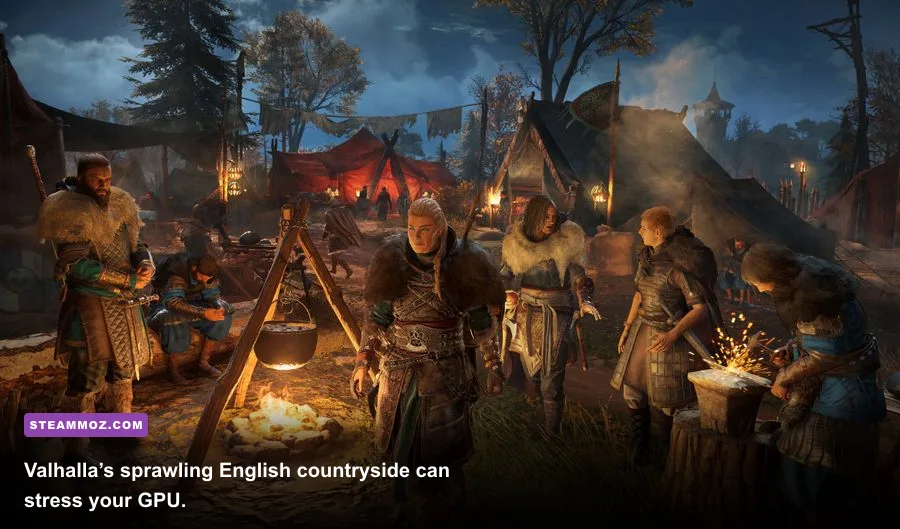
Meeting the minimum specification means the game should launch and deliver a playable 1080p Low profile. It doesn’t mean every scene will hold 30 FPS. The RX 570 and GTX 960 class is especially limited by 4GB of VRAM when texture quality, resolution scaling, and world detail are pushed upward. Expect occasional traversal stutter, slower asset streaming, and more aggressive dips around Ravensthorpe, Jorvik, and large monastery raids.
A modern six-core processor such as a Ryzen 5 3600, Ryzen 5 5600, Core i5-10400, or newer is a much safer practical minimum. These CPUs offer more thread headroom than Ubisoft’s older four-core recommendations, which helps when the game is streaming the map while handling combat AI, crowds, and background services. Eight gigabytes of RAM can work, but 16GB is the sensible floor for Windows 10 or 11 with a browser, launcher, voice chat, and overlays open.
For a comfortable 1080p High experience, a GTX 1660 Super, RTX 2060, RX 5600 XT, or RX 6600 is a better modern starting point than the launch-era GTX 1080 label suggests. You won’t necessarily max every setting, but these cards provide better efficiency and driver support. If you want a stable 60 FPS, look closer to an RTX 3060 Ti, RTX 4060, RX 6700 XT, or equivalent, depending on whether you use native resolution or adaptive scaling.
Valhalla’s 50GB requirement is also misleadingly easy to underestimate. Patches and downloadable content can increase the installed footprint, and an almost-full drive can hurt streaming performance. Leave at least 15–20GB free on the installation drive. An SSD won’t magically raise average FPS, but it can reduce loading, texture pop-in, and the ugly pauses that occur when the game pulls new sections of England into memory.
| Hardware area | Official floor | Practical target | Why it matters |
|---|---|---|---|
| CPU | 4-core Ryzen 3 1200 / i5-4460 | 6-core Ryzen 5 5600 / Core i5-12400 | Reduces city and raid-side frame-time spikes |
| RAM | 8GB | 16GB dual-channel | Improves background multitasking and streaming stability |
| GPU VRAM | 4GB | 8GB | Provides room for textures and higher resolutions |
| Drive | 50GB HDD | SSD with 15GB free space | Improves loading and asset streaming |
The best Valhalla graphics settings for 1080p

Assassin’s Creed Valhalla has a broad graphics menu, but not every option costs the same. The biggest performance wins usually come from resolution scaling, shadows, volumetric clouds, and world detail. Texture quality is comparatively cheap when your GPU has enough VRAM, so lowering every texture option first is a classic mistake. You’ll lose visual clarity without fixing the main bottleneck.
| Setting | Recommended value | FPS impact | Visual trade-off |
|---|---|---|---|
| Adaptive Quality | Off for testing; 60 FPS target when needed | Very high | Can soften the image during heavy scenes |
| World Details | High | High | Controls distant geometry and environmental density |
| Shadows | Medium or High | High | Medium loses some contact depth but looks clean |
| Volumetric Clouds | Medium | Medium to high | Sky lighting becomes less rich at Low |
| Environment Textures | High | Low with 8GB VRAM | Keep high for sharper stone, wood, and clothing |
| Anti-Aliasing | High | Medium | Lower values produce shimmer on foliage |
| Motion Blur | Off | Negligible | Sharper camera movement and combat readability |
For a minimum-spec machine, start at 1080p Low, then raise Environment Textures to Medium if VRAM usage stays comfortable. Keep Shadows at Medium, Volumetric Clouds at Low, and World Details at Medium. Turn off Adaptive Quality while tuning so you can see the true cost of each change. Once you know your normal frame rate, Adaptive Quality can be useful for a locked target, but it may visibly drop resolution during a raid.
For a mid-range 60-FPS profile, use 1080p or 1440p with World Details High, Environment Textures High, Shadows Medium, Clouds Medium, and Anti-Aliasing High. Ubisoft’s built-in benchmark is helpful, but it doesn’t fully represent busy settlements. Test in Ravensthorpe, ride through a city gate, and start a raid; those moments reveal CPU and streaming problems much faster than a quiet hilltop.
Our Far Cry 2 PC specs guide explains the same useful principle: diagnose the actual bottleneck instead of blindly dropping every setting to Low.
1080p, 1440p, and 4K performance expectations

At 1080p, Valhalla is often CPU-limited once a capable graphics card is installed. That’s why a stronger GPU doesn’t always eliminate dips in cities. At 1440p, the workload shifts more decisively toward the GPU, and an 8GB card becomes much more comfortable. Native 4K is brutally expensive: Ubisoft’s RTX 2080 and RX 5700 XT target only 30 FPS at Ultra, and current settings can still punish comparable older hardware.
| Resolution profile | Balanced hardware class | Likely target | Best compromise |
|---|---|---|---|
| 1080p Low | RX 570 / GTX 960 | 30 FPS | Use Medium textures if VRAM allows |
| 1080p High | GTX 1080 / Vega 64 class | 30–50 FPS | Reduce clouds and shadows before textures |
| 1080p 60 FPS | RTX 3060 Ti / RX 6700 XT class | 50–70 FPS | Use adaptive quality only for stubborn dips |
| 1440p High | RTX 3070 / RX 6800 class | 45–60 FPS | Use resolution scaling around 90 percent |
| 4K Ultra | RTX 3080 / RX 6800 XT class or newer | 30–60 FPS | Lower clouds, shadows, and scaling first |
These are practical ranges, not promises. Valhalla’s frame pacing can vary by region, weather, NPC density, and background tasks. A locked 45 or 50 FPS often feels better than an unstable 60 that falls into the thirties during every major settlement visit. If your monitor supports VRR, use it. G-Sync or FreeSync can make the game feel significantly smoother without forcing you to sacrifice the visual profile you actually enjoy.
CPU, RAM, VRAM, and SSD bottlenecks

The CPU question is easy to misread because the average frame rate can look acceptable while frame times feel uneven. Valhalla constantly simulates a living world: guards search restricted areas, civilians react to Eivor, animals populate wilderness, and raids fill the screen with allied and enemy combatants. Four physical cores can run the game, but six modern cores provide far more consistency. Close browser tabs and RGB utilities if you’re stuck with an older processor.
Dual-channel memory is another overlooked detail. One 8GB stick technically satisfies the capacity requirement, but it can reduce memory bandwidth and worsen minimum FPS. Two 8GB modules are preferable. If you’re using integrated graphics, dual-channel RAM is non-negotiable, though Valhalla is not a sensible integrated-GPU target.
VRAM usage rises sharply with resolution and textures. Four gigabytes is the minimum-era allowance; six is workable at 1080p; eight is the comfortable modern target for High settings and 1440p. If you see texture flicker, sudden muddy surfaces, or hitching after fast travel, lower Environment Textures and Anti-Aliasing before blaming the CPU.
The game’s official PC support information is available through Ubisoft’s troubleshooting hub. Keep Windows, chipset drivers, and GPU drivers current, but don’t assume the newest driver fixes every stutter. Shader compilation, overlays, and a nearly full SSD can all produce problems that look like a weak graphics card.
Final verdict on Valhalla’s PC requirements
Assassin’s Creed Valhalla is playable at its official minimum, but that specification is best understood as a launch-era 1080p Low, 30-FPS entry ticket. For a genuinely enjoyable PC experience, aim for a modern six-core CPU, 16GB of RAM, an SSD, and a GPU with 8GB of VRAM. That combination gives you room to use High textures, maintain better frame pacing, and survive the demanding scenes that Ubisoft’s table doesn’t capture.
My preferred target is 1080p or 1440p at a stable 60 FPS with High textures, Medium shadows, Medium clouds, and High world detail. It preserves Valhalla’s strongest visual qualities—weather, landscapes, armor detail, and glowing torchlight—while cutting the settings that quietly consume the most performance. Don’t chase Ultra just because your menu offers it. In this game, consistent frame times make stealth, parrying, archery, and mounted exploration feel better than a prettier benchmark screenshot.
Before buying an upgrade, use the official Assassin’s Creed Valhalla game page to confirm edition and content requirements, then compare your hardware against the table above. If you’re still troubleshooting older PC games, Steamoz’s real-world PC requirements guide for Drawful 2 offers a useful contrast: not every listed requirement tells the full performance story.