The best secret locations in Disney Dreamlight Valley are hiding in plain sight: Skull Rock, the Vitalys Mines, Dream Castle's locked-looking corners, Frosted Heights' blocked paths, and a string of character quests that quietly reference Disney films. On Steam, you can uncover most of them without a guide by checking map edges, revisiting realms after story milestones, and treating every quest item as a possible clue rather than simple clutter.
This isn't a list of random furniture glitches or content that only existed for one short event. These are reliable locations, secrets, environmental jokes, and quest chains worth hunting in the current PC version. A few are fully playable discoveries; others remain deliberately mysterious, which is exactly why the valley keeps pulling players back.
Start With These Five Secret Hunts
If you want the quickest tour, begin with the locations in this table. You won't need late-game combat gear because Dreamlight Valley has no traditional combat system. The real requirements are story progression, biome access, Royal Tools, and enough inventory space to avoid abandoning a clue halfway through.
| Secret | Where to Look | Requirement | What You Get |
|---|---|---|---|
| Skull Rock | Off Dazzle Beach | Access to Dazzle Beach and the wishing well | Environmental mystery and future-facing story clues |
| Vitalys Mines chamber | Sunlit Plateau waterfall | Sunlit Plateau access; pickaxe upgrade helps | Gems, quest clues, and a hidden puzzle route |
| Dream Castle side spaces | Behind pillars and stair areas | Dream Castle unlocked | Memory Orbs, visual references, and hidden items |
| Frosted Heights cave route | North and eastern cliff edges | Frosted Heights unlocked; Royal Tools | Quest materials, chests, and overlooked gathering nodes |
| Stitch's sock trail | Dazzle Beach, Peaceful Meadow, and Forest of Valor | Progress through Stitch's friendship storyline | Stitch, friendship rewards, and Disney references |
Before you leave, enable the map's character and resource visibility habits: check every sparkling object, pick up stray Night Thorns, and revisit areas after a realm quest. The game often places a quest item in a familiar biome only after the relevant character has moved into the valley.

🎮 Dream
Looking to experience this game? Grab your digital key directly on our store for $14.99.
View on Steammoz Store →Dream Castle Has More Than Its Realms
Dream Castle is designed to make you think vertically. Most players rush through the realm doors, but the castle's side aisles, stairs, balconies, and spaces behind large pillars deserve a slow walk. Several Memory Orbs and collectible objects can appear close to walls where the camera angle hides them, especially when the castle is crowded with companions.
Check every corner after major story beats
Return to Dream Castle after unlocking new realms or completing major Merlin and Forgotten story missions. The castle is also one of the best places to test the game's camera: pull the view back, rotate around the central staircase, and walk behind columns rather than assuming decorative geometry is solid. You can sometimes spot sparkle effects before the item itself is visible.
The castle's most important secret is less about a single chest and more about the story language surrounding the Forgotten. Doors, darkness, missing memories, and the split between the player's bright avatar and shadowy counterpart are deliberate visual callbacks to Disney's darker fantasy imagery. The Forgotten's spaces become more meaningful as you advance through the main story, so don't treat early locked-looking areas as proof that you've missed a key.
One practical warning: furniture placement can obscure narrow paths. If you've heavily decorated the Plaza, temporarily enter Furniture Mode and move large trees, benches, or custom structures away from the castle entrance. This also makes it easier to see dropped quest items and Dream Shards near the steps.
For official patch notes and platform-specific changes, keep an eye on the official Disney Dreamlight Valley news page. Story doors and quest triggers can change between updates, while the game's Steam page is the right place to verify the current PC build.
Skull Rock Is the Valley's Biggest Mystery
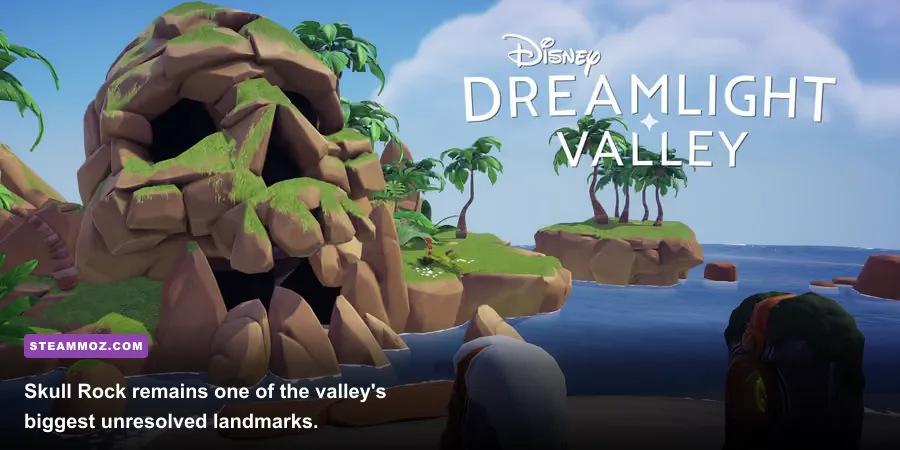
Travel to Dazzle Beach and look out toward the massive skull-shaped rock formation offshore. Skull Rock is not just background scenery. It is a major environmental clue tied to Peter Pan imagery, the Forgotten's story, and the wider question of what lies beyond the valley. The exact interaction available to you can depend on your story progress and the game's current update, but the landmark is worth revisiting rather than dismissing as an unreachable island.
How to inspect Skull Rock properly
Stand near the beach's shoreline and rotate the camera toward the rock at different times of day. Then use the wishing well to fast travel around Dazzle Beach and inspect the coastline from both sides. The angle from the eastern beach entrance is especially useful because it shows the rock's silhouette and the water gap more clearly.
Don't waste energy trying to glide or force your character across the water. Dreamlight Valley doesn't support free swimming to Skull Rock in the normal game loop, and attempts to reach it through furniture or landscape exploits can leave your avatar stuck. If a future quest opens a route, it will be signposted through dialogue, a prompt, or a story objective rather than requiring a platforming trick.
Skull Rock is a classic example of an Easter egg that works even before it becomes a traditional reward location. It creates anticipation. Disney fans will recognize the shape immediately, while players following the Forgotten's lore can connect it to the valley's missing pieces. Screenshot hunters should visit during sunset, when the orange sky makes the silhouette pop against the water.
For a similar style of exploration, Steamoz's guide to secret locations and hidden rewards in Eternal Destiny covers the same satisfying habit: inspect landmarks first, then return after progression flags change.
Follow the Hidden Route Through Vitalys Mines
The Vitalys Mines beneath Sunlit Plateau are one of the most rewarding places to explore slowly. They are easy to rush because the mine is tied to Scar's storyline and the Orb of Nurturing, but the winding tunnels contain branching paths, glowing gem clusters, mine carts, and a water-filled puzzle area that can blend into the scenery.
Use the mine's landmarks instead of guessing
Enter through the waterfall in Sunlit Plateau, then mark your route by the mine carts and pools. Mine every visible rock node as you go. Emerald, Aquamarine, Citrine, Amethyst, and other gems can spawn in the mine, and the confined layout makes it easier to miss a darkened node behind a bend. If your inventory is full, eat a stamina meal before entering and leave a chest near the entrance.
The most famous hidden section involves colored gems and a sequence puzzle. The required colors can vary by quest stage and objective, so read the on-screen instructions instead of blindly copying an old screenshot. The important trick is to place the requested gems into the matching slots, not to use the most valuable gem in your bag. Common versions of the puzzle ask for red, blue, green, and yellow examples, making spare basic gems useful.
Complete the puzzle during the relevant story quest, then search the chamber again. Players often grab the obvious objective and leave before checking nearby chests, harvestable items, or alternate tunnel bends. The mine's lighting also hides sparkle effects, so turn the camera toward the floor after every interaction.
| Mine Feature | Why Players Miss It | Best Method | Payoff |
|---|---|---|---|
| Gem nodes behind bends | Low lighting and narrow camera angles | Walk the outer wall and rotate the camera | Gems for selling, crafting, and quests |
| Mine-cart branches | Main quest path feels linear | Check every cart junction before continuing | Chests and extra materials |
| Colored-gem chamber | Quest objective pulls attention forward | Read the requested color sequence | Story progression and puzzle reward |
| Water pools | Decorative scenery looks non-interactive | Inspect edges after completing objectives | Additional clues and gathering opportunities |
If the mine seems empty after a quest, leave the biome, manually save, and return. Resource respawns and quest-state updates can be temperamental after a crash or interrupted loading screen. Steam players dealing with broader performance issues can also compare their setup with Steamoz's FPS-first crash troubleshooting guide; the games differ, but the save, driver, and overlay checks are useful.
Frosted Heights Rewards Careful Route Planning
Frosted Heights has a reputation for being visually obvious: snow, ice, cliffs, and Elsa's cave. The overlooked secrets are in the blocked sightlines. Large ice formations, rock walls, and the biome's pale color palette can hide chests and resource nodes until you approach from a different direction.
Clear the biome in layers
First, walk the outer perimeter with your pickaxe and shovel ready. Break small ice formations, remove Night Thorns, and dig sparkling spots near cliff edges. Next, check the river and bridges. Finally, revisit Elsa's cave and the surrounding paths after advancing her friendship quests. Quest objects can appear in areas that looked purely decorative during your first visit.
Elsa's ice cavern is an Easter egg as much as it is a quest location. The architecture, blue glow, and crystalline walls echo Frozen's visual language without turning the game into a combat dungeon. Search the sides of the room before speaking to Elsa, because the camera frequently centers on the character and hides collectibles just outside the conversation angle.
Frosted Heights is also a good place to use a companion with the Mining or Digging role. The bonus item chance matters more here because biome-specific materials and rare gems can be needed in bursts for crafting, friendship gifts, and quests. Bring a high-energy meal such as a five-star recipe rather than relying on berries; the cold biome's long loops make stamina management noticeable.
When decorating, leave a narrow walking lane around the biome's perimeter. A beautiful wall of trees can accidentally cover a chest spawn or make a quest sparkle impossible to spot. This is one reason players report that a secret has disappeared when it has really been buried behind their own custom build.
Stitch's Socks Hide a Film-Perfect Scavenger Hunt
Stitch's recruitment chain is one of Dreamlight Valley's best character-based Easter eggs. It begins with a wet sock found on Dazzle Beach, then expands into a scavenger hunt across the valley. The sequence uses familiar locations, Donald Duck's chaotic energy, and Stitch's obsession with collecting anything that looks remotely useful.
The sock trail and its timing
Pick up the sock on Dazzle Beach when it appears, investigate it through the quest menu, and follow the objective to Donald. The next pieces of the chain aren't always available immediately. Dreamlight Valley uses hidden real-time and progression gates, so completing one step may require waiting several in-game days before the next sock spawns. Keep checking Dazzle Beach and the other objective locations rather than assuming the quest is broken.
Stitch's questline rewards patience more than optimization. After each clue, inspect Donald's house, the beach, and nearby ground clutter for a prompt. Remove Night Thorns and dropped objects if the location looks crowded. Once Stitch arrives, raise his friendship by giving favorite gifts, completing daily conversations, and hanging out while mining or gardening. His later quests deliver more direct references to Lilo & Stitch and some of the funniest dialogue in the valley.
The clever detail is how the quest turns ordinary beach debris into narrative props. A sock isn't a legendary item with a glowing marker; it's the kind of silly evidence Donald would discover while investigating an intruder. That low-key presentation is why many Steam players walk past the first clue, especially when they expect every major secret to begin in a castle.
For official character and update information, the Disney Dreamlight Valley official site and the developer's Gameloft game page are safer references than old social-media screenshots. Quest timing and availability can shift with patches and limited-time content.
Small Easter Eggs Worth Catching on Every Visit
The valley's best references aren't always locked behind a quest. Look for them while doing routine chores, because the game constantly rewards players who stop sprinting between objectives.
WALL-E's realm and the forgotten boot
WALL-E's realm is packed with environmental storytelling: compacted trash, plant life forcing its way through machinery, and a tiny working space that immediately communicates the character's lonely routine. Check the corners before completing the realm objective. The arrangement of objects tells you what WALL-E values, and the realm's contrast between waste and growth is a visual summary of the film's central theme.
Remy's kitchen is a recipe-testing laboratory
Chez Remy is more than a restaurant menu. Use the cooking station to test ingredient combinations, then inspect the dining room and back counters after completing quests. Remy's realm and restaurant deliberately echo Ratatouille's hidden-kitchen fantasy, and the game's recipe system makes that reference interactive. Keep one or two spare ingredients in storage so you can experiment without sacrificing quest materials.
Look at the sky and water, not just the ground
Some of the most memorable screenshots come from weather and time-of-day combinations. Rain changes reflections on Dazzle Beach, sunset makes Skull Rock readable, and nighttime makes Dream Shards and sparkle effects easier to identify against darker terrain. Use the photo mode-style camera controls to frame the valley from low angles; the game places many Disney-inspired silhouettes in the background rather than directly on the path.
How to Avoid Missing New Secrets on Steam
Dreamlight Valley grows through updates, so a complete secret-hunting routine matters more than memorizing one static map. After installing a patch, visit the newest character's home, check every unlocked realm, and walk the edges of any newly opened biome. Then open the collection menus and compare your character, memory, critter, and recipe progress. Missing entries often point you toward a quest or location you ignored rather than a random bug.
| Routine | When to Do It | What to Check | Why It Works |
|---|---|---|---|
| Biome perimeter sweep | After a story or biome unlock | Chests, Night Thorns, sparkle spots, blocked paths | New quest objects often spawn outside main routes |
| Realm revisit | After inviting a character | Realm corners and formerly empty shelves | Character quests can reuse realm spaces |
| Collection audit | Weekly or after a patch | Memories, recipes, critters, clothing | Missing entries reveal unfinished activities |
| Save and reload check | When an objective won't trigger | Cloud sync, quest state, item prompts | Refreshes occasional loading or spawn issues |
Keep autosave in mind, but don't rely on it as your only backup. Let a quest objective update before teleporting, selling materials, or decorating the area. If a prompt refuses to appear, leave the biome, wait for the cloud icon to finish syncing, and restart the game cleanly. Avoid mods or save edits while troubleshooting, since they can make it harder to tell whether a missing item is a bug or altered game state.
Finally, don't flatten every biome into a perfectly efficient farm. Leave landmarks visible, preserve open paths, and keep chests away from quest hubs. Dreamlight Valley's secrets are built around recognition: the suspicious island, the odd sock, the glowing mine, the cave behind the snow, and the familiar Disney silhouette at the edge of your camera. If you keep those landmarks readable, you'll spot the next secret long before a checklist tells you where to look.