Dreamscape’s official PC requirements are not clearly published as a complete minimum-and-recommended specification sheet, so the safest answer is to treat a modern four-core gaming PC with 16GB of RAM and a GTX 1660-class GPU as the practical starting point. If your machine uses integrated graphics, 8GB of memory, or an older dual-core processor, don’t assume it will deliver a smooth experience. Check the current Dreamscape Steam listing before buying, because store metadata and hardware requirements can change during development or after major patches.
That distinction matters. Several games use the name Dreamscape, and not every listing represents the same project, engine, or visual workload. A system that comfortably handles a lightweight 2D title may struggle with a first-person Dreamscape built around real-time shadows, volumetric effects, high-resolution materials, and post-processing. This guide separates confirmed information from sensible hardware targets instead of inventing official numbers that the developer hasn’t supplied.
Dreamscape minimum and recommended PC specs
At the time of writing, there isn’t a dependable, universally published official table covering Dreamscape’s Windows minimum and recommended requirements. That means the numbers below are practical buying targets, not developer-certified specifications. They’re designed to answer the question most players actually have: what kind of PC should run the game without turning every atmospheric scene into a slideshow?
| Component | Practical minimum target | Recommended target | Why it matters |
|---|---|---|---|
| Operating system | Windows 10 64-bit | Windows 10 or Windows 11 64-bit | Modern game engines and current GPU drivers are built around 64-bit Windows. |
| Processor | Intel Core i5-8400 or Ryzen 5 2600 | Intel Core i5-12400 or Ryzen 5 5600 | Six physical cores give the game more room for streaming, lighting, and background tasks. |
| Memory | 16GB RAM | 16GB RAM, preferably dual-channel | 8GB can cause stutter when Windows and the game compete for memory. |
| Graphics card | GTX 1660 6GB or Radeon RX 580 8GB | RTX 3060 12GB or Radeon RX 6700 XT | Dedicated VRAM helps with textures, shadows, and post-processing. |
| Storage | SSD with at least 25GB free | NVMe SSD with at least 35GB free | An SSD reduces asset-streaming pauses and shortens loading screens. |
| Target experience | 1080p, low to medium, around 30-60 FPS | 1080p high or 1440p medium-high, around 60 FPS | Actual performance depends on the final build and scene complexity. |
The most important line here is the GPU. A GTX 1660 or RX 580 isn’t a guarantee of 60 FPS, but it gives you a realistic dedicated-graphics baseline for a modern atmospheric PC game. If Dreamscape turns out to be significantly lighter than its presentation suggests, those cards should have comfortable headroom. If it leans heavily on dynamic lighting or Unreal Engine-style effects, they’re more likely to land in the playable-but-adjusted category.
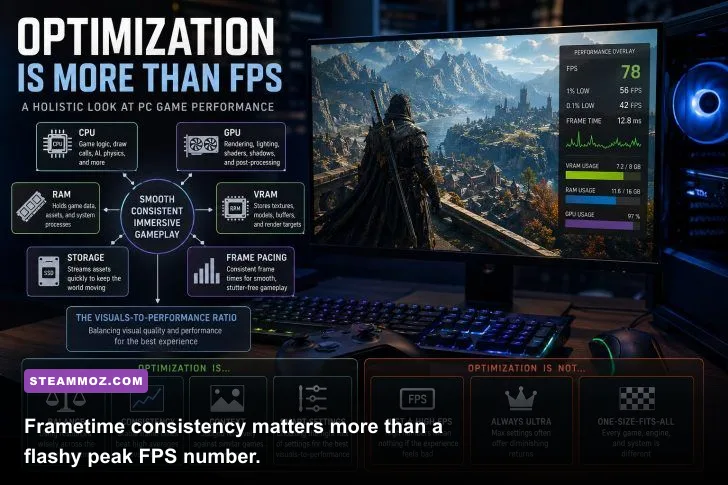
The recommended target is deliberately less extravagant than a flagship build. An RTX 3060 or RX 6700 XT paired with a current six-core CPU should handle 1080p high settings far more comfortably than an older high-end card paired with a weak processor. Don’t ignore the CPU: inconsistent frame pacing often feels like “low FPS” even when the counter reports an acceptable average.

🎮 Dream
Looking to experience this game? Grab your digital key directly on our store for $14.99.
View on Steammoz Store →What hardware matters most for Dreamscape?

For Dreamscape, upgrade priorities should be simple: dedicated GPU first, 16GB of RAM second, and an SSD before chasing an expensive processor. The graphics card controls resolution, shadow quality, ambient occlusion, reflections, and effects-heavy scenes. Those options usually account for most of the visual workload.
A six-core processor is the sensible floor for a new gaming PC. Older quad-core chips can still run many games, but background asset streaming, antivirus scans, browser tabs, and recording software can create sudden frame spikes. A Core i5-8400 or Ryzen 5 2600 is a reasonable lower target because both provide six cores, while a Ryzen 5 5600 or Core i5-12400 gives considerably better one-percent lows.
Memory is less glamorous, but 16GB is now the comfortable baseline. With 8GB, Windows may start paging data to storage while Dreamscape loads new areas. That doesn’t always reduce the average FPS; instead, it produces hitching when you turn quickly, enter a new room, or trigger a large visual event. Use two matching memory modules where possible so the system runs in dual-channel mode.
VRAM deserves special attention. Six gigabytes is workable at 1080p if textures are controlled, but 8GB or more gives you a safer buffer for high-quality assets. At 1440p, the extra memory becomes even more useful. If you see texture pop-in, delayed material loading, or sudden stutters after increasing texture quality, lower textures before reducing every other setting.
An SSD isn’t technically the same thing as more graphics power, but it can change how smooth the game feels. Install Dreamscape on an SSD with at least 20 percent free space. A nearly full SATA SSD is still preferable to a mechanical hard drive for streaming-heavy games, while an NVMe drive is the best option if your motherboard supports one.
Before installing, compare your exact hardware against the latest listing on Steam’s official hardware survey. It won’t provide Dreamscape-specific benchmarks, but it’s useful context for understanding what the mainstream PC audience is currently using.
Best Dreamscape graphics settings for stable FPS
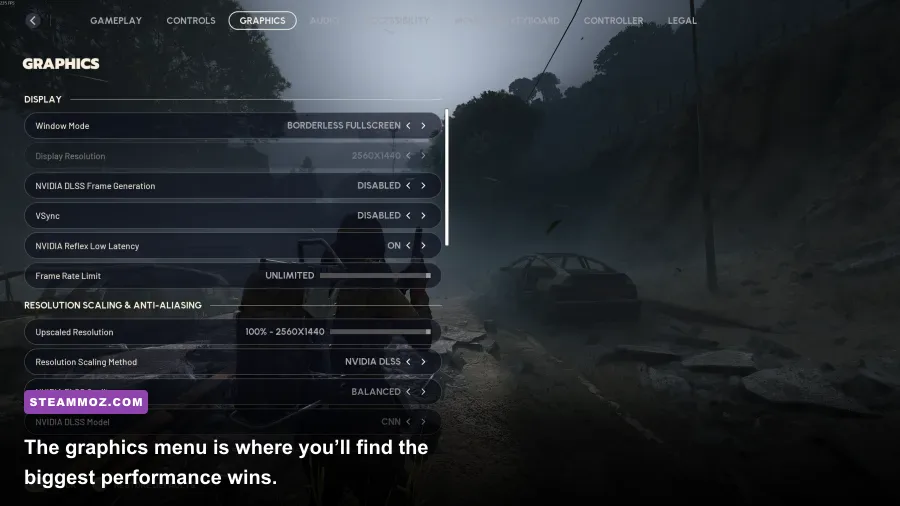
Start with a 1080p resolution and a 60 FPS cap rather than leaving the frame rate unlimited. A stable 60 feels better than a counter that jumps between 48 and 86 FPS, especially in a tense atmospheric game where camera movement and input response carry a lot of the experience.
| Setting | Recommended value | FPS impact | Visual trade-off |
|---|---|---|---|
| Resolution | Native 1080p | Very high | Lowering resolution improves performance quickly but softens the entire image. |
| Textures | High with 6-8GB VRAM; medium below that | Low to medium | Lower values reduce surface detail more than frame rate. |
| Shadows | Medium | High | Medium shadows preserve depth while cutting expensive distant shadows. |
| Ambient occlusion | Medium or enabled | Medium | Disabling it can make corners and objects look unnaturally flat. |
| Volumetric effects | Low or medium | High | Fog and light shafts look better at high settings but can punish weaker GPUs. |
| Reflections | Medium | Medium to high | Reduce this before textures if reflective surfaces cause drops. |
| Motion blur | Off | Negligible | Cleaner camera movement and easier performance testing. |
| Upscaling | Quality mode, if available | Medium to high gain | Usually a better compromise than dropping native resolution. |
Shadows and volumetric effects are the first settings I’d attack on a borderline PC. They’re visually impressive in screenshots, but their cost can spike when several light sources, fog layers, and moving objects occupy the same view. Medium shadows often preserve the atmosphere surprisingly well. Volumetrics are different: lowering them can make a scene look less cinematic, but it may be the only way to hold 60 FPS in dense interiors.
Textures usually affect VRAM more than raw GPU compute. Keep them high if your card has enough memory, then lower them only when you see hitching or texture-streaming problems. Reflections can be expensive on hardware that lacks modern ray-tracing acceleration, so don’t be afraid to use medium reflections even on a stronger card.
If Dreamscape offers DLSS, FSR, or XeSS, use the Quality preset at 1080p and Balanced at 1440p only when necessary. Avoid Ultra Performance unless you’re playing at 4K; the image reconstruction artifacts are far more obvious at lower resolutions. For troubleshooting, use the same test route each time and change one setting per run.
How to test whether your PC can run Dreamscape

Don’t rely on the minimum requirements alone, especially when those requirements are missing or incomplete. A reliable test starts with driver maintenance, background-process control, and a repeatable performance check.
- Confirm your hardware. Press Windows key, type “System Information,” and record your CPU and installed RAM. Use Device Manager or a trusted utility to identify the exact GPU and its VRAM.
- Install current drivers. Use the official NVIDIA driver page or AMD support page. A clean driver update can fix shader compilation and frame-pacing issues.
- Install the game on an SSD. Leave free space available and close large downloads. Streaming performance can be distorted if the drive is busy.
- Begin at 1080p medium. Disable motion blur, cap the frame rate to 60, and leave textures at a level your VRAM can handle.
- Play for at least 20 minutes. The opening area may be lighter than later scenes. Test movement, turning, loading transitions, and the most effects-heavy location you can reach.
- Watch one-percent lows. An average of 60 FPS with lows in the 20s will feel rough. Use an overlay such as Steam’s FPS counter or a monitoring tool that shows frametime.
For more general troubleshooting ideas, Steamoz’s guide to PC fixes for crashes and low FPS covers the usual checks, while our maximum-FPS settings guide explains why resolution, shadows, and frame caps should be tuned separately. The same logic applies here: find the expensive setting instead of blindly lowering everything.
If your system sits below the practical minimum, the best upgrade path is a used or budget dedicated GPU with at least 6GB of VRAM, followed by 16GB of dual-channel RAM. If you already own a GTX 1660-class card and 16GB of memory, try the medium profile before spending money. If you’re building new, a Ryzen 5 5600, Core i5-12400, RTX 3060-class GPU, 16GB RAM, and a 1TB SSD make a balanced Dreamscape-ready setup without wasting budget on parts the game may not need.
Keep checking the game’s official Steam page for the final requirements and patch notes. Until the developer publishes a definitive hardware table, these targets are the honest answer: 16GB RAM and a GTX 1660-class card should be your practical floor, while an RTX 3060-class system is the safer choice for smooth high-quality 1080p play.