
BLEACH Rebirth of Souls needs a reasonably modern gaming PC for smooth 1080p play: the official minimum calls for an Intel Core i7-4790 or AMD Ryzen 5 2600, 8GB of RAM, and a GeForce GTX 1060 6GB or Radeon RX 590. For the safer target, step up to an Intel Core i7-11700 or Ryzen 5 5600X, 16GB of memory, and an RTX 2080 or Radeon RX 6800 XT. Those recommended parts are the important line if you want high settings, stable frame pacing, and fewer drops during flashy Bankai attacks.
This is a 3D anime fighter built around reaction windows rather than sprawling open-world streaming, so the processor and graphics card demands are fairly predictable. Still, the minimum specification isn't a promise of flawless 60fps. It is closer to an entry point for 1080p play with reduced settings. Fighting games punish inconsistent performance more harshly than most genres: a brief hitch during a Reversal or Kikon Move can cost an entire round.
Before buying, compare your system against the table below, then use the settings profiles later in this guide. If your PC sits between the two official tiers, you can usually get a sharp-looking 1080p experience by lowering shadows and effects first rather than destroying texture quality.
BLEACH Rebirth of Souls PC requirements at a glance

The published requirements point to a game that scales mostly with GPU horsepower and available memory. The minimum GTX 1060 and RX 590 are older cards, but both remain capable of running modern games at 1080p when visual effects are controlled. Their 6GB and 8GB VRAM configurations also give them more breathing room than cheaper 4GB cards.
The CPU requirement deserves attention. The i7-4790 is old, but it has four cores and eight threads; the Ryzen 5 2600 offers six cores and twelve threads. That tells you the game does not demand a cutting-edge processor simply to boot. The recommended i7-11700 and Ryzen 5 5600X, however, provide much better minimum-frame performance. That difference matters when multiple characters, destruction effects, particles, and camera movement happen together.
| Component | Minimum | Recommended | What it means in practice |
|---|---|---|---|
| Operating system | Windows 10 64-bit | Windows 10 64-bit | Keep Windows and GPU drivers current |
| Processor | Intel Core i7-4790 / Ryzen 5 2600 | Intel Core i7-11700 / Ryzen 5 5600X | Recommended CPUs offer steadier frame times |
| Memory | 8GB RAM | 16GB RAM | 16GB reduces background-app pressure |
| Graphics | GTX 1060 6GB / Radeon RX 590 | RTX 2080 / Radeon RX 6800 XT | GPU controls effects, resolution, and image quality |
| DirectX | Version 12 | Version 12 | Use a DX12-compatible graphics card |
| Storage | 20GB available | 20GB available | An SSD is strongly preferable |
Bandai Namco lists BLEACH Rebirth of Souls on Steam as the authoritative source for the current PC specification. Requirements can change after patches, so check the store page again if the game receives a major technical update.

🎮 BLEACH Rebirth of Souls
Looking to experience this game? Grab your digital key directly on our store for $23.99.
View on Steammoz Store →Minimum specs are enough, but don't confuse them with 60fps

A GTX 1060 6GB or RX 590 should be treated as a 1080p Low-to-Medium starting point. These cards can render the game's cel-shaded characters cleanly, but they have less headroom for high shadow quality, volumetric effects, and heavy post-processing. The visual style is forgiving: character models and outlines retain much of their identity even after you reduce expensive effects.
The bigger risk on an 8GB system is not the game alone. Windows, Steam, browser tabs, recording software, and RGB utilities can consume several gigabytes before you enter a match. Once physical memory becomes tight, the system starts moving data to the page file. That creates the sort of stutter you feel as a missed guard or a late counter rather than an obvious crash.
Close Chrome, Discord overlays, hardware monitoring dashboards, and unnecessary launchers before testing. Leave the texture setting at Medium if your GPU has 6GB or more of VRAM, but lower effects and shadows if the frame rate dips during cinematic attacks. A stable 60fps at Medium is a much better competitive setup than a dramatic Ultra preset that repeatedly falls into the 40s.
Also install the game on an SSD if possible. The official storage figure is 20GB, but free space and drive speed still affect shader compilation, loading transitions, and general responsiveness. A nearly full mechanical hard drive can make a capable PC feel much slower than its specification suggests. For more general PC troubleshooting habits, Steamoz's PC crash and FPS fixes are useful reference material.
Recommended specs target a better competitive experience
The recommended i7-11700 or Ryzen 5 5600X is a meaningful upgrade, not just a box-ticking requirement. Both processors provide strong single-thread performance and enough multi-core capacity to keep the game responsive while Steam, voice chat, capture software, or an overlay runs in the background. That helps frame pacing, which is often more important than a headline average.
The RTX 2080 and RX 6800 XT sit in very different generations, but the message is clear: the recommended profile is aimed at high-quality 1080p and comfortable 1440p experimentation, not merely getting the game to launch. The RX 6800 XT is considerably stronger in raw raster performance, while the RTX 2080 benefits from mature driver support and useful upscaling options. Neither should be confused with a requirement for ray tracing; the official specification does not make ray tracing a mandatory feature.
Sixteen gigabytes of RAM is the sensible baseline for a modern gaming PC. It won't magically increase GPU performance, but it prevents background tasks from turning normal frame-time spikes into long pauses. If you are building a system specifically for this game, prioritize a dual-channel 16GB kit over an expensive CPU with only 8GB of memory.
| Hardware level | Suggested use | Likely graphics profile | Priority upgrade |
|---|---|---|---|
| Below minimum | Not recommended | Unreliable or unsupported | GPU first, then RAM |
| Minimum tier | 1080p play | Low/Medium, effects reduced | 16GB RAM and SSD |
| Between tiers | 1080p high-refresh play | Medium/High mix | CPU if frame pacing is poor |
| Recommended tier | 1080p high or 1440p tuned | High with selective reductions | 144Hz monitor only if locked performance is achieved |
| Above recommended | High-resolution play | High/Ultra where available | Keep frame times stable over visual excess |
If you are shopping for a new machine, don't spend the entire budget on a premium graphics card while pairing it with 8GB of RAM or a very old quad-core processor. This game is a duel-focused action title, and consistency wins. The smoothness advice in Steamoz's frame-focused graphics settings guide applies here too: tune the worst-performing moments, not the quiet menu scenes.
The best graphics settings for stable 1080p performance

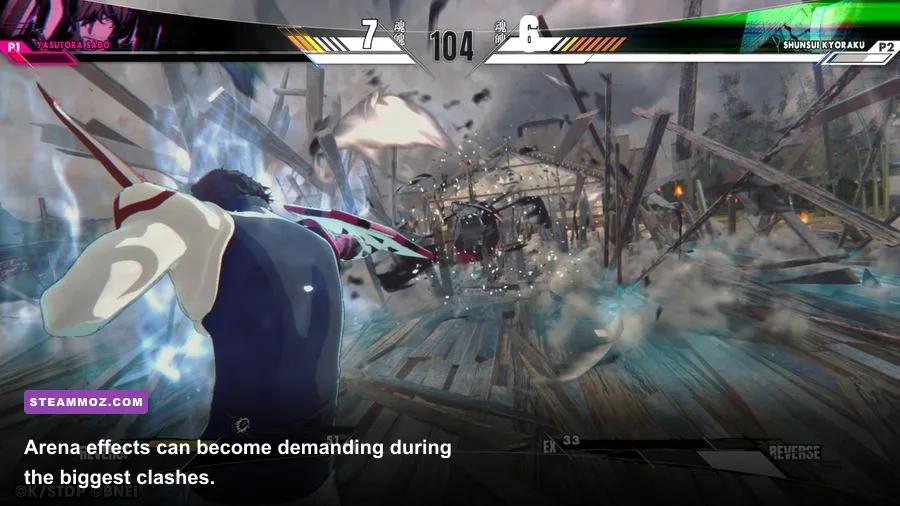
Start at 1920x1080 with the native resolution and test a real fight, not an empty training screen. Battles involving multiple effects are the stress case. Look for drops during a character's strongest special attack, camera transitions, and environmental destruction. If performance is already stable, raise textures before shadows; textures improve the image constantly, while shadows are often expensive for a comparatively subtle gain.
Use a frame-rate cap that your system can actually hold. A locked 60fps is the obvious target for a traditional fighter. If your PC fluctuates between 60 and 90fps, cap it at 60 rather than allowing constant swings. On a 120Hz or 144Hz display, pursue a higher lock only if the GPU can maintain it in the busiest sequences. Uneven frame delivery feels worse than a lower but consistent cap.
| Setting | Recommended value | FPS impact | Visual note |
|---|---|---|---|
| Resolution | 1920x1080 | Very high | Lower only when GPU-limited |
| Textures | High with 6GB+ VRAM; Medium on lower cards | Low to medium | Keep higher for character detail |
| Shadows | Medium | Medium to high | Good first reduction on the minimum GPU tier |
| Effects quality | Medium or High | High during special attacks | Lower if large moves cause stutter |
| Anti-aliasing | High or the default stable option | Medium | Protects outlines from shimmering |
| Post-processing | Medium | Low to medium | Reduce if blur hurts clarity |
| Motion blur | Off | Small | Sharper reactions and cleaner screenshots |
| Frame limit | Locked 60fps | Improves consistency | Prefer a stable cap to unstable highs |
Motion blur is an easy cut because it rarely helps you read a fast exchange. Keep anti-aliasing high enough to preserve the clean edges around robes, blades, and character silhouettes. If your display supports VRR, enable FreeSync or G-SYNC and still use a sensible cap below the panel's maximum refresh rate.
How to diagnose stutter, crashes, and bad frame pacing
First identify whether the problem is GPU load, CPU load, memory pressure, or shader compilation. If lowering resolution produces a large performance improvement, the graphics card is the bottleneck. If resolution changes barely matter but the frame rate collapses during crowded effects, the CPU or background software may be responsible. If the game feels fine after a restart but worsens after launching other programs, check RAM usage.
Update your NVIDIA or AMD driver, reboot, and verify the installation through Steam before changing ten settings at once. Then alter one option at a time. This is slower than blindly selecting Low, but it tells you which setting is actually responsible. A clean driver installation can help after moving from an older GPU, while deleting a broken shader cache may resolve repeated stutters after a driver update.
- Confirm Windows 10 64-bit or newer is fully updated.
- Install the latest WHQL graphics driver for your GPU.
- Verify the game files through Steam's Properties and Installed Files menu.
- Disable overlays and test a private match or training session.
- Set a 60fps cap and compare frame pacing in a demanding fight.
- Reduce effects and shadows before lowering textures or resolution.
Don't use a benchmark from another game to judge this one. The decisive test is a full match with the characters and effects you actually plan to use. Fighting-game responsiveness depends on consistency from one exchange to the next, and a beautiful screenshot cannot reveal a 100-millisecond hitch.
For users running older hardware, Steamoz's real-world PC specification breakdown offers a useful reminder: published minimums describe compatibility, not necessarily the ideal experience. If the machine still struggles after sensible tuning, check thermals, laptop power mode, and whether the game is using the dedicated GPU rather than integrated graphics.
What PC should you choose for BLEACH Rebirth of Souls?
The minimum specification is suitable for players who already own a GTX 1060-class desktop and are happy to tune settings. It is not a great target for a new purchase. An 8GB system with an old quad-core processor may run the game, but it leaves too little room for modern background workloads and future patches.
The recommended specification is the better buying benchmark. A Ryzen 5 5600X, Core i7-11700, or newer equivalent paired with 16GB RAM and a modern midrange GPU gives the game the performance cushion a reaction-based fighter deserves. You don't need an enthusiast PC, and the official requirements do not suggest that ray tracing or 4K Ultra is the intended baseline.
My practical verdict is simple: aim for a locked 1080p/60fps profile first, then spend spare GPU headroom on sharper textures and better effects. If your system meets minimum specs, start with Medium textures, Medium shadows, reduced effects, motion blur off, and a 60fps cap. If it meets recommended specs, begin at High, benchmark the busiest attacks, and lower only the settings that threaten frame pacing.
That approach keeps the visual identity of BLEACH Rebirth of Souls intact while protecting the timing that makes its sword clashes satisfying. Check the official Bleach game site for franchise updates and the Bandai Namco game page for official announcements. Specs tell you whether the game can run; a stable frame-time profile determines whether it feels right.