Call of Juarez: Gunslinger is remarkably easy to run by modern PC standards. The minimum target is an Intel Core 2 Duo-class processor, 2 GB of RAM, and a GeForce 8800 GT or Radeon HD 3870. For a smoother 1080p experience, aim for a Core 2 Duo around 3 GHz or better, 4 GB of memory, and a GeForce GTX 460 or Radeon HD 5850. Its 2013 visuals are stylized rather than cutting-edge, but the game can still punish weak integrated graphics, outdated drivers, and laptops running in power-saving mode.
This is the PC version of Techland's fast, arcade-leaning Western shooter, starring the fictionalized gunslinger Silas Greaves. The campaign mixes traditional firefights with slow-motion concentration, environmental destruction, and branching narration that literally reshapes the scenery. Those tricks look modest today, yet they create short bursts of heavy GPU and CPU activity when several enemies, fire effects, and exploding objects fill the screen.
Before buying, compare your computer against the official Steam listing. If your hardware is close to the minimum, don't assume every modern game-setting preset will behave sensibly: old PC ports often select conservative defaults poorly, especially on systems with integrated Intel graphics.

Call of Juarez: Gunslinger system requirements
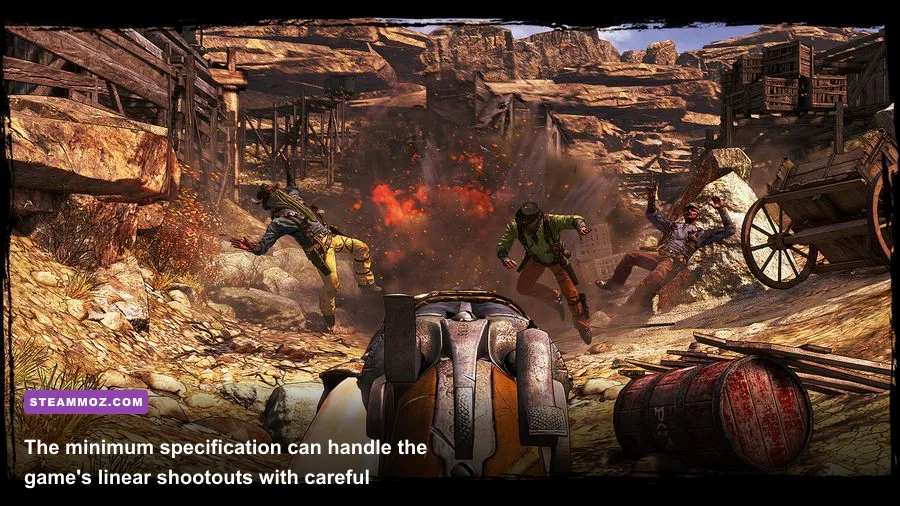
The published requirements are low, but the important detail is the age of the graphics cards. A GeForce 8800 GT and Radeon HD 3870 were midrange-to-upper-midrange parts in their era, not bargain-basement office GPUs. A contemporary laptop with a modern Core i3 may have plenty of processor power while still struggling if it relies on an entry-level UHD integrated GPU with shared memory.
| Component | Minimum | Recommended | What it means today |
|---|---|---|---|
| Operating system | Windows XP / Vista / 7 | Windows XP / Vista / 7 | Windows 10 and 11 can run it, but compatibility depends on drivers and display configuration. |
| Processor | Intel Core 2 Duo 2 GHz or AMD equivalent | Intel Core 2 Duo 3 GHz or AMD equivalent | Nearly any recent desktop CPU exceeds this, though single-thread performance still helps with busy fights. |
| Memory | 2 GB RAM | 4 GB RAM | 4 GB is the practical floor once Windows and background applications are included. |
| Graphics | GeForce 8800 GT / Radeon HD 3870 | GeForce GTX 460 / Radeon HD 5850 | Dedicated VRAM and driver support matter more than the age of the CPU. |
| DirectX | DirectX 9.0c | DirectX 9.0c | The game uses an older rendering path; newer DirectX hardware is backward-compatible. |
| Storage | 4 GB available space | 4 GB available space | An SSD improves loading and reduces texture-streaming hiccups, but it does not raise average FPS. |
There is a slightly awkward modern translation here. A recent six-core processor with 16 GB of RAM is overqualified, while a cheap laptop GPU may be the real bottleneck. The original recommended cards had dedicated memory and decent bandwidth for their time. That is why the safest comparison is performance, not just model number: a current GTX 1650, RX 570, or stronger card is comfortably above the recommended target, while some integrated GPUs remain borderline at 1080p.
Storage is the least worrying requirement. The installation is only about 4 GB, so even a small SSD has room for it. Still, an SSD is preferable because the campaign jumps between tightly scripted areas, and repeated loading screens feel noticeably less irritating on solid-state storage. For more general PC troubleshooting, Steamoz's guide to crashes and low FPS has useful checks that also apply here.
🎮 Call of Juarez: Gunslinger
Looking to experience this game? Grab your digital key directly on our store for $2.99.
View on Steammoz Store →How demanding is the campaign in practice?
On hardware that beats the recommended specification, Gunslinger is usually a comfortable 60-FPS game at 1080p. The campaign's linear design helps performance: enemy encounters are staged in compact arenas, sightlines are controlled, and you rarely render a huge open world. That makes the recommended GTX 460/HD 5850 target more credible than it might look on paper.
The rough spots appear during spectacle rather than exploration. A shootout in a canyon or settlement can combine smoke, muzzle flashes, destructible cover, multiple AI targets, and the game's comic-book-style visual effects. Gold Rush mode is a better stress test than the story because waves keep arriving and force the engine to manage more active characters at once. If your frame rate is stable in the campaign but dips during wave fights, the CPU and effects workload—not necessarily texture memory—is likely responsible.
There is also a gameplay reason to care about frame rate. Silas's concentration mechanic slows the action and rewards precise headshots, while Quickdraw sequences demand clean mouse input and fast target selection. A locked 60 FPS feels substantially better than an unstable 80-to-45 FPS swing. You don't need 144 FPS to enjoy the game, but consistency makes the timing feel more deliberate and reduces the sensation that the reticle is dragging during frantic encounters.
| Hardware profile | 1080p expectation | Likely limitation | Best approach |
|---|---|---|---|
| Below GeForce 8800 GT class | 720p, often below 60 FPS | GPU fill rate and shared memory | Lower resolution first; disable expensive effects before reducing texture quality. |
| Minimum-class dedicated GPU | 720p to 1080p, roughly 30–60 FPS | Effects-heavy firefights | Use medium effects and cap the frame rate for steadier aim. |
| Recommended-class GPU | 1080p near 60 FPS | Large wave encounters | High settings are reasonable, but lower shadows if dips appear. |
| Modern GTX 1650 / RX 570 or better | 1080p 60 FPS comfortably | Port quirks rather than raw power | Prioritize stable frame pacing, proper fullscreen mode, and current drivers. |
| Modern midrange GPU | 1440p or higher is possible | Engine scaling and display support | Test native resolution, but don't expect every modern ultrawide feature to work perfectly. |
Those numbers are practical targets rather than a promise from the developer. Results vary with resolution, driver version, background processes, and whether the game is running through a modern compatibility layer. The official Call of Juarez site is useful for franchise information, but the Steam build and your current Windows environment are the final authorities on installation behavior.
Best graphics settings for a stable 60 FPS
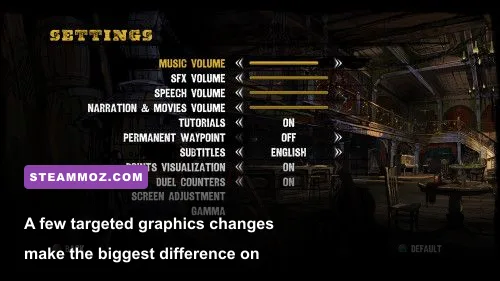
Gunslinger doesn't offer the enormous settings menus found in newer shooters, which is good news: you can focus on the options that actually affect performance. Start at 1920x1080 with fullscreen enabled, then test the opening section and a crowded combat arena. Don't judge performance while staring at an empty desert; the worst dips arrive when enemies, particles, and destruction overlap.
| Setting | Recommended value | FPS impact | Visual trade-off |
|---|---|---|---|
| Resolution | Native monitor resolution | Very high | The biggest performance lever; 1600x900 or 1280x720 can rescue weak GPUs. |
| Texture quality | High if VRAM allows | Low to medium | Lowering it makes surfaces blurrier but usually does less for FPS than shadows. |
| Shadow quality | Medium on minimum hardware | Medium to high | Reduces softness and scene depth, with a strong benefit in busy areas. |
| Anti-aliasing | Moderate or disabled | Medium | Edges become jaggier, but the cel-shaded art style hides some of the loss. |
| Effects / particles | Medium | Medium to high | Smoke, fire, and impact effects are less dense during shootouts. |
| Ambient occlusion | Disabled on weak GPUs | Medium | Corners lose subtle shading, while overall clarity remains strong. |
| V-sync | Enable if frame pacing is stable | Variable | Removes tearing; disable it if input latency bothers you and your FPS is high. |
A sensible minimum-spec profile
Use 1280x720 or 1600x900, medium textures, low-to-medium shadows, reduced effects, and disabled ambient occlusion. Keep the field of view at its default value while testing; widening it increases the number of visible objects and can make a borderline GPU work harder. If the game stutters rather than simply running slowly, close browsers and overlays first. Two gigabytes of system RAM leaves very little headroom for Windows, recording software, and launchers.
A recommended-spec profile
At a GTX 460 or HD 5850 level, start with 1080p, high textures, medium-to-high shadows, moderate anti-aliasing, and high effects. Cap the game at 60 FPS if your display or driver allows it. A cap is especially worthwhile for older CPUs because it prevents the system from chasing unnecessary frames between encounters, keeping frametimes more even when a wave of enemies appears.
For a broader performance mindset, Steamoz's Borderlands-like games guide covers the same kind of shooter-versus-hardware trade-offs. Gunslinger is less open-ended, but its combat still rewards clean frame pacing over impressive menu numbers.
What hardware matters most for this Western shooter?

The graphics card comes first, particularly if you're using 1080p. The recommended GTX 460 and HD 5850 are old, but their dedicated memory and bandwidth give them an advantage over weak integrated solutions. If your laptop has Intel HD 4000-class graphics or an entry-level AMD APU, expect to experiment with resolution and effects rather than blindly selecting High.
The processor matters in a different way. Gunslinger's AI is not a modern simulation, yet the game can become CPU-limited when several enemies are active and scripted events trigger together. A newer dual-core or quad-core chip will generally outperform the old Core 2 Duo requirement, even at a lower clock speed, thanks to better architecture. The key symptom is a GPU that isn't fully occupied while the frame rate falls during enemy-heavy encounters.
RAM is simple: 2 GB satisfies the letter of the minimum requirement, but 4 GB is the realistic starting point. On Windows 10 or 11, 8 GB gives you breathing room for Steam, voice chat, browser tabs, and capture tools. More than 8 GB won't transform performance, but too little memory can cause hitching that looks like a graphics problem.
| Upgrade or check | Helps most when | Expected result | Priority |
|---|---|---|---|
| Dedicated graphics card | FPS is low at native resolution | Higher average FPS and better effects quality | Highest |
| Dual-channel RAM | Using integrated graphics | Improves memory bandwidth and reduces dips | High for laptops |
| More system RAM | System has only 2–4 GB | Less swapping and fewer background-process hitches | Medium |
| SSD installation | Loading feels slow or inconsistent | Shorter loads, little change to FPS | Medium |
| CPU upgrade | GPU usage is low during crowded fights | Better minimum FPS and frame pacing | Situational |
Don't overlook thermal throttling. An old gaming laptop may technically exceed the recommended GPU but lose performance after ten minutes because heat forces the processor or graphics chip to reduce clock speed. Plug the system in, select a performance power plan, clean blocked vents, and monitor temperatures. Those steps are far more useful than downloading dubious “FPS booster” software.
Compatibility checks before you start playing
Modern Windows versions can run this older DirectX 9 game, but installation and display quirks are more likely than raw performance failures. Verify the game files through Steam, install the legacy DirectX components if prompted, and update your GPU driver. If the game launches to a black screen, try borderless or windowed mode and reset any forced driver-level resolution or sharpening profiles.
- Check the GPU model first. Compare it with the GeForce 8800 GT or Radeon HD 3870 minimum, not just the CPU listed in your laptop's advertisement.
- Confirm available memory. Close browsers, overlays, and recording applications if you have only 4 GB of RAM.
- Start at 1280x720. Raise resolution after confirming that a full combat encounter stays smooth.
- Test Gold Rush mode. It is a better stress test than walking through an empty story section.
- Cap unstable performance. A steady 30 or 60 FPS feels better than constant swings between the two.
- Use official support channels. Check the 505 Games support portal for publisher-side troubleshooting and the Steam client support resources for installation issues.
The biggest mistake is chasing maximum settings because the game looks old. Gunslinger's painted textures, exaggerated hit effects, and comic-panel presentation remain attractive at medium settings, while reduced shadows and particles are difficult to notice once the shooting starts. Put those saved frames into resolution and frame-time stability instead.
One final warning: resolution scaling and forced widescreen tweaks can introduce odd HUD placement or stretching. Test the unmodified Steam version first, then change one setting at a time. If you want more practical advice for getting through demanding action games, Steamoz's Alpine Unrest survival tips offer a useful reminder that reliable performance is part of good preparation.
Bottom line: if your PC has a modern dedicated GPU, 4 GB or more of RAM, and a processor newer than the Core 2 Duo era, Call of Juarez: Gunslinger should be an easy 1080p 60-FPS game. Systems near the minimum can still play it, but use 720p, reduce shadows and effects, and test a busy Gold Rush wave before settling on your final profile. The hardware bar is low; stable frame pacing and sensible compatibility tweaks are what separate a great quick-draw session from a frustrating one.