Architect Life: A House Design Simulator is worth playing in 2026 if you enjoy the methodical pleasure of planning rooms, correcting construction mistakes, and decorating a home one decision at a time. It isn't a second The Sims, and it certainly isn't a professional CAD package. Its appeal sits between both: a relaxed building game with a career structure, client briefs, practical constraints, and enough creative freedom to make a genuinely satisfying house. The catch is that its pace can feel deliberately slow, and the construction tools occasionally demand more patience than they should.
That makes this an easy recommendation for players who like House Flipper, The Sims 4's Build Mode, or low-pressure management games. If you need constant progression, dramatic challenges, or deep architectural simulation, Architect Life may feel thin. After spending time with its career contracts and unrestricted sandbox construction, my verdict is a cautious but positive 7/10.
What Architect Life Actually Does Well

Architect Life's central loop is refreshingly uncomplicated. You receive a brief, study the client's requirements, create a plan, construct the building, furnish it, and submit the finished result for evaluation. The game makes those steps feel connected rather than treating construction as a menu and decoration as a separate minigame.
That distinction matters. You aren't just dropping a prebuilt room onto a flat lot. You decide where walls go, how rooms connect, which windows face the garden, and whether the roofline complements the shape of the building. A bedroom tucked behind a noisy living area can make a layout feel awkward. A narrow corridor wastes space. A window placed without considering the exterior can make the front of the house look accidental. Architect Life is at its best when these small decisions start producing consequences you can see.
The career mode gives those decisions useful pressure. Client requests usually establish the boundaries: the number or type of rooms, a preferred style, practical facilities, and a spending limit. Those restrictions stop the early game from becoming an empty box-building exercise. You have a reason to care whether the kitchen is functional, whether the bedroom count matches the brief, and whether your expensive exterior choices leave enough money for furniture.
There is also a pleasing rhythm to the work. Demolishing a badly placed wall, rebuilding the floor plan, and watching the final walkthrough improve is more satisfying than it sounds. This is a game about iteration, not instant perfection. Players coming from our practical PC performance coverage should still keep expectations sensible: Architect Life is visually clean, but its real workload is design rather than spectacle.
| Mode or Activity | What You Do | Best For | Main Limitation |
|---|---|---|---|
| Career | Complete client-led building contracts | Learning the tools and earning structure | Briefs can restrict experimentation |
| Sandbox | Design homes with fewer practical limits | Creative builds and long sessions | Less external motivation |
| Blueprint planning | Shape rooms, circulation, and the footprint | Players who enjoy layout puzzles | Small placement errors can be fiddly |
| Decoration | Furnish rooms with furniture and finishes | Detail-focused builders | Repetition becomes noticeable in large projects |
| Walkthrough and evaluation | Inspect the completed property and submit it | Checking cohesion and requirements | Not every design decision feels equally rewarded |

🎮 Architect Life: A House Design Simulator
Looking to experience this game? Grab your digital key directly on our store for $8.99.
View on Steammoz Store →Building a House Is Better Than Decorating One

The strongest part of Architect Life is the construction workflow. Starting with a foundation and turning it into a believable home gives every room more context than a simple decorating simulator can provide. You think about entry points, sightlines, circulation, and the relationship between private and social spaces before worrying about which sofa matches the walls.
The interface generally keeps the major tasks understandable. Walls, doors, windows, floors, roofs, exterior treatments, and furnishings each have a clear role. The game isn't trying to teach architectural engineering, but it does encourage architectural thinking. A staircase isn't just an object; it consumes valuable floor area. A large window may improve a room visually while complicating the outside elevation. An open-plan kitchen can make a small home feel larger, but it also means the living space needs careful furniture placement.
That hands-on approach produces some surprisingly good “I made that” moments. A simple two-storey home with a compact kitchen, a central staircase, and a rear terrace can look more rewarding than a huge mansion assembled from expensive pieces. Scale matters. Architects who understand proportion will get more from the game than players who simply fill every available surface.
The trouble is precision. Placement can feel less exact than the fantasy suggests, particularly when several objects occupy a tight room. Snapping helps, but it doesn't eliminate the occasional struggle with alignment, rotation, or selecting the object you actually want. Large builds also reveal the limits of the catalogue. The available furniture and finish options support a variety of styles, but repetition becomes obvious when you decorate an entire neighbourhood rather than one home.
That is why I recommend building smaller during the opening contracts. A compact floor plan exposes the game's strengths: you can see how each choice affects the whole property, and you won't spend an hour furnishing a room that later needs to be demolished. The first house should be treated as a test project, not a masterpiece.
A practical first-house layout
Start with a simple rectangular footprint. Put the entrance near the centre of the front wall, keep the living room close to the entry, and place the kitchen beside it rather than at the far end of the property. Bedrooms work better away from the busiest route through the house. Reserve a small service area for the bathroom and utility needs before adding decorative spaces.
This isn't the only viable plan, but it reduces wasted corridors and makes the client's requirements easier to satisfy. Once the structure works, add visual character with roof shape, window rhythm, materials, and landscaping. In Architect Life, decoration is most effective when it reinforces a good plan instead of trying to hide a bad one.
Career Mode Gives the Game Its Needed Structure

Without career contracts, Architect Life would be a pleasant but fairly directionless house editor. The career framework gives you a reason to learn the difference between an attractive home and a compliant one. A client may care about room count, function, style, or cost more than your personal preference. That tension is useful because it turns design into a decision-making problem.
The best strategy is to separate must-have requirements from nice-to-have improvements. Build the required rooms and essential fittings first. Check the budget before buying premium furniture or committing to an elaborate exterior. Then spend whatever remains on the details that produce the biggest visual improvement: consistent flooring, coordinated wall finishes, sensible lighting, and a clear focal point in the living areas.
Don't confuse expensive with impressive. A room full of high-value objects can still look unfinished if the furniture blocks the path or clashes with the room's purpose. Evaluation systems in games like this tend to reward completion and compliance, but the human eye still notices whether a house makes sense. A dining table pressed against a wall, a bedroom with no usable circulation, or a bathroom opening directly into a social space will make the build feel artificial even if the checklist is complete.
Career progression is also where the game's repetition becomes most visible. Many contracts ask you to repeat the same broad sequence: plan, construct, furnish, review. The pleasure comes from improving your process, not from radically different mission design. If you approach every job as a chance to try a new layout or style, the repetition is manageable. If you expect each contract to introduce a new system, you'll probably run out of patience.
| Build Priority | Why It Matters | When to Spend More | Common Mistake |
|---|---|---|---|
| Client requirements | They define whether the contract is viable | Always complete these first | Decorating before checking the brief |
| Room circulation | Keeps doors, furniture, and routes usable | Before adding luxury items | Creating attractive but cramped rooms |
| Windows and exterior shape | Controls natural light and curb appeal | After the footprint is stable | Adding windows without considering the elevation |
| Furniture and finishes | Establishes personality and visual cohesion | Once the budget is secure | Mixing styles without a deliberate theme |
| Landscaping and extras | Adds polish but rarely rescues a weak plan | At the end of the contract | Spending the remaining budget too early |
Graphics, Performance, and Value in 2026
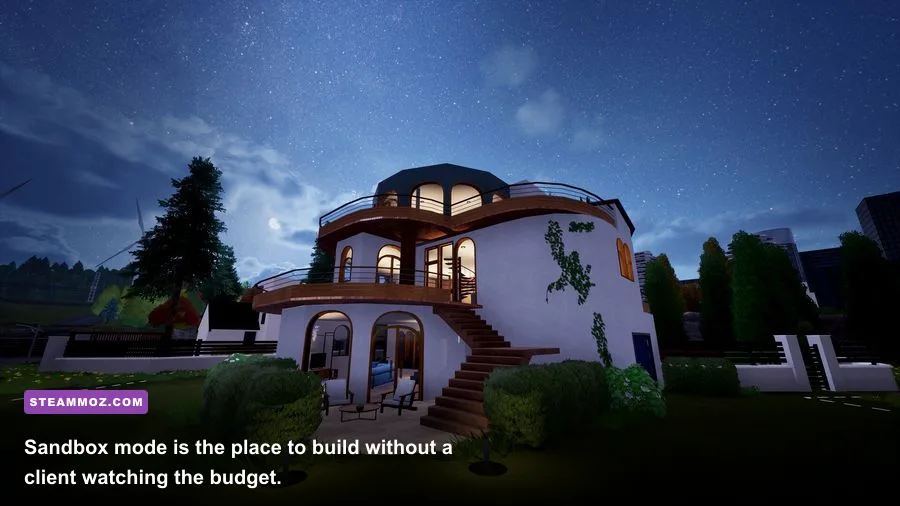
Architect Life is not a benchmark showcase. Its visual appeal comes from clean presentation, readable spaces, and the satisfaction of seeing a build from multiple viewpoints. You don't need cutting-edge hardware to appreciate it, but large furnished homes can put more pressure on performance than an empty starting lot. Extra objects, reflective surfaces, lighting, and detailed exterior decoration are the areas to watch.
The sensible approach is to begin with a balanced profile and only lower settings when your completed houses become busy. Reducing resolution quality too aggressively makes walls and furniture look soft, while lowering shadows usually costs less in visual clarity. If the game offers resolution scaling, keep it close to native resolution and adjust shadows, reflections, and ambient effects first. A stable frame rate matters more here than maximum image quality because precise placement is easier when the camera feels responsive.
| Setting Area | Recommended Starting Point | Performance Impact | Visual Trade-Off |
|---|---|---|---|
| Resolution | Native monitor resolution | High when reduced or increased | Preserves object clarity and UI readability |
| Shadows | Medium or High | Medium to High | Lower values flatten rooms and exteriors |
| Reflections | Medium | Medium | Mostly noticeable on polished surfaces and windows |
| Ambient lighting | Medium | Medium | Lower values make corners look less natural |
| Object or foliage detail | High for small builds, Medium for large lots | Medium | Lower settings reduce exterior richness |
| Frame-rate cap | Match your display's stable refresh target | Can reduce heat and fluctuations | Better consistency during placement and walkthroughs |
Before buying, check the current Architect Life Steam listing for updated requirements, controller support, user reviews, and patch notes. The game's value also depends heavily on your preferred pace. A sale price makes the recommendation much easier, while a full-price purchase demands that you already know you enjoy slow, detail-heavy construction.
Is Architect Life Worth Playing in 2026?
Yes, but only if you want a house-building game rather than a life simulator with houses attached. Architect Life succeeds because it respects the small decisions: a hallway that finally flows correctly, a roof that makes the exterior feel intentional, or a living room that looks convincing because every object has breathing room. Those moments are quiet, but they land.
It falls short when it tries to sell the fantasy of limitless architectural creativity while working within a finite catalogue and occasionally awkward placement tools. The career mode can feel repetitive, client evaluations aren't always as nuanced as the design process, and ambitious builders may eventually hit the ceiling of what the available systems support.
Still, that ceiling is high enough for the right audience. If you enjoyed the structured creativity of a slower, systems-driven classic, or you like games that reward planning over reflexes, Architect Life has a comfortable niche. It is especially good for players who want to build, inspect, revise, and build again without combat, timers, or constant resource panic.
My final advice is simple: buy it for the construction loop, start with career mode, and don't rush toward giant mansions. Learn how the blueprint, budget, room layout, and furnishing systems interact. Once your small homes look coherent, move into sandbox projects and experiment with bigger footprints. Architect Life won't replace professional design software or the freedom of a mature life-sim build editor, but in 2026 it remains a thoughtful, relaxing, and occasionally absorbing way to spend an evening designing a house that exists only because you made it.
For official information, compare the game's current details on the NACON official website and follow the developer's updates through Shine Research. If you want more PC-focused buying advice, our PC fixes and performance guides are a useful companion before you install.