
Dino Run DX has exceptionally modest PC requirements. The official Steam minimum is a 1 GHz processor, 512 MB of RAM, a DirectX 9-compatible graphics card, DirectX 9.0c, and roughly 100 MB of storage. There isn't a separate official recommended specification on the Steam listing, but practically any Windows laptop or desktop from the last decade should run it smoothly. The real performance questions are display scaling, browser-like background load, controller setup, and whether you want clean 60 FPS output on a modern monitor.
That distinction matters because Dino Run DX is a very old-school game with a very modern hardware mismatch. Its pixel-art stages, simple effects, and side-scrolling camera barely trouble current integrated graphics. However, the game is built around split-second jumps, sliding under hazards, and reacting to the extinction wave behind you. A technically capable PC can still deliver an unpleasant experience if Windows scaling, forced fullscreen, or inconsistent frame pacing gets in the way.
Dino Run DX minimum and recommended PC specs

The minimum figures below come from the game's Steam store information. They are deliberately low because Dino Run DX was designed for aging PCs and lightweight 2D hardware. A DirectX 9-class GPU is not a demanding target by today's standards; Intel HD Graphics, AMD Radeon integrated graphics, and virtually every discrete card released since the early 2010s exceed it by a wide margin.
| Component | Official minimum | Practical recommendation | Why it matters |
|---|---|---|---|
| Operating system | Windows XP/Vista/7-era Windows support | Windows 10 or Windows 11 with compatibility options if needed | The game is old; modern Windows compatibility is more relevant than raw power. |
| Processor | 1 GHz CPU | Any modern dual-core Intel, AMD, or Apple Silicon system through a compatible PC setup | Gameplay logic and 2D animation are extremely light on the CPU. |
| Memory | 512 MB RAM | 4 GB RAM or more for the whole system | Dino Run DX uses little memory, but current Windows and background apps do not. |
| Graphics | DirectX 9-compatible graphics hardware | Any current integrated GPU, including Intel UHD/Iris Xe or AMD Radeon integrated graphics | The game uses simple 2D visuals rather than modern 3D rendering. |
| DirectX | DirectX 9.0c | Current DirectX installation plus legacy runtime support if prompted | Newer DirectX versions do not always install every legacy component automatically. |
| Storage | About 100 MB available space | At least 500 MB free on the game drive | The installation is tiny, but leaving headroom avoids update and temporary-file problems. |
The important caveat is that “recommended” here isn't an official developer tier. Pixeljam does not publish a higher recommended CPU, GPU, or RAM target on the Steam specification panel. So don't read the practical recommendation as a benchmark requirement. A recent office PC is already overqualified. In fact, a low-power Chromebook-style machine running a compatible Windows environment may have more than enough graphics horsepower, while an older operating system may create the bigger headache.
If your goal is simply to confirm whether the game will launch, compare your machine against the official Dino Run DX Steam page. For a broader look at how lightweight PC games differ from genuinely demanding releases, our Drawful 2 PC specs guide offers a useful comparison.

🎮 Dino Run DX
Looking to experience this game? Grab your digital key directly on our store for $3.41.
View on Steammoz Store →What performance should you expect on a modern PC?
On current hardware, Dino Run DX should feel effectively instantaneous. The game does not stream a large open world, simulate complex physics, or render dense 3D scenes. Its workload is mostly sprite animation, scrolling backgrounds, collision checks, particles, and the constant movement of the extinction event. Integrated graphics are more than capable of handling that workload.
That doesn't mean every setup feels identical. The title's old display pipeline can behave differently depending on windowed mode, monitor refresh rate, GPU driver settings, and how Windows handles scaling. If the game appears to stutter, the first suspect should not be your graphics card. Check whether another application is stealing focus, whether a laptop has switched to a battery-saving profile, and whether the game is being stretched through multiple layers of scaling.
| Hardware profile | Expected result | Best use case | Likely limitation |
|---|---|---|---|
| Legacy 1 GHz PC with 512 MB RAM | Playable at the intended low-resolution presentation | Meeting the historical minimum | Modern Windows, drivers, and background processes may be the real obstacle. |
| Older office laptop with integrated graphics | Generally smooth at native or modestly scaled resolution | Portable play and keyboard runs | Battery mode can introduce input delay or uneven pacing. |
| Modern Intel or AMD laptop | Comfortably exceeds the game's needs | 60 FPS play, recording, and multitasking | Display scaling or compatibility behavior may need manual adjustment. |
| Gaming desktop with discrete GPU | Massively overqualified | High-refresh monitor, streaming, and overlays | Extra GPU power will not transform the game's art or mechanics. |
There is also a difference between performance and responsiveness. Dino Run DX's challenge comes from rhythm. You are watching the dinosaur's jump arc, judging whether a rock can be cleared, and deciding if an egg is worth the detour while the screen's danger line creeps closer. A stable 60 FPS presentation makes those decisions easier, but a 144 Hz monitor won't magically make the game play like a native modern high-refresh title. The game's animation and timing logic remain products of its original design.
For context, even considerably more demanding 2D and action games can run well on modest machines when their settings are tuned properly. Our Deadfall Adventures PC requirements breakdown shows why raw GPU age matters much more in 3D games than it does here.
Best graphics and display settings for smooth runs

Dino Run DX doesn't offer a modern PC graphics menu with dozens of sliders. That is good news: there are fewer settings to troubleshoot. The most useful tuning happens at the display level. Start with the game's native presentation, then increase the window size only if the image remains sharp and input feels immediate.
| Setting or adjustment | Recommended value | Performance impact | Visual and control note |
|---|---|---|---|
| Display mode | Start windowed; test fullscreen afterward | Negligible on modern hardware | Windowed mode can avoid black-screen or scaling problems on newer Windows versions. |
| Resolution scaling | Use an integer-like scale where possible | Very low | Whole-number scaling keeps pixel art cleaner than arbitrary stretching. |
| Refresh rate | 60 Hz or the most stable available mode | None | Consistency is more useful than chasing a high refresh number. |
| GPU driver profile | Maximum performance while plugged in | None in-game | Prevents aggressive laptop power saving from creating input lag. |
| VSync | Use only if tearing is visible | Potentially adds a frame of latency | Disable it if jumps feel delayed and your display remains tear-free. |
| Overlays | Disable unnecessary recording and chat overlays | Small, but variable | Older games are more likely to dislike overlay hooks than modern releases. |
Fixes for black screens, tiny windows, and launch issues
If the game launches to a black screen, use the simplest route first: switch between fullscreen and windowed mode, close overlay software, and run the executable with compatibility settings for an older version of Windows. Avoid downloading random “fix packs” from unofficial sites. The official Pixeljam website is a safer starting point for developer information, while Steam's community discussions can help identify a version-specific issue.
Windows may also apply blurry scaling if it enlarges a low-resolution window. Right-click the game's executable, open Properties, choose Compatibility, and inspect the high-DPI scaling override options. Test one change at a time. For pixel art, a slightly smaller but crisp window is usually better than a giant, smeared fullscreen image.
On a laptop, plug in the charger before judging performance. Set Windows to a balanced or performance power mode, and make sure the game isn't being forced through an unusual compatibility layer. If you use a controller, test keyboard input as well. The keyboard often gives the cleanest response for short hops and rapid direction changes, especially when a controller's dead zone makes a tiny correction feel too broad.
How the low requirements affect actual gameplay

The light hardware target doesn't make Dino Run DX shallow. It simply shifts the skill test away from equipment and toward route reading. The game asks you to maintain forward momentum while handling terrain, predators, collectible eggs, power-ups, and the advancing extinction event. A faster PC won't rescue a bad jump, and a slower-looking screen can make a good run feel unfair if frame pacing is inconsistent.
Momentum is more important than reckless speed
Your dinosaur is most vulnerable when you panic and hold the fastest movement option through terrain you haven't read. Hills, gaps, rocks, and enemy encounters create a natural rhythm: accelerate on open ground, jump before the obstacle's collision edge, then land with enough room to react. The camera's horizontal movement means you should think one screen section ahead rather than staring only at the dinosaur's feet.
Eggs are a classic trap for new players. They help progression and encourage exploration, but turning sharply for every collectible can cost more time than the reward is worth. If the extinction wave is already close, prioritize a safe route. In a calmer section, take the lower or less obvious path and use the extra space to collect eggs without breaking your movement rhythm.
Use power-ups as timing tools
Dino Run DX's power-ups are most valuable when they solve a specific problem. A speed boost belongs on a long, clear stretch or during a dangerous escape, not immediately before a cramped obstacle sequence. A jump-enhancing effect is strongest when the level presents consecutive gaps or elevated routes. Defensive effects are best saved for sections where an enemy or environmental hazard would otherwise force a stop.
This is why stable performance matters even though the game is easy to run. The difference between a clean jump and a late jump is tiny. Input delay from VSync, Bluetooth interference, or a struggling background application can turn a readable obstacle into a missed landing. Keep the machine quiet, use the input method you trust, and don't confuse graphical quality with competitive consistency.
Adventure, Arcade, and replay value
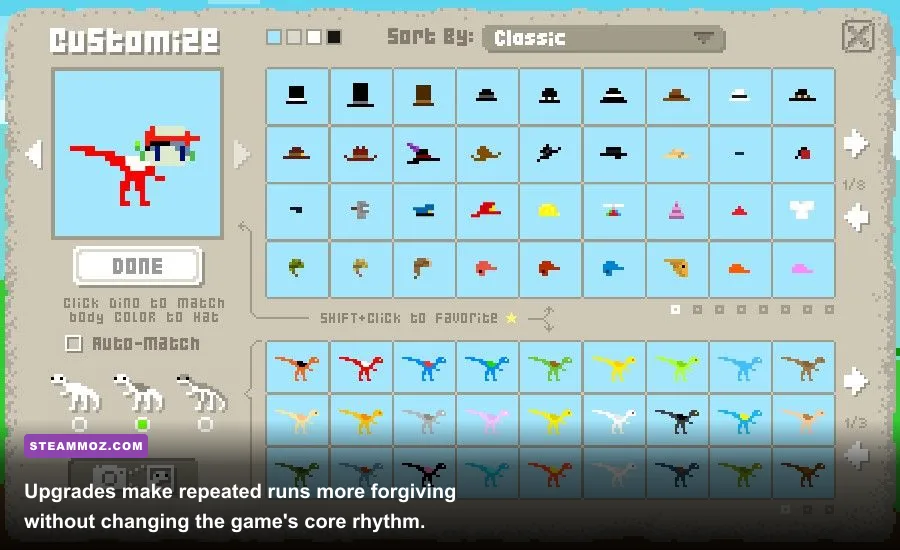
Adventure-style progression gives you a reason to return after failed runs, while arcade-focused play strips the experience back to survival, score, and route mastery. The upgrade loop can make later attempts more forgiving, but it doesn't remove the need to understand terrain. If you want to improve quickly, replay familiar areas and focus on one variable at a time: fewer collisions, more eggs, cleaner jumps, or better use of a boost.
That approach is more productive than simply grinding until the dinosaur is stronger. Upgrades help, but the extinction event keeps pressure on every decision. You still need to recognize when a jump is safe, when a shortcut is bait, and when preserving momentum is worth more than a collectible.
Is Dino Run DX worth installing on your PC?
If your PC can run Windows and install Steam, it almost certainly has enough power for Dino Run DX. The official minimum of 1 GHz, 512 MB RAM, DirectX 9 graphics, and around 100 MB of storage is so low that compatibility—not performance—is the sensible thing to investigate. Modern integrated graphics already sit far above the game's intended target.
The better question is whether you enjoy a game that turns simple controls into a demanding endurance test. Dino Run DX is quick to understand but surprisingly easy to replay. Its charm comes from the contrast between cheerful pixel-art dinosaurs and the constant threat of extinction behind them. Runs are short, failures are readable, and improvement usually comes from making one smarter route decision rather than waiting for a better weapon or a dramatic character build.
| Player situation | Verdict | Recommended approach |
|---|---|---|
| Using a modern office laptop | Excellent fit | Play windowed or at a clean integer-like scale and focus on input response. |
| Using an old Windows PC near the minimum | Potentially playable | Close background programs and expect compatibility troubleshooting rather than GPU problems. |
| Using a high-end gaming desktop | Overqualified, but ideal for recording | Disable unnecessary overlays and prioritize stable frame pacing over maximum refresh rate. |
| Looking for a deep modern progression system | Approach with realistic expectations | Expect replayable runs, upgrades, and route mastery—not a large RPG-style campaign. |
For another lightweight game where understanding the actual requirements matters more than owning a powerful GPU, check out our Dungeon Siege classic review. And if you're comparing older Steam games by how much hardware they demand, our Dragonkin settings guide covers the opposite problem: getting every frame from a much newer action RPG.
Bottom line: Dino Run DX needs almost no gaming hardware by current standards. Treat 1 GHz CPU, 512 MB RAM, DirectX 9 graphics, and 100 MB storage as the official floor, not a modern buying checklist. Any recent Intel or AMD laptop should clear the practical bar comfortably. Spend your effort on clean scaling, low input latency, and learning when to chase eggs versus when to outrun the end of the world.
For the latest platform details, ownership options, and any updated compatibility notes, consult the official Steam listing before installing.