
Bully: Scholarship Edition runs on extremely modest hardware, but its 2008 PC port can be more temperamental than its listed requirements suggest. The official baseline calls for a Pentium 4-class processor, 1 GB of RAM, and a Radeon X1600 or GeForce 7600 with 128 MB of video memory. For a smoother modern setup, aim for at least a Core 2 Duo or equivalent, 2 GB of RAM, a GeForce 8800/Radeon HD 2600-class GPU, Windows compatibility, and roughly 5 GB of free storage.
Those numbers look laughably low beside contemporary games, and technically they are. Bully is built on an older version of Rockstar's RenderWare technology, with compact environments, low-resolution textures, and a relatively small streaming footprint. The catch is that old PC games don't always behave like simple plug-and-play downloads. Bully: Scholarship Edition has a history of crashes, frame pacing oddities, controller friction, and problems on newer versions of Windows. Your PC is almost certainly powerful enough; the real question is whether the port plays nicely with your operating system, display, and input devices.

Official Bully: Scholarship Edition PC requirements

Rockstar's published specifications are from the Windows XP/Vista era, so treat them as a compatibility snapshot rather than a promise of flawless performance on Windows 10 or Windows 11. The minimum specification should launch the game at low settings, while the recommended tier gives the old engine enough breathing room for higher resolutions and steadier gameplay.
| Component | Minimum | Recommended | Modern interpretation |
|---|---|---|---|
| Operating system | Windows XP/Vista | Windows XP/Vista | Windows 10/11 usually works, but legacy-port fixes may be needed |
| Processor | Intel Pentium 4 3.0 GHz or AMD Athlon 3000+ | Intel Core 2 Duo 2.0 GHz or AMD Athlon X2 3800+ | Any recent dual-core or better CPU has ample raw power |
| Memory | 1 GB RAM | 2 GB RAM | Modern systems exceed this; background apps matter more |
| Graphics | Radeon X1600 or GeForce 7600, 128 MB | Radeon HD 2600 or GeForce 8800, 256 MB | Integrated graphics from the last decade should be sufficient |
| DirectX | DirectX 9.0c | DirectX 9.0c | Current Windows versions include backward-compatible DirectX components, but not every legacy file |
| Storage | 4.7 GB available | 4.7 GB available | Reserve 8-10 GB for updates, saves, and troubleshooting tools |
| Sound | DirectX 9.0c-compatible sound card | DirectX 9.0c-compatible sound card | Built-in motherboard audio is more than enough |
The graphics requirement is especially revealing. A GeForce 7600 and Radeon X1600 are DirectX 9-era cards with tiny memory pools by today's standards. Bully does not need ray tracing, shader-heavy lighting, or a large amount of VRAM. It needs a GPU that can handle its fixed-era rendering pipeline without driver weirdness. Even a recent Intel UHD, AMD Vega integrated GPU, or basic laptop GeForce should clear the performance bar comfortably.
Storage deserves one small warning. The listed 4.7 GB is the installation footprint, not necessarily the amount of free space you should leave on a crowded system drive. Steam needs room for temporary files, cloud synchronization, and updates. Installing with at least 8 GB free avoids a surprisingly common failure where the download completes but the unpacking process does not.
For another example of how old games can hide practical issues behind tiny requirements, compare our guide to Drawful 2's real PC requirements. The numbers are low, but the surrounding Windows experience still matters.
🎮 Bully: Scholarship Edition
Looking to experience this game? Grab your digital key directly on our store for $5.24.
View on Steammoz Store →What hardware do you really need today?
If you bought a gaming PC in the last ten years, you are almost certainly above Bully's recommended specification. A modern Core i3, Ryzen 3, or even a reasonably recent low-voltage laptop processor has vastly more single-threaded performance than the Core 2 Duo listed by Rockstar. The same goes for graphics: Intel Iris Xe, Radeon 680M, and current entry-level Nvidia GPUs all have more than enough horsepower for this game.
| Modern PC profile | Example hardware | Expected result | Best use case |
|---|---|---|---|
| Legacy minimum | Pentium 4, 1 GB RAM, GeForce 7600-class GPU | Playable at low resolution, but unstable by modern standards | Original-era hardware or testing old systems |
| Budget laptop | Recent Core i3/Ryzen 3, 8 GB RAM, integrated graphics | Comfortable 720p or 1080p performance | School, travel, and everyday laptops |
| Mainstream desktop | Core i5/Ryzen 5, 16 GB RAM, GTX 1650 or better | High settings with substantial headroom | 1080p gaming and multitasking |
| Modern gaming PC | Recent six-core CPU, 16-32 GB RAM, RTX/RX graphics card | Runs effortlessly; the port, not the hardware, becomes the limit | High-resolution displays and streaming |
That final point is important: buying a stronger GPU won't automatically cure Bully's PC-specific problems. If the game crashes when entering a mission, drops audio, or refuses to recognize a controller, those are usually compatibility or engine issues rather than a lack of graphical power. A high-end RTX card can render modern open-world games, yet it cannot rewrite an old save system or fix a broken frame-time assumption.
CPU single-core performance is more relevant than core count. Bully's simulation handles pedestrians, class schedules, mission triggers, and streaming in an older, lightly threaded way. You don't need a 16-core processor, but a modern CPU with strong per-core speed helps eliminate hitching when moving rapidly between Bullworth Academy, Old Bullworth Vale, and Bullworth Town.
RAM is similarly straightforward. The game itself was designed around 1-2 GB, but Windows 10 or 11 plus a browser, launcher, overlay, and antivirus scan can consume several gigabytes before Bully starts. Eight GB is a sensible floor for the entire computer; 16 GB is ideal if you keep other applications open. More memory won't increase the game's visual quality, but it can reduce system-level swapping and make Alt-Tab less painful.
Our broader breakdown of Deadfall Adventures PC specs makes the same distinction between old listed requirements and realistic modern recommendations. The headline numbers tell only half the story.
Best graphics settings for stable performance

Bully's graphics menu is not remotely as detailed as a modern PC game's. You won't find separate shadow maps, ambient occlusion, volumetric fog, or texture filtering controls. That simplicity is useful: resolution, anti-aliasing, and display mode do most of the work. Start with a clean 1080p profile, then reduce individual options only if you see stutter or unusual instability.
| Setting | Recommended value | Performance impact | Visual and stability note |
|---|---|---|---|
| Resolution | 1920x1080 | Moderate on weak integrated graphics | Best balance for modern monitors; use 1280x720 on very old GPUs |
| Texture quality | High | Low unless VRAM is extremely limited | Improves character and environment clarity |
| Anti-aliasing | 2x or the highest stable option | Moderate | Reduces jagged geometry; disable first on weak hardware |
| Shadow quality | High, then test | Moderate to high | Can affect outdoor scenes and may expose old-engine glitches |
| Reflections | High | Low to moderate | Keep enabled unless performance dips near water or glass |
| V-Sync | Use only if tearing appears | Can add latency or lock frame rate | External frame limiting may feel smoother on modern displays |
| Display mode | Fullscreen | Usually negligible | Often more reliable than borderless mode for this older port |
Resolution is the first setting to change because it has the clearest performance impact. At 1080p, Bully looks significantly cleaner than it did on its original 720p-era console targets, though some interface elements can appear soft or oddly scaled. If your laptop struggles, 1600x900 is a good middle ground. Dropping all the way to 720p is rarely necessary on hardware that meets the official recommended spec.
Anti-aliasing is the next logical trade-off. Bullworth contains plenty of thin geometry—fences, railings, bicycle spokes, and distant tree branches—that can shimmer at native resolution. Two-times anti-aliasing usually gives a worthwhile improvement without placing serious pressure on a modern GPU. On a GeForce 7600-class machine, however, it can be the difference between a stable scene and a noticeable dip.
Don't chase an arbitrary 144Hz target. Bully is a game about school bells, mission scripting, and close-quarters brawls, not competitive aiming. A consistent 60 frames per second feels excellent, while 30 is serviceable if your hardware is genuinely old. On modern high-refresh displays, an external limiter set to 60 FPS can produce steadier frame pacing than leaving the game uncapped. Test indoor areas, the football field, and the traffic-heavy streets around Bullworth Town rather than judging performance in an empty hallway.
Windows 10 and 11 compatibility tips
The biggest modern risk isn't meeting the requirements; it's getting the game to behave consistently. The Steam release targets old versions of Windows and DirectX, so a successful installation doesn't guarantee a trouble-free session. Before changing anything, install the game through the official Steam listing for Bully: Scholarship Edition and launch it once. This creates the configuration and save folders you may need for troubleshooting.
Use a sensible troubleshooting order
- Update Windows and your GPU driver. New drivers are not specifically optimized for Bully, but current DirectX and display components reduce unrelated crashes.
- Verify the game files in Steam. This catches incomplete installations and damaged archives before you start editing files.
- Try compatibility settings only after testing normally. Windows Vista or Windows 7 compatibility modes can help some systems, but they can also create new permission problems.
- Run the executable with appropriate permissions. If the game cannot create saves or configuration files, check the Documents folder and Windows security controls rather than repeatedly reinstalling.
- Disable overlays during diagnosis. Steam, Discord, recording tools, and GPU overlays can interfere with older DirectX 9 applications.
- Use a controller with XInput support. A modern Xbox-style pad is usually less troublesome than a generic DirectInput controller.
Controller support is worth highlighting because Bully was designed around console-style movement and analog camera control. Keyboard and mouse work, but driving, biking, and camera adjustment can feel stiff. If the game detects a controller incorrectly, disconnect other pads, racing wheels, or virtual input devices before blaming the installation. For more practical controller and setup advice, our Dungeon Siege classic-PC analysis covers the same kind of legacy input headaches.
Keep the first launch simple. Avoid forcing unusual resolutions, injecting reshade presets, or stacking unofficial patches before confirming that the unmodified game loads, saves, and completes a mission. Once the basics work, you can add community fixes carefully and keep a backup of the original executable and save files. The goal is not to modernize every pixel; it's to preserve a stable route through Jimmy's story.
Performance expectations across the game

Bully's world is compact, but it isn't static. Students follow schedules, prefects patrol the grounds, traffic moves through town, and mission scripts can suddenly fill an area with combatants or vehicles. That means the most useful performance test is not the opening cutscene. Walk from the boys' dormitory to the main school entrance, ride into Old Bullworth Vale, then test a busy mission area such as the carnival or the streets around Bullworth Town.
| Scenario | What stresses the PC | Likely issue on weak systems | Practical fix |
|---|---|---|---|
| School corridors | Interior streaming and scripted students | Short hitches when entering rooms | Use fullscreen and close overlays |
| Bullworth Academy grounds | Many NPCs, foliage, and distant geometry | Frame-time spikes during class changes | Lower shadows or anti-aliasing |
| Old Bullworth Vale | Outdoor streaming and vehicle traffic | Stutter while sprinting or biking | Reduce resolution before texture quality |
| Carnival and errands | Effects, crowds, and minigame transitions | Sudden dips or loading pauses | Cap the frame rate and disable overlays |
| Combat missions | Multiple characters and animation states | Input feels delayed during brawls | Favor a stable 30/60 FPS over maximum image quality |
A stable frame rate matters more during fights than it does while exploring. Jimmy's punches, grapples, counters, and weapon throws are animation-driven, so inconsistent frame delivery can make a perfectly timed response feel late. The combat system is forgiving compared with a fighting game, but you still want predictable timing when a prefect or Russell squares up.
The same principle applies to driving and biking. Bullworth's roads are narrow, and the camera can swing aggressively around corners. A smooth 60 FPS makes navigation noticeably more comfortable, but a locked 30 FPS is preferable to a wildly fluctuating 45-90 FPS presentation. If you experience uneven motion despite high average FPS, frame pacing—not GPU power—is probably the culprit.
Is Bully: Scholarship Edition worth playing on PC?
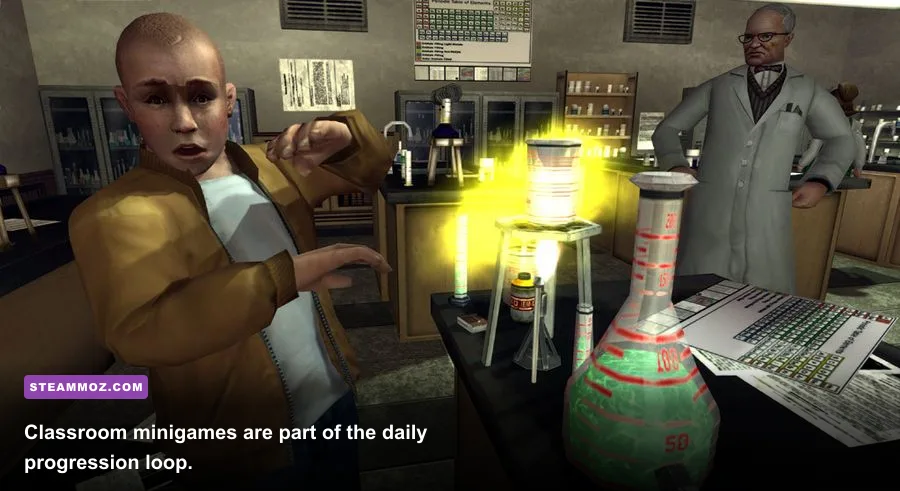
Yes, provided you approach it as a classic PC port rather than a modern remaster. The Scholarship Edition includes extra classes, missions, characters, and items beyond the original console release, while Bullworth remains one of Rockstar's most distinctive settings. Chemistry class, English assignments, shop lessons, and gym activities aren't disposable tutorials; they unlock useful rewards and give the school year its rhythm.
The minimum requirement is so low that nearly any current PC can render the game. The recommended specification is still easy to beat, and storage is practically irrelevant. What you should budget time for is compatibility testing: verify the installation, test fullscreen and controller behavior, keep overlays off if necessary, and make a backup before applying community fixes. That's a far more accurate preparation checklist than shopping for an expensive graphics card.
If you're deciding whether another older game deserves a modern playthrough, see our coverage of Dungeon Siege's PC experience, Disciples: Liberation, and Dragonkin's performance settings. Bully is less technically demanding than all three, but its personality has aged unusually well.
For the cleanest experience, use a modern dual-core-or-better CPU, 8 GB of system RAM, any integrated or dedicated GPU released in the last decade, and at least 8 GB of free storage. Set 1080p, keep textures and shadows high, use modest anti-aliasing, and cap the game at a stable frame rate. That setup won't fix every quirk in Rockstar's old Windows build, but it gives Jimmy Hopkins the reliable Bullworth semester he deserves.
For the publisher's broader information and support resources, visit Rockstar Games' official website and the Rockstar Support portal. Just remember that the original requirements are the starting line—not a guarantee that every modern Windows configuration will behave identically.